

Modelur Review:
Is It Worth It in 2026?
Modelur is best suited for architects and urban designers working in SketchUp who want parametric massing with instant feedback on FAR, parking, and zoning compliance — testing urban design alternatives several times faster than manual modeling.
From
From $60/month
Best For
Our Overall Rating
Based on comprehensive testing
Best For
- Architects and urban designers already working in SketchUp
- Teams doing massing studies and feasibility on urban sites
- Designers who need live FAR, parking, and zoning metrics while modeling
- Projects where zoning compliance drives the massing
Pricing
Starts at
Bottom Line
Modelur is best suited for architects and urban designers working in SketchUp who want parametric massing with instant feedback on FAR, parking, and zoning compliance — testing urban design alternatives several times faster than manual modeling.
Visit Modelur →Quick Verdict
Modelur scores 8.2/10 in our testing and is a strong choice for Architects and urban designers already working in SketchUp and Teams doing massing studies and feasibility on urban sites. Pricing starts at From $60/month.
What Is Modelur?
Overview
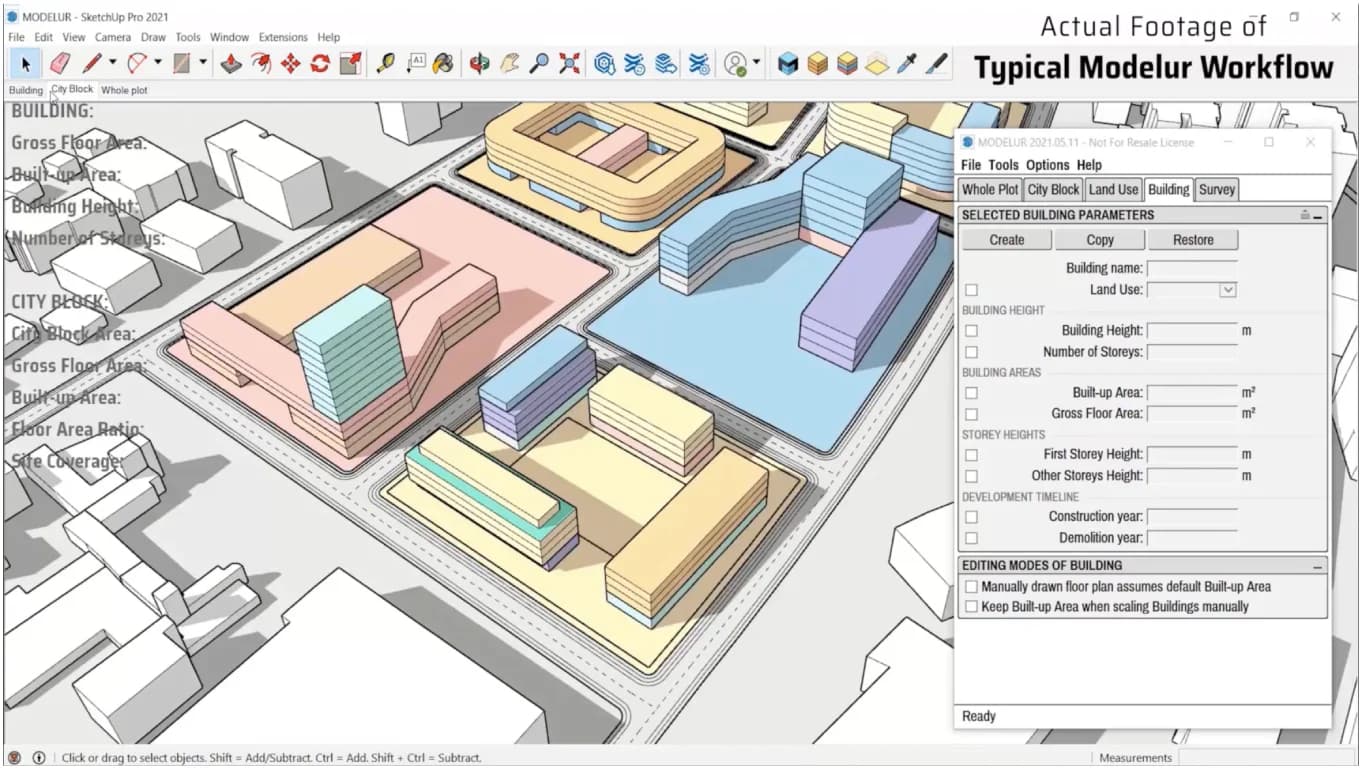
Modelur is a parametric urban design tool that runs inside SketchUp, letting architects and urban designers create and test massing alternatives quickly. Instead of modeling buildings manually, users work with parametric buildings and get live feedback on the metrics that drive urban design.
Its core value is speed with compliance: as you adjust massing, Modelur tracks FAR, apartment counts, parking needs, and zoning rules in real time, warning when a design breaks local regulations. For urban-scale feasibility, that turns a slow manual loop into rapid iteration.
This review evaluates Modelur on its parametric workflow, zoning intelligence, and fit for urban design in SketchUp in 2026.
Key Features
Parametric Massing
One-click massing generation and parametric buildings let designers create and revise urban schemes several times faster than manual modeling.
Live Performance Indicators
Modelur tracks FAR, apartments, and parking in real time, so the impact of a design change is visible immediately.
Interactive 3D Zoning
The tool adapts buildings to local zoning and warns when designs don't comply — for example, when buildings are too tall or too close together.
SketchUp and GIS Integration
Modelur works inside SketchUp and supports GIS via GeoJSON import/export, plus LiveSync with Excel on Windows.
Pros & Cons
Pros
- ✅ Parametric massing with one-click generation speeds up urban design iteration
- ✅ Instant feedback on FAR, apartments, parking, and zoning compliance
- ✅ Interactive 3D zoning warns when designs break local regulations
- ✅ Integrates directly into SketchUp with GIS (GeoJSON) import/export
Cons
- ❌ Requires SketchUp — it's a plugin, not a standalone tool
- ❌ Focused on massing and feasibility, not detailed design or rendering
- ❌ Some features (LiveSync with Excel) are Windows-only
- ❌ Best value for urban-scale projects rather than single small buildings
Who Is It Best For?
Modelur is the right tool if you:
- Already work in SketchUp and want parametric urban massing
- Do feasibility and massing studies on urban sites
- Need live FAR, parking, and zoning metrics while modeling
- Work on projects where zoning drives the massing
Modelur is not the right tool if you:
- Don't use SketchUp and don't want to adopt it
- Need detailed building design, BIM, or rendering
- Work on single small buildings where parametric urban tools add little
Alternatives to Consider
- Giraffe — browser-based urban planning and feasibility with GIS
- Autodesk Forma — site and massing analysis in the Autodesk ecosystem
- TestFit — rapid feasibility for multifamily and parking-heavy sites
- Snaptrude — concept-to-BIM design with site analysis
- Archicad AI — full BIM authoring for detailed design
Final Verdict
Modelur earns its place for architects and urban designers who live in SketchUp and need to test massing against real zoning and feasibility metrics fast. The combination of parametric buildings and live FAR, parking, and zoning feedback makes early urban design iteration much quicker.
It's a focused tool: a SketchUp plugin for massing and feasibility, not a design, BIM, or rendering platform.
Our recommendation: If SketchUp is already your tool, trial Modelur on an urban-scale site to see how much the live zoning feedback speeds up iteration. Our guide to the best AI tools for architects shows where feasibility tools fit.
Key Features
Parametric massing with one-click generation speeds up urban design iteration
Instant feedback on FAR, apartments, parking, and zoning compliance
Interactive 3D zoning warns when designs break local regulations
Integrates directly into SketchUp with GIS (GeoJSON) import/export
Best For
Architects and urban designers already working in SketchUp
Teams doing massing studies and feasibility on urban sites
Designers who need live FAR, parking, and zoning metrics while modeling
Projects where zoning compliance drives the massing
Pros & Cons
What We Like
- Parametric massing with one-click generation speeds up urban design iteration
- Instant feedback on FAR, apartments, parking, and zoning compliance
- Interactive 3D zoning warns when designs break local regulations
- Integrates directly into SketchUp with GIS (GeoJSON) import/export
What We Don't Like
- Requires SketchUp — it's a plugin, not a standalone tool
- Focused on massing and feasibility, not detailed design or rendering
- Some features (LiveSync with Excel) are Windows-only
- Best value for urban-scale projects rather than single small buildings
Top Modelur Alternatives
View all alternatives →


Modelur vs Top Alternatives
| Tool | Best For | Price | AI Quality | Features | Support | Ease of Use | Rating | |
|---|---|---|---|---|---|---|---|---|
 | Architects and urban designers already working in SketchUp | From $60/month | 8.2/10 | Current | ||||
 | Architecture | Contact for pricing | 7.7/10 | Read Review → | ||||
 | Architecture | Contact for pricing | 7.4/10 | Read Review → | ||||
 | Architecture | Contact for pricing | 7.1/10 | Read Review → | ||||
 | Architecture | Contact for pricing | 7/10 | Read Review → |
Our Modelur Verdict
Modelur is best suited for architects and urban designers working in SketchUp who want parametric massing with instant feedback on FAR, parking, and zoning compliance — testing urban design alternatives several times faster than manual modeling.
14-day money-back guarantee
FAQ
Related Articles
View all articles →Best AI Tools for Architects in 2026
Our editorial guide to the AI tools we recommend, including Modelur.
Read Guide →Modelur vs Top Alternatives: Full Comparison
Side-by-side breakdown of Modelur and its main competitors.
View Comparisons →Hands-on Guides & Workflows
Step-by-step playbooks for getting the most out of tools like Modelur.
Browse Guides →Related Tools in Architecture
See all the best Architecture →
ArchiGPT
ArchiGPT is best suited for architects, interior designers, and developers who want to turn sketches, photos, or 3D model screenshots into photorealistic renders through natural-language prompts — covering both interior and exterior visualization with archviz tools like relighting, staging, and style changes.
Read Review →
D5 Render
D5 Render is a real-time ray tracing renderer used by 80% architecture professionals, cutting rendering time from 12-18 hours (V-Ray) to 1-2 hours with higher quality results. It integrates natively with SketchUp, Revit, Rhino, ARCHICAD, and Blender via live-sync — with a free version and Pro from $38/month.
Read Review →
Rhino & Grasshopper
Rhino & Grasshopper is best suited for architects, computational designers, and furniture makers who need precise freeform 3D modeling and parametric design — building complex geometry through visual programming that generates, tests, and iterates design options algorithmically.
Read Review →
Midjourney
Midjourney remains the gold standard for AI image generation in 2026, delivering photorealistic renders and concept visuals that architecture, interior design, construction, and real estate professionals can use directly in client workflows.
Read Review →