

D5 Render Review:
Is It Worth It in 2026?
D5 Render is a real-time ray tracing renderer used by 80% architecture professionals, cutting rendering time from 12-18 hours (V-Ray) to 1-2 hours with higher quality results. It integrates natively with SketchUp, Revit, Rhino, ARCHICAD, and Blender via live-sync — with a free version and Pro from $38/month.
We may earn a commission when you purchase through links on our site. Learn more
From
Free version available / Pro from $38/month
Best For
Our Overall Rating
Based on comprehensive testing
Best For
- Architecture firms producing client presentations and design approvals
- Interior designers creating photorealistic furniture and material visualizations
- Construction companies visualizing completed projects for client proposals
- Real estate developers marketing off-plan properties with high-quality renders
- Freelance visualizers producing cinematic architectural animations
Pricing
Starts at
Bottom Line
D5 Render is a real-time ray tracing renderer used by 80% architecture professionals, cutting rendering time from 12-18 hours (V-Ray) to 1-2 hours with higher quality results. It integrates natively with SketchUp, Revit, Rhino, ARCHICAD, and Blender via live-sync — with a free version and Pro from $38/month.
Visit D5 Render →Quick Verdict
D5 Render scores 9.4/10 in our testing and is an excellent choice for Architecture firms producing client presentations and design approvals and Interior designers creating photorealistic furniture and material visualizations. A free tier is available, with paid plans from Free version available / Pro from $38/month.
What Is D5 Render?
Overview
Architectural rendering has historically been a painful tradeoff: photorealistic quality required overnight render times, while real-time feedback meant sacrificing visual fidelity. D5 Render eliminates that tradeoff.
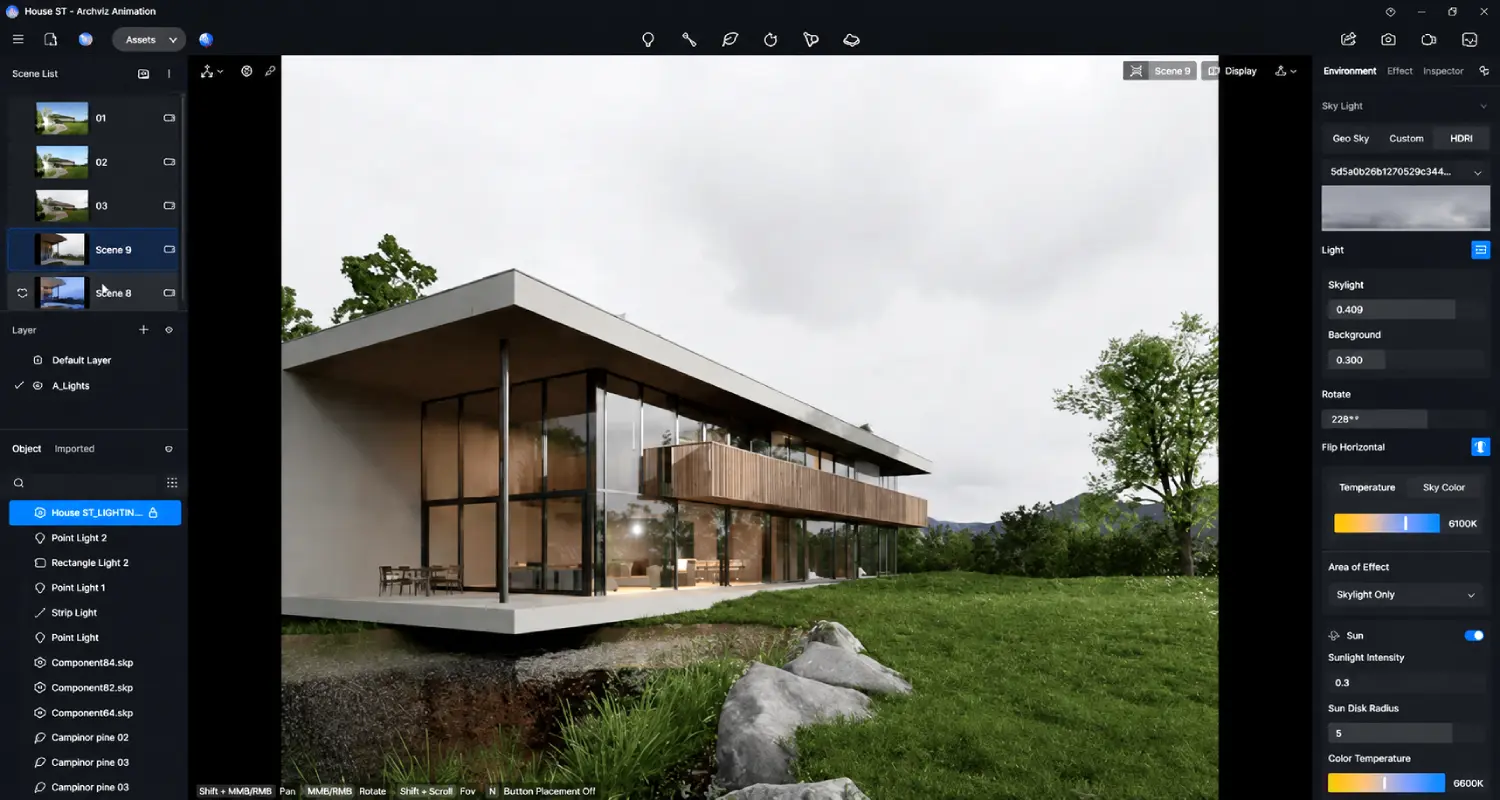
Built on NVIDIA RTX real-time ray tracing technology, D5 Render combines the visual accuracy of offline rendering (accurate lighting, soft shadows, reflections, global illumination) with a live viewport that updates as you work. Make a change to a material, move a light source, or add furniture — and the rendering updates immediately in the viewport, not after a 12-hour bake.
Used by architects and designers in 200+ countries, with 80% of its user base in architecture and planning, D5 Render has become the standard for teams that need high-quality client-facing visuals on realistic project timelines. One experienced user described cutting rendering time from 12-18 hours with V-Ray/Corona to 1-2 hours with D5 Render — with better results.
Key Features
Real-Time Ray Tracing Viewport
The defining feature: a rendering viewport that updates in real time using RTX ray tracing. Every material change, lighting adjustment, and scene modification is visible immediately with photorealistic accuracy — no test renders, no hour-long waits to see if a lighting tweak worked.
For architecture studios managing multiple client revision rounds, this interactive feedback loop is transformative. Instead of submitting a change and waiting overnight to review it, designers can iterate live — testing material options, lighting moods, and spatial arrangements in minutes rather than days.
LiveSync with Major 3D Software
D5 Render maintains live sync connections with the industry's primary modeling tools:
- SketchUp — rated 4.7/5 by D5 Render users for integration quality
- Revit — rated 4.8/5; geometry, materials, and camera positions sync in real time
- ARCHICAD — full ArchiCAD model import with material mapping
- Rhino — parametric geometry import with live updates
- 3ds Max, Cinema 4D, Blender — via export plugins
The workflow: model in your primary CAD/BIM software, and D5 Render displays the rendering in parallel. Changes in the model appear immediately in the D5 viewport — no export-import cycle breaking the creative flow.
16,000+ Asset Library
D5 Render's built-in asset library includes over 16,000 models as of early 2026: furniture, people, plants, trees, vehicles, lights, and environmental objects. Assets are high-quality, ready to place, and continuously expanded with platform updates.
For architecture and interior design projects, having furniture and environmental assets immediately available — without hunting third-party libraries or building custom models — significantly accelerates scene dressing and presentation setup.
AI Tools
Three AI-powered tools extend D5 Render's capabilities beyond manual rendering:
AI Atmosphere Match — analyzes a reference photo and automatically replicates its lighting, sky, and atmospheric conditions in your scene. Match the mood of a reference image you love without manually adjusting dozens of lighting parameters.
AI Enhancer — post-processes renders to improve detail, reduce noise, and enhance overall image quality without rerendering from scratch.
AI Ultra HD Texture — upscales textures in your asset library to ultra-high resolution, improving material quality without sourcing new texture files.
One-Click Weather and Environmental Effects
Create time-of-day lighting transitions, weather conditions (rain, snow, fog), and seasonal variations with single-click presets. For client presentations requiring multiple scene variations — golden hour, overcast day, evening — D5 Render produces each variant in minutes rather than requiring separate lighting setups.
Animation and Cinematic Output
Create walkthrough animations and cinematic videos with keyframe animation tools. For real estate developers marketing off-plan properties, or architecture firms presenting large-scale projects, cinematic fly-through videos produced in D5 Render are competitive with dedicated animation studios at a fraction of the time investment.
Output formats include 4K images, HDR panoramas, 360° panoramas, and video at various resolutions and frame rates.
Use Cases by Industry
Architecture Firms
Architecture firms use D5 Render primarily for two purposes: design development visualization (showing how a building looks during schematic and design development phases) and client presentation renders (final-quality images for approval and marketing). The LiveSync workflow with Revit and ARCHICAD makes D5 Render a natural extension of the existing BIM workflow rather than a separate tool requiring model re-creation.
The ability to produce multiple scene variations (different times of day, seasons, weather conditions) rapidly is particularly valuable for competition submissions and planning applications where visual impact influences outcomes.
Interior Design
Interior designers use D5 Render to visualize furnished spaces with accurate material representation — fabric textures, wood grain, metal finishes — and realistic lighting that reflects how a space will actually feel. The 16,000+ asset library covers residential and commercial furniture categories comprehensively.
Material comparisons (showing a client the same space with three different flooring options) that previously required overnight renders for each variation can be produced in under an hour with D5 Render's real-time workflow.
Construction
Construction companies use D5 Render for project proposal visualization: showing clients what a completed building or renovation will look like before construction begins. High-quality renders in client proposals differentiate firms from competitors submitting text-heavy documents, and reduce scope misunderstandings that lead to costly change orders.
Real Estate Development
Real estate developers marketing off-plan properties require compelling visual assets before construction completes. D5 Render's cinematic output — fly-through animations, multiple exterior and interior renders, 360° panoramas — produces the visual marketing material that converts off-plan buyers, at a production cost that fits development marketing budgets.
System Requirements
D5 Render requires:
- NVIDIA RTX GPU (RTX 2060 minimum; RTX 3080 or higher recommended for complex scenes)
- Windows 10/11 (64-bit)
- 16GB RAM minimum; 32GB recommended for large scenes
- DirectX 12 compatible system
The RTX GPU requirement is the primary hardware constraint. Teams on AMD GPUs or macOS cannot use D5 Render — Twinmotion (which supports macOS) or Lumion are alternatives in those cases.
Who Is It Best For?
D5 Render is the right fit if you:
- Produce client-facing architectural or interior design renders regularly
- Currently use V-Ray, Corona, or other offline renderers and want faster results
- Work with SketchUp, Revit, ARCHICAD, Rhino, or Blender
- Have an NVIDIA RTX GPU and Windows workstation
- Need presentation-quality output within project timelines, not overnight render queues
It is not the right fit if you:
- Use AMD GPU or macOS (hardware incompatibility)
- Need construction-documentation precision — D5 Render is a visualization tool
- Require the absolute highest render quality for final publication or broadcast (V-Ray/Corona still lead at the top)
Alternatives to Consider
- Lumion — strong real-time rendering; macOS compatible via Boot Camp; wider landscape and environmental asset library; from $49/month
- Enscape — excellent Revit and SketchUp integration; real-time VR support; popular in US architecture market; from $55/month
- Twinmotion — free with certain Unreal Engine licenses; macOS supported; excellent for large landscape scenes; steeper learning curve
- V-Ray — industry standard for highest-quality offline rendering; 12-18 hour render times; required for final photorealistic publication work
Final Verdict
D5 Render earns its position as the preferred real-time renderer for architecture professionals through a combination that competitors have not yet matched: RTX real-time ray tracing quality, seamless LiveSync with major CAD/BIM tools, a 16,000+ asset library, and AI tools that extend capability beyond manual rendering — all in a package that cuts rendering time from hours to minutes.
The hardware requirement (NVIDIA RTX GPU, Windows) is the significant limitation. For teams already on compatible hardware, D5 Render is one of the highest-ROI software investments available for architectural visualization workflows.
Our recommendation: Download the free version and complete one full client project workflow — import your existing model via LiveSync, dress the scene with library assets, and produce a final render. The time comparison against your current renderer will determine whether the Pro subscription is justified. For most architecture and interior design teams, it is.
Key Features
Real-time ray tracing — see accurate lighting, shadows, and reflections instantly
LiveSync with SketchUp, Revit, ARCHICAD, Rhino, 3ds Max, C4D, Blender
16,000+ asset library including furniture, plants, people, vehicles, materials
AI Atmosphere Match, AI Enhancer, AI Ultra HD Texture tools
Cuts rendering time from 12-18 hours to 1-2 hours vs V-Ray/Corona
Used by architects in 200+ countries
Best For
Architecture firms producing client presentations and design approvals
Interior designers creating photorealistic furniture and material visualizations
Construction companies visualizing completed projects for client proposals
Real estate developers marketing off-plan properties with high-quality renders
Freelance visualizers producing cinematic architectural animations
D5 Render Pricing
Pro
For professionals and growing teams
Try D5 Render Pro- All Free features
- Unlimited usage
- Priority support
- Advanced integrations
- Analytics
Enterprise
Custom pricing for large teams
Contact Sales- Everything in Pro
- Custom workflows
- Dedicated support
- SLA guarantee
- SSO & security
Prices shown are indicative. Always verify current pricing on the D5 Render website.
Pros & Cons
What We Like
- Real-time ray tracing — see accurate lighting, shadows, and reflections instantly
- LiveSync with SketchUp, Revit, ARCHICAD, Rhino, 3ds Max, C4D, Blender
- 16,000+ asset library including furniture, plants, people, vehicles, materials
- AI Atmosphere Match, AI Enhancer, AI Ultra HD Texture tools
- Cuts rendering time from 12-18 hours to 1-2 hours vs V-Ray/Corona
- Used by architects in 200+ countries
- Free version available with core functionality
What We Don't Like
- Requires NVIDIA RTX GPU — not compatible with AMD or older hardware
- High VRAM consumption on large-scale scenes can cause crashes
- Pro at $38/month may feel high for students or low-volume users
- Custom vegetation and large landscape scenes have limitations
- Windows only — no macOS support
Top D5 Render Alternatives
View all alternatives →


D5 Render vs Top Alternatives
| Tool | Best For | Price | AI Quality | Features | Support | Ease of Use | Rating | |
|---|---|---|---|---|---|---|---|---|
 | Architecture firms producing client presentations and design approvals | Free version available / Pro from $38/month | 9.4/10 | Current | ||||
 | Architecture | Contact for pricing | 8.9/10 | Read Review → | ||||
 | Architecture | Contact for pricing | 8.6/10 | Read Review → | ||||
 | Architecture | Contact for pricing | 8.3/10 | Read Review → | ||||
 | Architecture | Contact for pricing | 8/10 | Read Review → |
Our D5 Render Verdict
D5 Render is a real-time ray tracing renderer used by 80% architecture professionals, cutting rendering time from 12-18 hours (V-Ray) to 1-2 hours with higher quality results. It integrates natively with SketchUp, Revit, Rhino, ARCHICAD, and Blender via live-sync — with a free version and Pro from $38/month.
Free plan available
FAQ
Related Articles
View all articles →Best AI Tools for Architects in 2026
Our editorial guide to the AI tools we recommend, including D5 Render.
Read Guide →D5 Render vs Top Alternatives: Full Comparison
Side-by-side breakdown of D5 Render and its main competitors.
View Comparisons →Hands-on Guides & Workflows
Step-by-step playbooks for getting the most out of tools like D5 Render.
Browse Guides →Featured in Workflows
Related Tools in Architecture
See all the best Architecture →
Rhino & Grasshopper
Rhino & Grasshopper is best suited for architects, computational designers, and furniture makers who need precise freeform 3D modeling and parametric design — building complex geometry through visual programming that generates, tests, and iterates design options algorithmically.
Read Review →
Midjourney
Midjourney remains the gold standard for AI image generation in 2026, delivering photorealistic renders and concept visuals that architecture, interior design, construction, and real estate professionals can use directly in client workflows.
Read Review →
Veras
Veras is best suited for architects and designers already modeling in Revit, SketchUp, or Rhino who want AI-powered renders generated directly from their existing viewport, without exporting to a separate rendering application.
Read Review →
Archicad AI
Archicad AI is best suited for architecture firms and BIM-driven design teams who want AI-assisted modeling and documentation built directly into a full-featured BIM platform, rather than a separate visualization add-on.
Read Review →