

Midjourney Review:
Is It Worth It in 2026?
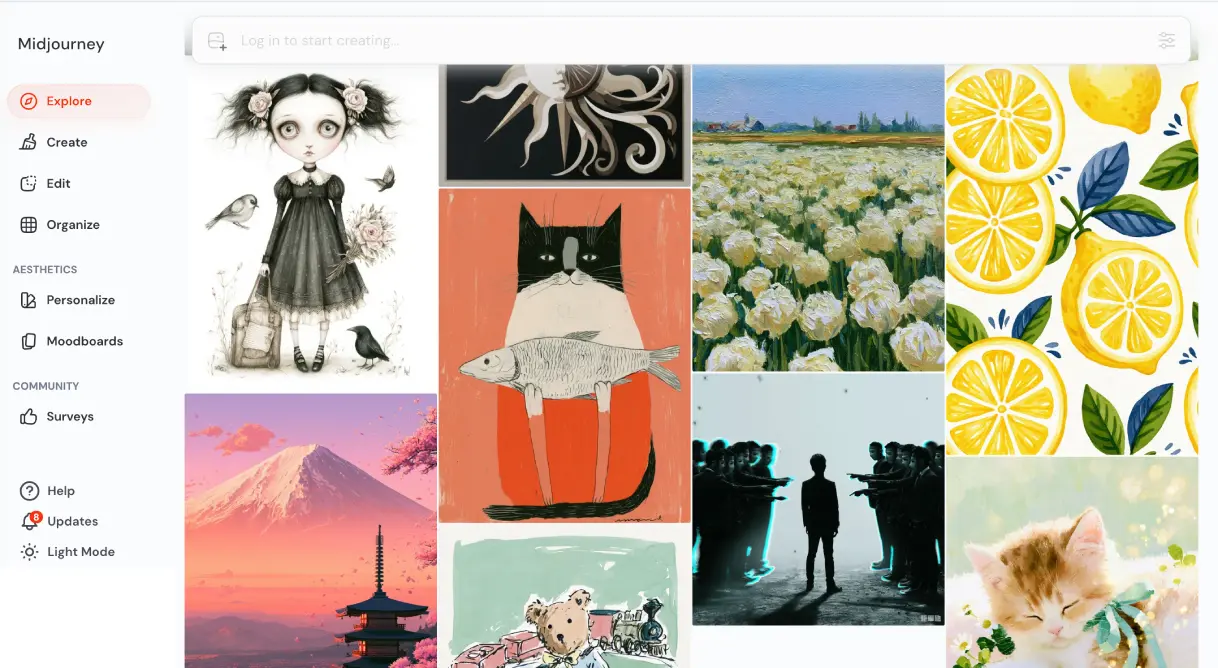
Midjourney remains the gold standard for AI image generation in 2026, delivering photorealistic renders and concept visuals that architecture, interior design, construction, and real estate professionals can use directly in client workflows.
From
From $10/month
Best For
Our Overall Rating
Based on comprehensive testing
Best For
- Interior designers creating mood boards and concept visuals
- Architects generating early-stage concept renders
- Real estate marketers producing property lifestyle imagery
- Furniture brands visualizing product variations at scale
- Construction firms presenting project proposals to clients
Pricing
Starts at
Bottom Line
Midjourney remains the gold standard for AI image generation in 2026, delivering photorealistic renders and concept visuals that architecture, interior design, construction, and real estate professionals can use directly in client workflows.
Visit Midjourney →Quick Verdict
Midjourney scores 9.2/10 in our testing and is an excellent choice for Interior designers creating mood boards and concept visuals and Architects generating early-stage concept renders. Pricing starts at From $10/month.
What Is Midjourney?
Overview
Midjourney is the AI image generator that most creative professionals encounter first — and for good reason. Since its launch in 2022, it has consistently set the benchmark for aesthetic quality in AI-generated imagery, and its 2026 releases (V7 as the current default, V8.1 as the latest alpha) push that standard further with faster generation speeds, native 2K resolution, and significantly improved prompt understanding.
For professionals in architecture, interior design, construction, and real estate, Midjourney occupies a specific and valuable role: it is the tool for generating aspirational visuals — concept renders, mood boards, lifestyle imagery, and presentation-quality artwork — faster than any traditional rendering pipeline. It will not replace dedicated CAD or BIM software, but it fills the gap between rough ideas and polished client presentations in a way no other tool currently matches.
This review evaluates Midjourney specifically through the lens of professionals in our four target industries, based on real workflow testing and community feedback from the 680,000+ member r/midjourney community.
What's New in 2026: V7 and V8.1
V8.1, released on April 30, 2026, brings faster generation, better prompt understanding, stronger small-detail retention, HD 2K image support, and Raw mode options.
Midjourney V8 Alpha launched on March 17, 2026, built on a completely rewritten codebase. V8 delivers 5x faster generation, native 2K resolution, dramatically improved text rendering, and better prompt understanding — while maintaining backward compatibility with existing V7 styles and moodboards.
For professionals, the most meaningful upgrades are:
- 2K HD output natively — presentation-ready without upscaling
- Stronger small-detail retention — critical for architectural textures, furniture grain, material finishes
- Better prompt adherence — fewer iterations needed to hit the right composition
- Faster standard generation — reduces friction in client-facing workflows
Note: V7 remains the current default version. V8.1 requires a Global V7/V8 Personalization Profile and may not be the default for every user.
How Each Industry Can Use Midjourney
Architecture & Construction
Architects and construction firms use Midjourney primarily for early-stage concept visualization — generating multiple design directions from a text brief before committing to detailed modeling. A prompt like modern sustainable office building, exposed concrete, green walls, natural light, photorealistic render, golden hour can produce a dozen compelling concept directions in under two minutes.
Practical use cases:
- Client pitch decks with concept imagery before CAD work begins
- Facade material and texture exploration
- Site context visualization (how a building fits its environment)
- Interior finish mood boards for commercial spaces
Key limitation for this industry: Midjourney cannot generate technically accurate floor plans, structural drawings, or dimensions. It is a visualization tool, not a design tool. Always pair with your existing CAD/BIM workflow.
Interior Design & Furniture
This is where Midjourney arguably delivers the most immediate value. Interior designers and furniture brands can use it to:
- Generate room mood boards in seconds instead of sourcing reference images manually
- Visualize furniture pieces in different colorways, materials, and room contexts
- Create lifestyle imagery for e-commerce product pages
- Test spatial compositions before physical staging or 3D modeling
A furniture brand can input Scandinavian lounge chair, walnut frame, cream boucle fabric, minimalist living room, natural light, product photography style and get multiple on-brand marketing visuals without a photoshoot.
Real Estate
Real estate professionals are finding Midjourney valuable for two specific tasks:
Property marketing imagery: Generate aspirational lifestyle visuals for listings — a property styled with ideal furniture and lighting, showing the potential of an empty space.
Development visualization: For off-plan properties, Midjourney can generate compelling renders of proposed interiors and exteriors for marketing before construction begins.
Important note for real estate: Midjourney images should always be clearly labeled as AI-generated or conceptual when used in property marketing to comply with advertising standards and avoid misleading buyers.
Pros & Cons
Pros
- ✅ Best-in-class image quality — consistently outperforms competitors on aesthetics
- ✅ V8.1 delivers native 2K HD output with dramatically faster generation
- ✅ Highly tunable via style references, moodboards, and --sref parameters
- ✅ All paid plans include full commercial usage rights
- ✅ Strong community with 680,000+ members sharing prompts and workflows
Cons
- ❌ No free trial — minimum commitment is $10/month
- ❌ No public API — cannot integrate into custom apps or workflows
- ❌ Stealth Mode locked to Pro plan at $60/month — essential for client work
- ❌ GPU hour system is confusing — unused hours do not roll over
- ❌ V8 premium features cost extra on top of subscription
Who Is It Best For?
Midjourney is the right tool if you:
- Need presentation-quality visuals faster than traditional rendering
- Work in a creative field where aesthetic output is part of your deliverable
- Can commit to at least $30/month (Standard) for practical professional use
- Understand that it generates inspiration and presentation assets, not technical drawings
It is not the right tool if you:
- Need a free or freemium starting point (there is no free trial)
- Require API access to embed image generation into your own platform
- Need to keep generations private on a budget (Stealth Mode requires Pro at $60/month)
- Are looking for technically precise architectural or construction outputs
Alternatives to Consider
Midjourney is the quality leader, but it is not the only option. Depending on your workflow and budget:
- Adobe Firefly — better for users already in the Adobe ecosystem; integrates directly with Photoshop and Illustrator; has a generous free tier
- Leonardo AI — strong free tier with daily generation credits; more customizable models; good for product visualization
- Canva AI — best for non-designers who want AI image generation within a broader design workflow; easier learning curve
- DALL-E 3 — available via ChatGPT Plus; good prompt adherence but aesthetics lag behind Midjourney for professional work
Final Verdict
Midjourney remains the benchmark for AI image quality in 2026, and for professionals in architecture, interior design, construction, and real estate, it delivers genuine workflow value — not just impressive demos. The ability to go from a text brief to a presentation-quality concept visual in under two minutes is a real competitive advantage in client-facing work.
The main friction points are real: no free trial, no API, and the Stealth Mode paywall at $60/month create a higher barrier than competitors. But for professionals who need the best-looking output and work in client environments where visual quality matters, those costs are justified.
Our recommendation: Start with Standard at $30/month. Upgrade to Pro only when client confidentiality becomes a requirement for your work. If you need renders that follow your actual 3D geometry rather than loose concepts, pair Midjourney with a model-aware tool like Veras; our guide to the best AI tools for architects covers where each one fits.
Key Features
Best-in-class image quality — consistently outperforms competitors on aesthetics
V8.1 delivers native 2K HD output with dramatically faster generation
Highly tunable via style references, moodboards, and --sref parameters
All paid plans include full commercial usage rights
Strong community with 680,000+ members sharing prompts and workflows
Best For
Interior designers creating mood boards and concept visuals
Architects generating early-stage concept renders
Real estate marketers producing property lifestyle imagery
Furniture brands visualizing product variations at scale
Construction firms presenting project proposals to clients
Midjourney Pricing
Starter
Perfect for individuals
Start Free Trial- Core features
- 5 projects
- Email support
- Standard exports
Professional
Best for professionals
Try Midjourney- All Starter features
- Unlimited projects
- Priority support
- Advanced integrations
- API access
Business
For teams and agencies
Contact Sales- All Pro features
- Team collaboration
- Admin controls
- Custom workflows
- Dedicated manager
Prices shown are indicative. Always verify current pricing on the Midjourney website.
Pros & Cons
What We Like
- Best-in-class image quality — consistently outperforms competitors on aesthetics
- V8.1 delivers native 2K HD output with dramatically faster generation
- Highly tunable via style references, moodboards, and --sref parameters
- All paid plans include full commercial usage rights
- Strong community with 680,000+ members sharing prompts and workflows
What We Don't Like
- No free trial — minimum commitment is $10/month
- No public API — cannot integrate into custom apps or workflows
- Stealth Mode (private generations) locked to Pro plan at $60/month
- GPU hour system is confusing for new users
- Fast GPU hours do not roll over month to month
Top Midjourney Alternatives
View all alternatives →


Midjourney vs Top Alternatives
| Tool | Best For | Price | AI Quality | Features | Support | Ease of Use | Rating | |
|---|---|---|---|---|---|---|---|---|
 | Interior designers creating mood boards and concept visuals | From $10/month | 9.2/10 | Current | ||||
 | Cross-niche | Contact for pricing | 8.7/10 | Read Review → | ||||
 | Cross-niche | Contact for pricing | 8.4/10 | Read Review → | ||||
 | Cross-niche | Contact for pricing | 8.1/10 | Read Review → | ||||
D3 DALL-E 3 | Cross-niche | Contact for pricing | 7.8/10 | — |
Our Midjourney Verdict
Midjourney remains the gold standard for AI image generation in 2026, delivering photorealistic renders and concept visuals that architecture, interior design, construction, and real estate professionals can use directly in client workflows.
14-day money-back guarantee
FAQ
Related Articles
View all articles →Best AI Tools for Architects in 2026
Our editorial guide to the AI tools we recommend, including Midjourney.
Read Guide →Midjourney vs Top Alternatives: Full Comparison
Side-by-side breakdown of Midjourney and its main competitors.
View Comparisons →Hands-on Guides & Workflows
Step-by-step playbooks for getting the most out of tools like Midjourney.
Browse Guides →Featured in Workflows
Looking for Alternatives?
5 Best Midjourney AlternativesCompare →Related Tools in Architecture
See all the best Architecture →
Veras
Veras is best suited for architects and designers already modeling in Revit, SketchUp, or Rhino who want AI-powered renders generated directly from their existing viewport, without exporting to a separate rendering application.
Read Review →
Archicad AI
Archicad AI is best suited for architecture firms and BIM-driven design teams who want AI-assisted modeling and documentation built directly into a full-featured BIM platform, rather than a separate visualization add-on.
Read Review →
Fireflies.ai
Fireflies.ai is best suited for architects, contractors, real estate agents, and design professionals who spend significant time in client meetings and project calls — automatically recording, transcribing, and summarizing meetings so teams can focus on the conversation rather than note-taking.
Read Review →
Vizcom
Vizcom is best suited for designers and architects who sketch by hand or on a tablet and want to turn rough concept drawings into polished, presentation-ready renders in seconds.
Read Review →