

ArchiGPT Review:
Is It Worth It in 2026?
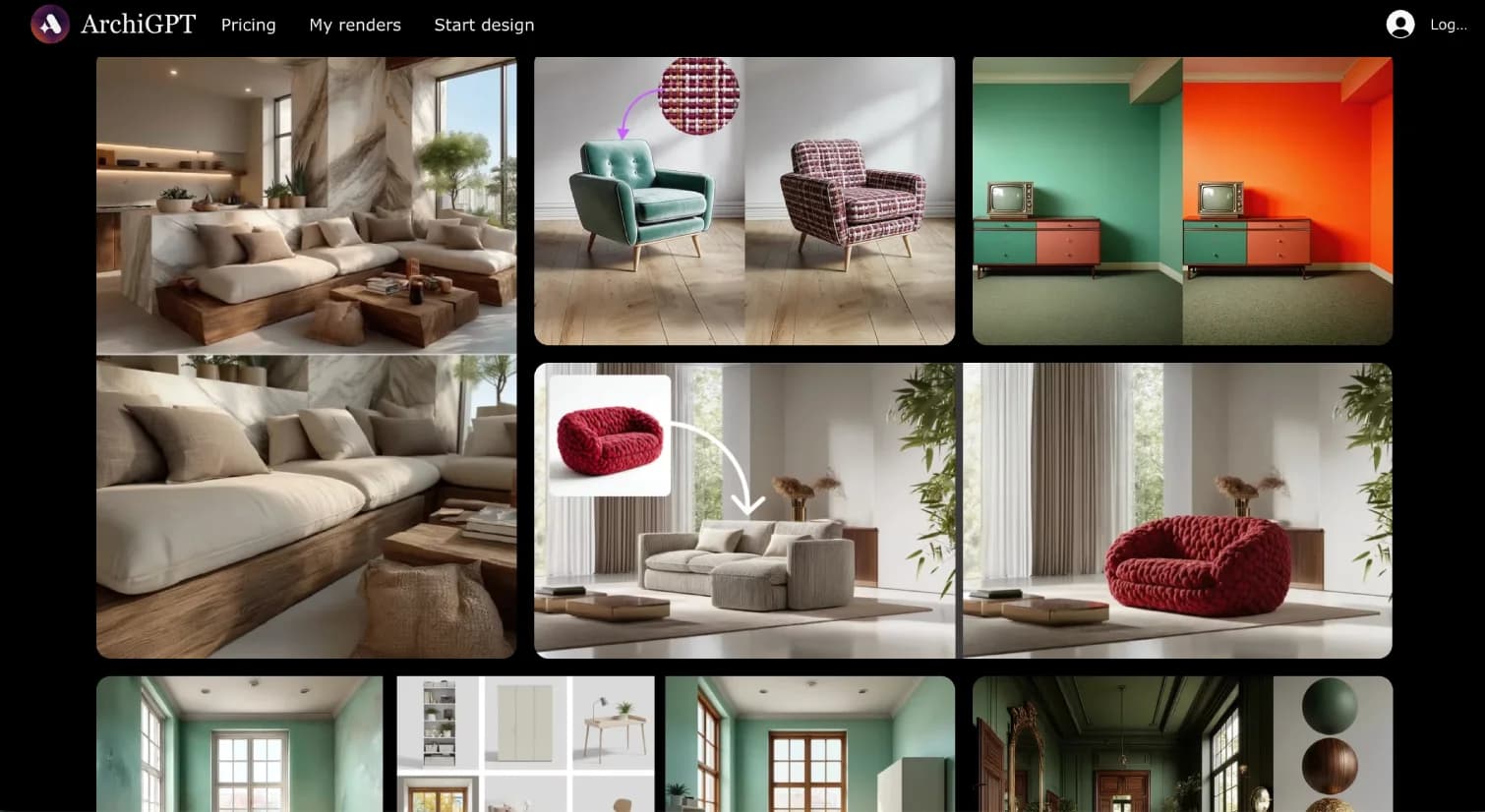
ArchiGPT is best suited for architects, interior designers, and developers who want to turn sketches, photos, or 3D model screenshots into photorealistic renders through natural-language prompts — covering both interior and exterior visualization with archviz tools like relighting, staging, and style changes.
From
From $19.99/month
Best For
Our Overall Rating
Based on comprehensive testing
Best For
- Architects producing quick concept renders for client conversations
- Interior designers restyling and staging spaces from a photo
- Developers visualizing exteriors and layouts before detailed design
- Students and small studios needing affordable archviz output
Pricing
Starts at
Bottom Line
ArchiGPT is best suited for architects, interior designers, and developers who want to turn sketches, photos, or 3D model screenshots into photorealistic renders through natural-language prompts — covering both interior and exterior visualization with archviz tools like relighting, staging, and style changes.
Visit ArchiGPT →Quick Verdict
ArchiGPT scores 8.0/10 in our testing and is a strong choice for Architects producing quick concept renders for client conversations and Interior designers restyling and staging spaces from a photo. Pricing starts at From $19.99/month.
What Is ArchiGPT?
Overview
ArchiGPT is a GPT-based architectural rendering assistant that turns sketches, images, and 3D model screenshots into photorealistic renders through natural-language interaction. It covers both interior and exterior visualization, adapting its rendering approach to room layouts or full building exteriors.
Beyond one-shot rendering, ArchiGPT offers a toolkit for common archviz tasks — restaging, changing sky and lighting, adding people and objects, coloring site and floor plans, and converting renders into technical-style drawings. It's aimed at users who want fast, controllable visuals without a full rendering suite.
This review evaluates ArchiGPT on its rendering quality, control, and practical fit for concept-stage visualization in 2026.
Key Features
Natural-Language Rendering
ArchiGPT generates photorealistic renders from sketches, photos, or 3D screenshots, with prompt-driven control over lighting, mood, camera angle, and style.
Interior and Exterior Coverage
The rendering engine adapts to both interior room layouts and full building exteriors, so a single tool covers most early-stage visualization needs.
Archviz Toolkit
Tools for staging, sky and lighting changes, adding people and objects, coloring plans, and turning renders into technical drawings extend it beyond simple image generation.
Accessible Pricing
Monthly plans aimed at individuals and students make it a low-commitment way to add AI rendering to a workflow.
Pros & Cons
Pros
- ✅ Turns sketches, photos, and 3D screenshots into photorealistic interior and exterior renders
- ✅ Natural-language editing for lighting, camera angle, people, textures, and style
- ✅ Archviz toolkit: staging, sky/lighting changes, plan coloring, render-to-drawing
- ✅ Accessible monthly pricing for individual designers and students
Cons
- ❌ Outputs are stylistic renders, not model-accurate technical drawings
- ❌ Render results depend on prompt quality and input reference material
- ❌ Coin/credit-based render limits can constrain heavy usage
- ❌ Overlaps with several similar AI rendering tools, so fit depends on workflow
Who Is It Best For?
ArchiGPT is the right tool if you:
- Need fast concept renders from a sketch, photo, or model screenshot
- Restyle or stage interiors without modeling
- Visualize exteriors early, before detailed design
- Want affordable archviz as an individual or small studio
ArchiGPT is not the right tool if you:
- Need model-accurate, construction-ready drawings rather than stylistic renders
- Require precise geometry control tied to a live 3D model
- Have very high render volumes that credit limits would constrain
Alternatives to Consider
- ArchitectGPT — closely comparable AI rendering suite from image inputs
- SketchUp Diffusion — renders directly from a SketchUp model's geometry
- Veras — AI rendering inside Revit, SketchUp, and Rhino
- ArchiVinci — browser-based AI architectural rendering
- Midjourney — best for concept mood imagery rather than geometry-accurate renders
Final Verdict
ArchiGPT earns its place for architects and designers who want quick, controllable photorealistic renders from whatever inputs they already have — a sketch, a photo, or a model screenshot — without a dedicated rendering engine. Its archviz toolkit adds useful post-production control beyond one-shot generation.
Like all AI renderers in this category, it's built for ideation and presentation, not model-accurate deliverables, and it competes with several similar tools.
Our recommendation: Trial ArchiGPT against your actual reference images and compare it with a model-aware renderer like SketchUp Diffusion before standardizing. Our guide to the best AI tools for architects shows where rendering fits in the wider workflow.
Key Features
Turns sketches, photos, and 3D screenshots into photorealistic interior and exterior renders
Natural-language editing for lighting, camera angle, people, textures, and style
Archviz toolkit: staging, sky/lighting changes, plan coloring, render-to-drawing
Accessible monthly pricing for individual designers and students
Best For
Architects producing quick concept renders for client conversations
Interior designers restyling and staging spaces from a photo
Developers visualizing exteriors and layouts before detailed design
Students and small studios needing affordable archviz output
Pros & Cons
What We Like
- Turns sketches, photos, and 3D screenshots into photorealistic interior and exterior renders
- Natural-language editing for lighting, camera angle, people, textures, and style
- Archviz toolkit: staging, sky/lighting changes, plan coloring, render-to-drawing
- Accessible monthly pricing for individual designers and students
What We Don't Like
- Outputs are stylistic renders, not model-accurate technical drawings
- Render results depend on prompt quality and input reference material
- Coin/credit-based render limits can constrain heavy usage
- Overlaps with several similar AI rendering tools, so fit depends on workflow
Top ArchiGPT Alternatives
View all alternatives →


ArchiGPT vs Top Alternatives
| Tool | Best For | Price | AI Quality | Features | Support | Ease of Use | Rating | |
|---|---|---|---|---|---|---|---|---|
 | Architects producing quick concept renders for client conversations | From $19.99/month | 8/10 | Current | ||||
 | Architecture | Contact for pricing | 7.5/10 | Read Review → | ||||
 | Architecture | Contact for pricing | 7.2/10 | Read Review → | ||||
 | Architecture | Contact for pricing | 7/10 | Read Review → | ||||
 | Architecture | Contact for pricing | 7/10 | Read Review → |
Our ArchiGPT Verdict
ArchiGPT is best suited for architects, interior designers, and developers who want to turn sketches, photos, or 3D model screenshots into photorealistic renders through natural-language prompts — covering both interior and exterior visualization with archviz tools like relighting, staging, and style changes.
14-day money-back guarantee
FAQ
Related Articles
View all articles →Best AI Tools for Architects in 2026
Our editorial guide to the AI tools we recommend, including ArchiGPT.
Read Guide →ArchiGPT vs Top Alternatives: Full Comparison
Side-by-side breakdown of ArchiGPT and its main competitors.
View Comparisons →Hands-on Guides & Workflows
Step-by-step playbooks for getting the most out of tools like ArchiGPT.
Browse Guides →Related Tools in Architecture
See all the best Architecture →
D5 Render
D5 Render is a real-time ray tracing renderer used by 80% architecture professionals, cutting rendering time from 12-18 hours (V-Ray) to 1-2 hours with higher quality results. It integrates natively with SketchUp, Revit, Rhino, ARCHICAD, and Blender via live-sync — with a free version and Pro from $38/month.
Read Review →
Rhino & Grasshopper
Rhino & Grasshopper is best suited for architects, computational designers, and furniture makers who need precise freeform 3D modeling and parametric design — building complex geometry through visual programming that generates, tests, and iterates design options algorithmically.
Read Review →
Midjourney
Midjourney remains the gold standard for AI image generation in 2026, delivering photorealistic renders and concept visuals that architecture, interior design, construction, and real estate professionals can use directly in client workflows.
Read Review →
Veras
Veras is best suited for architects and designers already modeling in Revit, SketchUp, or Rhino who want AI-powered renders generated directly from their existing viewport, without exporting to a separate rendering application.
Read Review →