

Rhino & Grasshopper Review:
Is It Worth It in 2026?
Rhino & Grasshopper is best suited for architects, computational designers, and furniture makers who need precise freeform 3D modeling and parametric design — building complex geometry through visual programming that generates, tests, and iterates design options algorithmically.
Best For
Our Overall Rating
Based on comprehensive testing
Best For
- Architects designing complex facades, roofs, and freeform geometry parametrically
- Computational designers automating design generation, testing, and optimization
- Furniture designers modeling precise curved forms for digital fabrication
- Design practices exploring generative and algorithm-driven design workflows
Pricing
See current pricing on the Rhino & Grasshopper website.
Bottom Line
Rhino & Grasshopper is best suited for architects, computational designers, and furniture makers who need precise freeform 3D modeling and parametric design — building complex geometry through visual programming that generates, tests, and iterates design options algorithmically.
Visit Rhino & Grasshopper →Quick Verdict
Rhino & Grasshopper scores 9.4/10 in our testing and is an excellent choice for Architects designing complex facades, roofs, and freeform geometry parametrically and Computational designers automating design generation, testing, and optimization.
What Is Rhino & Grasshopper?
Overview
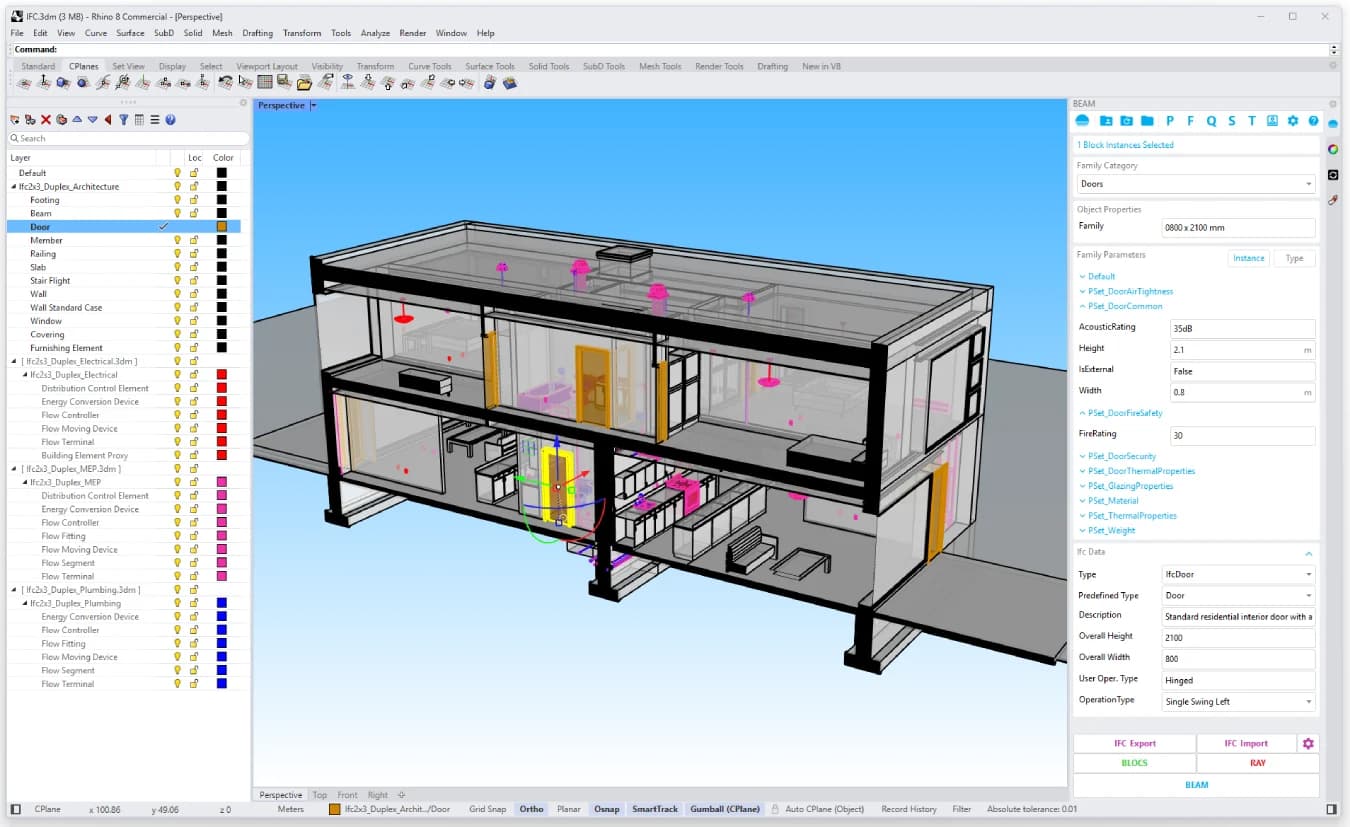
Rhino (Rhinoceros 3D) is the industry-standard NURBS modeling platform for precise freeform geometry, and Grasshopper — its built-in visual programming environment — is the leading tool for parametric and computational design. Together they let architects and designers build complex geometry algorithmically: defining the rules and parameters of a design, then generating and iterating options rather than modeling each one manually.
For architects working on complex facades and forms, computational designers automating design exploration, and furniture makers modeling precise curves for fabrication, Rhino & Grasshopper is the foundation of modern computational design practice — extended by a vast plugin ecosystem covering structural analysis, environmental simulation, optimization, and increasingly, AI-driven generation.
This review evaluates Rhino & Grasshopper based on its modeling power, parametric capabilities, and practical fit for architecture and design practices in 2026.
Key Features
Precision NURBS Modeling
Rhino models mathematically precise curves and surfaces — the freeform geometry that mesh-based tools approximate — making it the standard for designs that move from concept to fabrication with dimensional accuracy.
Grasshopper Parametric Design
Grasshopper lets designers build parametric definitions through visual node-based programming: connect components that define geometric rules, adjust parameters, and the design regenerates instantly — enabling systematic design exploration impossible with manual modeling.
Plugin Ecosystem
The Rhino/Grasshopper ecosystem includes thousands of plugins — Ladybug for environmental analysis, Karamba for structure, and a growing set of AI-driven generation and optimization tools — extending the platform far beyond modeling.
Fabrication-Ready Output
Rhino's precision and format support make it a bridge to digital fabrication — CNC, laser cutting, and 3D printing — which is why it's equally at home in furniture workshops and architecture studios.
Pros & Cons
Pros
- ✅ Industry-standard NURBS modeling handles precise freeform geometry other tools can't
- ✅ Grasshopper's visual programming enables parametric design without writing code
- ✅ Massive plugin ecosystem extends into analysis, optimization, AI, and fabrication
- ✅ One-time license pricing rather than subscription — rare in professional software
Cons
- ❌ Steep learning curve, especially for Grasshopper's computational design thinking
- ❌ Not a BIM platform — documentation workflows require pairing with Revit or ArchiCAD
- ❌ Complex parametric definitions can become hard to maintain without discipline
- ❌ AI features come mostly through third-party plugins rather than native tools
Who Is It Best For?
Rhino & Grasshopper is the right tool if you:
- Design complex or freeform geometry that pushes beyond standard modeling tools
- Want parametric workflows that generate and iterate design options systematically
- Fabricate what you design and need precision output for CNC and digital fabrication
- Invest in computational design skills as a long-term practice capability
Rhino & Grasshopper is not the right tool if you:
- Need BIM documentation and coordination as your primary workflow (use Revit/ArchiCAD)
- Want quick, simple 3D modeling with a gentle learning curve (consider SketchUp)
- Prefer AI-generated concepts over building parametric control yourself
Alternatives to Consider
- SketchUp — far easier 3D modeling for standard architectural and interior work
- Blender — free, powerful mesh modeling with growing design adoption
- Autodesk Revit — the BIM standard for documentation and building coordination
- Autodesk Forma — AI-driven early-stage site and massing analysis
- 3ds Max — high-end modeling and rendering for visualization-focused work
Final Verdict
Rhino & Grasshopper remains the deepest and most flexible design modeling environment for architects and designers who work with complex geometry or want parametric control over their designs. The learning investment is real — computational design is a skill, not a feature — but the capability ceiling is unmatched, and the plugin ecosystem keeps extending it into analysis, optimization, and AI.
It complements rather than replaces BIM: most practices pair Rhino/Grasshopper for design exploration with Revit or ArchiCAD for documentation. For furniture and fabrication work, its precision makes it a direct production tool.
Our recommendation: Learn Rhino's core modeling first, then start Grasshopper with one real, repetitive design task from your practice — a facade panel system or a parametric furniture family — because learning computational design through a project you actually need beats abstract tutorials for building lasting capability.
Key Features
Industry-standard NURBS modeling handles precise freeform geometry other tools can't
Grasshopper's visual programming enables parametric design without writing code
Massive plugin ecosystem extends into analysis, optimization, AI, and fabrication
One-time license pricing rather than subscription — rare in professional software
Best For
Architects designing complex facades, roofs, and freeform geometry parametrically
Computational designers automating design generation, testing, and optimization
Furniture designers modeling precise curved forms for digital fabrication
Design practices exploring generative and algorithm-driven design workflows
Pros & Cons
What We Like
- Industry-standard NURBS modeling handles precise freeform geometry other tools can't
- Grasshopper's visual programming enables parametric design without writing code
- Massive plugin ecosystem extends into analysis, optimization, AI, and fabrication
- One-time license pricing rather than subscription — rare in professional software
What We Don't Like
- Steep learning curve, especially for Grasshopper's computational design thinking
- Not a BIM platform — documentation workflows require pairing with Revit or ArchiCAD
- Complex parametric definitions can become hard to maintain without discipline
- AI features come mostly through third-party plugins rather than native tools
Top Rhino & Grasshopper Alternatives
View all alternatives →SketchUp
Alternative to Rhino & Grasshopper
Blender
Alternative to Rhino & Grasshopper
Autodesk Revit
Alternative to Rhino & Grasshopper

Autodesk Forma
Alternative to Rhino & Grasshopper
Read Review →3ds Max
Alternative to Rhino & Grasshopper
Rhino & Grasshopper vs Top Alternatives
| Tool | Best For | Price | AI Quality | Features | Support | Ease of Use | Rating | |
|---|---|---|---|---|---|---|---|---|
 | Architects designing complex facades, roofs, and freeform geometry parametrically | Contact for pricing | 9.4/10 | Current | ||||
S SketchUp | Architecture | Contact for pricing | 8.9/10 | — | ||||
B Blender | Architecture | Contact for pricing | 8.6/10 | — | ||||
AR Autodesk Revit | Architecture | Contact for pricing | 8.3/10 | — | ||||
 | Architecture | Contact for pricing | 8/10 | Read Review → |
Our Rhino & Grasshopper Verdict
Rhino & Grasshopper is best suited for architects, computational designers, and furniture makers who need precise freeform 3D modeling and parametric design — building complex geometry through visual programming that generates, tests, and iterates design options algorithmically.
Visit website for full details
FAQ
Related Articles
View all articles →Best AI Tools for Architects in 2026
Our editorial guide to the AI tools we recommend, including Rhino & Grasshopper.
Read Guide →Rhino & Grasshopper vs Top Alternatives: Full Comparison
Side-by-side breakdown of Rhino & Grasshopper and its main competitors.
View Comparisons →Hands-on Guides & Workflows
Step-by-step playbooks for getting the most out of tools like Rhino & Grasshopper.
Browse Guides →Related Tools in Architecture
See all the best Architecture →
Midjourney
Midjourney remains the gold standard for AI image generation in 2026, delivering photorealistic renders and concept visuals that architecture, interior design, construction, and real estate professionals can use directly in client workflows.
Read Review →
Veras
Veras is best suited for architects and designers already modeling in Revit, SketchUp, or Rhino who want AI-powered renders generated directly from their existing viewport, without exporting to a separate rendering application.
Read Review →
Archicad AI
Archicad AI is best suited for architecture firms and BIM-driven design teams who want AI-assisted modeling and documentation built directly into a full-featured BIM platform, rather than a separate visualization add-on.
Read Review →
Fireflies.ai
Fireflies.ai is best suited for architects, contractors, real estate agents, and design professionals who spend significant time in client meetings and project calls — automatically recording, transcribing, and summarizing meetings so teams can focus on the conversation rather than note-taking.
Read Review →