

Giraffe Review:
Is It Worth It in 2026?
Giraffe is best suited for urban planners, architects, and developers who want a browser-based platform that combines mapping, sketching, and live analytics on real-world maps — running feasibility, zoning, and site analysis directly in a GIS context for master planning and development.
From
Free version / From $1,000/year
Best For
Our Overall Rating
Based on comprehensive testing
Best For
- Urban planners and master planners working in a GIS context
- Developers running early feasibility and site analysis
- Architecture firms exploring massing and zoning at the site scale
- Teams needing shared, map-based analytics for public or client engagement
Pricing
Starts at
Bottom Line
Giraffe is best suited for urban planners, architects, and developers who want a browser-based platform that combines mapping, sketching, and live analytics on real-world maps — running feasibility, zoning, and site analysis directly in a GIS context for master planning and development.
Visit Giraffe →Quick Verdict
Giraffe scores 8.4/10 in our testing and is a strong choice for Urban planners and master planners working in a GIS context and Developers running early feasibility and site analysis. A free tier is available, with paid plans from Free version / From $1,000/year.
What Is Giraffe?
Overview
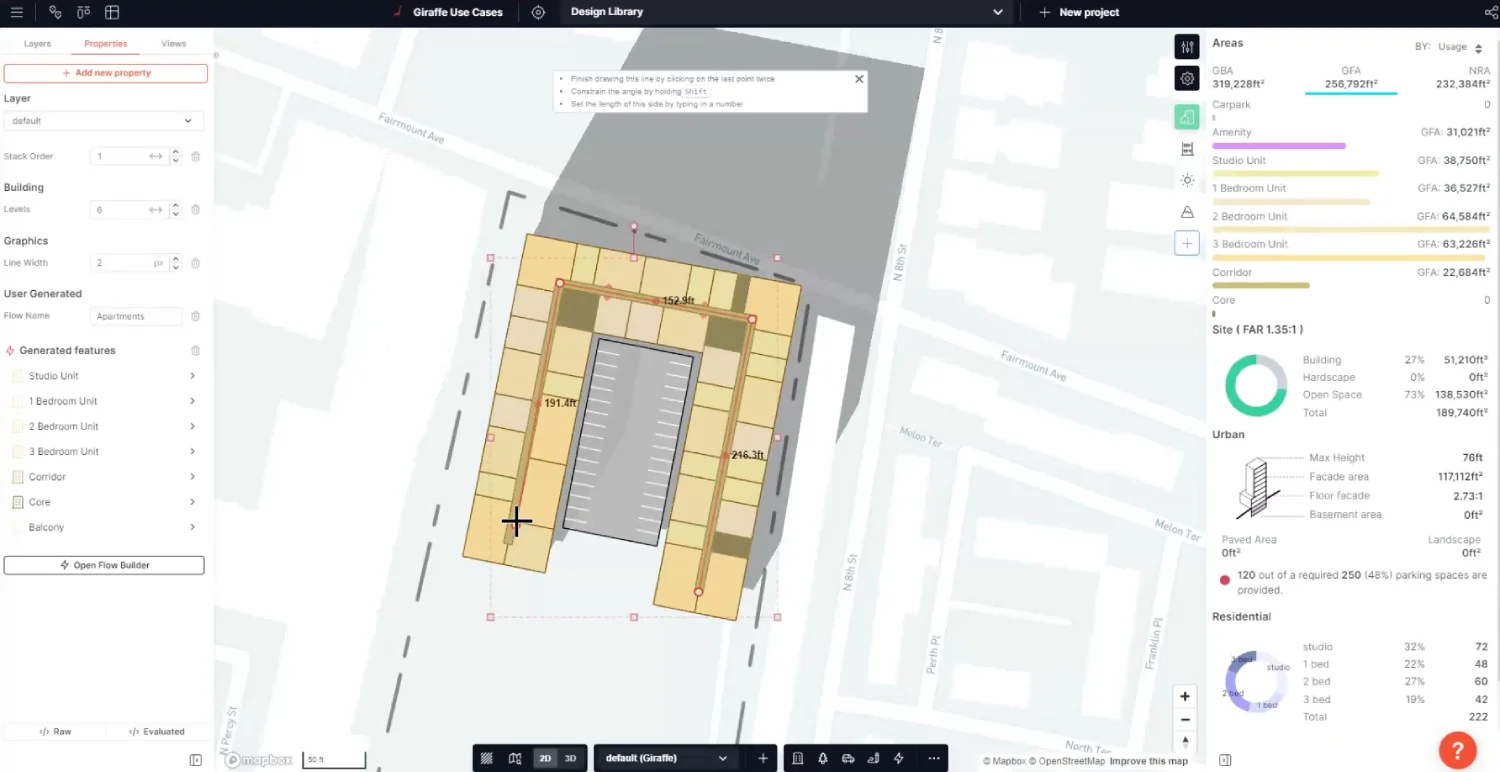
Giraffe is a browser-based platform that combines mapping, sketching, and live analytics into one workspace, letting architects, urban planners, and developers explore and communicate design ideas directly on real-world maps. Built for city planning, it sits at the site and portfolio scale rather than the individual building.
Its strength is bringing GIS data and feasibility analytics together with quick massing and layout sketching, so teams can assess zoning, flood, contours, and financial viability in the same place they draw. It has been used for feasibility studies, land-use planning, master planning, and development tracking.
This review evaluates Giraffe on its planning, GIS, and feasibility capabilities and its fit for early-stage development work in 2026.
Key Features
Map-Based Sketching
Users draw massing, road networks, parking, and layouts directly within a GIS context, combining design and site data in one view.
GIS Data Layering
Giraffe layers zoning, flood, contours, parcels, solar, and other site data so plans are assessed against real constraints from the start.
Feasibility and Financials
A suite of feasibility tools covers take-offs and financial viability, plus portfolio tools to understand an investment thesis across sites.
Cloud Collaboration and Sharing
As a browser-based platform, it supports shared projects for client, consultant, and public engagement without desktop GIS setup.
Pros & Cons
Pros
- ✅ Combines mapping, sketching, and live analytics on real-world maps in one workspace
- ✅ Strong GIS layering: zoning, flood, contours, parcels, solar, and site data
- ✅ Feasibility tools for take-offs and financial viability during early planning
- ✅ Free version lets you create and share a project before committing
Cons
- ❌ Focused on planning and feasibility rather than detailed building design or documentation
- ❌ Full value assumes comfort working with GIS data and site context
- ❌ Per-seat annual pricing suits firms more than occasional individual users
- ❌ Not a rendering or BIM tool — it complements rather than replaces them
Who Is It Best For?
Giraffe is the right tool if you:
- Do master planning or urban planning in a GIS context
- Run early feasibility and site analysis on development sites
- Explore massing and zoning at the site or portfolio scale
- Need shared, map-based analytics for engagement
Giraffe is not the right tool if you:
- Need detailed building design, BIM, or construction documentation
- Want photorealistic rendering rather than planning analytics
- Are an occasional individual user for whom per-seat pricing is hard to justify
Alternatives to Consider
- Autodesk Forma — site and massing analysis in the Autodesk ecosystem
- TestFit — rapid feasibility for multifamily and parking-driven sites
- Modelur — parametric urban design and zoning inside SketchUp
- Snaptrude — concept-to-BIM design with site analysis
- Archicad AI — full BIM authoring for detailed design
Final Verdict
Giraffe earns its place for planners, developers, and architects working at the site and portfolio scale who want mapping, sketching, and feasibility analytics in one browser-based tool. Bringing GIS context and financial viability together with quick massing is genuinely useful in the earliest phase of a project.
It isn't a building-design or rendering tool, so it works best alongside BIM and visualization software rather than replacing them.
Our recommendation: Try Giraffe's free version on a real site to test the GIS and feasibility workflow before adding seats. See our guide to the best AI tools for architects for where site analysis fits in the process.
Key Features
Combines mapping, sketching, and live analytics on real-world maps in one workspace
Strong GIS layering: zoning, flood, contours, parcels, solar, and site data
Feasibility tools for take-offs and financial viability during early planning
Free version lets you create and share a project before committing
Best For
Urban planners and master planners working in a GIS context
Developers running early feasibility and site analysis
Architecture firms exploring massing and zoning at the site scale
Teams needing shared, map-based analytics for public or client engagement
Pros & Cons
What We Like
- Combines mapping, sketching, and live analytics on real-world maps in one workspace
- Strong GIS layering: zoning, flood, contours, parcels, solar, and site data
- Feasibility tools for take-offs and financial viability during early planning
- Free version lets you create and share a project before committing
What We Don't Like
- Focused on planning and feasibility rather than detailed building design or documentation
- Full value assumes comfort working with GIS data and site context
- Per-seat annual pricing suits firms more than occasional individual users
- Not a rendering or BIM tool — it complements rather than replaces them
Top Giraffe Alternatives
View all alternatives →


Giraffe vs Top Alternatives
| Tool | Best For | Price | AI Quality | Features | Support | Ease of Use | Rating | |
|---|---|---|---|---|---|---|---|---|
 | Urban planners and master planners working in a GIS context | Free version / From $1,000/year | 8.4/10 | Current | ||||
 | Architecture | Contact for pricing | 7.9/10 | Read Review → | ||||
 | Architecture | Contact for pricing | 7.6/10 | Read Review → | ||||
 | Architecture | Contact for pricing | 7.3/10 | Read Review → | ||||
 | Architecture | Contact for pricing | 7/10 | Read Review → |
Our Giraffe Verdict
Giraffe is best suited for urban planners, architects, and developers who want a browser-based platform that combines mapping, sketching, and live analytics on real-world maps — running feasibility, zoning, and site analysis directly in a GIS context for master planning and development.
Free plan available
FAQ
Related Articles
View all articles →Best AI Tools for Architects in 2026
Our editorial guide to the AI tools we recommend, including Giraffe.
Read Guide →Giraffe vs Top Alternatives: Full Comparison
Side-by-side breakdown of Giraffe and its main competitors.
View Comparisons →Hands-on Guides & Workflows
Step-by-step playbooks for getting the most out of tools like Giraffe.
Browse Guides →Related Tools in Architecture
See all the best Architecture →
ideal.house
ideal.house is best suited for homeowners and early-stage architecture clients who want AI-generated exterior and architectural concepts before committing to an architect or builder.
Read Review →
SketchUp Diffusion
SketchUp Diffusion is best suited for architects and designers already working in SketchUp who want to generate AI-powered photorealistic renders or styled concept images directly from their 3D models — bridging the gap between rough 3D geometry and polished client-ready visualization without switching tools.
Read Review →
ArchitectGPT
ArchitectGPT is best suited for architects, designers, and real estate developers who need fast AI-generated architectural concepts, floor plan sketches, and exterior visualizations from text prompts or reference images — helping explore design directions quickly before committing to full CAD workflows.
Read Review →
Maket
Maket is best suited for architects, designers, and developers who want to generate and iterate 2D floor plan layouts from written requirements — exploring spatial options quickly at the concept stage before committing to detailed CAD or BIM work.
Read Review →