

Snaptrude Review:
Is It Worth It in 2026?
Snaptrude is best suited for architects and design teams who want an AI-powered, cloud-native BIM platform that turns a space program into a BIM-compliant model quickly, with real-time collaboration and Revit interoperability — closing the gap between concept design and BIM.
From
Free tier / From $499/year
Best For
Our Overall Rating
Based on comprehensive testing
Best For
- Architects who want to move from concept to a BIM model quickly
- Small and mid-size studios needing cloud collaboration without heavy IT setup
- Teams that design in a lightweight tool but hand off to Revit for documentation
- Firms exploring AI-assisted site analysis, massing, and programming
Pricing
Starts at
Bottom Line
Snaptrude is best suited for architects and design teams who want an AI-powered, cloud-native BIM platform that turns a space program into a BIM-compliant model quickly, with real-time collaboration and Revit interoperability — closing the gap between concept design and BIM.
Visit Snaptrude →Quick Verdict
Snaptrude scores 8.6/10 in our testing and is a strong choice for Architects who want to move from concept to a BIM model quickly and Small and mid-size studios needing cloud collaboration without heavy IT setup. A free tier is available, with paid plans from Free tier / From $499/year.
What Is Snaptrude?
Overview
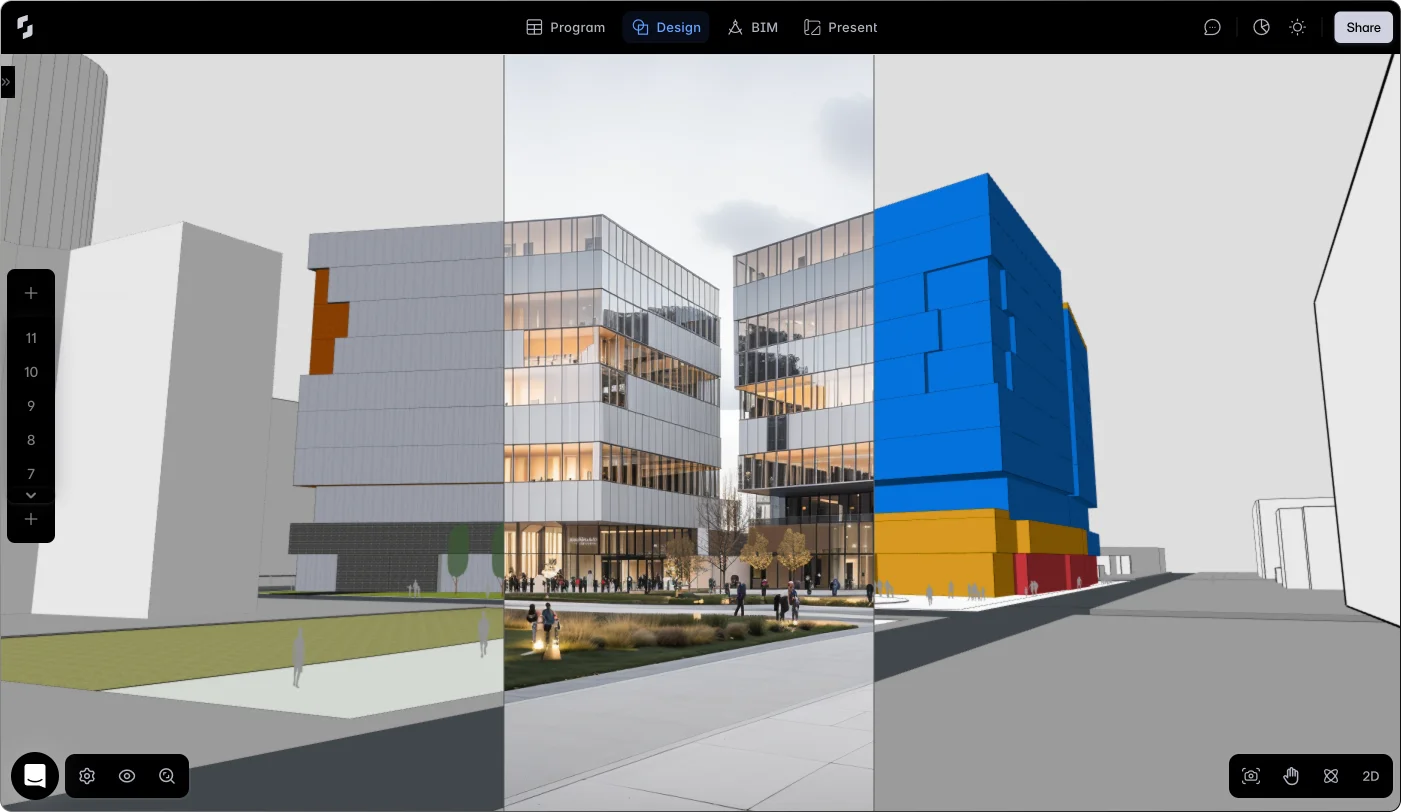
Snaptrude is a cloud-native, AI-powered BIM platform built to close the gap between concept design and a coordinated BIM model. Rather than treating early design and BIM as separate stages in separate tools, it lets architects move from a space program to a BIM-compliant model inside one browser-based workspace.
Its distinguishing bet is that design intent and BIM shouldn't live in different places. For studios that lose time re-modeling concepts in Revit, Snaptrude aims to compress site analysis, programming, massing, and BIM into a single AI-native flow, then export a clean Revit file when detailed documentation begins.
This review evaluates Snaptrude on its AI design generation, collaboration, interoperability, and fit for architectural practice in 2026.
Key Features
AI Model Generation
Snaptrude's AI agents can generate a BIM-compliant model from a space program or room schedule in minutes, plus assist with zoning, site analysis, and massing — turning early inputs into a workable model faster than manual modeling.
Cloud-Native Collaboration
Real-time, multi-user editing is built in, with no worksharing setup, VPN, or file-conflict management — several people can work on the same project at once from the browser.
Revit Interoperability
Snaptrude exports .rvt files with materials and parameters intact, so teams can continue detailed documentation in Revit without rebuilding the model.
One Workspace for Early Design
Site analysis, programming, massing, BIM, and presentation live in one tool, reducing the handoffs between disconnected concept and BIM applications.
Pros & Cons
Pros
- ✅ AI agents generate BIM-compliant models from a space program or room schedule in minutes
- ✅ Cloud-native real-time collaboration with no worksharing setup or file conflicts
- ✅ Exports clean .rvt files for teams that continue detailed work in Revit
- ✅ Free tier makes it low-risk to trial the concept-to-BIM workflow
Cons
- ❌ As a newer platform, it doesn't match the depth of mature BIM tools for full documentation
- ❌ Best value comes at the concept and early-design stages rather than late-stage detailing
- ❌ Teams committed to a Revit-only pipeline need to weigh the round-trip workflow
- ❌ AI-generated models still require architect review and refinement
Who Is It Best For?
Snaptrude is the right tool if you:
- Want to move from concept to BIM quickly without re-modeling in a separate tool
- Need cloud collaboration without heavy IT or worksharing setup
- Hand off to Revit for detailed documentation but design earlier upstream
- Are exploring AI-assisted site analysis, massing, and programming
Snaptrude is not the right tool if you:
- Need the full documentation depth of a mature, established BIM platform
- Work exclusively in Revit and don't want a round-trip workflow
- Are focused on late-stage detailing rather than concept and early design
Alternatives to Consider
- Archicad AI — mature, full-featured BIM authoring for end-to-end documentation
- Autodesk Forma — site and massing analysis in the Autodesk ecosystem
- TestFit — developer-focused feasibility and site planning
- Planner 5D — lightweight 2D/3D layout and interior design
- Giraffe — GIS-based master planning and feasibility
Final Verdict
Snaptrude earns its place for architects who feel the friction between concept design and BIM most acutely. The AI-assisted move from space program to BIM model, combined with genuine cloud collaboration and clean Revit export, makes it a strong fit for the early stages of a project.
It's less suited to teams that need deep, late-stage documentation from a single mature platform — that's not its focus yet.
Our recommendation: Trial Snaptrude on the free tier with a real early-stage project, then test the Revit export on your actual documentation workflow before adopting it studio-wide. For where it fits among architecture tools, see our guide to the best AI tools for architects.
Key Features
AI agents generate BIM-compliant models from a space program or room schedule in minutes
Cloud-native real-time collaboration with no worksharing setup or file conflicts
Exports clean .rvt files for teams that continue detailed work in Revit
Free tier makes it low-risk to trial the concept-to-BIM workflow
Best For
Architects who want to move from concept to a BIM model quickly
Small and mid-size studios needing cloud collaboration without heavy IT setup
Teams that design in a lightweight tool but hand off to Revit for documentation
Firms exploring AI-assisted site analysis, massing, and programming
Pros & Cons
What We Like
- AI agents generate BIM-compliant models from a space program or room schedule in minutes
- Cloud-native real-time collaboration with no worksharing setup or file conflicts
- Exports clean .rvt files for teams that continue detailed work in Revit
- Free tier makes it low-risk to trial the concept-to-BIM workflow
What We Don't Like
- As a newer platform, it doesn't match the depth of mature BIM tools for full documentation
- Best value comes at the concept and early-design stages rather than late-stage detailing
- Teams committed to a Revit-only pipeline need to weigh the round-trip workflow
- AI-generated models still require architect review and refinement
Top Snaptrude Alternatives
View all alternatives →


Snaptrude vs Top Alternatives
| Tool | Best For | Price | AI Quality | Features | Support | Ease of Use | Rating | |
|---|---|---|---|---|---|---|---|---|
 | Architects who want to move from concept to a BIM model quickly | Free tier / From $499/year | 8.6/10 | Current | ||||
 | Architecture | Contact for pricing | 8.1/10 | Read Review → | ||||
 | Architecture | Contact for pricing | 7.8/10 | Read Review → | ||||
 | Architecture | Contact for pricing | 7.5/10 | Read Review → | ||||
 | Architecture | Contact for pricing | 7.2/10 | Read Review → |
Our Snaptrude Verdict
Snaptrude is best suited for architects and design teams who want an AI-powered, cloud-native BIM platform that turns a space program into a BIM-compliant model quickly, with real-time collaboration and Revit interoperability — closing the gap between concept design and BIM.
Free plan available
FAQ
Related Articles
View all articles →Best AI Tools for Architects in 2026
Our editorial guide to the AI tools we recommend, including Snaptrude.
Read Guide →Snaptrude vs Top Alternatives: Full Comparison
Side-by-side breakdown of Snaptrude and its main competitors.
View Comparisons →Hands-on Guides & Workflows
Step-by-step playbooks for getting the most out of tools like Snaptrude.
Browse Guides →Related Tools in Architecture
See all the best Architecture →
Spacemaker
Spacemaker — acquired by Autodesk and now continued as Autodesk Forma — pioneered AI-driven early-stage site planning, letting architects and developers generate and evaluate site layout options against sunlight, noise, wind, and density criteria before committing to a design direction.
Read Review →
Giraffe
Giraffe is best suited for urban planners, architects, and developers who want a browser-based platform that combines mapping, sketching, and live analytics on real-world maps — running feasibility, zoning, and site analysis directly in a GIS context for master planning and development.
Read Review →
ideal.house
ideal.house is best suited for homeowners and early-stage architecture clients who want AI-generated exterior and architectural concepts before committing to an architect or builder.
Read Review →
SketchUp Diffusion
SketchUp Diffusion is best suited for architects and designers already working in SketchUp who want to generate AI-powered photorealistic renders or styled concept images directly from their 3D models — bridging the gap between rough 3D geometry and polished client-ready visualization without switching tools.
Read Review →