

Maket Review:
Is It Worth It in 2026?
Maket is best suited for architects, designers, and developers who want to generate and iterate 2D floor plan layouts from written requirements — exploring spatial options quickly at the concept stage before committing to detailed CAD or BIM work.
Best For
Our Overall Rating
Based on comprehensive testing
Best For
- Architects and designers exploring floor plan options before detailed CAD or BIM modeling
- Developers testing layout and unit-mix ideas at the feasibility stage
- Interior designers who need a quick spatial starting point from a brief
- Students and non-technical stakeholders generating layouts from plain-language requirements
Pricing
See current pricing on the Maket website.
Bottom Line
Maket is best suited for architects, designers, and developers who want to generate and iterate 2D floor plan layouts from written requirements — exploring spatial options quickly at the concept stage before committing to detailed CAD or BIM work.
Visit Maket →Quick Verdict
Maket scores 8.2/10 in our testing and is a strong choice for Architects and designers exploring floor plan options before detailed CAD or BIM modeling and Developers testing layout and unit-mix ideas at the feasibility stage.
What Is Maket?
Overview
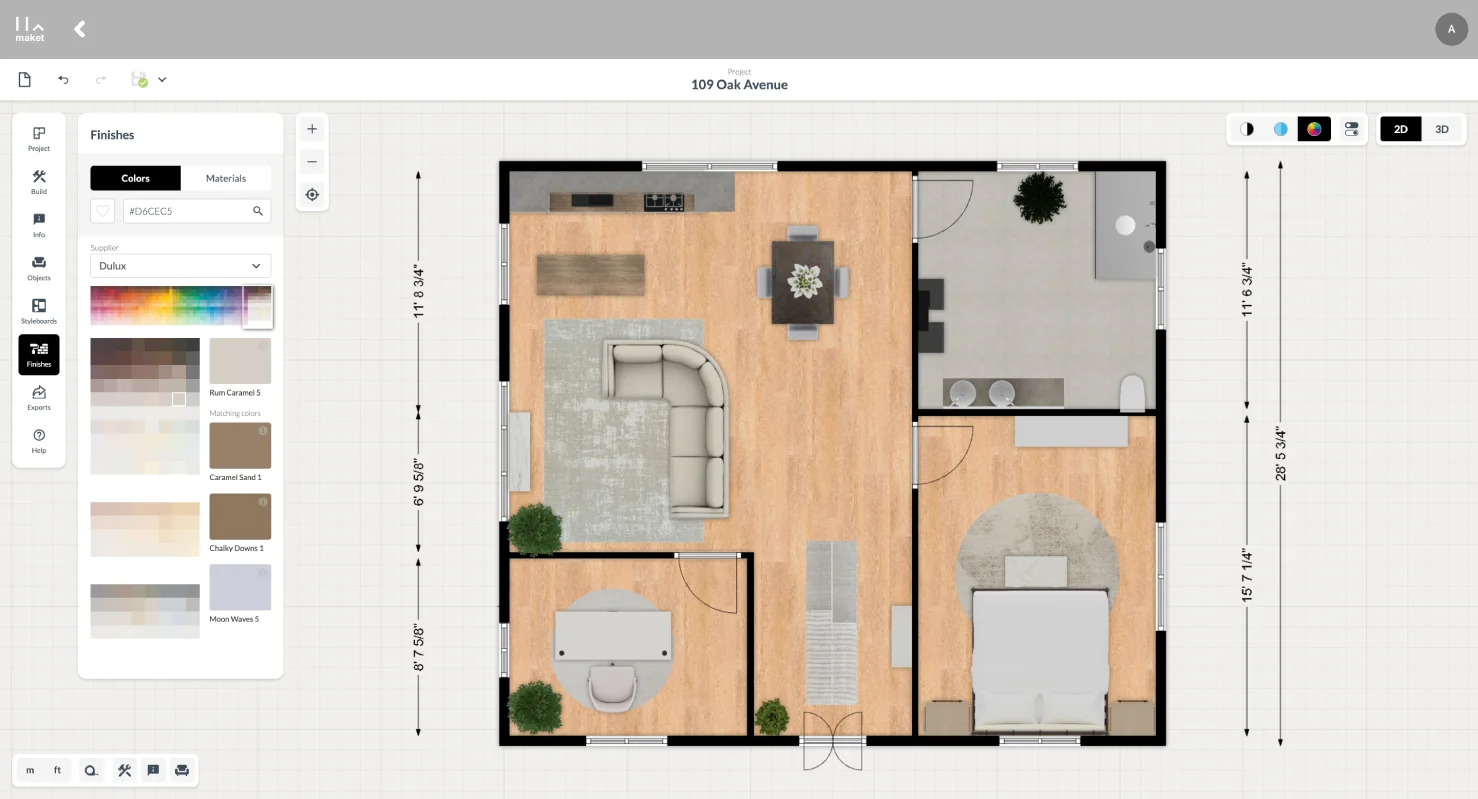
Maket is an AI-powered generative design tool focused on the front of the architectural process: turning written requirements into 2D floor plan options. Instead of starting from a blank canvas in CAD, a user describes what the space needs — room counts, approximate dimensions, and adjacencies — and Maket generates layout variations to react to and refine.
The tool targets the earliest, most exploratory phase of a project, where the value is in quickly comparing spatial options rather than producing polished documentation. For architects, designers, and developers, that early layout exploration is often slow and repetitive when done by hand; Maket aims to compress it.
This review evaluates Maket based on its floor plan generation, iteration workflow, and practical fit for concept-stage design in 2026.
Key Features
Requirement-Driven Floor Plan Generation
Maket's core capability is generating 2D floor plans from plain-language requirements — room counts, sizes, and how spaces should relate to each other — producing several layout options rather than a single answer.
Fast Layout Iteration
Because plans are generated rather than drawn, testing a different program or adjacency is quick. This suits the feasibility and concept stages, where comparing options matters more than detail.
Design and Material Suggestions
Beyond layouts, Maket offers design and material suggestions that help move from an abstract brief toward a more concrete direction before detailed design begins.
Browser-Based and Accessible
Maket runs in the browser with no install, making it approachable for non-CAD users and useful for early conversations with clients or stakeholders who can't read technical drawings.
Pros & Cons
Pros
- ✅ Generates multiple 2D floor plan options from written requirements like room counts and adjacencies
- ✅ Fast iteration at the earliest concept stage, when exploring layout options has the most leverage
- ✅ Browser-based and approachable for non-CAD users, with no software install
- ✅ Design and material suggestions help move from a blank brief toward a concrete direction
Cons
- ❌ Generated plans are early-stage concepts, not construction-ready or code-checked documents
- ❌ Spatial and structural feasibility still needs an architect's review before detailed design
- ❌ Focused on layout generation rather than rendering or visualization
- ❌ Output quality depends on how clearly the requirements and constraints are specified
Who Is It Best For?
Maket is the right tool if you:
- Explore floor plan options early and want to compare layouts before committing to CAD or BIM
- Work at the feasibility stage on unit mix, room programs, or adjacency studies
- Want a fast spatial starting point from a written brief rather than a blank canvas
- Involve non-technical stakeholders who respond better to generated layouts than to technical drawings
Maket is not the right tool if you:
- Need construction-ready, code-compliant documentation rather than concept layouts
- Are looking primarily for photorealistic rendering rather than layout generation
- Require precise structural or MEP coordination at this stage
Alternatives to Consider
Maket is strong for early floor plan generation, but it is not the only option:
- ArchitectGPT — focuses on rendering and visualizing a design from an image rather than generating the layout itself
- TestFit — better for developer-driven feasibility with unit counts, parking, and cost metrics
- Autodesk Forma — site and massing analysis within the Autodesk ecosystem
- ArkDesign AI — generative design aimed at residential and multifamily layouts
- Planner 5D — layout and interior design tool with 2D/3D editing
Final Verdict
Maket earns its place for architects, designers, and developers who want to generate and compare floor plan layouts at the concept stage, rather than drawing every option by hand. Its value is highest at the front of a project, where exploring spatial directions quickly has the most leverage on the eventual design.
As with other AI design tools, the output is a starting point, not a deliverable — generated plans need an architect's judgment on feasibility and code before detailed design proceeds.
Our recommendation: Use Maket to generate several layout directions from your brief, then take the strongest option into your CAD or BIM workflow. It pairs naturally with a rendering tool like ArchitectGPT once you need to visualize the design — see our guide to the best AI tools for architects for the full workflow.
Key Features
Generates multiple 2D floor plan options from written requirements like room counts and adjacencies
Fast iteration at the earliest concept stage, when exploring layout options has the most leverage
Browser-based and approachable for non-CAD users, with no software install
Design and material suggestions help move from a blank brief toward a concrete direction
Best For
Architects and designers exploring floor plan options before detailed CAD or BIM modeling
Developers testing layout and unit-mix ideas at the feasibility stage
Interior designers who need a quick spatial starting point from a brief
Students and non-technical stakeholders generating layouts from plain-language requirements
Pros & Cons
What We Like
- Generates multiple 2D floor plan options from written requirements like room counts and adjacencies
- Fast iteration at the earliest concept stage, when exploring layout options has the most leverage
- Browser-based and approachable for non-CAD users, with no software install
- Design and material suggestions help move from a blank brief toward a concrete direction
What We Don't Like
- Generated plans are early-stage concepts, not construction-ready or code-checked documents
- Spatial and structural feasibility still needs an architect's review before detailed design
- Focused on layout generation rather than rendering or visualization
- Output quality depends on how clearly the requirements and constraints are specified
Top Maket Alternatives
View all alternatives →


Maket vs Top Alternatives
| Tool | Best For | Price | AI Quality | Features | Support | Ease of Use | Rating | |
|---|---|---|---|---|---|---|---|---|
 | Architects and designers exploring floor plan options before detailed CAD or BIM modeling | Contact for pricing | 8.2/10 | Current | ||||
 | Architecture | Contact for pricing | 7.7/10 | Read Review → | ||||
 | Architecture | Contact for pricing | 7.4/10 | Read Review → | ||||
 | Architecture | Contact for pricing | 7.1/10 | Read Review → | ||||
 | Architecture | Contact for pricing | 7/10 | Read Review → |
Our Maket Verdict
Maket is best suited for architects, designers, and developers who want to generate and iterate 2D floor plan layouts from written requirements — exploring spatial options quickly at the concept stage before committing to detailed CAD or BIM work.
Visit website for full details
FAQ
Related Articles
View all articles →Best AI Tools for Architects in 2026
Our editorial guide to the AI tools we recommend, including Maket.
Read Guide →Maket vs Top Alternatives: Full Comparison
Side-by-side breakdown of Maket and its main competitors.
View Comparisons →Hands-on Guides & Workflows
Step-by-step playbooks for getting the most out of tools like Maket.
Browse Guides →Head-to-Head Comparisons
Featured in Workflows
Related Tools in Architecture
See all the best Architecture →
Modelur
Modelur is best suited for architects and urban designers working in SketchUp who want parametric massing with instant feedback on FAR, parking, and zoning compliance — testing urban design alternatives several times faster than manual modeling.
Read Review →
ArchiGPT
ArchiGPT is best suited for architects, interior designers, and developers who want to turn sketches, photos, or 3D model screenshots into photorealistic renders through natural-language prompts — covering both interior and exterior visualization with archviz tools like relighting, staging, and style changes.
Read Review →
D5 Render
D5 Render is a real-time ray tracing renderer used by 80% architecture professionals, cutting rendering time from 12-18 hours (V-Ray) to 1-2 hours with higher quality results. It integrates natively with SketchUp, Revit, Rhino, ARCHICAD, and Blender via live-sync — with a free version and Pro from $38/month.
Read Review →
Rhino & Grasshopper
Rhino & Grasshopper is best suited for architects, computational designers, and furniture makers who need precise freeform 3D modeling and parametric design — building complex geometry through visual programming that generates, tests, and iterates design options algorithmically.
Read Review →