

Planner 5D Review:
Is It Worth It in 2026?
Planner 5D is an AI-powered floor plan and interior design platform used by 120+ million users worldwide. It converts uploaded images or text prompts into 2D/3D floor plans instantly, with 8,000+ furniture items, 4K rendering, and VR walkthroughs — from a free plan to professional and enterprise white-label tiers.
We may earn a commission when you purchase through links on our site. Learn more
From
Free plan available / Premium from $4.99/month
Best For
Our Overall Rating
Based on comprehensive testing
Best For
- Interior designers creating client concept visuals and mood boards
- Architecture firms generating early-stage concept floor plans
- Real estate agents staging and visualizing empty properties
- Furniture retailers letting customers visualize products in their space
- Homeowners and clients collaborating on renovation concepts
Pricing
Starts at
Bottom Line
Planner 5D is an AI-powered floor plan and interior design platform used by 120+ million users worldwide. It converts uploaded images or text prompts into 2D/3D floor plans instantly, with 8,000+ furniture items, 4K rendering, and VR walkthroughs — from a free plan to professional and enterprise white-label tiers.
Visit Planner 5D →Quick Verdict
Planner 5D scores 8.8/10 in our testing and is a strong choice for Interior designers creating client concept visuals and mood boards and Architecture firms generating early-stage concept floor plans. A free tier is available, with paid plans from Free plan available / Premium from $4.99/month.
What Is Planner 5D?
Overview
Planner 5D sits in a unique position in the design software landscape: professional enough for architects and interior designers to use in client-facing workflows, accessible enough for homeowners to use without training. With 120 million users and 400 million projects created, it is the most widely adopted floor plan and interior design platform in the world.
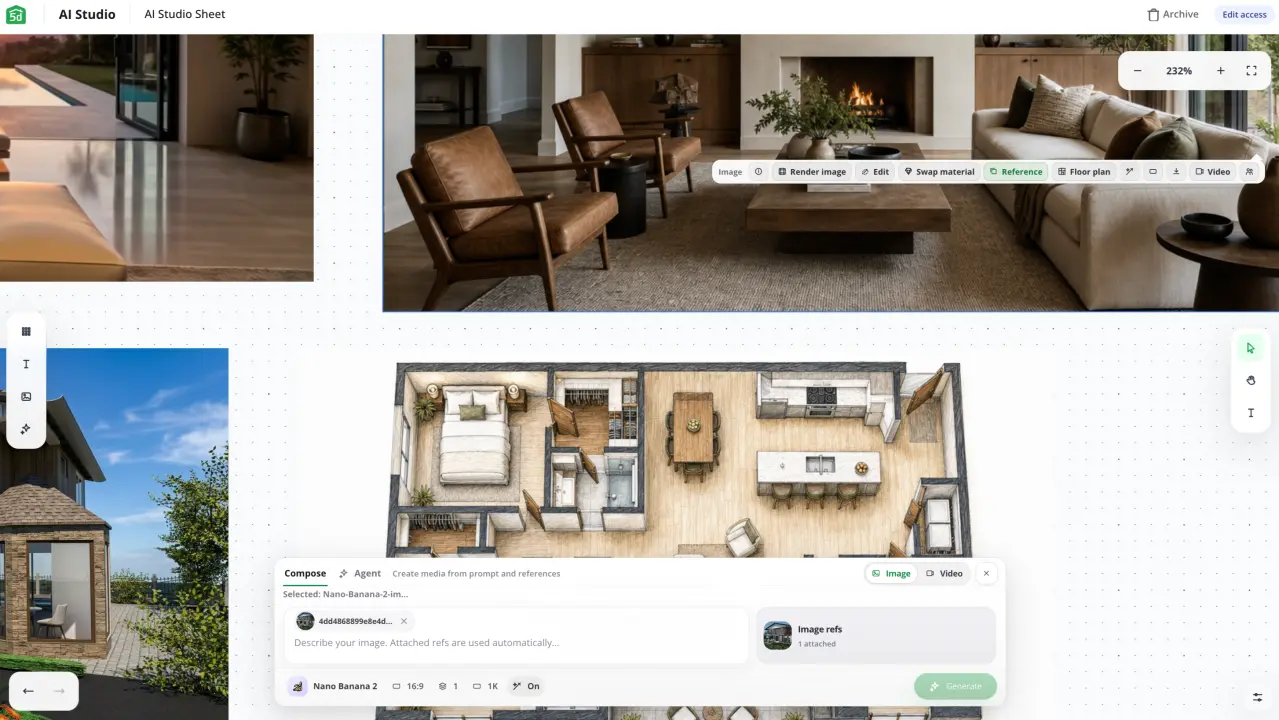
The AI capabilities introduced in recent years are what separate Planner 5D from legacy room planning tools. Upload a photo of an existing floor plan and the AI converts it to an editable 3D model in under two minutes. Describe a room concept in text and the AI generates a layout. Adjust furniture, materials, and lighting in real time. Export 4K renders, 360° panoramas, and VR walkthroughs for client presentations.
For professionals in architecture, interior design, real estate, and furniture, Planner 5D fills the gap between rough concept and polished visual — faster than any traditional rendering pipeline.
Key Features
AI Floor Plan Recognition
The standout feature for professionals: photograph or scan an existing floor plan, upload it to Planner 5D, and the AI converts it into a fully editable 2D and 3D model in approximately 1-2 minutes. Wall dimensions, room shapes, and openings are automatically detected and placed.
This is the tool for architects needing to quickly digitize hand-drawn sketches, real estate agents converting old property plans into modern 3D visuals, or interior designers working from existing building drawings.
2D and 3D Design Editor
The drag-and-drop editor allows full control over floor plans: add and move walls, place doors and windows, furnish rooms from the 8,000+ item catalog, apply materials and textures, adjust lighting. Switch between 2D plan view and 3D walkthrough view instantly. Changes are reflected in both views simultaneously.
Cross-platform syncing (web, iOS, Android) means projects started on desktop continue seamlessly on mobile — relevant for site visits, client meetings, and field work.
4K Photorealistic Rendering
On paid plans, Planner 5D generates photorealistic renders using ray tracing — accurate lighting, reflections, and shadows. The rendering quality is sufficient for client presentations, mood boards, and marketing materials. Premium allows 5 renders per month; Professional provides unlimited rendering.
For comparison: traditional rendering software (V-Ray, Corona) can take 12-18 hours for a complex scene. Planner 5D delivers comparable quality for concept-level presentations in minutes.
360° VR Walkthroughs and Apple Vision Pro
Create navigable 360° panoramas and VR walkthroughs of completed designs. Clients can "walk through" a space before it is built. Apple Vision Pro compatibility enables spatial viewing of designs — relevant for architecture firms and real estate developers demonstrating unbuilt spaces to premium clients.
Enterprise White-Label
The Enterprise tier allows furniture retailers, real estate companies, and interior design platforms to embed Planner 5D's visualization technology under their own branding. A furniture retailer can offer customers an in-store or online tool to visualize products in their own rooms. A real estate developer can offer buyers a visualization tool for off-plan properties.
Experts Marketplace
Planner 5D hosts a marketplace of professional interior designers available for hire. For users who want to move beyond DIY into professionally produced designs, the platform provides a direct path to qualified designers familiar with the tool — relevant for high-value residential or commercial projects.
Use Cases by Industry
Architecture
Architects use Planner 5D primarily for two workflows: digitizing existing floor plans via AI recognition (faster than manual CAD entry for early-stage projects), and generating presentation-quality 3D visuals before committing to detailed BIM modeling. The tool does not replace CAD or BIM for construction documentation — it accelerates the concept and presentation stages.
Interior Design
Interior designers use Planner 5D to create client-facing concept visuals: furnished floor plans, mood board renders, and material/color explorations. The 8,000+ item catalog covers most residential and commercial furniture categories. The ability to generate unlimited renders on Professional makes it practical for iterative client work.
Real Estate
Real estate agents and property developers use Planner 5D for two purposes: virtual staging of empty properties (furnishing them digitally for listing photos) and off-plan property visualization (showing buyers what a yet-to-be-built apartment or house will look like furnished). Both applications measurably improve listing engagement and buyer confidence.
Furniture Retail
Furniture retailers with Enterprise access offer customers an in-store or e-commerce visualization experience: place our sofa in your room, see how it looks with your existing furniture. This reduces return rates, increases purchase confidence, and extends time spent on the retailer's platform.
Who Is It Best For?
Planner 5D is the right fit if you:
- Need client-ready concept visuals faster than traditional rendering
- Work in a creative field where aesthetic output is part of the deliverable
- Want a tool that non-designers (clients, homeowners) can collaborate on
- Need VR or AR visualization capability without expensive hardware
- Are a furniture retailer or real estate developer needing embedded visualization (Enterprise)
It is not the right fit if you:
- Need construction-ready CAD drawings with dimensions and specifications
- Require deep BIM integration for structural or MEP coordination
- Need to render at the highest professional quality (V-Ray/Corona for final images)
Alternatives to Consider
- Foyr Neo — stronger photorealistic rendering; better for design-forward professional studios; from $22/month
- RoomSketcher — simpler interface; better for floor plan documentation; good for real estate
- SketchUp — industry-standard 3D modeling; steeper learning curve; better for architecture and construction
- Homestyler — free competitor; simpler; less powerful AI features
Final Verdict
Planner 5D is the most accessible professional-quality design visualization tool available in 2026. Its AI floor plan recognition, 8,000+ furniture catalog, 4K rendering, and VR capabilities deliver genuine workflow value for architecture, interior design, real estate, and furniture professionals — at a price point (free to $33/month) that makes it viable for independent practitioners and studios alike.
The limitation is clear: Planner 5D is a visualization tool, not a CAD or BIM platform. Use it to create beautiful concept visuals and client presentations. Use your CAD software to produce technical documentation.
Our recommendation: Start with the free plan. Design one complete room or floor plan using real project data. If the quality meets your client presentation standard, Professional at $33.33/month pays for itself after your first render saves a client presentation. For polished final renders, compare it with Foyr Neo; our guide to the best AI tools for interior design shows where layout-first tools fit alongside restyle and rendering options.
Key Features
120+ million users — most widely adopted consumer-facing design tool
AI floor plan recognition converts uploaded images to editable 3D in 1-2 minutes
8,000+ furniture and decor items in catalog
4K photorealistic rendering on paid plans
360° VR walkthrough and Apple Vision Pro compatibility
Enterprise white-label available for furniture retailers and real estate companies
Best For
Interior designers creating client concept visuals and mood boards
Architecture firms generating early-stage concept floor plans
Real estate agents staging and visualizing empty properties
Furniture retailers letting customers visualize products in their space
Homeowners and clients collaborating on renovation concepts
Planner 5D Pricing
Pro
For professionals and growing teams
Try Planner 5D Pro- All Free features
- Unlimited usage
- Priority support
- Advanced integrations
- Analytics
Enterprise
Custom pricing for large teams
Contact Sales- Everything in Pro
- Custom workflows
- Dedicated support
- SLA guarantee
- SSO & security
Prices shown are indicative. Always verify current pricing on the Planner 5D website.
Pros & Cons
What We Like
- 120+ million users — most widely adopted consumer-facing design tool
- AI floor plan recognition converts uploaded images to editable 3D in 1-2 minutes
- 8,000+ furniture and decor items in catalog
- 4K photorealistic rendering on paid plans
- 360° VR walkthrough and Apple Vision Pro compatibility
- Enterprise white-label available for furniture retailers and real estate companies
- Free plan with unlimited projects and 50% catalog access
What We Don't Like
- Not a professional CAD tool — cannot produce construction-ready drawings
- Only 5 renders/month on Premium plan — heavy users need Professional
- Professional plan at $33.33/month may be high for occasional users
- Asset library depth varies vs dedicated interior design platforms like Foyr Neo
Top Planner 5D Alternatives
View all alternatives →
Foyr Neo
Alternative to Planner 5D
Read Review →RoomSketcher
Alternative to Planner 5D
SketchUp
Alternative to Planner 5D

Homestyler
Alternative to Planner 5D
Read Review →Planner 5D vs Top Alternatives
| Tool | Best For | Price | AI Quality | Features | Support | Ease of Use | Rating | |
|---|---|---|---|---|---|---|---|---|
 | Interior designers creating client concept visuals and mood boards | Free plan available / Premium from $4.99/month | 8.8/10 | Current | ||||
 | Architecture | Contact for pricing | 8.3/10 | Read Review → | ||||
R RoomSketcher | Architecture | Contact for pricing | 8/10 | — | ||||
S SketchUp | Architecture | Contact for pricing | 7.7/10 | — | ||||
 | Architecture | Contact for pricing | 7.4/10 | Read Review → |
Our Planner 5D Verdict
Planner 5D is an AI-powered floor plan and interior design platform used by 120+ million users worldwide. It converts uploaded images or text prompts into 2D/3D floor plans instantly, with 8,000+ furniture items, 4K rendering, and VR walkthroughs — from a free plan to professional and enterprise white-label tiers.
Free plan available
FAQ
Related Articles
View all articles →Best AI Tools for Architects in 2026
Our editorial guide to the AI tools we recommend, including Planner 5D.
Read Guide →Planner 5D vs Top Alternatives: Full Comparison
Side-by-side breakdown of Planner 5D and its main competitors.
View Comparisons →Hands-on Guides & Workflows
Step-by-step playbooks for getting the most out of tools like Planner 5D.
Browse Guides →Featured in Workflows
Looking for Alternatives?
5 Best Planner 5D AlternativesCompare →Related Tools in Architecture
See all the best Architecture →
PromeAI
PromeAI is best suited for architects, interior designers, and homeowners who want to convert hand sketches, floor plans, or 3D model exports into realistic renderings quickly, without deep 3D rendering software experience.
Read Review →
Rendair AI
Rendair AI is best suited for architects and designers who want to turn sketches, 3D models, or floor plans into photorealistic renders in seconds, with chat-based editing and animation tools all in one platform.
Read Review →
TestFit
TestFit is best suited for developers, architects, and feasibility teams who need to quickly generate and compare multiple site layout and massing options before committing to a full design, rather than manually testing each configuration.
Read Review →
Visualizee.ai
Visualizee.ai is best suited for architects, interior designers, and real estate professionals who want AI-generated renders of exteriors, interiors, and site-context aerials from text prompts or existing project files.
Read Review →