

ArkDesign AI Review:
Is It Worth It in 2026?
ArkDesign AI is best suited for architects and space planners who need to rapidly generate and iterate on floor plan layouts from basic site parameters, reducing the time spent on early-stage plan exploration before detailed design begins.
Best For
Our Overall Rating
Based on comprehensive testing
Best For
- Architects generating multiple layout options for client presentations quickly
- Space planners exploring room configurations before committing to a design direction
- Real estate developers evaluating massing and unit mix scenarios
- Interior designers testing room arrangement concepts before detailed planning
Pricing
See current pricing on the ArkDesign AI website.
Bottom Line
ArkDesign AI is best suited for architects and space planners who need to rapidly generate and iterate on floor plan layouts from basic site parameters, reducing the time spent on early-stage plan exploration before detailed design begins.
Visit ArkDesign AI →Quick Verdict
ArkDesign AI scores 8.4/10 in our testing and is a strong choice for Architects generating multiple layout options for client presentations quickly and Space planners exploring room configurations before committing to a design direction.
What Is ArkDesign AI?
Overview
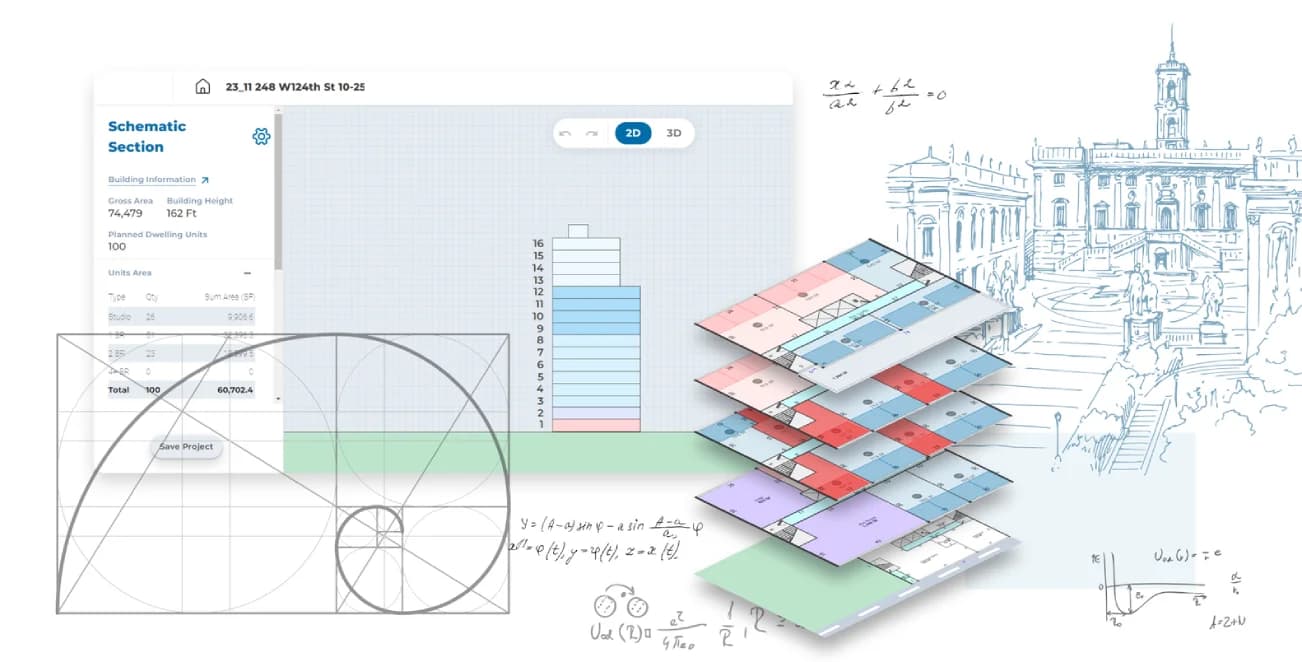
ArkDesign AI is an AI-powered floor plan generation tool that produces layout options from site boundaries and room program inputs. Rather than starting from a blank canvas, designers input basic parameters — site dimensions, required rooms, target area — and ArkDesign AI generates multiple spatial arrangement options for review and iteration.
For architects and space planners, the early-stage layout phase often involves manually exploring many possible room configurations before settling on a direction to develop further. ArkDesign AI compresses this exploration phase, surfacing layout options that satisfy the stated program faster than manual drafting.
This review evaluates ArkDesign AI based on its layout generation quality, workflow fit, and practical value for architecture and interior design teams in 2026.
Key Features
Multi-Option Floor Plan Generation
ArkDesign AI produces multiple distinct floor plan layouts from the same input parameters, giving designers a range of spatial strategies to compare rather than a single AI recommendation. This range is more useful for client presentations and early-stage design exploration.
Program-Based Input
Rather than requiring detailed CAD input, ArkDesign AI works from high-level program specifications — the number and types of rooms, size targets, and site constraints. This makes it accessible early in the design process before precise measurements are finalized.
Export to CAD and BIM
Generated floor plans can be exported in formats compatible with standard CAD and BIM tools, allowing designers to take AI-generated layouts into Revit, AutoCAD, or ArchiCAD for detailed development.
Rapid Iteration
Once an initial layout is generated, designers can adjust parameters and regenerate quickly, making it practical to explore how changes to room count, size requirements, or site constraints affect the available layout options.
Pros & Cons
Pros
- ✅ Generates multiple floor plan layout options from simple site boundary and program inputs
- ✅ Significantly reduces time spent on early-stage space planning exploration
- ✅ Outputs can be exported and refined in standard CAD and BIM tools
- ✅ Intuitive interface requires no advanced parametric or scripting knowledge
Cons
- ❌ Generated plans are starting points that require significant refinement for construction documentation
- ❌ Less suitable for highly complex or irregular site geometries
- ❌ Limited control over structural systems and building code compliance checking
- ❌ Best used for early concept exploration rather than full design development
Who Is It Best For?
ArkDesign AI is the right tool if you:
- Need to generate and compare multiple layout options quickly at the start of a project
- Work on straightforward residential or small commercial layouts where AI-generated plans are a viable starting point
- Want to reduce manual drafting time in the early exploration phase
- Present multiple design directions to clients and need to produce options efficiently
ArkDesign AI is not the right tool if you:
- Need construction-ready documentation or building code compliance validation
- Work on complex sites with irregular boundaries or significant structural constraints
- Require integration with a full BIM workflow from the earliest project stage
Alternatives to Consider
- Autodesk Forma — stronger for urban-scale massing and environmental analysis alongside layout
- TestFit — purpose-built for multifamily residential unit mix and massing optimization
- Spacemaker — cloud-based urban planning and site optimization with more analytical depth
- Planner 5D — better for interior layout with furniture placement rather than architectural floor plans
- Foyr Neo — stronger for interior design visualization after floor plan is established
Final Verdict
ArkDesign AI delivers genuine value at the earliest stage of the architectural design process — the phase where exploring multiple layout strategies quickly has the most impact. For architects spending hours manually exploring room configurations, the ability to generate comparable options from program inputs in minutes is a real productivity gain.
The tool's outputs need professional refinement before reaching design development or construction documentation, which is expected for an early-stage exploration tool. For the right use case — rapid layout option generation for client review — it performs well.
Our recommendation: Use ArkDesign AI at project kickoff to generate a range of layout options before committing design hours to manual development. Compare the best AI-generated option against your intuitive first approach — the difference will show where the tool adds value and where your judgment needs to guide it.
Key Features
Generates multiple floor plan layout options from simple site boundary and program inputs
Significantly reduces time spent on early-stage space planning exploration
Outputs can be exported and refined in standard CAD and BIM tools
Intuitive interface requires no advanced parametric or scripting knowledge
Best For
Architects generating multiple layout options for client presentations quickly
Space planners exploring room configurations before committing to a design direction
Real estate developers evaluating massing and unit mix scenarios
Interior designers testing room arrangement concepts before detailed planning
Pros & Cons
What We Like
- Generates multiple floor plan layout options from simple site boundary and program inputs
- Significantly reduces time spent on early-stage space planning exploration
- Outputs can be exported and refined in standard CAD and BIM tools
- Intuitive interface requires no advanced parametric or scripting knowledge
What We Don't Like
- Generated plans are starting points that require significant refinement for construction documentation
- Less suitable for highly complex or irregular site geometries
- Limited control over structural systems and building code compliance checking
- Best used for early concept exploration rather than full design development
Top ArkDesign AI Alternatives
View all alternatives →


ArkDesign AI vs Top Alternatives
| Tool | Best For | Price | AI Quality | Features | Support | Ease of Use | Rating | |
|---|---|---|---|---|---|---|---|---|
 | Architects generating multiple layout options for client presentations quickly | Contact for pricing | 8.4/10 | Current | ||||
 | Architecture | Contact for pricing | 7.9/10 | Read Review → | ||||
 | Architecture | Contact for pricing | 7.6/10 | Read Review → | ||||
 | Architecture | Contact for pricing | 7.3/10 | Read Review → | ||||
 | Architecture | Contact for pricing | 7/10 | Read Review → |
Our ArkDesign AI Verdict
ArkDesign AI is best suited for architects and space planners who need to rapidly generate and iterate on floor plan layouts from basic site parameters, reducing the time spent on early-stage plan exploration before detailed design begins.
Visit website for full details
FAQ
Related Articles
View all articles →Best AI Tools for Interior Design in 2026
Our editorial guide to the AI tools we recommend, including ArkDesign AI.
Read Guide →ArkDesign AI vs Top Alternatives: Full Comparison
Side-by-side breakdown of ArkDesign AI and its main competitors.
View Comparisons →Hands-on Guides & Workflows
Step-by-step playbooks for getting the most out of tools like ArkDesign AI.
Browse Guides →Related Tools in Interior Design
See all the best Interior Design →
Dehome.ai
Dehome.ai is best suited for homeowners and renters who want fast AI-generated interior and exterior redesign concepts from a single room photo, with results typically ready in seconds rather than minutes.
Read Review →
DesignSense.ai
DesignSense.ai is best suited for homeowners and design enthusiasts who want AI-generated room styling and personalized recommendations based on their own space and taste.
Read Review →
InteriorAI
InteriorAI is best suited for homeowners, interior designers, and real estate agents who want to generate AI-redesigned room concepts from a single photo across dozens of interior styles — exploring design directions quickly without design software experience.
Read Review →
REimagineHome
REimagineHome is best suited for real estate agents and homeowners who need fast, affordable virtual staging or renovation visualization — uploading a photo of an empty or outdated room and generating furnished or renovated versions in different styles within minutes.
Read Review →