

SketchUp Diffusion Review:
Is It Worth It in 2026?
SketchUp Diffusion is best suited for architects and designers already working in SketchUp who want to generate AI-powered photorealistic renders or styled concept images directly from their 3D models — bridging the gap between rough 3D geometry and polished client-ready visualization without switching tools.
Best For
Our Overall Rating
Based on comprehensive testing
Best For
- Architects using SketchUp for design work who need fast concept renders for client presentations
- Interior designers creating quick styled visualizations from SketchUp furniture and space models
- Design teams producing early-stage renders for design review without waiting for full rendering
- Educators and students using SketchUp who want to generate presentable images from rough models
Pricing
See current pricing on the SketchUp Diffusion website.
Bottom Line
SketchUp Diffusion is best suited for architects and designers already working in SketchUp who want to generate AI-powered photorealistic renders or styled concept images directly from their 3D models — bridging the gap between rough 3D geometry and polished client-ready visualization without switching tools.
Visit SketchUp Diffusion →Quick Verdict
SketchUp Diffusion scores 8.4/10 in our testing and is a strong choice for Architects using SketchUp for design work who need fast concept renders for client presentations and Interior designers creating quick styled visualizations from SketchUp furniture and space models.
What Is SketchUp Diffusion?
Overview
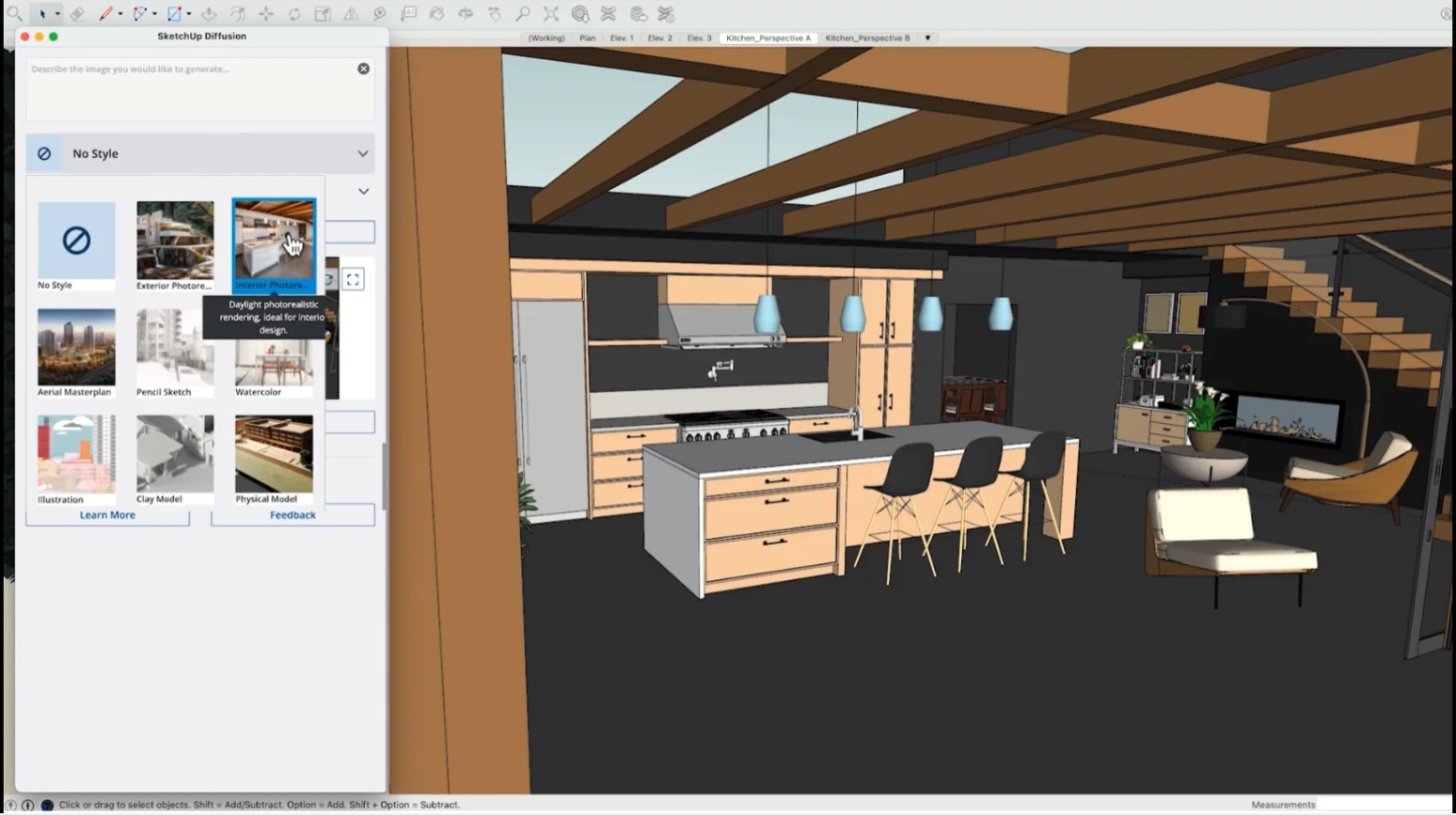
SketchUp Diffusion is an AI-powered image generation tool integrated directly into SketchUp, Trimble's widely used 3D modeling platform for architecture, interior design, and construction. Rather than exporting a model to a separate rendering engine, Diffusion allows users to generate AI-styled concept images and photorealistic renders from their SketchUp models without leaving the SketchUp environment.
The tool uses the 3D geometry of the SketchUp model as structural guidance for the AI generation process, producing outputs that respect the spatial layout and proportions of the designed space while applying AI-generated materials, lighting, and atmospheric detail. This positions it as a fast visualization bridge between rough 3D geometry and polished concept imagery.
This review evaluates SketchUp Diffusion based on its render quality, workflow integration, and practical fit for architecture and design workflows in 2026.
Key Features
In-App AI Render Generation
SketchUp Diffusion runs inside the SketchUp interface, allowing designers to generate styled concept images from their active model view without exporting files, switching applications, or waiting for a render farm queue.
Geometry-Guided AI Generation
Unlike a standalone AI image generator, Diffusion uses the 3D geometry of the SketchUp model as a structural guide — meaning generated images respect the actual spatial layout, room proportions, and massing of the designed space rather than inventing geometry.
Style and Atmosphere Control
Users can direct the AI generation toward different visual styles — photorealistic, hand-drawn, watercolor, conceptual — as well as influence lighting mood, material character, and level of artistic abstraction.
Fast Iteration for Design Review
The integrated workflow makes it practical to generate multiple concept images quickly at different stages of design, supporting faster design review cycles and more frequent visual communication with clients.
Pros & Cons
Pros
- ✅ Generates styled renders and photorealistic images directly from SketchUp models without exporting
- ✅ Maintains spatial accuracy of the 3D model while applying AI-generated materials and lighting
- ✅ Significantly faster than traditional rendering pipelines for quick concept visualization
- ✅ Integrated directly into the SketchUp environment, reducing workflow interruption
Cons
- ❌ Requires an active SketchUp subscription — not a standalone tool for non-SketchUp users
- ❌ AI-generated outputs may not match the photorealism standard of dedicated rendering engines like V-Ray
- ❌ Style control is less precise than manual rendering where every material and light is explicitly set
- ❌ Output quality depends on the level of detail in the underlying SketchUp model
Who Is It Best For?
SketchUp Diffusion is the right tool if you:
- Already use SketchUp as your primary 3D design tool and want faster visualization without switching apps
- Need concept renders quickly for early client meetings or design review sessions
- Want to explore visual styles for a space without the setup time of a full rendering engine
- Work in a fast-paced design environment where visualization speed matters more than rendering perfection
SketchUp Diffusion is not the right tool if you:
- Need the photorealistic precision and material control of dedicated rendering engines for final deliverables
- Don't use SketchUp — you'd need to switch platforms to access the tool
- Require rendering output that meets the quality standard for luxury real estate or high-end marketing materials
Alternatives to Consider
- Chaos V-Ray — industry-leading physically based rendering engine for SketchUp and other platforms
- Enscape — real-time rendering plugin for SketchUp, Revit, and Rhino with VR support
- Lumion — standalone real-time rendering platform with strong architectural visualization output
- Twinmotion — real-time 3D visualization tool with strong material and lighting control
- Adobe Firefly — general AI image generation for concept art and mood boards outside SketchUp
Final Verdict
SketchUp Diffusion solves a real workflow friction point for designers who need concept-quality visuals faster than traditional rendering allows. By staying inside SketchUp and using 3D geometry as generation guidance, it produces outputs that are more spatially accurate than standalone AI image generators — making it genuinely more useful for architecture and design work.
The output quality ceiling is below dedicated rendering engines like V-Ray or Enscape for final deliverables, but that's not the use case. For fast concept visualization and early client communication, SketchUp Diffusion is a practical, well-integrated addition to an existing SketchUp workflow.
Our recommendation: Use SketchUp Diffusion for concept-stage client communication and design review, then switch to a dedicated renderer like Chaos V-Ray or Chaos Enscape for final visualization deliverables where image quality is a client expectation. Our guide to the best AI tools for architects shows where native rendering fits in the wider workflow.
Key Features
Generates styled renders and photorealistic images directly from SketchUp models without exporting
Maintains spatial accuracy of the 3D model while applying AI-generated materials and lighting
Significantly faster than traditional rendering pipelines for quick concept visualization
Integrated directly into the SketchUp environment, reducing workflow interruption
Best For
Architects using SketchUp for design work who need fast concept renders for client presentations
Interior designers creating quick styled visualizations from SketchUp furniture and space models
Design teams producing early-stage renders for design review without waiting for full rendering
Educators and students using SketchUp who want to generate presentable images from rough models
Pros & Cons
What We Like
- Generates styled renders and photorealistic images directly from SketchUp models without exporting
- Maintains spatial accuracy of the 3D model while applying AI-generated materials and lighting
- Significantly faster than traditional rendering pipelines for quick concept visualization
- Integrated directly into the SketchUp environment, reducing workflow interruption
What We Don't Like
- Requires an active SketchUp subscription — not a standalone tool for non-SketchUp users
- AI-generated outputs may not match the photorealism standard of dedicated rendering engines like V-Ray
- Style control is less precise than manual rendering where every material and light is explicitly set
- Output quality depends on the level of detail in the underlying SketchUp model
Top SketchUp Diffusion Alternatives
View all alternatives →


SketchUp Diffusion vs Top Alternatives
| Tool | Best For | Price | AI Quality | Features | Support | Ease of Use | Rating | |
|---|---|---|---|---|---|---|---|---|
 | Architects using SketchUp for design work who need fast concept renders for client presentations | Contact for pricing | 8.4/10 | Current | ||||
 | Architecture | Contact for pricing | 7.9/10 | Read Review → | ||||
 | Architecture | Contact for pricing | 7.6/10 | Read Review → | ||||
 | Architecture | Contact for pricing | 7.3/10 | Read Review → | ||||
 | Architecture | Contact for pricing | 7/10 | Read Review → |
Our SketchUp Diffusion Verdict
SketchUp Diffusion is best suited for architects and designers already working in SketchUp who want to generate AI-powered photorealistic renders or styled concept images directly from their 3D models — bridging the gap between rough 3D geometry and polished client-ready visualization without switching tools.
Visit website for full details
FAQ
Related Articles
View all articles →Best AI Tools for Architects in 2026
Our editorial guide to the AI tools we recommend, including SketchUp Diffusion.
Read Guide →SketchUp Diffusion vs Top Alternatives: Full Comparison
Side-by-side breakdown of SketchUp Diffusion and its main competitors.
View Comparisons →Hands-on Guides & Workflows
Step-by-step playbooks for getting the most out of tools like SketchUp Diffusion.
Browse Guides →Head-to-Head Comparisons
Featured in Workflows
Related Tools in Architecture
See all the best Architecture →
ArchitectGPT
ArchitectGPT is best suited for architects, designers, and real estate developers who need fast AI-generated architectural concepts, floor plan sketches, and exterior visualizations from text prompts or reference images — helping explore design directions quickly before committing to full CAD workflows.
Read Review →
Maket
Maket is best suited for architects, designers, and developers who want to generate and iterate 2D floor plan layouts from written requirements — exploring spatial options quickly at the concept stage before committing to detailed CAD or BIM work.
Read Review →
Modelur
Modelur is best suited for architects and urban designers working in SketchUp who want parametric massing with instant feedback on FAR, parking, and zoning compliance — testing urban design alternatives several times faster than manual modeling.
Read Review →
ArchiGPT
ArchiGPT is best suited for architects, interior designers, and developers who want to turn sketches, photos, or 3D model screenshots into photorealistic renders through natural-language prompts — covering both interior and exterior visualization with archviz tools like relighting, staging, and style changes.
Read Review →