

Lumion Review:
Is It Worth It in 2026?
Lumion is best suited for architects and design teams who need to produce fast, attractive architectural renderings and animations — including exterior scenes with landscape, context, and people — directly from their CAD or BIM models without becoming rendering specialists.
Best For
Our Overall Rating
Based on comprehensive testing
Best For
- Architecture firms producing exterior renders, site visualizations, and fly-through animations
- Urban planners creating context visualizations with landscape, people, and traffic
- Real estate developers showing building designs in context for planning approvals
- Small architecture firms needing professional visualization without a dedicated visualization team
Pricing
See current pricing on the Lumion website.
Bottom Line
Lumion is best suited for architects and design teams who need to produce fast, attractive architectural renderings and animations — including exterior scenes with landscape, context, and people — directly from their CAD or BIM models without becoming rendering specialists.
Visit Lumion →Quick Verdict
Lumion scores 9.2/10 in our testing and is an excellent choice for Architecture firms producing exterior renders, site visualizations, and fly-through animations and Urban planners creating context visualizations with landscape, people, and traffic.
What Is Lumion?
Overview
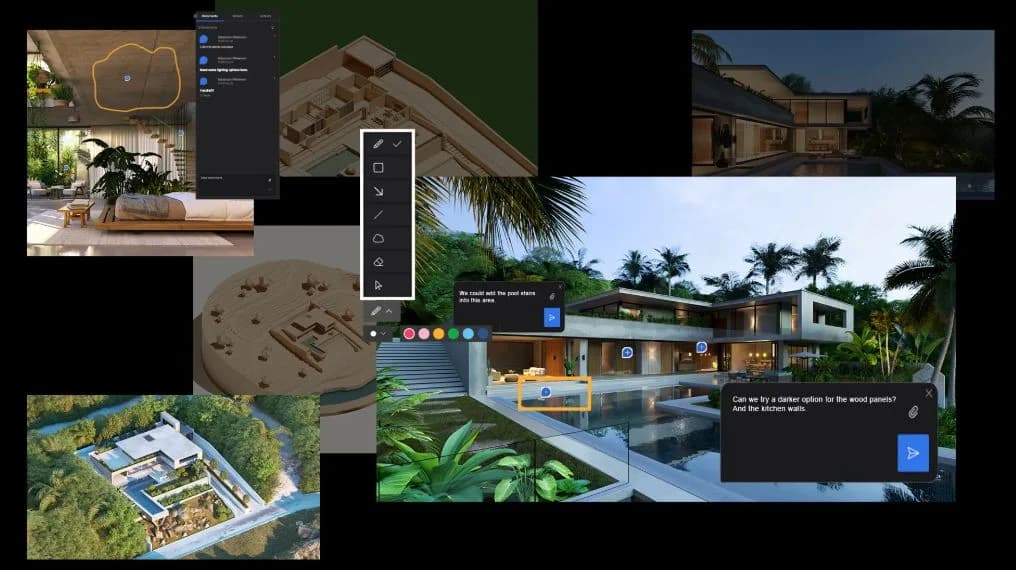
Lumion is a standalone architectural visualization software that focuses on speed and accessibility — enabling architects and design professionals to produce attractive, context-rich architectural renders and animations without the steep learning curve of production rendering engines. Its standout capability is its massive library of landscape, entourage, and context assets — trees, people, vehicles, furniture, and environmental effects — that allow architects to place buildings convincingly in real-world scenes.
Unlike plugin-based renderers that work inside the 3D application, Lumion is a standalone environment. Models are imported from Revit, SketchUp, AutoCAD, Rhino, and other applications, then placed in Lumion scenes where lighting, landscape, and entourage are added quickly using its large asset library.
This review evaluates Lumion based on its rendering speed, visual quality, asset library, and practical fit for architecture and real estate firms in 2026.
Key Features
Fast Real-Time Rendering
Lumion's GPU-accelerated real-time rendering makes it possible to produce finished architectural renders in a fraction of the time required by offline renderers. A project that might take days of offline rendering in V-Ray or Corona can often be visualized in Lumion in hours — making rapid turnaround for client presentations practical.
Largest Context Asset Library
Lumion's asset library is the most extensive of any architectural visualization tool — thousands of trees, plants, landscape elements, people, vehicles, furniture items, and atmospheric effects. Building a convincing exterior scene with site context, pedestrian activity, and natural elements is faster in Lumion than in any comparable tool.
LiveSync Real-Time Update
Lumion's LiveSync plugin for Revit, SketchUp, Rhino, and ArchiCAD updates the Lumion scene in real time as model changes are made in the design application — similar to Enscape's workflow. This allows architects to review design changes in their rendered context without a manual export step.
Animation and Video Output
Lumion supports architectural animation with camera path tools, moving people and vehicles, weather and time-of-day transitions, and video output — making it a practical tool for animated fly-through videos without requiring video production expertise.
Pros & Cons
Pros
- ✅ Extremely fast rendering allows architects to produce high-quality visuals in hours, not days
- ✅ Largest library of landscape, people, vehicles, and context assets of any architecture renderer
- ✅ Intuitive interface accessible to architects without dedicated visualization experience
- ✅ LiveSync plugin updates Lumion in real time as 3D model changes are made in the host application
Cons
- ❌ Interior rendering quality lags behind offline renderers like Corona for production-grade still images
- ❌ Requires a high-performance GPU — Lumion is demanding on workstation hardware
- ❌ Less suited to custom photorealistic material setups compared to V-Ray or Corona
- ❌ Windows-only — no macOS support
Who Is It Best For?
Lumion is the right tool if you:
- Produce exterior architectural renders and animations where context, landscape, and entourage are important
- Need fast turnaround — client presentations, competition entries, planning submissions — where days of offline rendering isn't practical
- Are an architect, not a visualization specialist and want accessible, intuitive rendering software
- Work on site-level and urban-scale visualizations where the asset library depth is the deciding factor
Lumion is not the right tool if you:
- Primarily produce interior renders where Corona or V-Ray's material realism is the priority
- Work on a Mac — Lumion is Windows-only
- Need production-grade photorealism for marketing imagery that will face close scrutiny
Alternatives to Consider
- Enscape — better integration within Revit/SketchUp workflows with comparable speed; stronger for interiors
- Twinmotion — free for architects, Unreal Engine-based, strong visual quality and asset library
- D5 Render — GPU real-time renderer with competitive quality and growing landscape asset library
- Chaos Corona — offline renderer for production-grade photorealism when Lumion's quality ceiling isn't enough
- V-Ray — production rendering at the highest quality tier, but significantly slower and more complex
Final Verdict
Lumion has maintained its position as the go-to architectural visualization tool for speed and context because it does both better than any comparable option. The asset library depth for exterior scenes and the fast rendering pipeline make it the most practical choice for architecture firms that need to produce a lot of client-ready visualizations across many projects without a dedicated rendering team.
For interior rendering and final production imagery where maximum photorealism is required, Lumion's quality ceiling is a genuine limitation. But for the high-volume exterior visualization and animation work that drives most architecture firm presentation needs, Lumion delivers the best speed-to-quality ratio available.
Our recommendation: Use Lumion for exterior scenes, animations, and any visualization where site context and entourage are important. Pair it with Chaos Enscape for interior visualization work where Lumion's material realism doesn't reach the bar you need.
Key Features
Extremely fast rendering allows architects to produce high-quality visuals in hours, not days
Largest library of landscape, people, vehicles, and context assets of any architecture renderer
Intuitive interface accessible to architects without dedicated visualization experience
LiveSync plugin updates Lumion in real time as 3D model changes are made in the host application
Best For
Architecture firms producing exterior renders, site visualizations, and fly-through animations
Urban planners creating context visualizations with landscape, people, and traffic
Real estate developers showing building designs in context for planning approvals
Small architecture firms needing professional visualization without a dedicated visualization team
Pros & Cons
What We Like
- Extremely fast rendering allows architects to produce high-quality visuals in hours, not days
- Largest library of landscape, people, vehicles, and context assets of any architecture renderer
- Intuitive interface accessible to architects without dedicated visualization experience
- LiveSync plugin updates Lumion in real time as 3D model changes are made in the host application
What We Don't Like
- Interior rendering quality lags behind offline renderers like Corona for production-grade still images
- Requires a high-performance GPU — Lumion is demanding on workstation hardware
- Less suited to custom photorealistic material setups compared to V-Ray or Corona
- Windows-only — no macOS support
Top Lumion Alternatives
View all alternatives →


Lumion vs Top Alternatives
| Tool | Best For | Price | AI Quality | Features | Support | Ease of Use | Rating | |
|---|---|---|---|---|---|---|---|---|
 | Architecture firms producing exterior renders, site visualizations, and fly-through animations | Contact for pricing | 9.2/10 | Current | ||||
 | Architecture | Contact for pricing | 8.7/10 | Read Review → | ||||
 | Architecture | Contact for pricing | 8.4/10 | Read Review → | ||||
 | Architecture | Contact for pricing | 8.1/10 | Read Review → | ||||
 | Architecture | Contact for pricing | 7.8/10 | Read Review → |
Our Lumion Verdict
Lumion is best suited for architects and design teams who need to produce fast, attractive architectural renderings and animations — including exterior scenes with landscape, context, and people — directly from their CAD or BIM models without becoming rendering specialists.
Visit website for full details
FAQ
Related Articles
View all articles →Best AI Tools for Interior Design in 2026
Our editorial guide to the AI tools we recommend, including Lumion.
Read Guide →Lumion vs Top Alternatives: Full Comparison
Side-by-side breakdown of Lumion and its main competitors.
View Comparisons →Hands-on Guides & Workflows
Step-by-step playbooks for getting the most out of tools like Lumion.
Browse Guides →Looking for Alternatives?
5 Best Lumion AlternativesCompare →Related Tools in Interior Design
See all the best Interior Design →
Twinmotion
Twinmotion is best suited for architects, students, and design firms who want high-quality real-time rendering powered by Unreal Engine — at no cost for qualifying users — with strong visual quality and a growing AI-assisted feature set for faster scene creation.
Read Review →
Foyr Neo
Foyr Neo is best suited for interior designers and furniture retailers who want a single browser-based platform to build floor plans, place furniture, and generate photorealistic renders without expensive hardware or a steep learning curve.
Read Review →
Photoroom
Photoroom is best suited for furniture retailers and real estate marketers who want to turn a phone photo of a product or space into a clean, sales-ready image in seconds, without a studio setup or manual editing in Photoshop.
Read Review →
Seedance 2.0
Seedance 2.0 is ByteDance's AI video generation model best suited for real estate, interior design, and furniture businesses that want to turn photos, floor plans, or simple prompts into polished marketing or walkthrough videos with native audio.
Read Review →