

Adobe Firefly Review:
Is It Worth It in 2026?
Adobe Firefly is best suited for creative professionals already working inside the Adobe ecosystem who need commercially safe generative AI for images, text effects, and vector graphics — especially those integrating AI into Photoshop and Illustrator workflows.
Best For
Our Overall Rating
Based on comprehensive testing
Best For
- Interior designers creating mood boards and concept visuals inside Photoshop
- Furniture brands generating product lifestyle imagery at scale
- Architecture firms producing early-stage visual concepts from text prompts
- Real estate marketers creating property lifestyle imagery for listings
Pricing
See current pricing on the Adobe Firefly website.
Bottom Line
Adobe Firefly is best suited for creative professionals already working inside the Adobe ecosystem who need commercially safe generative AI for images, text effects, and vector graphics — especially those integrating AI into Photoshop and Illustrator workflows.
Visit Adobe Firefly →Quick Verdict
Adobe Firefly scores 9.2/10 in our testing and is an excellent choice for Interior designers creating mood boards and concept visuals inside Photoshop and Furniture brands generating product lifestyle imagery at scale.
What Is Adobe Firefly?
Overview
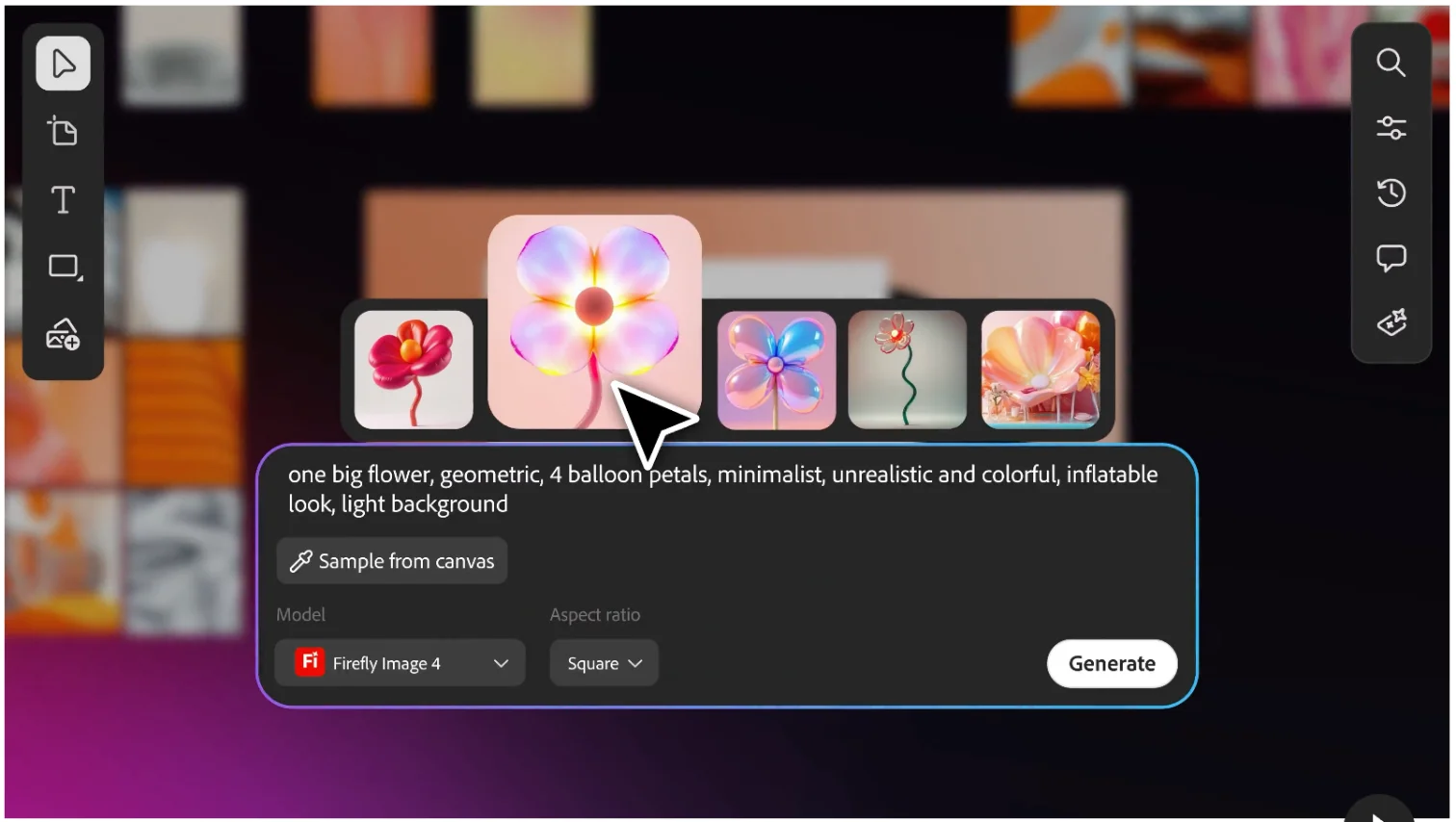
Adobe Firefly is Adobe's family of generative AI models built directly into Creative Cloud and available as a standalone web app. Unlike many AI image generators trained on scraped internet data, Firefly was trained exclusively on licensed Adobe Stock content and public domain material — making it one of the few tools in the space where commercial use of outputs is explicitly safe.
For design professionals in interior design, architecture, furniture, and real estate, this matters. Generating mood board visuals, lifestyle imagery, and concept renders without IP exposure is a practical concern, and Firefly addresses it directly.
This review evaluates Adobe Firefly based on its image quality, workflow integrations, and practical fit for design industry use cases in 2026.
Key Features
Commercially Safe Generative AI
Firefly's training dataset is built from Adobe Stock licensed content, openly licensed work, and public domain material. Adobe's Content Credentials technology also embeds provenance data into generated outputs. For commercial design work, this is a meaningful practical advantage over tools with unclear training provenance.
Photoshop & Illustrator Integration
Firefly powers Generative Fill and Generative Expand directly inside Photoshop — allowing designers to extend backgrounds, remove objects, and generate new scene elements within an existing image without leaving their primary editing tool. Illustrator integration brings text-to-vector generation into the design workflow.
Structure Reference and Style Reference
Beyond text prompts, Firefly supports uploading a reference image to guide structure (composition, pose, layout) or style (color palette, artistic treatment) separately. This level of creative control is more useful for production design work than pure text-to-image tools.
Text Effects and Vector Generation
Firefly can generate stylized text effects and decorative vector elements — useful for marketing materials, signage concepts, and branded content in furniture and real estate contexts.
Pros & Cons
Pros
- ✅ Trained exclusively on licensed Adobe Stock content, making outputs commercially safe
- ✅ Deeply integrated into Photoshop, Illustrator, and InDesign via Generative Fill and Generative Expand
- ✅ Produces high-quality, photorealistic images and vector graphics with strong prompt adherence
- ✅ Structure Reference and Style Reference controls give designers precise creative guidance
Cons
- ❌ Requires an Adobe Creative Cloud subscription for full access and workflow integrations
- ❌ Standalone web app has usage credit limits tied to subscription tier
- ❌ Less suitable for highly experimental or abstract art styles compared to open-source alternatives
- ❌ Video generation features are still maturing compared to image generation quality
Who Is It Best For?
Adobe Firefly is the right tool if you:
- Already use Adobe Creative Cloud and want AI generation without leaving Photoshop or Illustrator
- Need commercially safe outputs for client work, marketing, or published materials
- Want precise creative control beyond simple text-to-image generation
- Produce lifestyle imagery, mood boards, or concept renders for interior design or real estate clients
Adobe Firefly is not the right tool if you:
- Don't have an Adobe Creative Cloud subscription and want standalone AI image generation
- Need maximum stylistic experimentation without licensing or usage credit limits
- Require batch image generation at scale for e-commerce or product catalog use
Alternatives to Consider
- Midjourney — better for highly stylized, artistic outputs where commercial licensing is less critical
- DALL-E 3 — strong text-to-image quality via ChatGPT, simpler prompt interface
- Stable Diffusion — open source, unlimited local generation, but requires technical setup
- Ideogram — strong typography integration in generated images
- Leonardo AI — good middle ground for designers wanting detailed control without Adobe dependency
Final Verdict
Adobe Firefly earns its place as the most production-ready AI image generator for design professionals already inside the Adobe ecosystem. The commercial safety guarantee, native Photoshop integration, and improving image quality make it the lowest-friction path to integrating generative AI into existing creative workflows.
Its value is lower for users without Creative Cloud subscriptions, and it won't replace purpose-built tools for highly experimental visual development. But for interior designers, furniture brands, and real estate marketers producing client-safe visual assets — Firefly is the most practical choice in 2026.
Our recommendation: Test Generative Fill inside Photoshop on a real project before evaluating the standalone web app — the integration is where Firefly's value is most concentrated. For pure concept ideation where style takes priority over commercial safety, compare it with Midjourney first.
Key Features
Trained exclusively on licensed Adobe Stock content, making outputs commercially safe
Deeply integrated into Photoshop, Illustrator, and InDesign via Generative Fill and Generative Expand
Produces high-quality, photorealistic images and vector graphics with strong prompt adherence
Structure Reference and Style Reference controls give designers precise creative guidance
Best For
Interior designers creating mood boards and concept visuals inside Photoshop
Furniture brands generating product lifestyle imagery at scale
Architecture firms producing early-stage visual concepts from text prompts
Real estate marketers creating property lifestyle imagery for listings
Pros & Cons
What We Like
- Trained exclusively on licensed Adobe Stock content, making outputs commercially safe
- Deeply integrated into Photoshop, Illustrator, and InDesign via Generative Fill and Generative Expand
- Produces high-quality, photorealistic images and vector graphics with strong prompt adherence
- Structure Reference and Style Reference controls give designers precise creative guidance
What We Don't Like
- Requires an Adobe Creative Cloud subscription for full access and workflow integrations
- Standalone web app has usage credit limits tied to subscription tier
- Less suitable for highly experimental or abstract art styles compared to open-source alternatives
- Video generation features are still maturing compared to image generation quality
Top Adobe Firefly Alternatives
View all alternatives →
Midjourney
Alternative to Adobe Firefly
Read Review →DALL-E 3
Alternative to Adobe Firefly
Stable Diffusion
Alternative to Adobe Firefly
Ideogram
Alternative to Adobe Firefly

Leonardo AI
Alternative to Adobe Firefly
Read Review →Adobe Firefly vs Top Alternatives
| Tool | Best For | Price | AI Quality | Features | Support | Ease of Use | Rating | |
|---|---|---|---|---|---|---|---|---|
 | Interior designers creating mood boards and concept visuals inside Photoshop | Contact for pricing | 9.2/10 | Current | ||||
 | Design | Contact for pricing | 8.7/10 | Read Review → | ||||
D3 DALL-E 3 | Design | Contact for pricing | 8.4/10 | — | ||||
SD Stable Diffusion | Design | Contact for pricing | 8.1/10 | — | ||||
I Ideogram | Design | Contact for pricing | 7.8/10 | — |
Our Adobe Firefly Verdict
Adobe Firefly is best suited for creative professionals already working inside the Adobe ecosystem who need commercially safe generative AI for images, text effects, and vector graphics — especially those integrating AI into Photoshop and Illustrator workflows.
Visit website for full details
FAQ
Related Articles
View all articles →Best AI Tools for Interior Design in 2026
Our editorial guide to the AI tools we recommend, including Adobe Firefly.
Read Guide →Adobe Firefly vs Top Alternatives: Full Comparison
Side-by-side breakdown of Adobe Firefly and its main competitors.
View Comparisons →Hands-on Guides & Workflows
Step-by-step playbooks for getting the most out of tools like Adobe Firefly.
Browse Guides →Related Tools in Interior Design
See all the best Interior Design →
Canva AI
Canva AI is best suited for marketing teams, real estate agents, interior designers, and furniture brands who need to produce professional-quality visual content — social media posts, presentations, flyers, and mood boards — without professional design skills.
Read Review →
Chaos V-Ray
Chaos V-Ray is best suited for professional architectural visualization studios and production rendering teams who need the most widely adopted, broadly compatible production renderer — supporting more host applications than any competitor and trusted across film, games, and architecture for decades.
Read Review →
Lumion
Lumion is best suited for architects and design teams who need to produce fast, attractive architectural renderings and animations — including exterior scenes with landscape, context, and people — directly from their CAD or BIM models without becoming rendering specialists.
Read Review →
Twinmotion
Twinmotion is best suited for architects, students, and design firms who want high-quality real-time rendering powered by Unreal Engine — at no cost for qualifying users — with strong visual quality and a growing AI-assisted feature set for faster scene creation.
Read Review →