

Twinmotion Review:
Is It Worth It in 2026?
Twinmotion is best suited for architects, students, and design firms who want high-quality real-time rendering powered by Unreal Engine — at no cost for qualifying users — with strong visual quality and a growing AI-assisted feature set for faster scene creation.
Best For
Our Overall Rating
Based on comprehensive testing
Best For
- Architecture students and educators needing professional-quality rendering without licensing cost
- Small architecture firms wanting high visual quality without ongoing software subscription burden
- Design teams producing exterior visualizations, animations, and VR content from CAD/BIM models
- Firms already familiar with or interested in adopting Unreal Engine-based visualization workflows
Pricing
See current pricing on the Twinmotion website.
Bottom Line
Twinmotion is best suited for architects, students, and design firms who want high-quality real-time rendering powered by Unreal Engine — at no cost for qualifying users — with strong visual quality and a growing AI-assisted feature set for faster scene creation.
Visit Twinmotion →Quick Verdict
Twinmotion scores 9.2/10 in our testing and is an excellent choice for Architecture students and educators needing professional-quality rendering without licensing cost and Small architecture firms wanting high visual quality without ongoing software subscription burden.
What Is Twinmotion?
Overview
Twinmotion is a real-time architectural visualization application built on Epic Games' Unreal Engine, offering high-quality rendering, animation, and VR output at no cost for architects, students, and educators under Epic's licensing terms. It imports models directly from Revit, SketchUp, ArchiCAD, Rhino, and other common design tools, then provides a large library of materials, vegetation, people, and environmental assets to quickly build convincing, photorealistic scenes.
Because it's backed by Epic Games and built on the same engine powering high-end video games, Twinmotion delivers visual quality that competes directly with paid real-time renderers like Lumion and Enscape — while being free for a large portion of its target user base in architecture and education.
This review evaluates Twinmotion based on its rendering quality, asset library, AI feature additions, and practical fit for architecture and design visualization in 2026.
Key Features
Unreal Engine Visual Quality
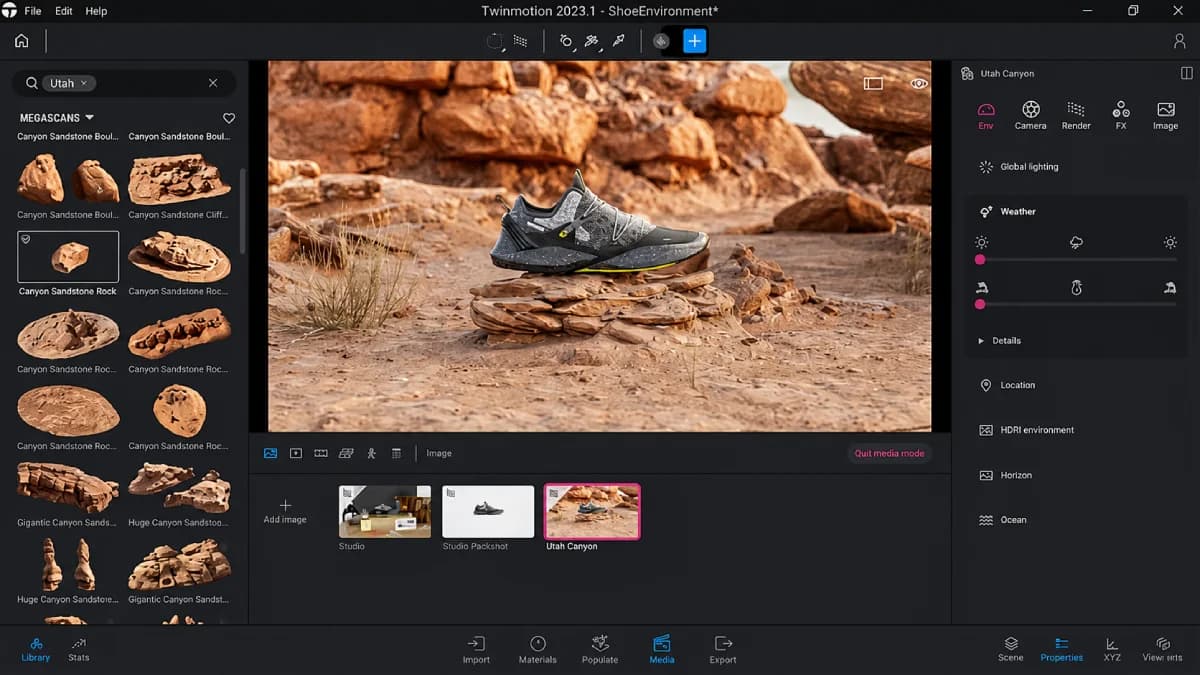
Built on Unreal Engine, Twinmotion benefits from game-engine-grade real-time rendering technology — dynamic lighting, realistic materials, and high-fidelity environmental effects that produce visually compelling results without offline render times.
Free Licensing for Architects and Students
Epic Games offers Twinmotion at no cost to architecture professionals, students, and educators under defined licensing terms — a significant cost advantage compared to subscription-based competitors like Lumion and Enscape for qualifying users.
Extensive Asset Library
Twinmotion includes a large library of materials, vegetation, people, vehicles, and environmental effects (rain, fog, time of day) that allow designers to quickly populate and contextualize architectural scenes without sourcing assets separately.
Direct CAD/BIM Import
The application supports direct import from Revit, SketchUp, ArchiCAD, Rhino, and other common architecture and design tools, with a "Direct Link" feature that allows model updates to sync into Twinmotion scenes.
Pros & Cons
Pros
- ✅ Free for architects, urban planners, and students under Epic Games' licensing terms
- ✅ Built on Unreal Engine, delivering strong real-time visual quality at no licensing cost
- ✅ Large library of materials, vegetation, people, and context assets included at no extra charge
- ✅ Direct import support for Revit, SketchUp, ArchiCAD, and other common design applications
Cons
- ❌ Commercial use beyond the free tier requires a paid license depending on company size and revenue
- ❌ Requires a capable GPU for smooth real-time performance, similar to other Unreal Engine applications
- ❌ Less integrated live-link workflow compared to Enscape's tighter host-application connection
- ❌ AI-assisted features are newer additions and less mature than the core rendering engine itself
Who Is It Best For?
Twinmotion is the right tool if you:
- Are a student, educator, or qualify under Epic's free licensing terms and want professional-grade rendering at no cost
- Want Unreal Engine visual quality without learning Unreal Engine's full development environment
- Need a large built-in asset library for context, landscape, and entourage without separate purchases
- Already use Revit, SketchUp, or ArchiCAD and want a compatible real-time rendering companion
Twinmotion is not the right tool if you:
- Run a larger commercial firm where Epic's revenue-based licensing tiers apply significant cost
- Need the tightest possible live-link integration with your specific design application (Enscape may fit better)
- Require the absolute highest production rendering quality for marketing-grade still images (consider Corona or V-Ray)
Alternatives to Consider
- Lumion — comparable real-time rendering quality and asset library, but always a paid license
- Chaos Enscape — tighter live-link integration with Revit/SketchUp, also a paid subscription
- D5 Render — competitive real-time quality with growing market adoption and its own free tier options
- Chaos Vantage — superior ray-traced quality for V-Ray users, but requires the Chaos ecosystem
- Unreal Engine (direct) — for teams wanting maximum customization beyond what Twinmotion's simplified interface offers
Final Verdict
Twinmotion delivers an unusually strong value proposition: Unreal Engine-grade real-time visualization quality at no cost for the architecture students, educators, and many qualifying professionals who make up a large share of the target market. The combination of visual quality, asset library depth, and zero licensing cost makes it one of the most accessible high-quality rendering tools available.
For larger commercial firms where Epic's licensing tiers introduce cost, the calculus shifts toward comparing total cost against Lumion or Enscape based on specific workflow needs. But for the qualifying free-tier audience, Twinmotion is difficult to beat on quality-per-dollar.
Our recommendation: Confirm your eligibility for Epic's free licensing terms before evaluating Twinmotion against paid alternatives — if you qualify, the visual quality you get at no cost makes it the default starting point for real-time architectural visualization.
Key Features
Free for architects, urban planners, and students under Epic Games' licensing terms
Built on Unreal Engine, delivering strong real-time visual quality at no licensing cost
Large library of materials, vegetation, people, and context assets included at no extra charge
Direct import support for Revit, SketchUp, ArchiCAD, and other common design applications
Best For
Architecture students and educators needing professional-quality rendering without licensing cost
Small architecture firms wanting high visual quality without ongoing software subscription burden
Design teams producing exterior visualizations, animations, and VR content from CAD/BIM models
Firms already familiar with or interested in adopting Unreal Engine-based visualization workflows
Pros & Cons
What We Like
- Free for architects, urban planners, and students under Epic Games' licensing terms
- Built on Unreal Engine, delivering strong real-time visual quality at no licensing cost
- Large library of materials, vegetation, people, and context assets included at no extra charge
- Direct import support for Revit, SketchUp, ArchiCAD, and other common design applications
What We Don't Like
- Commercial use beyond the free tier requires a paid license depending on company size and revenue
- Requires a capable GPU for smooth real-time performance, similar to other Unreal Engine applications
- Less integrated live-link workflow compared to Enscape's tighter host-application connection
- AI-assisted features are newer additions and less mature than the core rendering engine itself
Top Twinmotion Alternatives
View all alternatives →
Lumion
Alternative to Twinmotion
Read Review →
Chaos Enscape
Alternative to Twinmotion
Read Review →
D5 Render
Alternative to Twinmotion
Read Review →
Chaos Vantage
Alternative to Twinmotion
Read Review →Unreal Engine (direct)
Alternative to Twinmotion
Twinmotion vs Top Alternatives
| Tool | Best For | Price | AI Quality | Features | Support | Ease of Use | Rating | |
|---|---|---|---|---|---|---|---|---|
 | Architecture students and educators needing professional-quality rendering without licensing cost | Contact for pricing | 9.2/10 | Current | ||||
 | Architecture | Contact for pricing | 8.7/10 | Read Review → | ||||
 | Architecture | Contact for pricing | 8.4/10 | Read Review → | ||||
 | Architecture | Contact for pricing | 8.1/10 | Read Review → | ||||
 | Architecture | Contact for pricing | 7.8/10 | Read Review → |
Our Twinmotion Verdict
Twinmotion is best suited for architects, students, and design firms who want high-quality real-time rendering powered by Unreal Engine — at no cost for qualifying users — with strong visual quality and a growing AI-assisted feature set for faster scene creation.
Visit website for full details
FAQ
Related Articles
View all articles →Best AI Tools for Interior Design in 2026
Our editorial guide to the AI tools we recommend, including Twinmotion.
Read Guide →Twinmotion vs Top Alternatives: Full Comparison
Side-by-side breakdown of Twinmotion and its main competitors.
View Comparisons →Hands-on Guides & Workflows
Step-by-step playbooks for getting the most out of tools like Twinmotion.
Browse Guides →Looking for Alternatives?
5 Best Twinmotion AlternativesCompare →Related Tools in Interior Design
See all the best Interior Design →
Foyr Neo
Foyr Neo is best suited for interior designers and furniture retailers who want a single browser-based platform to build floor plans, place furniture, and generate photorealistic renders without expensive hardware or a steep learning curve.
Read Review →
Photoroom
Photoroom is best suited for furniture retailers and real estate marketers who want to turn a phone photo of a product or space into a clean, sales-ready image in seconds, without a studio setup or manual editing in Photoshop.
Read Review →
Seedance 2.0
Seedance 2.0 is ByteDance's AI video generation model best suited for real estate, interior design, and furniture businesses that want to turn photos, floor plans, or simple prompts into polished marketing or walkthrough videos with native audio.
Read Review →
Collov AI
Collov AI is best suited for homeowners, designers, and real estate professionals who want comprehensive AI-generated interior design concepts and virtual staging from real room photos.
Read Review →