

Veras Review:
Is It Worth It in 2026?
Veras is best suited for architects and designers already modeling in Revit, SketchUp, or Rhino who want AI-powered renders generated directly from their existing viewport, without exporting to a separate rendering application.
Best For
Our Overall Rating
Based on comprehensive testing
Best For
- Architects generating client-ready renders directly from their Revit or SketchUp model
- Interior designers visualizing material and style options on existing layouts
- Design teams wanting fast visualization without a dedicated rendering specialist
- Firms using Rhino who want AI rendering integrated into their existing workflow
Pricing
See current pricing on the Veras website.
Bottom Line
Veras is best suited for architects and designers already modeling in Revit, SketchUp, or Rhino who want AI-powered renders generated directly from their existing viewport, without exporting to a separate rendering application.
Visit Veras →Quick Verdict
Veras scores 9.2/10 in our testing and is an excellent choice for Architects generating client-ready renders directly from their Revit or SketchUp model and Interior designers visualizing material and style options on existing layouts.
What Is Veras?
Overview
Veras, by EvolveLAB, is an AI-powered visualization tool that plugs directly into Revit, SketchUp, and Rhino, as well as Forma and the web. Rather than requiring an export to a separate rendering application, Veras captures the current viewport of your model and uses AI, guided by text prompts, to transform it into a styled render while preserving the actual geometry you've already modeled.
This integration is the core of its appeal: architects and designers can generate a polished, photorealistic visual directly from the software they're already working in, without the workflow interruption of exporting geometry to a standalone renderer.
This review evaluates Veras based on its rendering quality, geometry fidelity, and practical fit inside existing BIM and modeling workflows heading into 2026.
Key Features
In-App Viewport Rendering
Veras runs as a plugin inside Revit, SketchUp, and Rhino, capturing the current viewport and rendering it with AI directly inside the application you're already using — no export or round-trip required.
Geometry Override Slider
This feature lets users adjust how closely the AI follows the underlying model geometry, balancing creative exploration against precision when the goal is a more literal representation of the actual design.
Render Selection
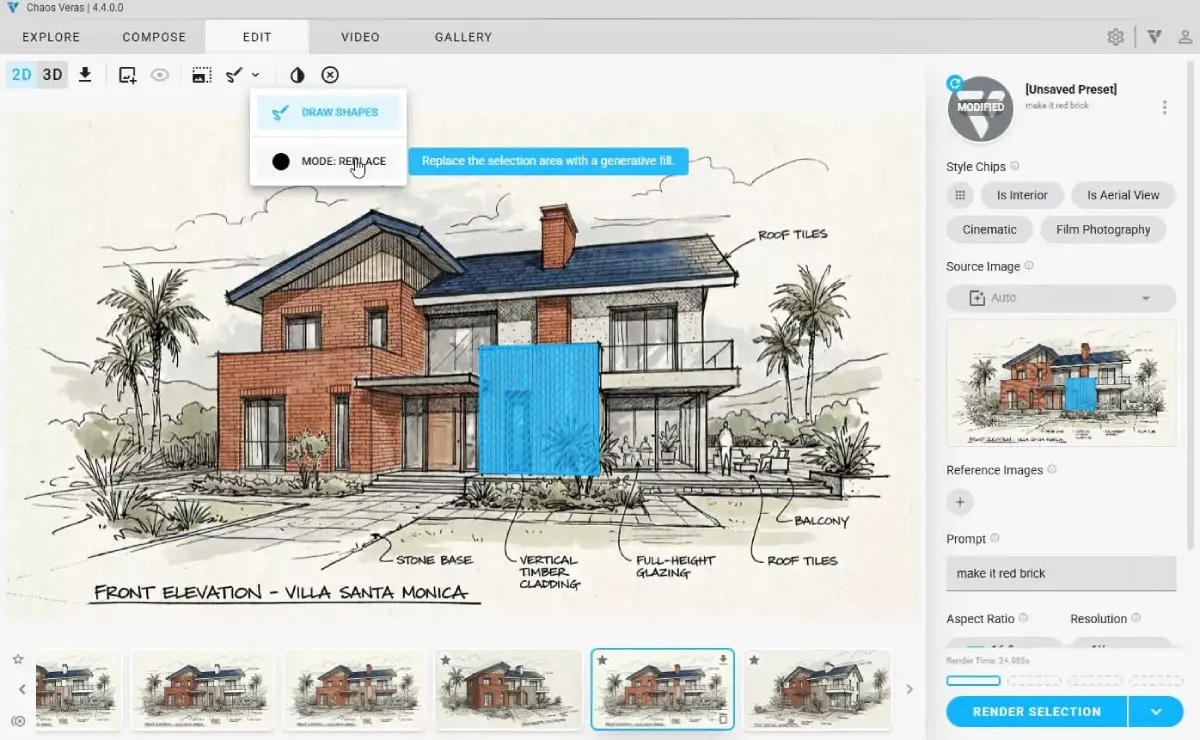
Rather than regenerating an entire image to change one detail, Render Selection lets users select a portion of the render and redefine it with a new prompt, refining specific areas without starting over.
Multi-Platform Support
Veras supports a wide range of host applications and recent software versions, making it practical to adopt across a design team using different primary modeling tools.
Pros & Cons
Pros
- ✅ Plugs directly into Revit, SketchUp, and Rhino — no exporting required
- ✅ Preserves the geometry of your actual model rather than reinterpreting it loosely
- ✅ Render Selection lets you re-prompt and regenerate just part of an image
- ✅ Geometry Override Slider gives control over how literally the model is followed
Cons
- ❌ Subscription pricing per user can add up for larger teams
- ❌ Output quality still depends on the quality of the underlying model and viewport
- ❌ Best results require some iteration on prompts and settings
- ❌ Limited to supported host applications rather than working as a standalone tool
Who Is It Best For?
Veras is the right tool if you:
- Already model in Revit, SketchUp, or Rhino and want rendering without leaving the app
- Need renders that stay faithful to your actual model geometry, not a loose interpretation
- Want to iterate quickly on specific parts of a render rather than regenerating everything
- Work across a design team using multiple modeling tools
Veras is not the right tool if you:
- Don't use one of its supported host applications
- Need a fully standalone rendering tool independent of a modeling platform
- Have a tight per-seat budget and a large team that would need multiple licenses
Alternatives to Consider
Veras is strong for in-app, geometry-faithful AI rendering, but it is not the only option:
- D5 Render — full real-time rendering engine with deeper lighting and material control
- ArchiVinci — browser-based, no plugin or modeling software required
- Vizcom — broader sketch-to-render tool popular beyond architecture alone
- Midjourney — more flexible and creative, with less structural fidelity to the original model
- Archicad AI — full BIM authoring platform with AI-assisted modeling, not just rendering
Final Verdict
Veras earns its place for architects and designers who want AI rendering without breaking their existing modeling workflow. Working directly inside Revit, SketchUp, or Rhino — and actually respecting the geometry already modeled — sets it apart from more general image generators like Midjourney that treat architectural input as loose inspiration.
The per-seat subscription cost is worth weighing against team size, and results still benefit from some prompt iteration to dial in the desired look.
Our recommendation: Trial Veras directly inside your primary modeling tool on a real project view to evaluate render quality and geometry fidelity before rolling it out across your full design team. For how it stacks up against other options, see our guide to the best AI tools for architects.
Key Features
Plugs directly into Revit, SketchUp, and Rhino — no exporting required
Preserves the geometry of your actual model rather than reinterpreting it loosely
Render Selection lets you re-prompt and regenerate just part of an image
Geometry Override Slider gives control over how literally the model is followed
Best For
Architects generating client-ready renders directly from their Revit or SketchUp model
Interior designers visualizing material and style options on existing layouts
Design teams wanting fast visualization without a dedicated rendering specialist
Firms using Rhino who want AI rendering integrated into their existing workflow
Pros & Cons
What We Like
- Plugs directly into Revit, SketchUp, and Rhino — no exporting required
- Preserves the geometry of your actual model rather than reinterpreting it loosely
- Render Selection lets you re-prompt and regenerate just part of an image
- Geometry Override Slider gives control over how literally the model is followed
What We Don't Like
- Subscription pricing per user can add up for larger teams
- Output quality still depends on the quality of the underlying model and viewport
- Best results require some iteration on prompts and settings
- Limited to supported host applications rather than working as a standalone tool
Top Veras Alternatives
View all alternatives →

Veras vs Top Alternatives
| Tool | Best For | Price | AI Quality | Features | Support | Ease of Use | Rating | |
|---|---|---|---|---|---|---|---|---|
 | Architects generating client-ready renders directly from their Revit or SketchUp model | Contact for pricing | 9.2/10 | Current | ||||
 | Architecture | Contact for pricing | 8.7/10 | Read Review → | ||||
 | Architecture | Contact for pricing | 8.4/10 | Read Review → | ||||
 | Architecture | Contact for pricing | 8.1/10 | Read Review → | ||||
 | Architecture | Contact for pricing | 7.8/10 | Read Review → |
Our Veras Verdict
Veras is best suited for architects and designers already modeling in Revit, SketchUp, or Rhino who want AI-powered renders generated directly from their existing viewport, without exporting to a separate rendering application.
Visit website for full details
FAQ
Related Articles
View all articles →Best AI Tools for Architects in 2026
Our editorial guide to the AI tools we recommend, including Veras.
Read Guide →Veras vs Top Alternatives: Full Comparison
Side-by-side breakdown of Veras and its main competitors.
View Comparisons →Hands-on Guides & Workflows
Step-by-step playbooks for getting the most out of tools like Veras.
Browse Guides →Related Tools in Architecture
See all the best Architecture →
Archicad AI
Archicad AI is best suited for architecture firms and BIM-driven design teams who want AI-assisted modeling and documentation built directly into a full-featured BIM platform, rather than a separate visualization add-on.
Read Review →
Fireflies.ai
Fireflies.ai is best suited for architects, contractors, real estate agents, and design professionals who spend significant time in client meetings and project calls — automatically recording, transcribing, and summarizing meetings so teams can focus on the conversation rather than note-taking.
Read Review →
Vizcom
Vizcom is best suited for designers and architects who sketch by hand or on a tablet and want to turn rough concept drawings into polished, presentation-ready renders in seconds.
Read Review →
ArchiVinci
ArchiVinci is best suited for architects, interior designers, and real estate professionals who want fast, client-ready renders from a sketch, screenshot, or rough 3D model without setting up a full rendering pipeline.
Read Review →