

REimagineHome Review:
Is It Worth It in 2026?
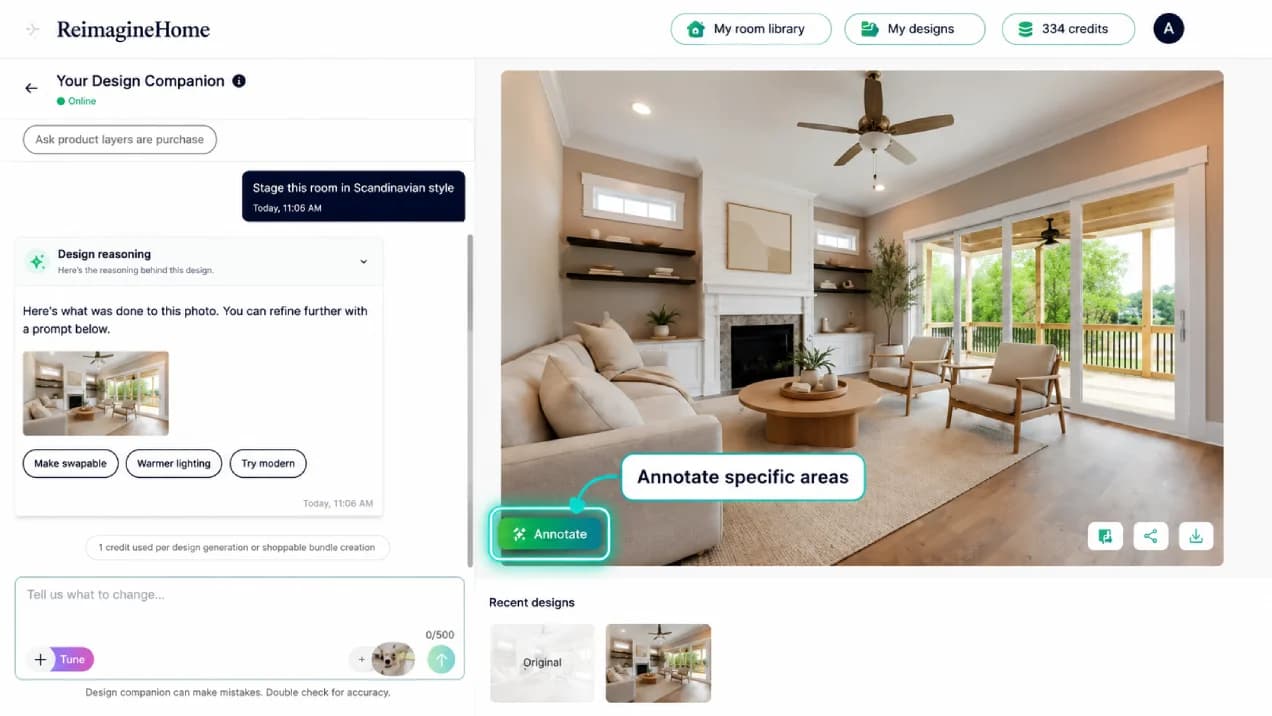
REimagineHome is best suited for real estate agents and homeowners who need fast, affordable virtual staging or renovation visualization — uploading a photo of an empty or outdated room and generating furnished or renovated versions in different styles within minutes.
We may earn a commission when you purchase through links on our site. Learn more
Best For
Our Overall Rating
Based on comprehensive testing
Best For
- Real estate agents virtually staging vacant listing photos to improve buyer interest
- Homeowners visualizing renovation or redecoration options before committing to a renovation
- Real estate investors evaluating renovation potential for flip or rental properties
- Interior designers creating quick before/after visualization for client pitches
Pricing
See current pricing on the REimagineHome website.
Bottom Line
REimagineHome is best suited for real estate agents and homeowners who need fast, affordable virtual staging or renovation visualization — uploading a photo of an empty or outdated room and generating furnished or renovated versions in different styles within minutes.
Visit REimagineHome →Quick Verdict
REimagineHome scores 8.4/10 in our testing and is a strong choice for Real estate agents virtually staging vacant listing photos to improve buyer interest and Homeowners visualizing renovation or redecoration options before committing to a renovation.
What Is REimagineHome?
Overview
REimagineHome is an AI-powered virtual staging and renovation visualization tool that transforms photos of real rooms — whether empty, outdated, or unfurnished — into styled, furnished, or renovated versions using AI image generation. Real estate agents and homeowners upload a single room photo, select a design style or renovation type, and receive multiple visualized versions within minutes.
This addresses two distinct but related real estate use cases: virtual staging for vacant listings (helping buyers visualize furnished potential) and renovation visualization for homeowners or investors considering updates (helping them see potential outcomes before committing budget to physical changes).
This review evaluates REimagineHome based on its image generation quality, use case versatility, and practical fit for real estate and interior visualization needs in 2026.
Key Features
AI Virtual Staging
REimagineHome can take a photo of an empty room and generate a furnished version, applying realistic furniture placement and styling appropriate to the room's dimensions and architectural features — addressing the well-documented marketing benefit of staged listing photos at a fraction of physical staging cost.
Renovation Visualization
Beyond staging, the tool can visualize renovation outcomes — new flooring, updated cabinetry, different paint colors, or modernized fixtures — applied to an existing room photo, giving homeowners and investors a preview of potential renovation directions.
Multiple Style Options
For both staging and renovation use cases, REimagineHome generates options across multiple design styles — modern, traditional, minimalist, farmhouse, and others — allowing users to compare different aesthetic directions for the same space.
Fast Turnaround
Generation happens in minutes rather than the days required for physical staging coordination or professional rendering services, making it practical to visualize multiple rooms or style options quickly during a listing preparation or renovation planning process.
Pros & Cons
Pros
- ✅ Generates virtually staged or renovated room photos from a single uploaded image in minutes
- ✅ Offers multiple design styles to visualize different aesthetic directions for the same space
- ✅ Significantly cheaper than traditional physical staging or professional renovation renderings
- ✅ Easy to use without design software experience — upload, select style, generate
Cons
- ❌ Generated images are for marketing visualization only, not construction-accurate renovation plans
- ❌ Output quality varies depending on the clarity and angle of the original room photo
- ❌ Cannot account for structural changes, only cosmetic furnishing and finish updates
- ❌ Disclosure requirements for virtually staged listing photos vary by market and MLS rules
Who Is It Best For?
REimagineHome is the right tool if you:
- List vacant properties and want to show buyers furnished potential without physical staging cost
- Consider a renovation and want to visualize different finish and style options before committing budget
- Need fast turnaround on staging or renovation visuals for time-sensitive listings
- Want to compare multiple design directions for the same space before deciding on a final approach
REimagineHome is not the right tool if you:
- Need construction-accurate renovation plans with structural and budget detail
- Are in a market with strict MLS disclosure rules that limit virtual staging use for listing photos
- Require professional photography-quality output for high-end luxury listing marketing
Alternatives to Consider
- Collov AI — similar AI redesign tool with strong style transfer from photo references
- RoomGPT — simpler, faster room redesign tool focused on style transformation
- Virtual Staging AI — purpose-built virtual staging tool with strong real estate market focus
- ArchiVinci — broader AI architectural visualization including exterior renovation concepts
- Foyr Neo — full interior design platform for when detailed floor planning is also needed
Final Verdict
REimagineHome delivers practical value for the specific, well-defined use cases of virtual staging and renovation visualization — both situations where a fast, affordable visual preview meaningfully helps move a real estate or renovation decision forward. The cost and speed advantage over physical staging or professional rendering is substantial.
The output is marketing and visualization material, not construction documentation — buyers and homeowners need to understand the distinction, and agents need to follow local disclosure requirements for virtually staged photos. Within those boundaries, REimagineHome is a useful, low-cost tool.
Our recommendation: Check your local MLS and disclosure requirements for virtually staged photos before using REimagineHome output in active listings. For renovation visualization with homeowner or investor clients, the tool works well as a conversation starter — pair it with a contractor estimate before finalizing any renovation decision.
Key Features
Generates virtually staged or renovated room photos from a single uploaded image in minutes
Offers multiple design styles to visualize different aesthetic directions for the same space
Significantly cheaper than traditional physical staging or professional renovation renderings
Easy to use without design software experience — upload, select style, generate
Best For
Real estate agents virtually staging vacant listing photos to improve buyer interest
Homeowners visualizing renovation or redecoration options before committing to a renovation
Real estate investors evaluating renovation potential for flip or rental properties
Interior designers creating quick before/after visualization for client pitches
Pros & Cons
What We Like
- Generates virtually staged or renovated room photos from a single uploaded image in minutes
- Offers multiple design styles to visualize different aesthetic directions for the same space
- Significantly cheaper than traditional physical staging or professional renovation renderings
- Easy to use without design software experience — upload, select style, generate
What We Don't Like
- Generated images are for marketing visualization only, not construction-accurate renovation plans
- Output quality varies depending on the clarity and angle of the original room photo
- Cannot account for structural changes, only cosmetic furnishing and finish updates
- Disclosure requirements for virtually staged listing photos vary by market and MLS rules
Top REimagineHome Alternatives
View all alternatives →


REimagineHome vs Top Alternatives
| Tool | Best For | Price | AI Quality | Features | Support | Ease of Use | Rating | |
|---|---|---|---|---|---|---|---|---|
 | Real estate agents virtually staging vacant listing photos to improve buyer interest | Contact for pricing | 8.4/10 | Current | ||||
 | Real Estate | Contact for pricing | 7.9/10 | Read Review → | ||||
 | Real Estate | Contact for pricing | 7.6/10 | Read Review → | ||||
 | Real Estate | Contact for pricing | 7.3/10 | Read Review → | ||||
 | Real Estate | Contact for pricing | 7/10 | Read Review → |
Our REimagineHome Verdict
REimagineHome is best suited for real estate agents and homeowners who need fast, affordable virtual staging or renovation visualization — uploading a photo of an empty or outdated room and generating furnished or renovated versions in different styles within minutes.
Visit website for full details
FAQ
Related Articles
View all articles →Best AI Tools for Interior Design in 2026
Our editorial guide to the AI tools we recommend, including REimagineHome.
Read Guide →REimagineHome vs Top Alternatives: Full Comparison
Side-by-side breakdown of REimagineHome and its main competitors.
View Comparisons →Hands-on Guides & Workflows
Step-by-step playbooks for getting the most out of tools like REimagineHome.
Browse Guides →Related Tools in Interior Design
See all the best Interior Design →
Homestyler
Homestyler is best suited for homeowners, aspiring interior designers, and real estate stagers who want a free, browser-based platform to experiment with room layouts, furniture placement, and interior styles in 3D — without the learning curve of professional design software.
Read Review →
ImagineArt
ImagineArt is best suited for interior designers, furniture brands, and architects who need a versatile AI image generation platform to create concept visuals, mood board imagery, product renders, and design inspiration — going from text prompt to styled visual in seconds.
Read Review →
InstantDeco AI
InstantDeco AI is best suited for real estate agents, property managers, and homeowners who need instant, affordable AI-generated interior redesigns and virtual staging — transforming a single room photo into multiple styled variations in seconds via API or a simple web interface.
Read Review →
Moodboard AI
Moodboard AI is best suited for interior designers and decorators who need to quickly produce cohesive, styled mood boards for client presentations — generating color palettes, material pairings, and layout compositions from a style brief instead of manually assembling reference images.
Read Review →