

InteriorAI Review:
Is It Worth It in 2026?
InteriorAI is best suited for homeowners, interior designers, and real estate agents who want to generate AI-redesigned room concepts from a single photo across dozens of interior styles — exploring design directions quickly without design software experience.
From
From $49/month
Best For
Our Overall Rating
Based on comprehensive testing
Best For
- Homeowners exploring interior style direction before committing to a redesign
- Interior designers generating quick style comparison visuals for early client conversations
- Real estate agents virtually staging empty rooms for listing marketing photos
- Design enthusiasts experimenting with dramatically different interior aesthetics for the same space
Pricing
Starts at
Bottom Line
InteriorAI is best suited for homeowners, interior designers, and real estate agents who want to generate AI-redesigned room concepts from a single photo across dozens of interior styles — exploring design directions quickly without design software experience.
Visit InteriorAI →Quick Verdict
InteriorAI scores 8.4/10 in our testing and is a strong choice for Homeowners exploring interior style direction before committing to a redesign and Interior designers generating quick style comparison visuals for early client conversations. Pricing starts at From $49/month.
What Is InteriorAI?
Overview
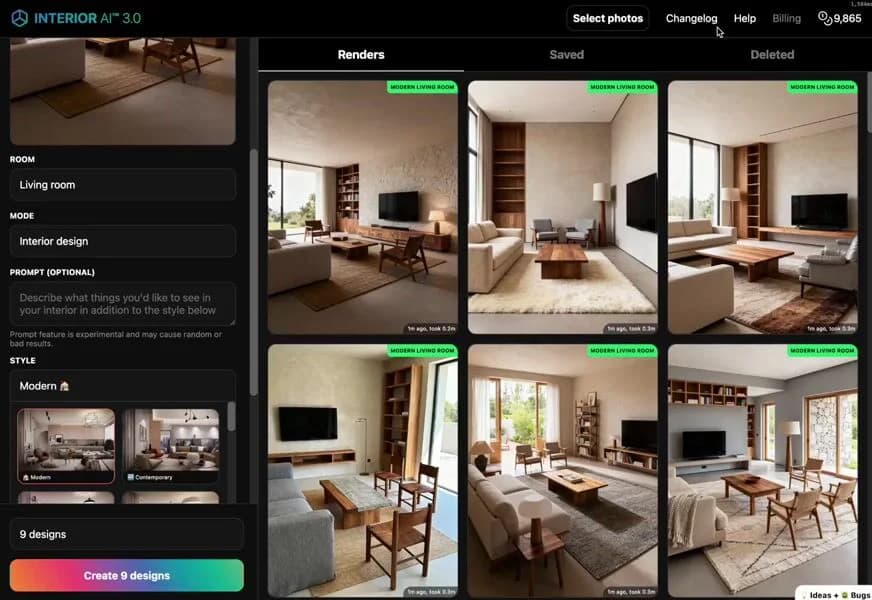
InteriorAI is an AI-powered interior design tool that takes a photo of a real room and generates redesigned versions of that space across a wide range of interior styles — modern, Scandinavian, industrial, bohemian, traditional, and many others. Users upload a single room photo, select a style, and receive AI-generated images showing how the space might look with that aesthetic applied.
As one of the earlier AI room redesign tools to gain wide adoption, InteriorAI established many of the conventions that similar tools now follow: simple upload workflow, multiple style options, fast generation, and output intended for inspiration and visualization rather than precise design specification.
This review evaluates InteriorAI based on its redesign output quality, style variety, and practical value for interior design and real estate use cases in 2026.
Key Features
Wide Style Library
InteriorAI offers a broad selection of interior design styles as generation targets — covering major contemporary aesthetics as well as more niche or eclectic directions — giving users meaningful variety when exploring how a space might be reimagined.
Single Photo Input
The tool requires only a photo of the existing room as input, making it accessible to anyone with a smartphone camera and removing the need for floor plans, CAD files, or design software familiarity.
Multiple Outputs Per Generation
For each style selection, InteriorAI generates multiple variations, allowing users to compare different AI interpretations of the same style applied to their space before selecting a direction to explore further.
Before/After Comparison
The platform presents generated outputs alongside the original room photo, making it easy to compare the existing space against the redesigned concept — a useful format for presenting design directions to clients or family members.
Pros & Cons
Pros
- ✅ Generates redesigned room images across a wide variety of interior styles from a single photo
- ✅ Simple upload-and-generate workflow requires no design software experience
- ✅ Fast turnaround makes it practical to compare many style directions for the same space
- ✅ Useful for both personal design exploration and real estate virtual staging
Cons
- ❌ Generated images are conceptual style references, not precise or buildable interior plans
- ❌ Furniture placement and spatial accuracy can be inconsistent across different room types
- ❌ Less control over specific materials, finishes, or individual furniture selections
- ❌ Output quality depends on the lighting and angle of the original uploaded room photo
Who Is It Best For?
InteriorAI is the right tool if you:
- Want to explore many different interior styles for the same room before making any design commitment
- Need quick visual concepts for a client conversation or renovation planning discussion
- Are virtually staging a vacant listing and want affordable alternatives to physical staging
- Don't need precise specifications — just a visual sense of direction to build from
InteriorAI is not the right tool if you:
- Need buildable interior plans with specific product selections, dimensions, or material specifications
- Want to control exact furniture placement or room layout beyond style transformation
- Require professional-grade output quality for high-end luxury listing marketing
Alternatives to Consider
- REimagineHome — comparable tool with a stronger real estate virtual staging focus
- RoomGPT — free-tier room redesign tool with a similar style transformation approach
- Collov AI — AI redesign with stronger style consistency and photo reference capability
- MyRoomDesigner AI — affordable homeowner-focused redesign tool with similar workflow
- Homestyler — full floor plan and furniture placement tool for users needing more design control
Final Verdict
InteriorAI delivers well on its core promise — generating quick, visually interesting redesign concepts from a room photo without requiring design expertise. For homeowners exploring style direction, designers needing rapid concept visuals, and real estate agents wanting affordable virtual staging options, it's a practical, low-friction starting point.
As the AI room redesign category has grown more crowded, InteriorAI's position comes from its style breadth and established reputation. For most straightforward redesign and staging needs, it remains a competent choice.
Our recommendation: Upload the same room photo to InteriorAI and one or two competitors like RoomGPT simultaneously — comparing output quality side by side for your specific room type is the fastest way to identify which tool produces the most useful results for your situation. For where fast staging fits alongside layout and rendering options, see our guide to the best AI tools for interior design.
Key Features
Generates redesigned room images across a wide variety of interior styles from a single photo
Simple upload-and-generate workflow requires no design software experience
Fast turnaround makes it practical to compare many style directions for the same space
Useful for both personal design exploration and real estate virtual staging
Best For
Homeowners exploring interior style direction before committing to a redesign
Interior designers generating quick style comparison visuals for early client conversations
Real estate agents virtually staging empty rooms for listing marketing photos
Design enthusiasts experimenting with dramatically different interior aesthetics for the same space
Pros & Cons
What We Like
- Generates redesigned room images across a wide variety of interior styles from a single photo
- Simple upload-and-generate workflow requires no design software experience
- Fast turnaround makes it practical to compare many style directions for the same space
- Useful for both personal design exploration and real estate virtual staging
What We Don't Like
- Generated images are conceptual style references, not precise or buildable interior plans
- Furniture placement and spatial accuracy can be inconsistent across different room types
- Less control over specific materials, finishes, or individual furniture selections
- Output quality depends on the lighting and angle of the original uploaded room photo
Top InteriorAI Alternatives
View all alternatives →


InteriorAI vs Top Alternatives
| Tool | Best For | Price | AI Quality | Features | Support | Ease of Use | Rating | |
|---|---|---|---|---|---|---|---|---|
 | Homeowners exploring interior style direction before committing to a redesign | From $49/month | 8.4/10 | Current | ||||
 | Furniture | Contact for pricing | 7.9/10 | Read Review → | ||||
 | Furniture | Contact for pricing | 7.6/10 | Read Review → | ||||
 | Furniture | Contact for pricing | 7.3/10 | Read Review → | ||||
 | Furniture | Contact for pricing | 7/10 | Read Review → |
Our InteriorAI Verdict
InteriorAI is best suited for homeowners, interior designers, and real estate agents who want to generate AI-redesigned room concepts from a single photo across dozens of interior styles — exploring design directions quickly without design software experience.
14-day money-back guarantee
FAQ
Related Articles
View all articles →Best AI Tools for Interior Design in 2026
Our editorial guide to the AI tools we recommend, including InteriorAI.
Read Guide →InteriorAI vs Top Alternatives: Full Comparison
Side-by-side breakdown of InteriorAI and its main competitors.
View Comparisons →Hands-on Guides & Workflows
Step-by-step playbooks for getting the most out of tools like InteriorAI.
Browse Guides →Head-to-Head Comparisons
Featured in Workflows
Related Tools in Interior Design
See all the best Interior Design →
REimagineHome
REimagineHome is best suited for real estate agents and homeowners who need fast, affordable virtual staging or renovation visualization — uploading a photo of an empty or outdated room and generating furnished or renovated versions in different styles within minutes.
Read Review →
Homestyler
Homestyler is best suited for homeowners, aspiring interior designers, and real estate stagers who want a free, browser-based platform to experiment with room layouts, furniture placement, and interior styles in 3D — without the learning curve of professional design software.
Read Review →
ImagineArt
ImagineArt is best suited for interior designers, furniture brands, and architects who need a versatile AI image generation platform to create concept visuals, mood board imagery, product renders, and design inspiration — going from text prompt to styled visual in seconds.
Read Review →
InstantDeco AI
InstantDeco AI is best suited for real estate agents, property managers, and homeowners who need instant, affordable AI-generated interior redesigns and virtual staging — transforming a single room photo into multiple styled variations in seconds via API or a simple web interface.
Read Review →