

ArchiVinci Review:
Is It Worth It in 2026?
ArchiVinci is best suited for architects, interior designers, and real estate professionals who want fast, client-ready renders from a sketch, screenshot, or rough 3D model without setting up a full rendering pipeline.
Best For
Our Overall Rating
Based on comprehensive testing
Best For
- Architects turning rough sketches into client-ready concept renders quickly
- Interior designers generating style variations for the same room layout
- Real estate agents and developers visualizing masterplan or exterior concepts
- Students and early-career designers exploring ideas without a full render setup
Pricing
See current pricing on the ArchiVinci website.
Bottom Line
ArchiVinci is best suited for architects, interior designers, and real estate professionals who want fast, client-ready renders from a sketch, screenshot, or rough 3D model without setting up a full rendering pipeline.
Visit ArchiVinci →Quick Verdict
ArchiVinci scores 8.8/10 in our testing and is a strong choice for Architects turning rough sketches into client-ready concept renders quickly and Interior designers generating style variations for the same room layout.
What Is ArchiVinci?
Overview
ArchiVinci is an AI-powered rendering platform built specifically for architectural and interior design workflows, rather than as a general-purpose image generator. It transforms sketches, photos, and screenshots of 3D models into hyper-realistic renders, using Stable Diffusion and ControlNet-based technology to keep the structural geometry of the original input intact rather than generating a loosely related image.
Because it runs entirely in a web browser with no GPU or software installation required, it lowers the barrier for architects, interior designers, and real estate professionals who want client-ready visuals without setting up a dedicated rendering pipeline.
This review evaluates ArchiVinci based on its render quality, geometry preservation, and practical fit for fast-turnaround visualization work heading into 2026.
Key Features
Sketch & Screenshot-to-Render
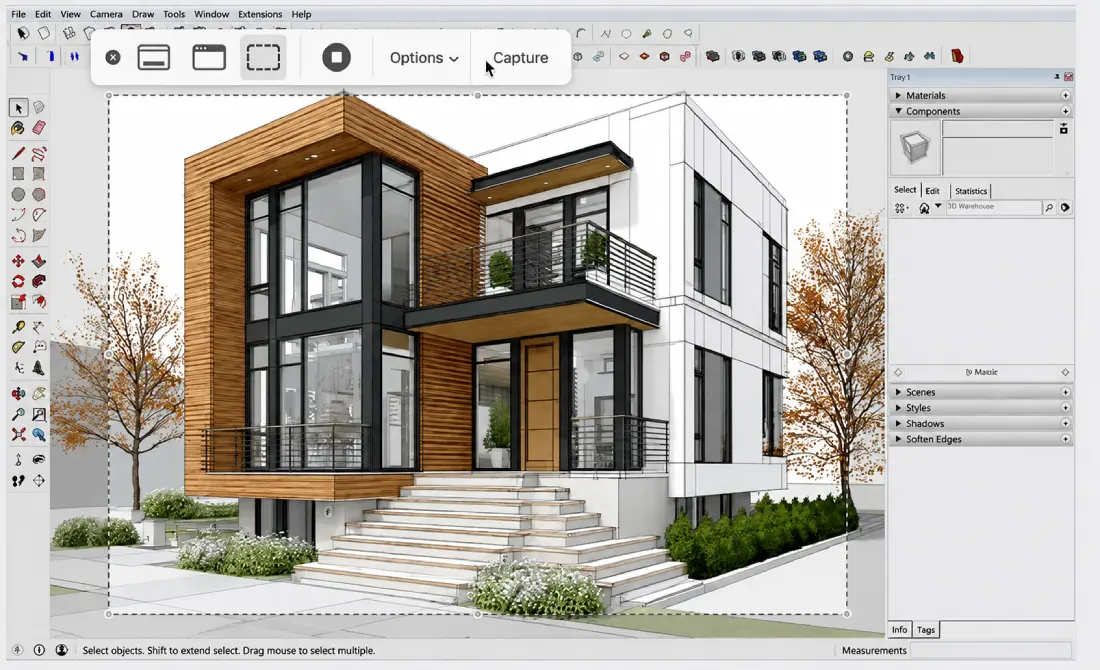
Upload a hand sketch, a screenshot of a rough 3D model, or a photo, and ArchiVinci generates a photorealistic render while preserving the underlying structure — walls, openings, massing — rather than reinterpreting the design from scratch.
Dedicated Design Modules
The platform includes separate modules for interior, exterior, masterplan, and urban design, each tuned to the specific visual conventions and scale of that design context rather than a single generic rendering mode.
Virtual Staging & Style Transfer
Beyond generating a render from scratch, ArchiVinci supports virtual staging and style transfer, letting users apply a different design style to an existing space or add furniture and decor to an empty render.
Browser-Based, No Installation
ArchiVinci runs entirely in the browser, supporting 4K–8K output without requiring a powerful local GPU or dedicated rendering software, making it accessible on standard work laptops.
Pros & Cons
Pros
- ✅ Runs entirely in the browser — no GPU or software installation required
- ✅ Dedicated modules for interior, exterior, masterplan, and urban design
- ✅ Preserves structural geometry from the original sketch or model
- ✅ Generates multiple design variations quickly from a single input
Cons
- ❌ Output quality depends on the clarity of the input sketch or screenshot
- ❌ Not a substitute for full 3D modeling and lighting control in complex projects
- ❌ Higher-resolution exports and advanced modules sit behind paid tiers
- ❌ AI-generated renders still benefit from a human design review pass
Who Is It Best For?
ArchiVinci is the right tool if you:
- Need fast, client-ready renders from a sketch or rough model without a full rendering setup
- Want to explore multiple design directions quickly before committing to one
- Work across interior, exterior, and masterplan scales and want tools tuned to each
- Don't have access to a powerful GPU but still need high-resolution output
ArchiVinci is not the right tool if you:
- Need full control over lighting, materials, and camera in a complex 3D scene
- Are working from a very rough or unclear input that the AI can't interpret reliably
- Require construction-grade rendering accuracy rather than concept-level visuals
Alternatives to Consider
ArchiVinci is strong for fast, geometry-preserving architectural rendering, but it is not the only option:
- Veras — plugs directly into Revit, SketchUp, and Rhino as a viewport-based renderer
- Vizcom — broader sketch-to-render tool popular across product and industrial design too
- Midjourney — more flexible for general architectural imagery, with less structural fidelity
- D5 Render — better for architects already working from full 3D models needing real-time rendering
- Homedesigns.ai — more consumer-focused, geared toward homeowner room makeovers
Final Verdict
ArchiVinci earns its place as an accessible, browser-based rendering tool that takes design fidelity seriously — preserving the actual geometry of a sketch or model rather than just generating a vaguely similar image. The dedicated modules for different design scales make it flexible across architecture, interior design, and masterplan work.
For projects needing full 3D lighting and material control, a traditional rendering pipeline still has the edge — but for fast, client-ready concept visuals, ArchiVinci removes most of the setup friction.
Our recommendation: Start with a clear, well-lit sketch or screenshot to test render quality on your actual design style before committing to a paid tier for higher-resolution exports.
Key Features
Runs entirely in the browser — no GPU or software installation required
Dedicated modules for interior, exterior, masterplan, and urban design
Preserves structural geometry from the original sketch or model
Generates multiple design variations quickly from a single input
Best For
Architects turning rough sketches into client-ready concept renders quickly
Interior designers generating style variations for the same room layout
Real estate agents and developers visualizing masterplan or exterior concepts
Students and early-career designers exploring ideas without a full render setup
Pros & Cons
What We Like
- Runs entirely in the browser — no GPU or software installation required
- Dedicated modules for interior, exterior, masterplan, and urban design
- Preserves structural geometry from the original sketch or model
- Generates multiple design variations quickly from a single input
What We Don't Like
- Output quality depends on the clarity of the input sketch or screenshot
- Not a substitute for full 3D modeling and lighting control in complex projects
- Higher-resolution exports and advanced modules sit behind paid tiers
- AI-generated renders still benefit from a human design review pass
Top ArchiVinci Alternatives
View all alternatives →


ArchiVinci vs Top Alternatives
| Tool | Best For | Price | AI Quality | Features | Support | Ease of Use | Rating | |
|---|---|---|---|---|---|---|---|---|
 | Architects turning rough sketches into client-ready concept renders quickly | Contact for pricing | 8.8/10 | Current | ||||
 | Architecture | Contact for pricing | 8.3/10 | Read Review → | ||||
 | Architecture | Contact for pricing | 8/10 | Read Review → | ||||
 | Architecture | Contact for pricing | 7.7/10 | Read Review → | ||||
 | Architecture | Contact for pricing | 7.4/10 | Read Review → |
Our ArchiVinci Verdict
ArchiVinci is best suited for architects, interior designers, and real estate professionals who want fast, client-ready renders from a sketch, screenshot, or rough 3D model without setting up a full rendering pipeline.
Visit website for full details
FAQ
Related Articles
View all articles →Best AI Tools for Architects in 2026
Our editorial guide to the AI tools we recommend, including ArchiVinci.
Read Guide →ArchiVinci vs Top Alternatives: Full Comparison
Side-by-side breakdown of ArchiVinci and its main competitors.
View Comparisons →Hands-on Guides & Workflows
Step-by-step playbooks for getting the most out of tools like ArchiVinci.
Browse Guides →Related Tools in Architecture
See all the best Architecture →
Planner 5D
Planner 5D is an AI-powered floor plan and interior design platform used by 120+ million users worldwide. It converts uploaded images or text prompts into 2D/3D floor plans instantly, with 8,000+ furniture items, 4K rendering, and VR walkthroughs — from a free plan to professional and enterprise white-label tiers.
Read Review →
PromeAI
PromeAI is best suited for architects, interior designers, and homeowners who want to convert hand sketches, floor plans, or 3D model exports into realistic renderings quickly, without deep 3D rendering software experience.
Read Review →
Rendair AI
Rendair AI is best suited for architects and designers who want to turn sketches, 3D models, or floor plans into photorealistic renders in seconds, with chat-based editing and animation tools all in one platform.
Read Review →
TestFit
TestFit is best suited for developers, architects, and feasibility teams who need to quickly generate and compare multiple site layout and massing options before committing to a full design, rather than manually testing each configuration.
Read Review →