

Homedesigns.ai Review:
Is It Worth It in 2026?
Homedesigns.ai is best suited for homeowners, renters, and interior design enthusiasts who want fast, photorealistic room makeovers generated from a single photo, without hiring a designer.
We may earn a commission when you purchase through links on our site. Learn more
Best For
Our Overall Rating
Based on comprehensive testing
Best For
- Homeowners planning a renovation who want visual direction first
- Renters wanting to preview decor changes without committing
- Real estate agents staging listing photos virtually
- Interior design enthusiasts exploring styles before buying furniture
Pricing
See current pricing on the Homedesigns.ai website.
Bottom Line
Homedesigns.ai is best suited for homeowners, renters, and interior design enthusiasts who want fast, photorealistic room makeovers generated from a single photo, without hiring a designer.
Visit Homedesigns.ai →Quick Verdict
Homedesigns.ai scores 8.6/10 in our testing and is a strong choice for Homeowners planning a renovation who want visual direction first and Renters wanting to preview decor changes without committing.
What Is Homedesigns.ai?
Overview
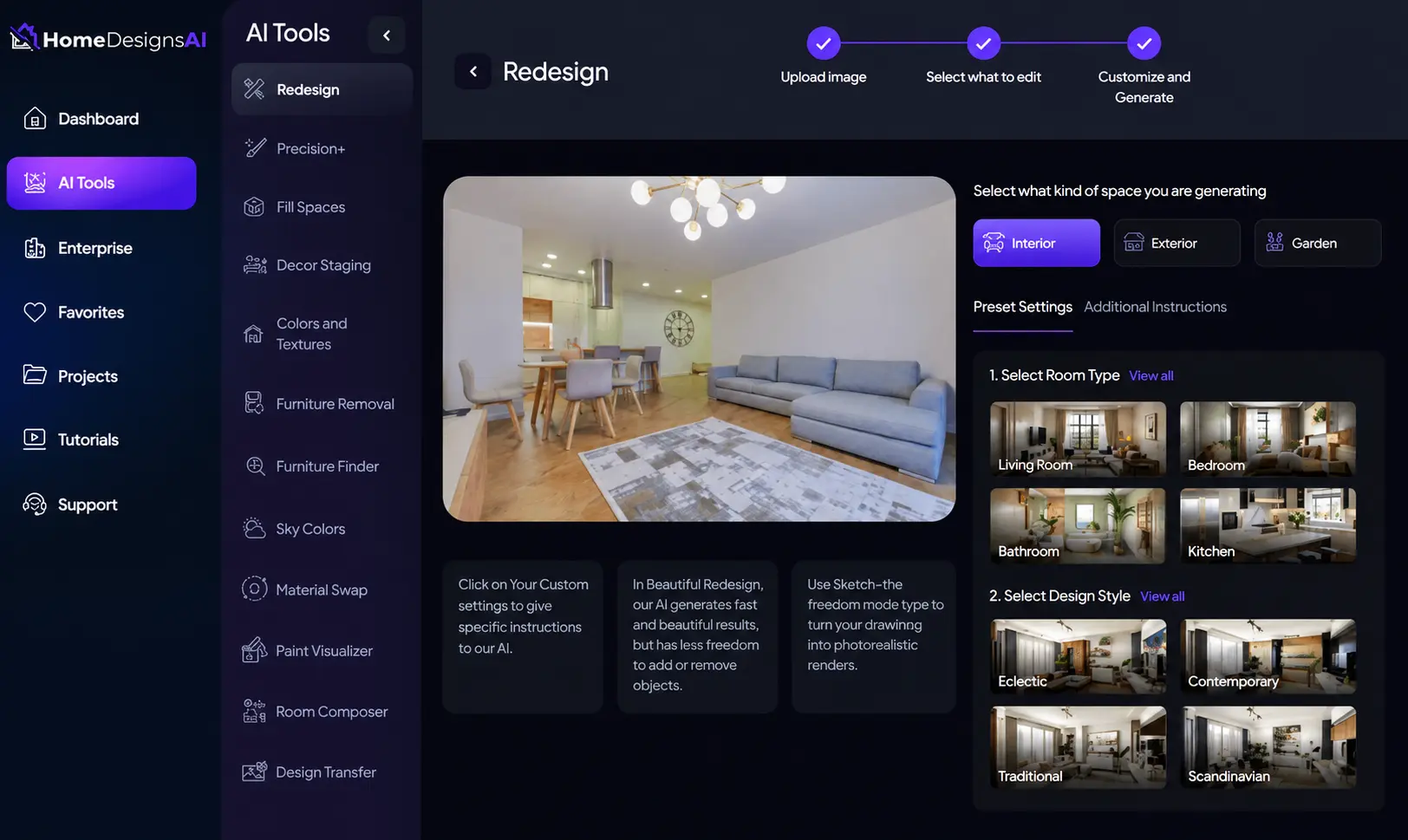
Homedesigns.ai is an AI-powered interior design platform that turns a single photo of a room into multiple photorealistic redesign concepts. Instead of starting from a blank canvas or hiring a designer for initial concepts, users upload a picture of their actual space and let the AI reimagine it across different styles — from modern minimalist to traditional, coastal, or industrial.
The platform is built around speed and accessibility: there's no need for floor plans, measurements, or design software experience. This makes it a practical entry point for homeowners and renters who want a clearer sense of what's possible before spending money on renovation or furniture.
This review evaluates Homedesigns.ai based on hands-on testing of its redesign generation, style range, and output quality, heading into 2026.
Key Features
Photo-to-Redesign Generation
Upload a photo of any room and Homedesigns.ai generates multiple redesigned versions in different styles within minutes. The AI preserves the room's basic structure — windows, doors, layout — while reimagining furniture, color palettes, and decor.
Wide Style Library
The platform supports dozens of design styles spanning modern, Scandinavian, industrial, bohemian, traditional, and more, letting users compare how the same room would look across very different aesthetics before settling on a direction.
Multi-Room Support
Homedesigns.ai works across living rooms, bedrooms, kitchens, bathrooms, and outdoor spaces, making it useful for planning a full-home refresh rather than a single room.
Exterior & Landscaping Concepts
Beyond interiors, the platform also generates exterior and landscaping redesigns, which is useful for homeowners weighing curb-appeal upgrades alongside interior changes.
Pros & Cons
Pros
- ✅ Generates photorealistic redesigns from a single room photo
- ✅ Wide range of styles and room types supported
- ✅ Fast turnaround compared to hiring a designer
- ✅ Affordable way to visualize renovation ideas before committing
Cons
- ❌ AI-generated layouts can be impractical to replicate exactly
- ❌ Furniture and decor shown aren't always purchasable as-is
- ❌ Output quality depends heavily on the input photo
- ❌ Limited control over fine-grained design details
Who Is It Best For?
Homedesigns.ai is the right tool if you:
- Want quick visual direction before a renovation or furniture purchase without hiring a designer
- Are comparing design styles and want to see the same room reimagined multiple ways
- Work in real estate and need virtually staged photos for listings
- Have a clear photo of the space you want redesigned — results depend on input quality
Homedesigns.ai is not the right tool if you:
- Need exact, buildable floor plans or technical drawings
- Want every piece of furniture in the result to be directly purchasable
- Require precise control over individual design elements rather than AI-generated concepts
Alternatives to Consider
Homedesigns.ai is strong for fast photo-based redesigns, but it is not the only option:
- RoomGPT — similar photo-to-redesign concept with a simpler, more limited style set
- Interior AI — comparable feature set with stronger focus on real estate staging
- Planner 5D — better for users who want to build and edit a full 3D floor plan
- REimagine Home — focuses specifically on exterior and curb-appeal redesigns
- ideal.house — geared more toward architectural visualization than quick style previews
Final Verdict
Homedesigns.ai earns its place as an accessible entry point into AI-assisted interior design. The ability to upload one photo and instantly see a room reimagined across multiple styles removes a real barrier — most people struggle to visualize a finished space from scratch, and this tool solves that problem quickly and affordably.
The main thing to keep in mind is that the output is a visual concept, not a buildable plan — treat it as inspiration and direction rather than a literal shopping list or blueprint.
Our recommendation: Upload a well-lit, clear photo of your actual room and generate several style variations before deciding on a direction — the variety is where this tool adds the most value.
Key Features
Generates photorealistic redesigns from a single room photo
Wide range of styles and room types supported
Fast turnaround compared to hiring a designer
Affordable way to visualize renovation ideas before committing
Best For
Homeowners planning a renovation who want visual direction first
Renters wanting to preview decor changes without committing
Real estate agents staging listing photos virtually
Interior design enthusiasts exploring styles before buying furniture
Pros & Cons
What We Like
- Generates photorealistic redesigns from a single room photo
- Wide range of styles and room types supported
- Fast turnaround compared to hiring a designer
- Affordable way to visualize renovation ideas before committing
What We Don't Like
- AI-generated layouts can be impractical to replicate exactly
- Furniture and decor shown aren't always purchasable as-is
- Output quality depends heavily on the input photo
- Limited control over fine-grained design details
Top Homedesigns.ai Alternatives
View all alternatives →


Homedesigns.ai vs Top Alternatives
| Tool | Best For | Price | AI Quality | Features | Support | Ease of Use | Rating | |
|---|---|---|---|---|---|---|---|---|
 | Homeowners planning a renovation who want visual direction first | Contact for pricing | 8.6/10 | Current | ||||
 | Furniture | Contact for pricing | 8.1/10 | Read Review → | ||||
 | Furniture | Contact for pricing | 7.8/10 | Read Review → | ||||
 | Furniture | Contact for pricing | 7.5/10 | Read Review → | ||||
 | Furniture | Contact for pricing | 7.2/10 | Read Review → |
Our Homedesigns.ai Verdict
Homedesigns.ai is best suited for homeowners, renters, and interior design enthusiasts who want fast, photorealistic room makeovers generated from a single photo, without hiring a designer.
Visit website for full details
FAQ
Related Articles
View all articles →Best AI Tools for Interior Design in 2026
Our editorial guide to the AI tools we recommend, including Homedesigns.ai.
Read Guide →Homedesigns.ai vs Top Alternatives: Full Comparison
Side-by-side breakdown of Homedesigns.ai and its main competitors.
View Comparisons →Hands-on Guides & Workflows
Step-by-step playbooks for getting the most out of tools like Homedesigns.ai.
Browse Guides →Featured in Workflows
Related Tools in Interior Design
See all the best Interior Design →
MeltFlex AI
MeltFlex AI is best suited for homeowners and renters who want a room redesign where every piece of furniture shown is a real, purchasable product from retailers like IKEA, Amazon, Wayfair, and Pottery Barn.
Read Review →
ArkDesign AI
ArkDesign AI is best suited for architects and space planners who need to rapidly generate and iterate on floor plan layouts from basic site parameters, reducing the time spent on early-stage plan exploration before detailed design begins.
Read Review →
Dehome.ai
Dehome.ai is best suited for homeowners and renters who want fast AI-generated interior and exterior redesign concepts from a single room photo, with results typically ready in seconds rather than minutes.
Read Review →
DesignSense.ai
DesignSense.ai is best suited for homeowners and design enthusiasts who want AI-generated room styling and personalized recommendations based on their own space and taste.
Read Review →