

Submagic Review:
Is It Worth It in 2026?
Submagic is best suited for real estate agents, designers, and content creators making short-form video who want AI to add dynamic captions, B-roll, and effects automatically — turning raw phone footage into polished, engaging TikToks, Reels, and Shorts without manual editing.
We may earn a commission when you purchase through links on our site. Learn more
Best For
Our Overall Rating
Based on comprehensive testing
Best For
- Real estate agents polishing property tour and personal-brand videos for social media
- Interior designers and architects adding captions to project walkthrough clips
- Furniture and design brands producing engaging short-form product and lifestyle videos
- Content creators who want professional captions and effects without manual editing
Pricing
See current pricing on the Submagic website.
Bottom Line
Submagic is best suited for real estate agents, designers, and content creators making short-form video who want AI to add dynamic captions, B-roll, and effects automatically — turning raw phone footage into polished, engaging TikToks, Reels, and Shorts without manual editing.
Visit Submagic →Quick Verdict
Submagic scores 8.8/10 in our testing and is a strong choice for Real estate agents polishing property tour and personal-brand videos for social media and Interior designers and architects adding captions to project walkthrough clips.
What Is Submagic?
Overview
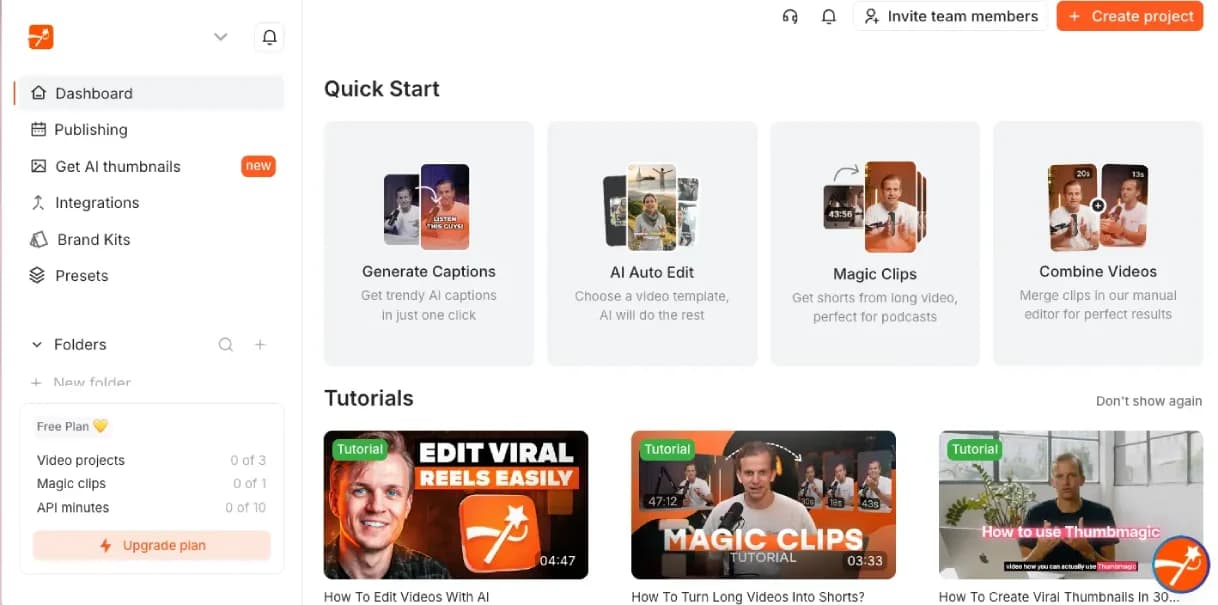
Submagic is an AI-powered tool for enhancing short-form videos with dynamic captions, B-roll suggestions, emojis, and effects — turning raw footage into polished, engaging content for TikTok, Instagram Reels, and YouTube Shorts. Rather than manually captioning and editing every clip, creators upload footage and Submagic automatically adds the styled captions and enhancements that characterize high-performing short-form video.
For real estate agents making personal-brand and property videos, interior designers and architects sharing project walkthroughs, and furniture brands producing social content, Submagic addresses the gap between shooting raw phone footage and publishing polished, engaging clips — automating the captioning and enhancement that would otherwise require manual editing skills.
This review evaluates Submagic based on its captioning quality, enhancement features, and practical fit for short-form video in the real estate and design industries in 2026.
Key Features
Dynamic AI Captions
Submagic automatically transcribes video and adds dynamic, styled captions — with high accuracy and the animated, attention-holding caption styles that drive engagement on short-form platforms where most viewing happens sound-off.
B-Roll and Effect Suggestions
The platform suggests relevant B-roll footage, emojis, and visual effects to layer into videos automatically, adding the visual variety that keeps short-form viewers engaged without manual sourcing and editing.
Fast Short-Form Production
Submagic is built for speed, transforming raw footage into polished, caption-enhanced clips in minutes — making it practical to produce a consistent stream of short-form content without a dedicated editor.
Caption Style Templates
The platform offers caption styles modeled on popular high-engagement formats, letting creators apply proven visual styles rather than designing caption appearance from scratch.
Pros & Cons
Pros
- ✅ Adds dynamic, styled captions automatically with high transcription accuracy
- ✅ Auto-suggests B-roll, emojis, and effects to make short videos more engaging
- ✅ Fast turnaround transforms raw footage into polished social clips in minutes
- ✅ Caption styling matches popular high-engagement short-form video formats
Cons
- ❌ Focused on short-form enhancement — not a full video editing suite
- ❌ Auto-generated captions and effects need review for accuracy and brand appropriateness
- ❌ Best value requires regular short-form video production to justify the subscription
- ❌ Over-use of effects and emojis can look generic if not customized to brand tone
Who Is It Best For?
Submagic is the right tool if you:
- Produce short-form video and want professional captions and effects without manual editing
- Shoot raw phone footage and need to turn it into polished, engaging social clips quickly
- Want high-engagement caption styles proven to hold attention on TikTok, Reels, and Shorts
- Post regularly and need an efficient way to enhance every clip consistently
Submagic is not the right tool if you:
- Need a full video editing suite for complex, multi-clip production
- Produce mostly long-form video where a clipping tool would be more relevant first
- Rarely post short-form video, where the subscription isn't justified
Alternatives to Consider
- Klap — AI clipping tool that turns long videos into short clips, with captioning included
- Vizard.ai — AI video repurposing with clip generation and multi-platform formatting
- CapCut — free video editor with strong AI caption and effect features
- Opus Clip — AI long-to-short clipping with viral-moment detection and captions
- Descript — comprehensive video editing with AI transcription and text-based editing
Final Verdict
Submagic excels at what it focuses on: making short-form video more engaging through automatic dynamic captions and enhancements. For real estate agents, designers, and architects producing social video from raw footage, it delivers the polished, high-engagement caption styling that drives short-form performance — without requiring video editing skills or hours of manual work.
The tool is a short-form enhancement specialist rather than a full editing suite, and its value scales with how much short-form video you produce. The auto-added effects benefit from light customization to avoid a generic look. For creators committed to short-form video, Submagic is a strong, focused choice.
Our recommendation: Pick one or two caption styles that match your brand tone and use them consistently rather than switching styles per video — a recognizable, consistent caption look builds visual brand identity across your short-form content, which matters more for engagement than maximizing effects on any single clip.
Key Features
Adds dynamic, styled captions automatically with high transcription accuracy
Auto-suggests B-roll, emojis, and effects to make short videos more engaging
Fast turnaround transforms raw footage into polished social clips in minutes
Caption styling matches popular high-engagement short-form video formats
Best For
Real estate agents polishing property tour and personal-brand videos for social media
Interior designers and architects adding captions to project walkthrough clips
Furniture and design brands producing engaging short-form product and lifestyle videos
Content creators who want professional captions and effects without manual editing
Pros & Cons
What We Like
- Adds dynamic, styled captions automatically with high transcription accuracy
- Auto-suggests B-roll, emojis, and effects to make short videos more engaging
- Fast turnaround transforms raw footage into polished social clips in minutes
- Caption styling matches popular high-engagement short-form video formats
What We Don't Like
- Focused on short-form enhancement — not a full video editing suite
- Auto-generated captions and effects need review for accuracy and brand appropriateness
- Best value requires regular short-form video production to justify the subscription
- Over-use of effects and emojis can look generic if not customized to brand tone
Top Submagic Alternatives
View all alternatives →


Submagic vs Top Alternatives
| Tool | Best For | Price | AI Quality | Features | Support | Ease of Use | Rating | |
|---|---|---|---|---|---|---|---|---|
 | Real estate agents polishing property tour and personal-brand videos for social media | Contact for pricing | 8.8/10 | Current | ||||
 | Marketing | Contact for pricing | 8.3/10 | Read Review → | ||||
 | Marketing | Contact for pricing | 8/10 | Read Review → | ||||
 | Marketing | Contact for pricing | 7.7/10 | Read Review → | ||||
 | Marketing | Contact for pricing | 7.4/10 | Read Review → |
Our Submagic Verdict
Submagic is best suited for real estate agents, designers, and content creators making short-form video who want AI to add dynamic captions, B-roll, and effects automatically — turning raw phone footage into polished, engaging TikToks, Reels, and Shorts without manual editing.
Visit website for full details
FAQ
Related Articles
View all articles →Best AI Productivity Tools for Professionals in 2026
Discover the top AI tools we recommend in AI Productivity Tools.
View Hub →Submagic vs Top Alternatives: Full Comparison
Side-by-side breakdown of Submagic and its main competitors.
View Comparisons →Hands-on Guides & Workflows
Step-by-step playbooks for getting the most out of tools like Submagic.
Browse Guides →Related Tools in AI Productivity Tools
See all the best AI Productivity Tools →
Togal.AI
Togal.AI is best suited for general contractors, estimators, and construction companies who need to dramatically reduce the time spent on manual quantity takeoffs from construction drawings — using AI to automate the measurement and counting work that underpins cost estimates.
Read Review →
Beautiful.ai
Beautiful.ai is best suited for design professionals and real estate teams who need to produce polished client presentations quickly, without a dedicated graphic designer, by letting AI handle layout and formatting decisions automatically.
Read Review →
Dorik
Dorik is best suited for real estate agents, designers, and small businesses who want to build a professional website quickly using AI — generating a complete site from a text prompt, then customizing it with no-code tools without hiring a web developer.
Read Review →
Doxel
Doxel is best suited for general contractors and owners on large commercial construction projects who need automated, data-driven progress tracking and quality control — replacing manual site walks with AI analysis of 3D scan data captured by autonomous robots.
Read Review →