

CapCut Review:
Is It Worth It in 2026?
CapCut is best suited for furniture, real estate, and design businesses that need to edit and publish social media video quickly, using AI-assisted captions, templates, and background tools instead of a full production workflow.
Best For
Our Overall Rating
Based on comprehensive testing
Best For
- Furniture brands editing product and showroom videos for social media quickly
- Real estate agents turning property walkthrough footage into polished listing videos
- Interior designers producing before-and-after reveal videos for Instagram and TikTok
- Construction companies editing project update clips without a dedicated video editor
Pricing
See current pricing on the CapCut website.
Bottom Line
CapCut is best suited for furniture, real estate, and design businesses that need to edit and publish social media video quickly, using AI-assisted captions, templates, and background tools instead of a full production workflow.
Visit CapCut →Quick Verdict
CapCut scores 9.0/10 in our testing and is an excellent choice for Furniture brands editing product and showroom videos for social media quickly and Real estate agents turning property walkthrough footage into polished listing videos.
What Is CapCut?
Overview
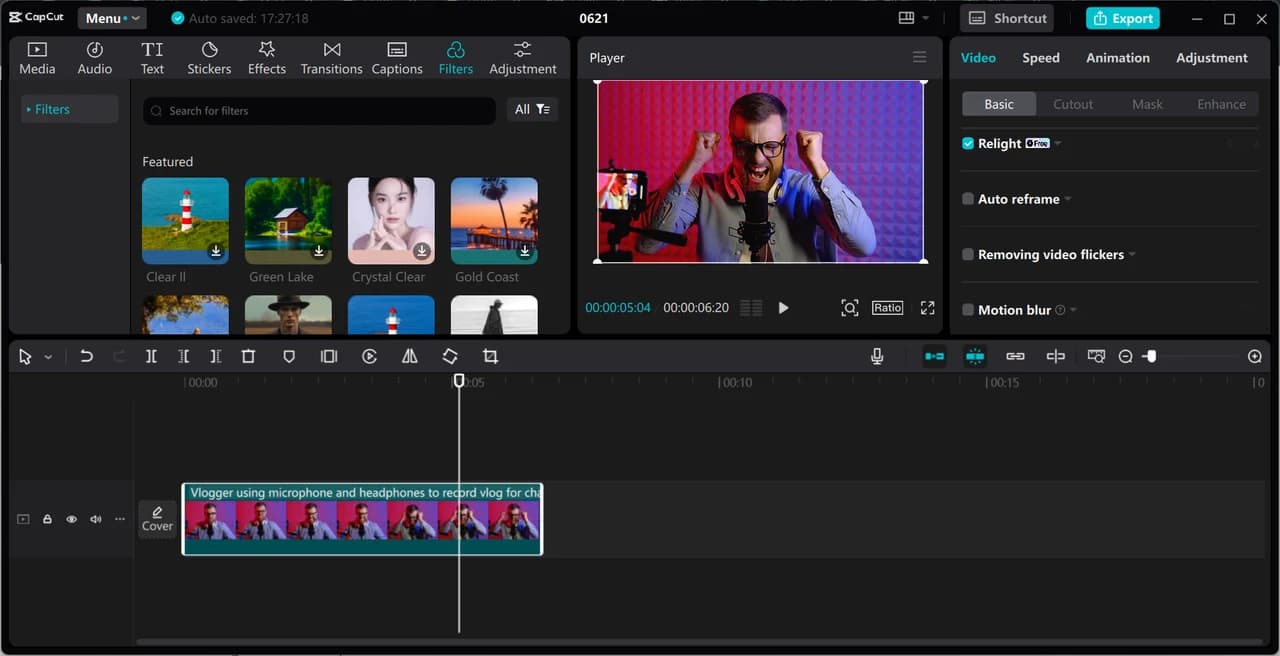
CapCut is a video editing platform combining a full-featured free timeline editor with AI-assisted tools — auto-captions, background removal, smart trimming, AI Auto-Edit, and text-to-speech voiceover — built primarily around short-form, social-first video. Its effects library runs to more than 50,000 templates, transitions, and motion graphics, with an AI recommendation system suggesting options based on the type of content being edited.
For furniture, real estate, interior design, and construction businesses producing a steady stream of social video — product showcases, listing walkthroughs, before-and-after reveals, project updates — CapCut's combination of a genuinely usable free tier and fast AI-assisted editing removes much of the time cost of turning raw footage into something publishable.
This review evaluates CapCut based on its editing depth, AI feature accuracy, and practical fit for businesses producing marketing video without a dedicated editor heading into 2026.
Key Features
AI Auto-Edit
CapCut's AI Auto-Edit analyzes raw clips and assembles a rough cut automatically, giving users a working starting point to refine rather than building a timeline from a blank project every time.
Auto-Captions & Voiceover
Auto-generated captions run at roughly 92-94% accuracy on clear talking-head footage without manual correction, and built-in AI text-to-speech voiceover lets users add narration without recording audio separately.
Massive Template & Effects Library
With over 50,000 templates, transitions, filters, and motion graphics, CapCut covers a wide range of visual styles, with AI suggesting effects that match the specific type of content being edited.
Full-Featured Free Tier
Unlike many editors that gate core functionality behind a paywall, CapCut's free plan includes multi-track timeline editing, keyframe animation, chroma key, basic stabilization, and AI voiceover — enough for genuinely usable, professional-looking output before ever upgrading.
Pros & Cons
Pros
- ✅ Fully capable free tier — cut, multi-track timeline, keyframes, chroma key, AI voiceover
- ✅ Over 50,000 templates, transitions, and effects, with AI recommending ones that fit the footage
- ✅ Auto-captions run around 92-94% accuracy on clear talking-head footage without corrections
- ✅ AI Auto-Edit turns raw clips into a rough cut automatically to speed up first-draft editing
Cons
- ❌ AI editing tools work on footage you already have — they don't replace filming itself
- ❌ Effects-heavy templates can feel more social-first than fitting every brand's tone
- ❌ Deeper color grading and audio mixing still favor dedicated professional editors
- ❌ Best results at scale still benefit from a consistent, planned content calendar
Who Is It Best For?
CapCut is the right tool if you:
- Need to edit and publish social video regularly without hiring a dedicated editor
- Want a genuinely usable free tier before committing to a paid subscription
- Produce short-form content — Reels, TikToks, listing walkthroughs — as a core part of marketing
- Value speed in turning raw footage into a polished, captioned final cut
CapCut is not the right tool if you:
- Need professional-grade color grading or multi-track audio mixing for long-form production
- Want a tool built primarily around transcript-based editing rather than a timeline
- Are producing content where a heavily templated, social-first aesthetic doesn't fit the brand
Alternatives to Consider
- Descript — better for transcript-based editing and podcast or long-form production
- Opus Clip — stronger specifically for repurposing long videos into multiple short clips
- Zebracat — better for assembling a full marketing video from a script rather than raw footage
- Synthesia — better for polished, avatar-presenter-led corporate and training video
- Fliki — better for turning existing blog or written content directly into narrated video
Final Verdict
CapCut earns its place as a practical, low-cost entry point for businesses that need to produce social video regularly without a dedicated editor. The combination of a genuinely capable free tier, a huge effects library, and AI tools that speed up captioning and rough cuts covers most of what furniture, real estate, and design businesses need for day-to-day marketing video.
For long-form production, professional audio work, or transcript-based editing workflows, a more specialized tool will serve better — CapCut's strength is fast, social-first video at volume.
Our recommendation: Use AI Auto-Edit on your next batch of raw footage to see how much manual editing time it actually saves before building out a more templated workflow around it.
Key Features
Fully capable free tier — cut, multi-track timeline, keyframes, chroma key, AI voiceover
Over 50,000 templates, transitions, and effects, with AI recommending ones that fit the footage
Auto-captions run around 92-94% accuracy on clear talking-head footage without corrections
AI Auto-Edit turns raw clips into a rough cut automatically to speed up first-draft editing
Best For
Furniture brands editing product and showroom videos for social media quickly
Real estate agents turning property walkthrough footage into polished listing videos
Interior designers producing before-and-after reveal videos for Instagram and TikTok
Construction companies editing project update clips without a dedicated video editor
Pros & Cons
What We Like
- Fully capable free tier — cut, multi-track timeline, keyframes, chroma key, AI voiceover
- Over 50,000 templates, transitions, and effects, with AI recommending ones that fit the footage
- Auto-captions run around 92-94% accuracy on clear talking-head footage without corrections
- AI Auto-Edit turns raw clips into a rough cut automatically to speed up first-draft editing
What We Don't Like
- AI editing tools work on footage you already have — they don't replace filming itself
- Effects-heavy templates can feel more social-first than fitting every brand's tone
- Deeper color grading and audio mixing still favor dedicated professional editors
- Best results at scale still benefit from a consistent, planned content calendar
Top CapCut Alternatives
View all alternatives →


CapCut vs Top Alternatives
| Tool | Best For | Price | AI Quality | Features | Support | Ease of Use | Rating | |
|---|---|---|---|---|---|---|---|---|
 | Furniture brands editing product and showroom videos for social media quickly | Contact for pricing | 9/10 | Current | ||||
 | Cross-niche | Contact for pricing | 8.5/10 | Read Review → | ||||
 | Cross-niche | Contact for pricing | 8.2/10 | Read Review → | ||||
 | Cross-niche | Contact for pricing | 7.9/10 | Read Review → | ||||
 | Cross-niche | Contact for pricing | 7.6/10 | Read Review → |
Our CapCut Verdict
CapCut is best suited for furniture, real estate, and design businesses that need to edit and publish social media video quickly, using AI-assisted captions, templates, and background tools instead of a full production workflow.
Visit website for full details
FAQ
Related Articles
View all articles →Best AI Content & Marketing Tools for Professionals in 2026
Discover the top AI tools we recommend in AI Content & Marketing Tools.
View Hub →CapCut vs Top Alternatives: Full Comparison
Side-by-side breakdown of CapCut and its main competitors.
View Comparisons →Hands-on Guides & Workflows
Step-by-step playbooks for getting the most out of tools like CapCut.
Browse Guides →Related Tools in AI Content & Marketing Tools
See all the best AI Content & Marketing Tools →
Descript
Descript is best suited for real estate, architecture, and design businesses producing client testimonials, walkthroughs, or podcasts who want to edit video and audio by editing a text transcript instead of a traditional timeline.
Read Review →
Grammarly
Grammarly is a writing assistant best suited for architecture, construction, and real estate professionals who send a high volume of client emails, proposals, and reports and want consistently polished, error-free communication.
Read Review →
Jasper AI
Jasper is one of the best AI writing tools for marketing teams and agencies in 2026 — offering brand voice training, 50+ templates, and team collaboration features that help content creators produce high-quality copy at scale.
Read Review →
NeuronWriter
NeuronWriter is best suited for architecture, construction, furniture, and real estate businesses that write their own blog and website content and want NLP-driven guidance to make it actually rank, not just read well.
Read Review →