

Opus Clip Review:
Is It Worth It in 2026?
Opus Clip is best suited for real estate, furniture, and design businesses sitting on long-form video — walkthroughs, webinars, interviews — who want AI to find and cut the best short-form moments automatically instead of manually scrubbing footage.
Best For
Our Overall Rating
Based on comprehensive testing
Best For
- Real estate agencies turning long property tour footage into short listing highlight clips
- Furniture brands repurposing showroom or trade show video into social content
- Interior designers clipping client walkthroughs into shareable before-and-after moments
- Construction companies turning project update recordings into short progress clips
Pricing
See current pricing on the Opus Clip website.
Bottom Line
Opus Clip is best suited for real estate, furniture, and design businesses sitting on long-form video — walkthroughs, webinars, interviews — who want AI to find and cut the best short-form moments automatically instead of manually scrubbing footage.
Visit Opus Clip →Quick Verdict
Opus Clip scores 9.0/10 in our testing and is an excellent choice for Real estate agencies turning long property tour footage into short listing highlight clips and Furniture brands repurposing showroom or trade show video into social content.
What Is Opus Clip?
Overview
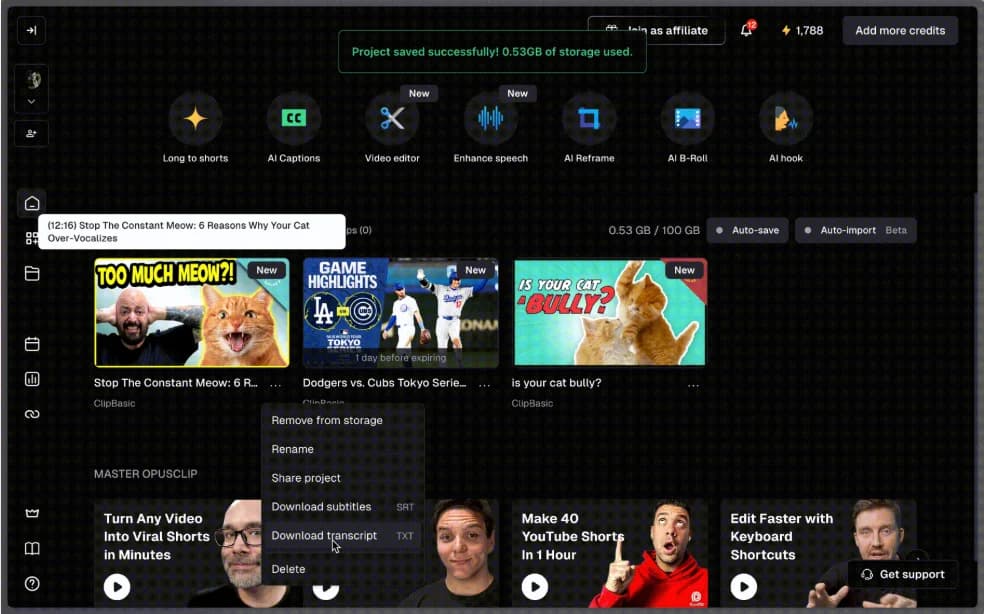
Opus Clip uses AI to find and cut the most engaging moments from long-form video, turning webinars, interviews, and walkthrough recordings into multiple short-form clips automatically. Its ClipAnything model analyzes visual, audio, and sentiment cues to identify viral-worthy moments, adds automatic captions in over 25 languages, and reframes footage for vertical formats — while a URL-based clipping feature lets users generate clips from any public video without downloading the source file first.
For real estate, furniture, and design businesses that already sit on hours of long-form video — property tours, showroom walkthroughs, client presentations — this matters because most of that footage never gets repurposed simply due to the time cost of manually scrubbing through it to find the best moments.
This review evaluates Opus Clip based on its clip selection accuracy, editing automation depth, and practical fit for businesses repurposing existing video heading into 2026.
Key Features
ClipAnything
Opus Clip's core AI model analyzes visual, audio, and sentiment cues across a long-form video to identify moments likely to perform well as standalone short-form content, rather than requiring manual review of the entire recording.
URL-Based Clipping
Rather than only working with uploaded files, ClipAnything can generate clips directly from any public video URL — conference talks, interviews, competitor content — without needing to download the source video first.
Generative B-Roll & Styled Captions
The platform can insert contextually relevant AI-generated or stock B-roll to cover visual gaps, alongside dynamic, animated captions styled to match the video's energy and auto-generated hooks designed to stop the scroll in the first few seconds.
Built-In Social Scheduler
On paid plans, clips can be scheduled and auto-posted directly to YouTube, YouTube Shorts, Instagram Reels, TikTok, Facebook Pages, LinkedIn, and X, removing a separate scheduling step after clips are generated.
Pros & Cons
Pros
- ✅ ClipAnything analyzes visual, audio, and sentiment cues to find viral-worthy moments automatically
- ✅ Can clip directly from a public video URL without needing to download the source file
- ✅ Generative B-roll fills visual gaps and animated, styled captions match the content's energy
- ✅ Built-in social scheduler auto-posts clips to YouTube Shorts, Reels, TikTok, and more
Cons
- ❌ Reports of roughly 40% of auto-generated clips needing to be discarded or reworked
- ❌ AI selection still benefits from a human pass to confirm the best moments made the cut
- ❌ Most valuable when there's a steady supply of long-form source video to repurpose
- ❌ Auto-generated hooks and titles need a brand-voice check before publishing at scale
Who Is It Best For?
Opus Clip is the right tool if you:
- Already have long-form video — tours, webinars, interviews — that isn't being repurposed
- Want AI to do the first pass on finding good moments rather than manually scrubbing footage
- Post regularly across multiple short-form platforms and want scheduling built in
- Are comfortable reviewing and discarding a portion of auto-generated clips before publishing
Opus Clip is not the right tool if you:
- Don't yet have a library of long-form video to draw clips from
- Expect every AI-selected clip to be publish-ready without any review
- Need precise, manual control over every cut rather than an AI-driven starting point
Alternatives to Consider
- CapCut — better for building short-form video from scratch rather than clipping existing footage
- Descript — stronger for transcript-based editing of the original long-form source itself
- Zebracat — better for assembling a marketing video from a script rather than repurposing footage
- Fliki — better for turning written content directly into narrated video
- Synthesia — better for polished, avatar-presenter-led video rather than clipping real footage
Final Verdict
Opus Clip earns its place for businesses sitting on unused long-form video who want AI to handle the time-consuming part of finding and cutting the best moments. The combination of sentiment-aware clip selection, URL-based clipping, and a built-in social scheduler turns a backlog of recordings into a genuine, ongoing short-form content pipeline.
Treat the AI's output as a strong first pass rather than a finished product — reviewing and discarding weaker clips before publishing keeps quality consistent even as volume scales up.
Our recommendation: Run your most recent long-form recording — a property tour or client walkthrough — through Opus Clip first, and review the output honestly before deciding whether to make it a standard part of your video workflow.
Key Features
ClipAnything analyzes visual, audio, and sentiment cues to find viral-worthy moments automatically
Can clip directly from a public video URL without needing to download the source file
Generative B-roll fills visual gaps and animated, styled captions match the content's energy
Built-in social scheduler auto-posts clips to YouTube Shorts, Reels, TikTok, and more
Best For
Real estate agencies turning long property tour footage into short listing highlight clips
Furniture brands repurposing showroom or trade show video into social content
Interior designers clipping client walkthroughs into shareable before-and-after moments
Construction companies turning project update recordings into short progress clips
Pros & Cons
What We Like
- ClipAnything analyzes visual, audio, and sentiment cues to find viral-worthy moments automatically
- Can clip directly from a public video URL without needing to download the source file
- Generative B-roll fills visual gaps and animated, styled captions match the content's energy
- Built-in social scheduler auto-posts clips to YouTube Shorts, Reels, TikTok, and more
What We Don't Like
- Reports of roughly 40% of auto-generated clips needing to be discarded or reworked
- AI selection still benefits from a human pass to confirm the best moments made the cut
- Most valuable when there's a steady supply of long-form source video to repurpose
- Auto-generated hooks and titles need a brand-voice check before publishing at scale
Top Opus Clip Alternatives
View all alternatives →


Opus Clip vs Top Alternatives
| Tool | Best For | Price | AI Quality | Features | Support | Ease of Use | Rating | |
|---|---|---|---|---|---|---|---|---|
 | Real estate agencies turning long property tour footage into short listing highlight clips | Contact for pricing | 9/10 | Current | ||||
 | Cross-niche | Contact for pricing | 8.5/10 | Read Review → | ||||
 | Cross-niche | Contact for pricing | 8.2/10 | Read Review → | ||||
 | Cross-niche | Contact for pricing | 7.9/10 | Read Review → | ||||
 | Cross-niche | Contact for pricing | 7.6/10 | Read Review → |
Our Opus Clip Verdict
Opus Clip is best suited for real estate, furniture, and design businesses sitting on long-form video — walkthroughs, webinars, interviews — who want AI to find and cut the best short-form moments automatically instead of manually scrubbing footage.
Visit website for full details
FAQ
Related Articles
View all articles →Best AI Content & Marketing Tools for Professionals in 2026
Discover the top AI tools we recommend in AI Content & Marketing Tools.
View Hub →Opus Clip vs Top Alternatives: Full Comparison
Side-by-side breakdown of Opus Clip and its main competitors.
View Comparisons →Hands-on Guides & Workflows
Step-by-step playbooks for getting the most out of tools like Opus Clip.
Browse Guides →Related Tools in AI Content & Marketing Tools
See all the best AI Content & Marketing Tools →
Surfer SEO
Surfer SEO is best suited for architecture, construction, furniture, and real estate businesses writing their own content who want live, SERP-backed optimization scoring and AI writing guidance tied directly to what's actually ranking.
Read Review →
Moosend
Moosend is best suited for furniture, real estate, and construction businesses that want affordable email marketing automation — welcome series, cart recovery, re-engagement — with a visual workflow builder and AI writing help included.
Read Review →
SearchAtlas
SearchAtlas is an all-in-one AI SEO platform combining keyword research, content optimization, backlink analysis, and OTTO — an AI automation engine that implements SEO fixes automatically instead of just flagging them. Used by 50,000+ marketers and agencies.
Read Review →
Typefully
Typefully is best suited for architecture, construction, and real estate professionals building a personal or company presence on X and LinkedIn who want a focused writing and scheduling tool rather than a heavy social media suite.
Read Review →