

Doxel Review:
Is It Worth It in 2026?
Doxel is best suited for general contractors and owners on large commercial construction projects who need automated, data-driven progress tracking and quality control — replacing manual site walks with AI analysis of 3D scan data captured by autonomous robots.
Best For
Our Overall Rating
Based on comprehensive testing
Best For
- General contractors managing large commercial construction projects with complex BIM models
- Owners and developers monitoring construction progress and quality on major projects
- Construction managers needing objective productivity and schedule performance data
- Project teams looking to reduce costly rework through early deviation detection
Pricing
See current pricing on the Doxel website.
Bottom Line
Doxel is best suited for general contractors and owners on large commercial construction projects who need automated, data-driven progress tracking and quality control — replacing manual site walks with AI analysis of 3D scan data captured by autonomous robots.
Visit Doxel →Quick Verdict
Doxel scores 8.6/10 in our testing and is a strong choice for General contractors managing large commercial construction projects with complex BIM models and Owners and developers monitoring construction progress and quality on major projects.
What Is Doxel?
Overview
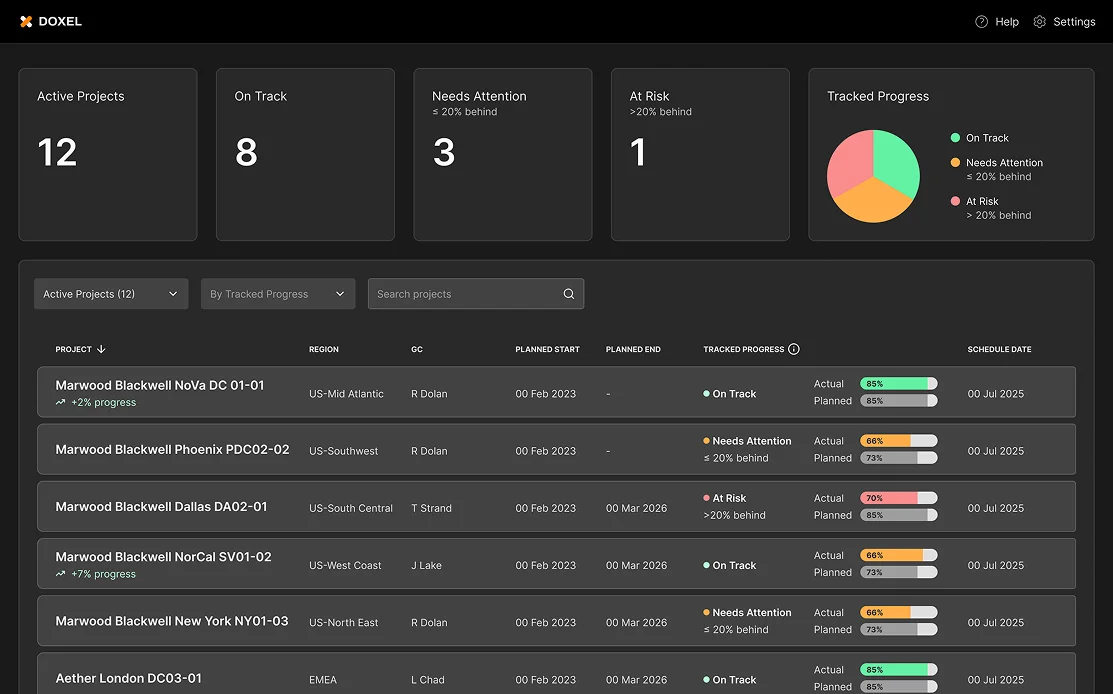
Doxel is an AI-powered construction monitoring platform that uses autonomous robots equipped with LiDAR scanners and cameras to capture as-built site conditions, then compares that data against BIM models to identify progress deviations, quality issues, and productivity trends in near real time.
Rather than relying on manual site walks and subjective progress reporting, Doxel gives project teams quantitative data on what has been built, how it compares to the model, and how labor productivity is tracking against the schedule. For owners and general contractors on large commercial projects, this shifts progress monitoring from an opinion-based activity to a data-driven one.
This review evaluates Doxel based on its monitoring capabilities, BIM integration, and practical fit for construction project teams in 2026.
Key Features
Autonomous Site Scanning
Doxel deploys autonomous robots that navigate construction sites independently, capturing LiDAR point clouds and visual data across large floor areas without requiring a technician to manually scan. This makes regular, comprehensive site captures operationally practical on large projects.
AI BIM Comparison
Captured scan data is automatically compared against the project's BIM model, with AI identifying where as-built conditions deviate from the design — flagging geometry misalignments, missing work, and potential quality issues for review by the project team.
Schedule and Productivity Analytics
Beyond quality, Doxel tracks labor productivity by measuring how much work is being installed each day against the project schedule. This gives superintendents and project managers an objective data source for identifying productivity trends and schedule risk before they become critical path issues.
Early Rework Detection
By identifying deviations from the BIM model early — rather than during a formal inspection — Doxel reduces the cost of rework. Catching a coordination error when it can still be corrected before adjacent work is installed is significantly cheaper than finding it after enclosure.
Pros & Cons
Pros
- ✅ Autonomous robots capture LiDAR and visual data across the site without manual scanning
- ✅ AI compares as-built conditions to BIM models to identify deviations in near real time
- ✅ Tracks labor productivity and schedule progress with quantitative data rather than subjective estimates
- ✅ Reduces rework costs by catching quality and coordination issues earlier in construction
Cons
- ❌ Requires BIM model as a reference baseline — less effective without detailed digital models
- ❌ Hardware deployment and integration adds complexity versus software-only solutions
- ❌ Primarily suited to large commercial projects where the ROI justifies the implementation cost
- ❌ Data collection frequency depends on robot scheduling rather than continuous monitoring
Who Is It Best For?
Doxel is the right tool if you:
- Manage large commercial construction projects with detailed BIM models and high rework cost exposure
- Need objective progress data rather than relying on superintendent reports and schedule estimates
- Want to reduce rework costs through earlier detection of quality and coordination deviations
- Have owner or GC accountability for project cost and schedule performance
Doxel is not the right tool if you:
- Work on small or residential projects where manual monitoring is sufficient
- Don't have BIM models to serve as the comparison baseline
- Need a software-only solution without hardware deployment requirements
Alternatives to Consider
- ALICE Technologies — AI construction scheduling optimization rather than site monitoring
- Fieldwire — field management and task tracking without autonomous scanning capabilities
- Autodesk Construction Cloud — broader construction management platform with progress documentation features
- Procore — comprehensive construction management covering quality, safety, and documentation
Final Verdict
Doxel represents a meaningful advance in construction quality control and progress monitoring — replacing subjective site walk reporting with AI-analyzed scan data that can objectively compare what has been built against what was designed. For large commercial projects where rework costs and schedule delays are significant financial risks, this shift from opinion to data is valuable.
The implementation overhead is real, and the tool is not suited to smaller projects or teams without BIM infrastructure. But for the right project scale, Doxel's early deviation detection capability pays for itself by catching expensive coordination issues before they become rework.
Our recommendation: Evaluate Doxel's ROI against your last two or three projects' rework costs. If rework and late-stage quality issues were a meaningful cost on those projects, Doxel's early detection value is worth the implementation investment.
Key Features
Autonomous robots capture LiDAR and visual data across the site without manual scanning
AI compares as-built conditions to BIM models to identify deviations in near real time
Tracks labor productivity and schedule progress with quantitative data rather than subjective estimates
Reduces rework costs by catching quality and coordination issues earlier in construction
Best For
General contractors managing large commercial construction projects with complex BIM models
Owners and developers monitoring construction progress and quality on major projects
Construction managers needing objective productivity and schedule performance data
Project teams looking to reduce costly rework through early deviation detection
Pros & Cons
What We Like
- Autonomous robots capture LiDAR and visual data across the site without manual scanning
- AI compares as-built conditions to BIM models to identify deviations in near real time
- Tracks labor productivity and schedule progress with quantitative data rather than subjective estimates
- Reduces rework costs by catching quality and coordination issues earlier in construction
What We Don't Like
- Requires BIM model as a reference baseline — less effective without detailed digital models
- Hardware deployment and integration adds complexity versus software-only solutions
- Primarily suited to large commercial projects where the ROI justifies the implementation cost
- Data collection frequency depends on robot scheduling rather than continuous monitoring
Top Doxel Alternatives
View all alternatives →


Doxel vs Top Alternatives
| Tool | Best For | Price | AI Quality | Features | Support | Ease of Use | Rating | |
|---|---|---|---|---|---|---|---|---|
 | General contractors managing large commercial construction projects with complex BIM models | Contact for pricing | 8.6/10 | Current | ||||
 | Construction | Contact for pricing | 8.1/10 | Read Review → | ||||
 | Construction | Contact for pricing | 7.8/10 | Read Review → | ||||
 | Construction | Contact for pricing | 7.5/10 | Read Review → | ||||
 | Construction | Contact for pricing | 7.2/10 | Read Review → |
Our Doxel Verdict
Doxel is best suited for general contractors and owners on large commercial construction projects who need automated, data-driven progress tracking and quality control — replacing manual site walks with AI analysis of 3D scan data captured by autonomous robots.
Visit website for full details
FAQ
Related Articles
View all articles →Best AI Productivity Tools for Professionals in 2026
Discover the top AI tools we recommend in AI Productivity Tools.
View Hub →Doxel vs Top Alternatives: Full Comparison
Side-by-side breakdown of Doxel and its main competitors.
View Comparisons →Hands-on Guides & Workflows
Step-by-step playbooks for getting the most out of tools like Doxel.
Browse Guides →Related Tools in AI Productivity Tools
See all the best AI Productivity Tools →
Expandi
Expandi is best suited for B2B professionals in commercial real estate, construction, and architecture who want to automate LinkedIn outreach safely — running personalized connection and messaging campaigns to build networks and generate leads without manually sending every message.
Read Review →
Frase
Frase is best suited for real estate blogs, design publications, and content marketers who want to research, write, and optimize SEO content that ranks — analyzing top-ranking pages for any keyword and generating optimized content briefs and drafts based on what search engines reward.
Read Review →
FreeOCR.AI
FreeOCR.AI is best suited for architecture, construction, and real estate businesses that need to pull editable text, tables, or structured data out of scanned plans, invoices, and contracts without retyping everything by hand.
Read Review →
Grok
Grok is xAI's conversational AI assistant best suited for professionals who want real-time access to current information and trends, layered with general-purpose writing and research help.
Read Review →