

Descript Review:
Is It Worth It in 2026?
Descript is best suited for real estate, architecture, and design businesses producing client testimonials, walkthroughs, or podcasts who want to edit video and audio by editing a text transcript instead of a traditional timeline.
Best For
Our Overall Rating
Based on comprehensive testing
Best For
- Real estate agencies producing client testimonial and market update video content
- Architecture and design firms recording and cleaning up client walkthrough narration
- Construction companies producing podcast-style project update or interview content
- Businesses wanting to fix narration mistakes without re-recording the entire take
Pricing
See current pricing on the Descript website.
Bottom Line
Descript is best suited for real estate, architecture, and design businesses producing client testimonials, walkthroughs, or podcasts who want to edit video and audio by editing a text transcript instead of a traditional timeline.
Visit Descript →Quick Verdict
Descript scores 9.0/10 in our testing and is an excellent choice for Real estate agencies producing client testimonial and market update video content and Architecture and design firms recording and cleaning up client walkthrough narration.
What Is Descript?
Overview
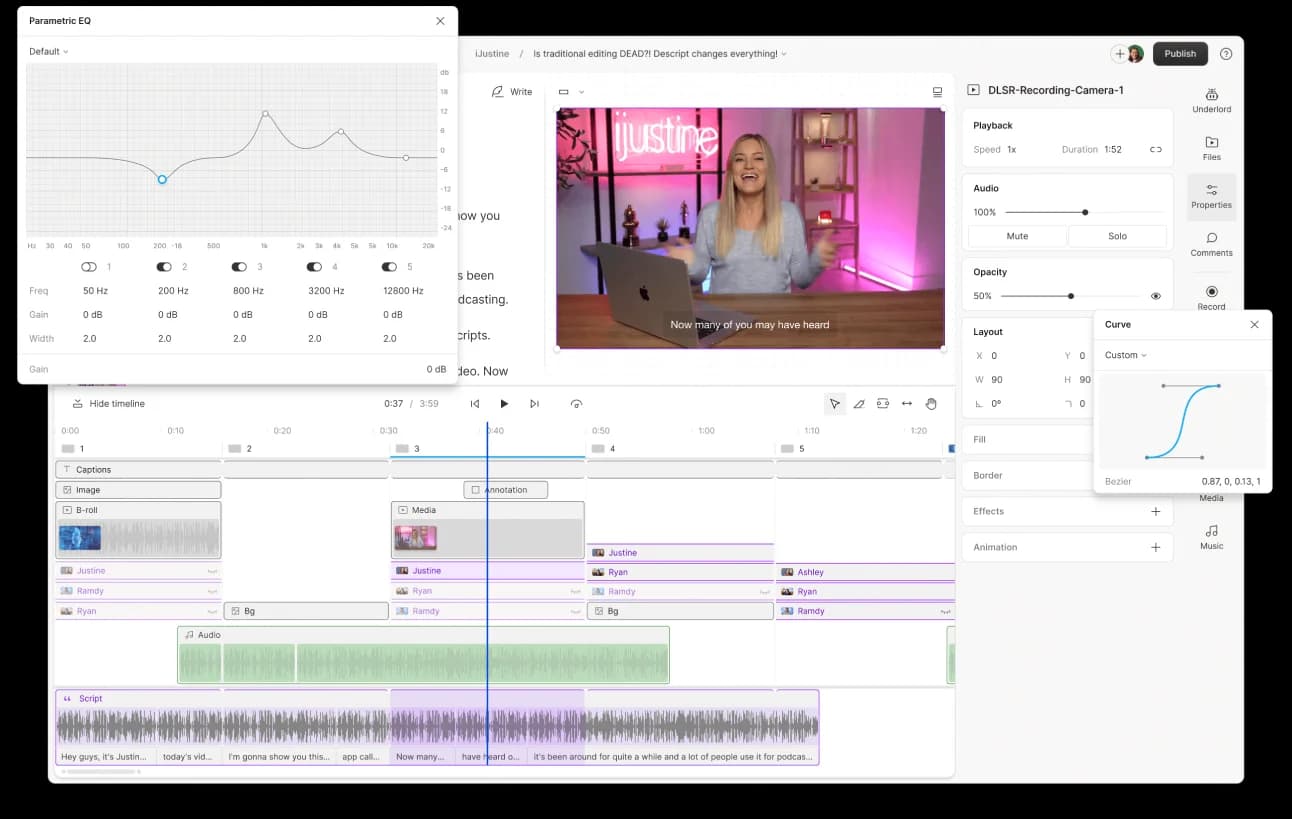
Descript edits video and audio through a document-style workflow — delete a word in the transcript, and it's deleted from the recording, just like editing a Word document rather than dragging clips on a timeline. Its Overdub feature captures not just a speaker's vocal timbre but their pacing, emphasis, and emotional inflection, so a misspoken date or name can be typed as a correction in the script and Descript generates the fixed audio in that person's own voice. Studio Sound, a regenerative AI tool, strips background noise and room echo from a recording made in a noisy environment.
For real estate, architecture, and design businesses producing client testimonials, project walkthroughs, or podcast-style content, this matters because re-recording an entire take over one mistake is a real time cost — Descript's transcript-based correction and voice cloning remove that friction directly.
This review evaluates Descript based on its editing workflow, voice cloning quality, and practical fit for businesses producing spoken-word video and audio content heading into 2026.
Key Features
Transcript-Based Editing
Descript transcribes recorded video or audio automatically, then lets users edit the actual media by editing the text transcript directly — deleting, moving, or rewriting words edits the underlying recording in sync.
Overdub Voice Cloning
After training on a short sample of a speaker's voice, Overdub can generate new sentences in that person's own voice — including their pacing and emotional inflection — letting users fix misspoken words by typing a correction rather than re-recording.
Studio Sound
This regenerative AI audio tool removes background noise and room echo from a recording, making audio captured in an imperfect environment sound like it was recorded in a professional studio.
Underlord AI Assistant
Underlord automates tedious production tasks — removing filler words like "um" and "uh," adjusting eye contact in video, and generating short social clips from longer recordings — reducing manual post-production work.
Pros & Cons
Pros
- ✅ Edit video and audio by deleting or rewriting words in the transcript, not a timeline
- ✅ Overdub voice cloning fixes misspoken words by generating corrected audio in your own voice
- ✅ Studio Sound strips background noise and room echo to sound professionally recorded
- ✅ Underlord AI assistant automates filler-word removal, eye contact fixes, and social clip generation
Cons
- ❌ Transcript-based editing takes an adjustment period for editors used to a timeline
- ❌ Voice cloning and AI production features are strongest on paid tiers, not the free plan
- ❌ Best suited to talking-head, interview, and podcast-style content over heavily stylized edits
- ❌ Deep multi-track color grading still favors a traditional professional video editor
Who Is It Best For?
Descript is the right tool if you:
- Produce talking-head, interview, or podcast-style content regularly
- Want to fix mistakes by editing text rather than re-recording or manually scrubbing a timeline
- Record in imperfect audio environments and need clean, studio-quality sound afterward
- Want AI to automate repetitive production tasks like filler-word removal and clip generation
Descript is not the right tool if you:
- Produce heavily stylized, effects-driven social video better suited to a timeline editor
- Need deep multi-track color grading and audio mixing beyond conversational content
- Want the full AI production suite without moving past the free plan
Alternatives to Consider
- CapCut — better for effects-heavy, template-driven short-form social video editing
- Opus Clip — stronger specifically for repurposing existing long-form video into short clips
- Synthesia — better for fully AI-avatar-presented video rather than editing real recordings
- Wispr Flow — relevant for dictating notes and scripts quickly rather than editing recorded media
- Fliki — better for turning written content directly into narrated video from scratch
Final Verdict
Descript earns its place for businesses producing spoken-word content — testimonials, walkthroughs, interviews, podcasts — who want editing that matches how people actually think about fixing a recording: by changing what was said, not manually scrubbing a timeline. Overdub and Studio Sound directly address the two most common post-production headaches: mistakes and bad audio environments.
For heavily stylized, effects-driven social content, a timeline-first editor will still be the better fit — Descript's strength is conversational, spoken-word production.
Our recommendation: Record your next client testimonial or walkthrough with Descript from the start, and test Overdub on one intentional correction to evaluate voice quality before relying on it for client-facing content.
Key Features
Edit video and audio by deleting or rewriting words in the transcript, not a timeline
Overdub voice cloning fixes misspoken words by generating corrected audio in your own voice
Studio Sound strips background noise and room echo to sound professionally recorded
Underlord AI assistant automates filler-word removal, eye contact fixes, and social clip generation
Best For
Real estate agencies producing client testimonial and market update video content
Architecture and design firms recording and cleaning up client walkthrough narration
Construction companies producing podcast-style project update or interview content
Businesses wanting to fix narration mistakes without re-recording the entire take
Pros & Cons
What We Like
- Edit video and audio by deleting or rewriting words in the transcript, not a timeline
- Overdub voice cloning fixes misspoken words by generating corrected audio in your own voice
- Studio Sound strips background noise and room echo to sound professionally recorded
- Underlord AI assistant automates filler-word removal, eye contact fixes, and social clip generation
What We Don't Like
- Transcript-based editing takes an adjustment period for editors used to a timeline
- Voice cloning and AI production features are strongest on paid tiers, not the free plan
- Best suited to talking-head, interview, and podcast-style content over heavily stylized edits
- Deep multi-track color grading still favors a traditional professional video editor
Top Descript Alternatives
View all alternatives →


Descript vs Top Alternatives
| Tool | Best For | Price | AI Quality | Features | Support | Ease of Use | Rating | |
|---|---|---|---|---|---|---|---|---|
 | Real estate agencies producing client testimonial and market update video content | Contact for pricing | 9/10 | Current | ||||
 | Cross-niche | Contact for pricing | 8.5/10 | Read Review → | ||||
 | Cross-niche | Contact for pricing | 8.2/10 | Read Review → | ||||
 | Cross-niche | Contact for pricing | 7.9/10 | Read Review → | ||||
 | Cross-niche | Contact for pricing | 7.6/10 | Read Review → |
Our Descript Verdict
Descript is best suited for real estate, architecture, and design businesses producing client testimonials, walkthroughs, or podcasts who want to edit video and audio by editing a text transcript instead of a traditional timeline.
Visit website for full details
FAQ
Related Articles
View all articles →Best AI Content & Marketing Tools for Professionals in 2026
Discover the top AI tools we recommend in AI Content & Marketing Tools.
View Hub →Descript vs Top Alternatives: Full Comparison
Side-by-side breakdown of Descript and its main competitors.
View Comparisons →Hands-on Guides & Workflows
Step-by-step playbooks for getting the most out of tools like Descript.
Browse Guides →Related Tools in AI Content & Marketing Tools
See all the best AI Content & Marketing Tools →
Grammarly
Grammarly is a writing assistant best suited for architecture, construction, and real estate professionals who send a high volume of client emails, proposals, and reports and want consistently polished, error-free communication.
Read Review →
Jasper AI
Jasper is one of the best AI writing tools for marketing teams and agencies in 2026 — offering brand voice training, 50+ templates, and team collaboration features that help content creators produce high-quality copy at scale.
Read Review →
NeuronWriter
NeuronWriter is best suited for architecture, construction, furniture, and real estate businesses that write their own blog and website content and want NLP-driven guidance to make it actually rank, not just read well.
Read Review →
Opus Clip
Opus Clip is best suited for real estate, furniture, and design businesses sitting on long-form video — walkthroughs, webinars, interviews — who want AI to find and cut the best short-form moments automatically instead of manually scrubbing footage.
Read Review →