

SubClip Review:
Is It Worth It in 2026?
SubClip is best suited for real estate agents, designers, and content creators who want to add AI-generated captions and turn videos into short-form clips quickly — making social video more engaging and accessible without manual captioning or editing.
We may earn a commission when you purchase through links on our site. Learn more
Best For
Our Overall Rating
Based on comprehensive testing
Best For
- Real estate agents captioning property and personal-brand videos for social media
- Interior designers and architects adding captions to project walkthrough clips
- Furniture and design brands producing captioned short-form social video efficiently
- Creators who mainly need captioning and clipping without a full editing suite
Pricing
See current pricing on the SubClip website.
Bottom Line
SubClip is best suited for real estate agents, designers, and content creators who want to add AI-generated captions and turn videos into short-form clips quickly — making social video more engaging and accessible without manual captioning or editing.
Visit SubClip →Quick Verdict
SubClip scores 8.0/10 in our testing and is a strong choice for Real estate agents captioning property and personal-brand videos for social media and Interior designers and architects adding captions to project walkthrough clips.
What Is SubClip?
Overview
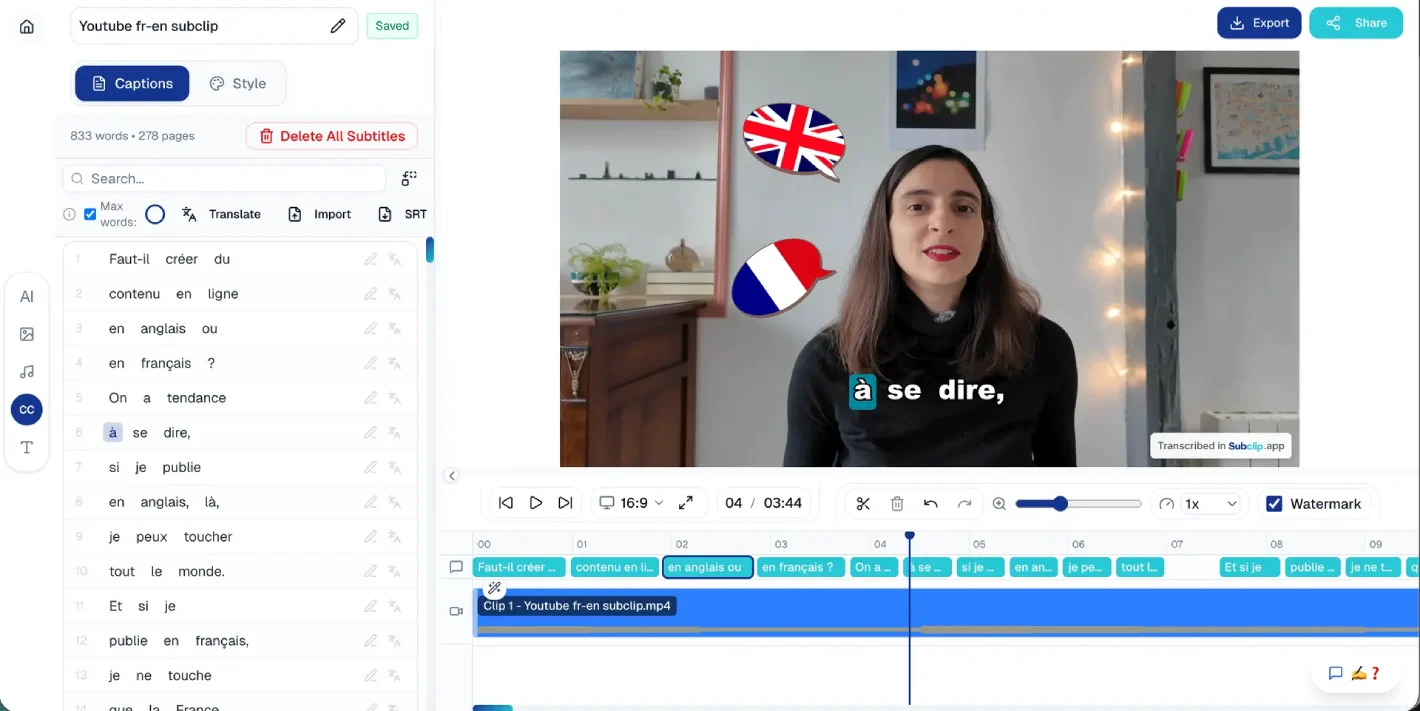
SubClip is an AI video tool for adding captions and creating short-form clips from video content. It focuses on the two most common needs for social video — accurate automatic captioning and turning footage into platform-ready short clips — with a fast, accessible workflow that requires no video editing experience.
For real estate agents captioning property videos, interior designers and architects sharing project walkthroughs, and furniture brands producing social content, SubClip addresses the practical need to make video more engaging and accessible — captions drive engagement on sound-off social feeds and improve accessibility — without the manual effort of captioning and editing each clip by hand.
This review evaluates SubClip based on its captioning accuracy, clipping features, and practical fit for short-form video in the real estate and design industries in 2026.
Key Features
AI Auto-Captioning
SubClip automatically transcribes video and generates captions, adding the text overlays that drive engagement on social platforms where much video is watched without sound — and improving accessibility for all viewers.
Short-Form Clipping
The platform helps turn video into short-form clips formatted for social platforms, supporting the workflow from raw footage to publishable social content without manual video editing.
Accessible Workflow
SubClip is designed for ease of use, letting creators add captions and produce clips without video editing skills or complex software — lowering the barrier to consistent social video production.
Social-Ready Output
The tool formats and styles captions for social video, producing output ready to post on TikTok, Reels, and Shorts without additional formatting work.
Pros & Cons
Pros
- ✅ Adds accurate AI-generated captions to videos automatically for social and accessibility
- ✅ Helps turn video into short-form clips formatted for social platforms
- ✅ Fast, accessible workflow requires no video editing experience
- ✅ Affordable option for creators who mainly need captioning and simple clipping
Cons
- ❌ Auto-generated captions require review for accuracy with names and industry terms
- ❌ Fewer advanced enhancement features than more established short-form video tools
- ❌ Newer tool with a smaller track record than category leaders
- ❌ Value depends on regular short-form video production to justify the subscription
Who Is It Best For?
SubClip is the right tool if you:
- Need captions on your video for social engagement and accessibility without manual work
- Produce short-form clips and want a simple tool for captioning and formatting
- Lack video editing skills and want an accessible captioning and clipping workflow
- Want an affordable, focused tool rather than a full-featured video editing suite
SubClip is not the right tool if you:
- Need advanced enhancement features like B-roll, effects, and complex editing
- Produce highly polished video where a more established tool's feature depth matters
- Rarely make short-form video, where the subscription isn't justified
Alternatives to Consider
- Submagic — AI captioning and short-form enhancement with B-roll and effect suggestions
- Klap — AI clipping tool that turns long videos into short clips with captions
- CapCut — free video editor with strong AI caption and editing features
- Vizard.ai — AI video repurposing with clip generation and multi-platform formatting
- Opus Clip — AI long-to-short clipping with viral-moment detection and captions
Final Verdict
SubClip delivers the core essentials of social video preparation — accurate AI captioning and short-form clipping — in an accessible, affordable package. For real estate agents, designers, and architects who mainly need to caption their videos and format them for social platforms, it covers those needs without the cost or complexity of a full editing suite.
As a newer, more focused tool, SubClip offers fewer advanced enhancement features than established category leaders. For creators whose needs are primarily captioning and simple clipping, that focus keeps it simple and affordable; for those wanting richer enhancement, a more feature-rich alternative may fit better.
Our recommendation: Compare SubClip's captioning accuracy and output against a free tier of CapCut on the same clip before subscribing — since captioning is the core function, the quality and accuracy of the captions on your actual footage is the most important factor in whether SubClip is the right fit for your workflow.
Key Features
Adds accurate AI-generated captions to videos automatically for social and accessibility
Helps turn video into short-form clips formatted for social platforms
Fast, accessible workflow requires no video editing experience
Affordable option for creators who mainly need captioning and simple clipping
Best For
Real estate agents captioning property and personal-brand videos for social media
Interior designers and architects adding captions to project walkthrough clips
Furniture and design brands producing captioned short-form social video efficiently
Creators who mainly need captioning and clipping without a full editing suite
Pros & Cons
What We Like
- Adds accurate AI-generated captions to videos automatically for social and accessibility
- Helps turn video into short-form clips formatted for social platforms
- Fast, accessible workflow requires no video editing experience
- Affordable option for creators who mainly need captioning and simple clipping
What We Don't Like
- Auto-generated captions require review for accuracy with names and industry terms
- Fewer advanced enhancement features than more established short-form video tools
- Newer tool with a smaller track record than category leaders
- Value depends on regular short-form video production to justify the subscription
Top SubClip Alternatives
View all alternatives →


SubClip vs Top Alternatives
| Tool | Best For | Price | AI Quality | Features | Support | Ease of Use | Rating | |
|---|---|---|---|---|---|---|---|---|
 | Real estate agents captioning property and personal-brand videos for social media | Contact for pricing | 8/10 | Current | ||||
 | Marketing | Contact for pricing | 7.5/10 | Read Review → | ||||
 | Marketing | Contact for pricing | 7.2/10 | Read Review → | ||||
 | Marketing | Contact for pricing | 7/10 | Read Review → | ||||
 | Marketing | Contact for pricing | 7/10 | Read Review → |
Our SubClip Verdict
SubClip is best suited for real estate agents, designers, and content creators who want to add AI-generated captions and turn videos into short-form clips quickly — making social video more engaging and accessible without manual captioning or editing.
Visit website for full details
FAQ
Related Articles
View all articles →Best AI Productivity Tools for Professionals in 2026
Discover the top AI tools we recommend in AI Productivity Tools.
View Hub →SubClip vs Top Alternatives: Full Comparison
Side-by-side breakdown of SubClip and its main competitors.
View Comparisons →Hands-on Guides & Workflows
Step-by-step playbooks for getting the most out of tools like SubClip.
Browse Guides →Related Tools in AI Productivity Tools
See all the best AI Productivity Tools →
UseArticle
UseArticle is best suited for real estate blogs, design businesses, and content marketers who want to produce SEO-optimized articles at scale — generating long-form, search-ready blog content quickly to build organic traffic without writing every article manually.
Read Review →
PlanGrid
PlanGrid is a construction document and field collaboration tool that existing users can still rely on, but it is now in maintenance mode under Autodesk, with new customers directed to Autodesk Build instead.
Read Review →
ChatGPT
ChatGPT is OpenAI's general-purpose AI assistant best suited for architecture, construction, and real estate professionals who want one flexible tool for writing, research, image generation, and everyday problem-solving.
Read Review →
Claude
Claude is Anthropic's AI assistant best suited for architecture, construction, and real estate professionals who regularly need to analyze long contracts, specifications, or reports and want careful, well-reasoned written output.
Read Review →