

SketchUp AI Review:
Is It Worth It in 2026?
SketchUp AI is best suited for architects, interior designers, and furniture designers already using SketchUp who want AI-assisted modeling, generative design suggestions, and faster workflows within the familiar SketchUp modeling environment.
Best For
Our Overall Rating
Based on comprehensive testing
Best For
- Architects and designers already using SketchUp who want AI assistance within their existing workflow
- Furniture designers modeling products and components in 3D for visualization and production
- Interior designers building 3D space layouts before passing models to rendering plugins
- Small design firms wanting AI productivity gains without switching their core modeling software
Pricing
See current pricing on the SketchUp AI website.
Bottom Line
SketchUp AI is best suited for architects, interior designers, and furniture designers already using SketchUp who want AI-assisted modeling, generative design suggestions, and faster workflows within the familiar SketchUp modeling environment.
Visit SketchUp AI →Quick Verdict
SketchUp AI scores 9.0/10 in our testing and is an excellent choice for Architects and designers already using SketchUp who want AI assistance within their existing workflow and Furniture designers modeling products and components in 3D for visualization and production.
What Is SketchUp AI?
Overview
SketchUp AI refers to the growing set of AI-powered features and integrations being added to Trimble's SketchUp, one of the most widely used 3D modeling tools in architecture, interior design, and furniture design. Rather than replacing SketchUp's core manual modeling approach, these AI capabilities are layered into the existing workflow — assisting with generative design suggestions, faster massing exploration, and AI-powered extensions from the SketchUp ecosystem.
Because SketchUp has one of the largest user bases of any 3D modeling tool in architecture and design, AI enhancements to the platform have an outsized practical impact — users don't need to learn a new tool to benefit from AI assistance, they get it within software they already know.
This review evaluates SketchUp AI based on its integration quality, productivity impact, and practical fit for architecture, interior design, and furniture design workflows in 2026.
Key Features
AI-Assisted Modeling Suggestions
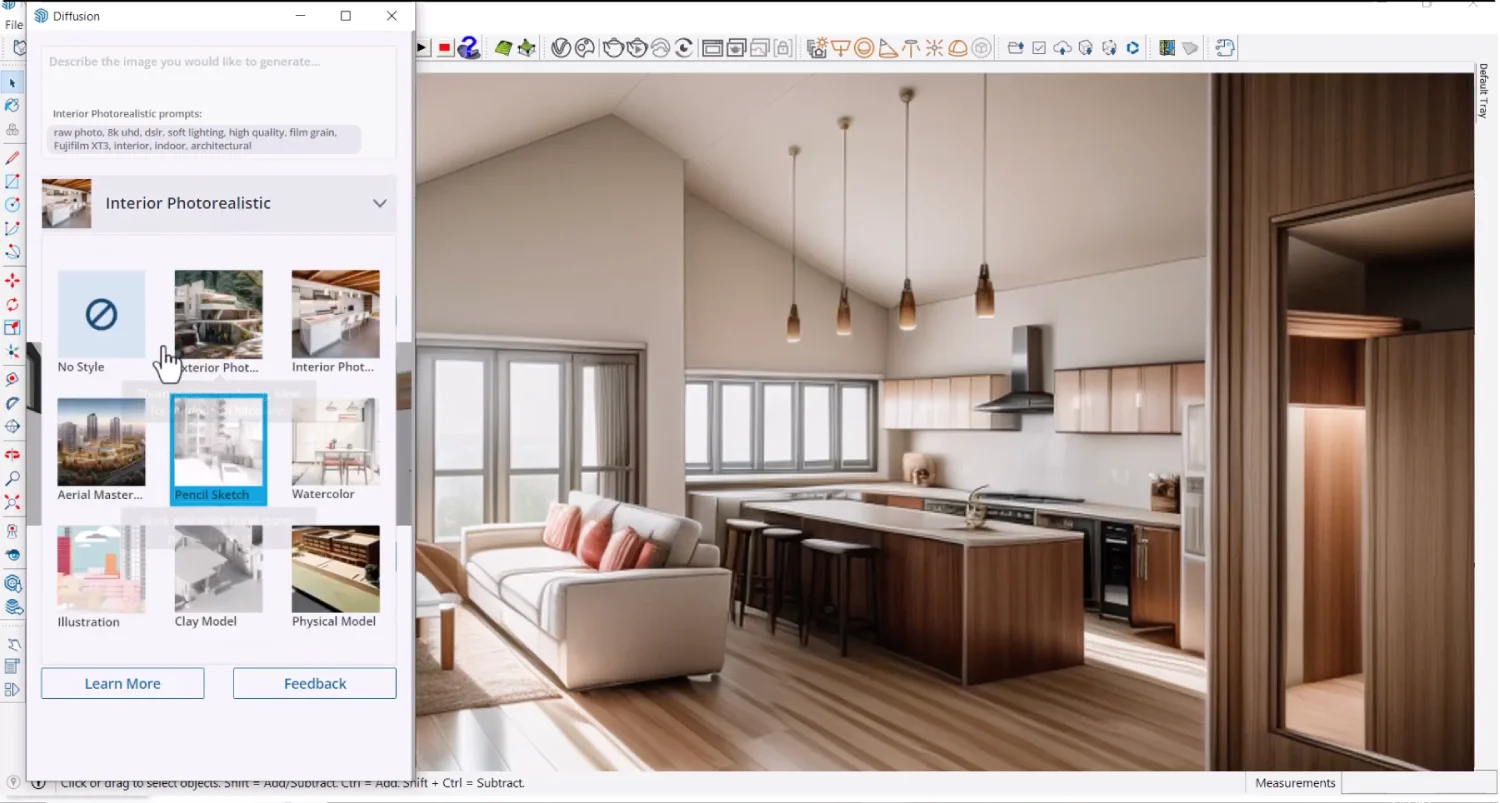
SketchUp's AI capabilities can suggest modeling approaches, auto-complete repetitive geometry, and assist with common modeling tasks — reducing some of the manual repetition involved in 3D modeling without requiring users to leave the familiar SketchUp interface.
Generative Design Exploration
AI-powered extensions and features support generative design exploration — testing multiple massing or layout variations based on defined parameters, similar in concept to dedicated generative design tools but accessible within SketchUp's existing modeling environment.
Extension Ecosystem Integration
SketchUp's large extension marketplace includes numerous AI-powered plugins for rendering, material generation, and modeling assistance — meaning the practical AI capability available to a SketchUp user extends well beyond Trimble's native features through this ecosystem.
Familiar Modeling Environment
Because AI features are integrated into SketchUp rather than requiring a separate application, designers retain access to the full SketchUp toolset, model library, and existing project files while gaining AI assistance incrementally.
Pros & Cons
Pros
- ✅ AI features integrate directly into the familiar SketchUp modeling workflow without switching tools
- ✅ Generative AI suggestions can speed up massing, layout, and design exploration tasks
- ✅ Large existing SketchUp user base means extensive plugin and extension ecosystem support
- ✅ Approachable 3D modeling interface remains accessible even with AI features layered in
Cons
- ❌ AI features are still evolving compared to purpose-built generative design tools
- ❌ Core modeling approach remains manual — AI assists but doesn't replace modeling skill
- ❌ Best results require existing SketchUp proficiency to take full advantage of AI suggestions
- ❌ Render quality from SketchUp alone still requires a plugin like Enscape or V-Ray for production output
Who Is It Best For?
SketchUp AI is the right tool if you:
- Already use SketchUp as your primary 3D modeling tool and want incremental AI productivity gains
- Work across architecture, interior design, or furniture design where SketchUp's flexibility serves multiple use cases
- Want generative design exploration without learning a dedicated parametric design tool like Grasshopper
- Value an approachable modeling interface over the steeper learning curve of more complex BIM or parametric tools
SketchUp AI is not the right tool if you:
- Need the most advanced generative design and AI capabilities available regardless of modeling environment
- Require full BIM workflows with detailed building data management (consider Revit instead)
- Want a completely AI-native design tool rather than AI features added to an existing manual modeling tool
Alternatives to Consider
- Autodesk Forma — stronger early-stage AI-powered massing and environmental analysis tools
- Rhino + Grasshopper — more powerful parametric and generative design capability for complex geometry
- ArkDesign AI — purpose-built AI floor plan generation rather than general 3D modeling with AI features
- Revit — better for full BIM workflows requiring detailed building data management
- Vectorworks — comparable modeling tool with its own growing AI feature set
Final Verdict
SketchUp AI's value comes from where it lives — inside one of the most widely adopted 3D modeling tools in design, meaning AI productivity gains reach a huge existing user base without requiring a platform switch. For designers who already know and rely on SketchUp, these incremental AI features add genuine time savings without disrupting established workflows.
It's not positioned as the most advanced AI design tool available — purpose-built generative design and AI-native platforms offer deeper capability in specific areas. But for the practical reality of most architecture, interior design, and furniture design workflows already built around SketchUp, the AI enhancements are a meaningful and low-friction upgrade.
Our recommendation: If you're already a SketchUp user, explore the AI features incrementally as they roll out rather than switching tools — the productivity gain comes without retraining cost. For final rendering, continue pairing SketchUp with Chaos Enscape or a comparable rendering plugin.
Key Features
AI features integrate directly into the familiar SketchUp modeling workflow without switching tools
Generative AI suggestions can speed up massing, layout, and design exploration tasks
Large existing SketchUp user base means extensive plugin and extension ecosystem support
Approachable 3D modeling interface remains accessible even with AI features layered in
Best For
Architects and designers already using SketchUp who want AI assistance within their existing workflow
Furniture designers modeling products and components in 3D for visualization and production
Interior designers building 3D space layouts before passing models to rendering plugins
Small design firms wanting AI productivity gains without switching their core modeling software
Pros & Cons
What We Like
- AI features integrate directly into the familiar SketchUp modeling workflow without switching tools
- Generative AI suggestions can speed up massing, layout, and design exploration tasks
- Large existing SketchUp user base means extensive plugin and extension ecosystem support
- Approachable 3D modeling interface remains accessible even with AI features layered in
What We Don't Like
- AI features are still evolving compared to purpose-built generative design tools
- Core modeling approach remains manual — AI assists but doesn't replace modeling skill
- Best results require existing SketchUp proficiency to take full advantage of AI suggestions
- Render quality from SketchUp alone still requires a plugin like Enscape or V-Ray for production output
Top SketchUp AI Alternatives
View all alternatives →
Autodesk Forma
Alternative to SketchUp AI
Read Review →
Rhino + Grasshopper
Alternative to SketchUp AI
Read Review →
ArkDesign AI
Alternative to SketchUp AI
Read Review →Revit
Alternative to SketchUp AI
Vectorworks
Alternative to SketchUp AI
SketchUp AI vs Top Alternatives
| Tool | Best For | Price | AI Quality | Features | Support | Ease of Use | Rating | |
|---|---|---|---|---|---|---|---|---|
 | Architects and designers already using SketchUp who want AI assistance within their existing workflow | Contact for pricing | 9/10 | Current | ||||
 | Architecture | Contact for pricing | 8.5/10 | Read Review → | ||||
 | Architecture | Contact for pricing | 8.2/10 | Read Review → | ||||
 | Architecture | Contact for pricing | 7.9/10 | Read Review → | ||||
R Revit | Architecture | Contact for pricing | 7.6/10 | — |
Our SketchUp AI Verdict
SketchUp AI is best suited for architects, interior designers, and furniture designers already using SketchUp who want AI-assisted modeling, generative design suggestions, and faster workflows within the familiar SketchUp modeling environment.
Visit website for full details
FAQ
Related Articles
View all articles →Best AI Design Tools for Professionals in 2026
Discover the top AI tools we recommend in AI Design Tools.
View Hub →SketchUp AI vs Top Alternatives: Full Comparison
Side-by-side breakdown of SketchUp AI and its main competitors.
View Comparisons →Hands-on Guides & Workflows
Step-by-step playbooks for getting the most out of tools like SketchUp AI.
Browse Guides →Related Tools in AI Design Tools
See all the best AI Design Tools →
Chaos Vantage
Chaos Vantage is best suited for architectural visualization studios and VFX teams already using V-Ray who need a real-time ray-traced preview of complex scenes — enabling interactive client walkthroughs and lighting exploration without waiting for full offline renders.
Read Review →
GetIllustrations
GetIllustrations is best suited for architecture, construction, furniture, and real estate businesses that want polished, human-made vector illustrations for their website and marketing without commissioning custom artwork for every page.
Read Review →
Roomvo
Roomvo is best suited for flooring, paint, and home improvement retailers who need AR and AI visualization tools that let customers see products like flooring, tile, and paint applied to their own room photos before purchasing.
Read Review →
UX Pilot
UX Pilot is best suited for architecture, construction, furniture, and real estate businesses building a custom website or app who want AI-generated wireframes and UI screens exported to Figma or working code in minutes.
Read Review →