

Chaos Vantage Review:
Is It Worth It in 2026?
Chaos Vantage is best suited for architectural visualization studios and VFX teams already using V-Ray who need a real-time ray-traced preview of complex scenes — enabling interactive client walkthroughs and lighting exploration without waiting for full offline renders.
Best For
Our Overall Rating
Based on comprehensive testing
Best For
- Architectural visualization studios using V-Ray who need real-time walkthroughs for client meetings
- Interior designers exploring lighting and material options interactively within a 3D scene
- Real estate developers conducting interactive virtual property tours from 3D models
- VFX teams wanting accelerated pre-visualization from V-Ray scene assets
Pricing
See current pricing on the Chaos Vantage website.
Bottom Line
Chaos Vantage is best suited for architectural visualization studios and VFX teams already using V-Ray who need a real-time ray-traced preview of complex scenes — enabling interactive client walkthroughs and lighting exploration without waiting for full offline renders.
Visit Chaos Vantage →Quick Verdict
Chaos Vantage scores 8.8/10 in our testing and is a strong choice for Architectural visualization studios using V-Ray who need real-time walkthroughs for client meetings and Interior designers exploring lighting and material options interactively within a 3D scene.
What Is Chaos Vantage?
Overview
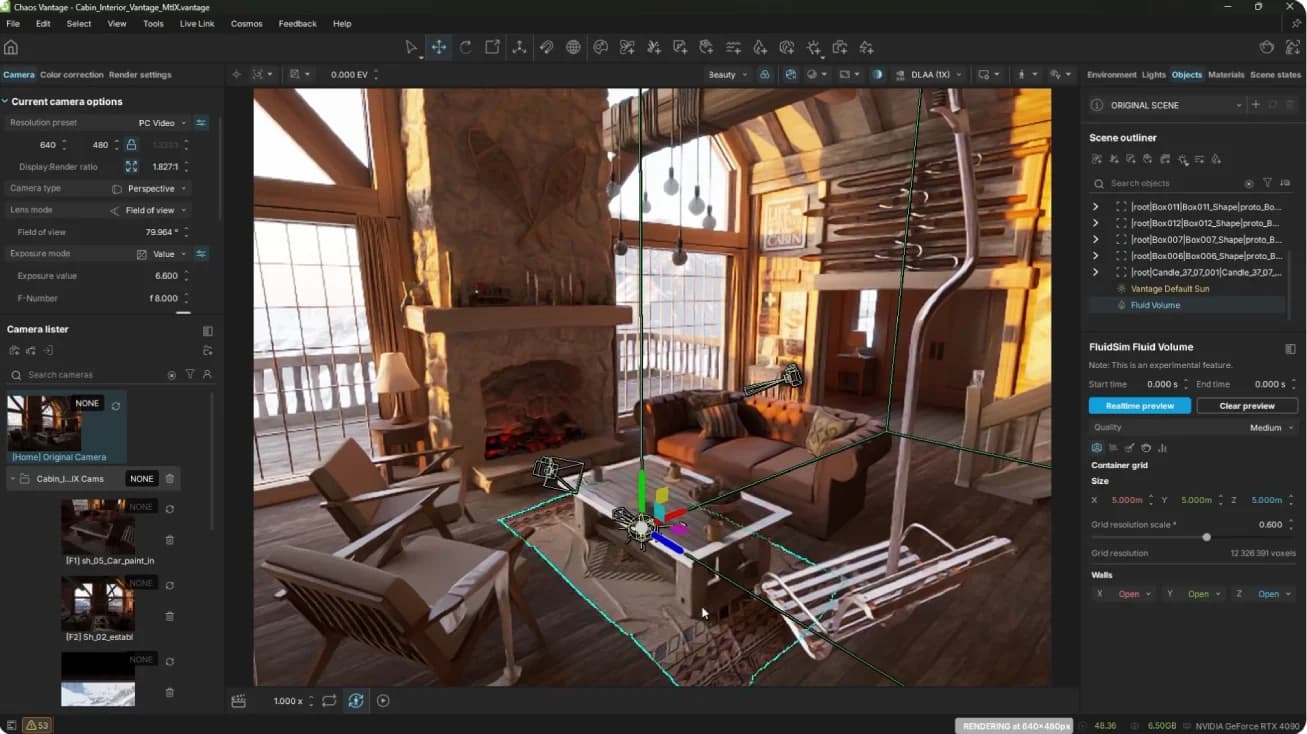
Chaos Vantage is a real-time ray-tracing visualization tool from Chaos Group, designed specifically to work with V-Ray scene files. Using NVIDIA RTX GPU hardware, it reads V-Ray scenes directly and renders them in real time — enabling interactive exploration of lighting, materials, camera angles, and animations that would otherwise require full offline render iterations to evaluate.
For architectural visualization professionals working with V-Ray, Vantage solves the expensive feedback loop of making a change, waiting for a render to finish, reviewing the result, and repeating. With Vantage, that feedback is immediate, allowing lighting and material decisions to be made interactively rather than through slow iteration cycles.
This review evaluates Chaos Vantage based on its real-time rendering quality, V-Ray integration, and practical fit for architectural visualization and interior design in 2026.
Key Features
Real-Time GPU Ray Tracing
Vantage uses NVIDIA RTX hardware acceleration to deliver real-time ray-traced rendering of complex architectural scenes. Reflections, global illumination, and area lighting behave physically correctly — providing a quality preview that is meaningfully closer to final render than traditional real-time rasterization.
Direct V-Ray Scene Integration
Vantage reads V-Ray scene files (.vrscene) without re-exporting or material conversion. V-Ray materials, lights, cameras, and geometry load directly, meaning studios can move existing production assets into Vantage without additional setup work.
Live-Link with 3ds Max
A live connection between 3ds Max and Vantage allows scene changes — moved objects, adjusted lights, changed materials — to update in the Vantage viewport in real time. This turns Vantage into a real-time feedback layer for 3ds Max scene authoring.
Interactive Walkthroughs and Animation
Vantage supports interactive camera navigation for client walkthroughs, as well as animation playback, enabling real estate developers and designers to walk clients through a 3D property in real time rather than waiting for a pre-rendered animation.
Pros & Cons
Pros
- ✅ Real-time GPU ray tracing produces near-photorealistic previews from V-Ray scenes instantly
- ✅ Reads V-Ray scene files directly with no re-setup or material conversion required
- ✅ Enables interactive lighting and material exploration without offline render iteration
- ✅ Supports live-link with 3ds Max and other applications for real-time scene updates
Cons
- ❌ Requires a high-end NVIDIA RTX GPU — not accessible on standard workstations
- ❌ Primarily designed as a companion to V-Ray rather than a standalone renderer
- ❌ Output quality, while impressive for real-time, doesn't match final Corona or V-Ray offline renders
- ❌ Less suited to non-V-Ray workflows or teams not already in the Chaos ecosystem
Who Is It Best For?
Chaos Vantage is the right tool if you:
- Already use V-Ray and want to accelerate your lighting and material iteration without full offline renders
- Conduct live client walkthroughs of architectural or interior spaces from 3D models
- Have NVIDIA RTX hardware and want to leverage GPU ray tracing for real-time visualization
- Need to compare lighting scenarios quickly before committing to a final render direction
Chaos Vantage is not the right tool if you:
- Don't use V-Ray as your primary renderer — Vantage's value is almost entirely V-Ray ecosystem dependent
- Work on a standard workstation without a high-end NVIDIA RTX GPU
- Need a standalone real-time renderer with broad application support
Alternatives to Consider
- Enscape — better for real-time visualization directly inside Revit, SketchUp, or Rhino without needing V-Ray
- Lumion — standalone real-time renderer with broader accessibility and a large asset library
- D5 Render — GPU-accelerated real-time renderer with strong quality and growing architecture adoption
- Twinmotion — Unreal Engine-based real-time renderer, free for architects, with strong asset library
- Chaos Corona — better for final offline production renders in 3ds Max if real-time isn't required
Final Verdict
Chaos Vantage is a genuinely valuable addition to a V-Ray production workflow, compressing the iteration cycle on lighting and material decisions from hours to seconds. For studios where V-Ray is already the primary production renderer and the hardware investment in NVIDIA RTX is already made, Vantage pays for itself quickly in reduced render iteration time.
It's not a standalone product — it's a multiplier on an existing V-Ray investment. Teams outside the Chaos ecosystem will find purpose-built real-time renderers like Enscape or Lumion more practical.
Our recommendation: If your studio already runs V-Ray on RTX hardware, Vantage is the logical addition — the workflow benefit is immediate. For teams evaluating entry into real-time visualization without an existing V-Ray dependency, compare Enscape and Lumion first as more accessible standalone options.
Key Features
Real-time GPU ray tracing produces near-photorealistic previews from V-Ray scenes instantly
Reads V-Ray scene files directly with no re-setup or material conversion required
Enables interactive lighting and material exploration without offline render iteration
Supports live-link with 3ds Max and other applications for real-time scene updates
Best For
Architectural visualization studios using V-Ray who need real-time walkthroughs for client meetings
Interior designers exploring lighting and material options interactively within a 3D scene
Real estate developers conducting interactive virtual property tours from 3D models
VFX teams wanting accelerated pre-visualization from V-Ray scene assets
Pros & Cons
What We Like
- Real-time GPU ray tracing produces near-photorealistic previews from V-Ray scenes instantly
- Reads V-Ray scene files directly with no re-setup or material conversion required
- Enables interactive lighting and material exploration without offline render iteration
- Supports live-link with 3ds Max and other applications for real-time scene updates
What We Don't Like
- Requires a high-end NVIDIA RTX GPU — not accessible on standard workstations
- Primarily designed as a companion to V-Ray rather than a standalone renderer
- Output quality, while impressive for real-time, doesn't match final Corona or V-Ray offline renders
- Less suited to non-V-Ray workflows or teams not already in the Chaos ecosystem
Top Chaos Vantage Alternatives
View all alternatives →


Chaos Vantage vs Top Alternatives
| Tool | Best For | Price | AI Quality | Features | Support | Ease of Use | Rating | |
|---|---|---|---|---|---|---|---|---|
 | Architectural visualization studios using V-Ray who need real-time walkthroughs for client meetings | Contact for pricing | 8.8/10 | Current | ||||
 | Architecture | Contact for pricing | 8.3/10 | Read Review → | ||||
 | Architecture | Contact for pricing | 8/10 | Read Review → | ||||
 | Architecture | Contact for pricing | 7.7/10 | Read Review → | ||||
 | Architecture | Contact for pricing | 7.4/10 | Read Review → |
Our Chaos Vantage Verdict
Chaos Vantage is best suited for architectural visualization studios and VFX teams already using V-Ray who need a real-time ray-traced preview of complex scenes — enabling interactive client walkthroughs and lighting exploration without waiting for full offline renders.
Visit website for full details
FAQ
Related Articles
View all articles →Best AI Design Tools for Professionals in 2026
Discover the top AI tools we recommend in AI Design Tools.
View Hub →Chaos Vantage vs Top Alternatives: Full Comparison
Side-by-side breakdown of Chaos Vantage and its main competitors.
View Comparisons →Hands-on Guides & Workflows
Step-by-step playbooks for getting the most out of tools like Chaos Vantage.
Browse Guides →Related Tools in AI Design Tools
See all the best AI Design Tools →
GetIllustrations
GetIllustrations is best suited for architecture, construction, furniture, and real estate businesses that want polished, human-made vector illustrations for their website and marketing without commissioning custom artwork for every page.
Read Review →
Roomvo
Roomvo is best suited for flooring, paint, and home improvement retailers who need AR and AI visualization tools that let customers see products like flooring, tile, and paint applied to their own room photos before purchasing.
Read Review →
UX Pilot
UX Pilot is best suited for architecture, construction, furniture, and real estate businesses building a custom website or app who want AI-generated wireframes and UI screens exported to Figma or working code in minutes.
Read Review →
CGTrader
CGTrader is best suited for architects, interior designers, and furniture visualization teams who need ready-made 3D models — offering one of the largest marketplaces of professional 3D assets for renders, along with enterprise 3D modeling services for product catalogs at scale.
Read Review →