

UX Pilot Review:
Is It Worth It in 2026?
UX Pilot is best suited for architecture, construction, furniture, and real estate businesses building a custom website or app who want AI-generated wireframes and UI screens exported to Figma or working code in minutes.
We may earn a commission when you purchase through links on our site. Learn more
Best For
Our Overall Rating
Based on comprehensive testing
Best For
- Construction or real estate startups prototyping a client-facing app interface
- Architecture firms building internal tool UI without a dedicated designer
- Furniture brands designing an ecommerce site flow before development begins
- Product teams wanting to test multiple UI directions quickly before committing
Pricing
See current pricing on the UX Pilot website.
Bottom Line
UX Pilot is best suited for architecture, construction, furniture, and real estate businesses building a custom website or app who want AI-generated wireframes and UI screens exported to Figma or working code in minutes.
Visit UX Pilot →Quick Verdict
UX Pilot scores 8.8/10 in our testing and is a strong choice for Construction or real estate startups prototyping a client-facing app interface and Architecture firms building internal tool UI without a dedicated designer.
What Is UX Pilot?
Overview
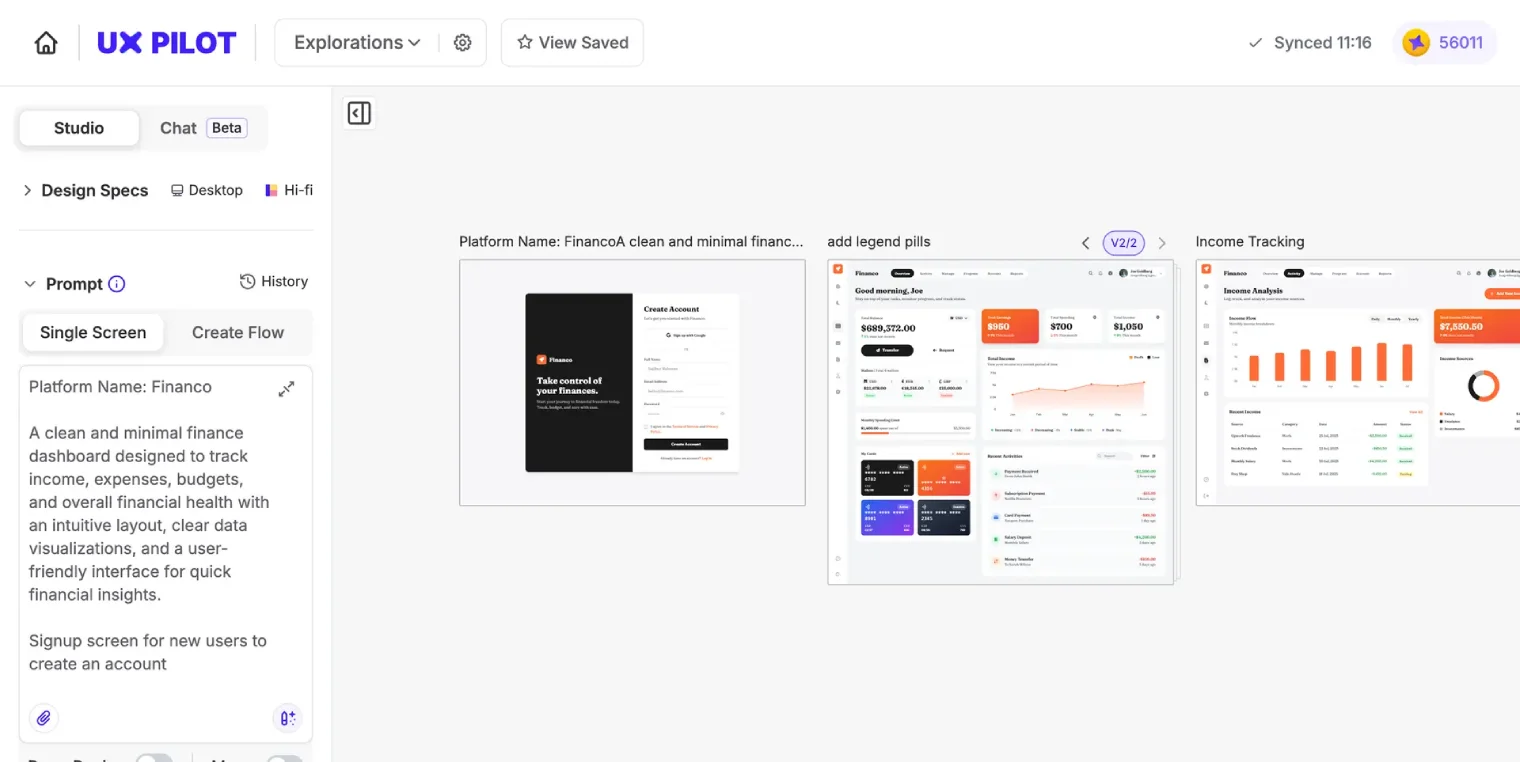
UX Pilot generates wireframes and UI designs from a simple text prompt, producing structured, editable layouts in seconds rather than starting from a blank canvas. Its Autoflow mode goes further, building entire multi-screen user journeys — onboarding, dashboards, checkout — in a single pass with consistent navigation and logical structure across every screen, while Blitz mode generates layouts significantly faster for rapid iteration.
For architecture, construction, furniture, and real estate businesses building a custom website or app without an in-house design team, this matters because getting from "we need this app to work this way" to an actual visual layout — one that a developer can build from — usually requires either hiring a designer or spending considerable time learning design software.
This review evaluates UX Pilot based on its wireframe quality, multi-screen consistency, and practical fit for non-designers building real interfaces heading into 2026.
Key Features
Prompt-to-Wireframe Generation
UX Pilot auto-generates structured, low- to high-fidelity wireframes from a text description, applying relevant UX patterns and conventions rather than producing a generic, unstructured layout.
Autoflow Multi-Screen Journeys
Rather than generating one screen at a time, Autoflow mode builds an entire user journey — multiple connected screens with consistent navigation — in a single pass, which matters for anything beyond a single landing page.
Code Export
Generated designs can be exported as clean, semantic React, HTML, or Tailwind code that matches the visual design, giving developers a real starting point rather than just a picture to manually recreate.
Custom Design System Training
UX Pilot can be trained on an existing Figma design system, letting generated screens match established brand guidelines and component patterns rather than producing generic, off-brand output.
Pros & Cons
Pros
- ✅ Generates structured, editable wireframes from a simple prompt in seconds
- ✅ Autoflow mode builds consistent multi-screen user journeys in a single pass
- ✅ Exports clean, semantic React, HTML, or Tailwind code matching the visual design
- ✅ Can train on your own Figma design system to match existing brand guidelines
Cons
- ❌ Generated UI is a strong starting point, not a finished, polished final product
- ❌ Best results require some familiarity with Figma or basic design review skills
- ❌ Code export still needs a developer to integrate it into a real, working application
- ❌ Free plan limits mean regular use requires a paid tier
Who Is It Best For?
UX Pilot is the right tool if you:
- Need to design a multi-screen app or website flow without a dedicated designer
- Want exportable code, not just a static image, as a starting point for development
- Already have a Figma design system you want new screens to match
- Want to quickly compare multiple UI directions before committing to one
UX Pilot is not the right tool if you:
- Need a finished, pixel-perfect interface without any further design refinement
- Have no plan to actually build the generated UI into a real application
- Want a tool that handles backend logic and functionality, not just visual design
Alternatives to Consider
UX Pilot is strong for AI-generated wireframes and UI flows, but it is not the only option:
- AI Designer — broader visual design coverage including brand kits, not just UI screens
- Emergent — better if you need a full working application, not just the front-end design
- RapidNative — focused specifically on mobile UI generation rather than web wireframes
- Unicorn Platform — better for a complete, working marketing website rather than custom UI design
- GetIllustrations — relevant for illustration assets to pair with a generated UI
Final Verdict
UX Pilot earns its place for teams that need to move from an app or website idea to an actual, structured visual layout quickly — the Autoflow multi-screen consistency and clean code export set it apart from simpler single-screen mockup tools. For businesses without in-house design resources, it meaningfully lowers the barrier to having something concrete to build from.
The output is best treated as a strong starting point — a developer or designer will still want to review and refine before treating any generated screen as final.
Our recommendation: Use Autoflow to map out your core user journey first, then export to Figma for refinement before handing code off to a developer for implementation.
Key Features
Generates structured, editable wireframes from a simple prompt in seconds
Autoflow mode builds consistent multi-screen user journeys in a single pass
Exports clean, semantic React, HTML, or Tailwind code matching the visual design
Can train on your own Figma design system to match existing brand guidelines
Best For
Construction or real estate startups prototyping a client-facing app interface
Architecture firms building internal tool UI without a dedicated designer
Furniture brands designing an ecommerce site flow before development begins
Product teams wanting to test multiple UI directions quickly before committing
Pros & Cons
What We Like
- Generates structured, editable wireframes from a simple prompt in seconds
- Autoflow mode builds consistent multi-screen user journeys in a single pass
- Exports clean, semantic React, HTML, or Tailwind code matching the visual design
- Can train on your own Figma design system to match existing brand guidelines
What We Don't Like
- Generated UI is a strong starting point, not a finished, polished final product
- Best results require some familiarity with Figma or basic design review skills
- Code export still needs a developer to integrate it into a real, working application
- Free plan limits mean regular use requires a paid tier
Top UX Pilot Alternatives
View all alternatives →


UX Pilot vs Top Alternatives
| Tool | Best For | Price | AI Quality | Features | Support | Ease of Use | Rating | |
|---|---|---|---|---|---|---|---|---|
 | Construction or real estate startups prototyping a client-facing app interface | Contact for pricing | 8.8/10 | Current | ||||
 | Cross-niche | Contact for pricing | 8.3/10 | Read Review → | ||||
 | Cross-niche | Contact for pricing | 8/10 | Read Review → | ||||
 | Cross-niche | Contact for pricing | 7.7/10 | Read Review → | ||||
 | Cross-niche | Contact for pricing | 7.4/10 | Read Review → |
Our UX Pilot Verdict
UX Pilot is best suited for architecture, construction, furniture, and real estate businesses building a custom website or app who want AI-generated wireframes and UI screens exported to Figma or working code in minutes.
Visit website for full details
FAQ
Related Articles
View all articles →Best AI Design Tools for Professionals in 2026
Discover the top AI tools we recommend in AI Design Tools.
View Hub →UX Pilot vs Top Alternatives: Full Comparison
Side-by-side breakdown of UX Pilot and its main competitors.
View Comparisons →Hands-on Guides & Workflows
Step-by-step playbooks for getting the most out of tools like UX Pilot.
Browse Guides →Related Tools in AI Design Tools
See all the best AI Design Tools →
CGTrader
CGTrader is best suited for architects, interior designers, and furniture visualization teams who need ready-made 3D models — offering one of the largest marketplaces of professional 3D assets for renders, along with enterprise 3D modeling services for product catalogs at scale.
Read Review →
Leonardo AI
Leonardo AI is best suited for designers and professionals who want flexible AI image generation with a genuinely usable free tier — offering daily generation credits, customizable and fine-tuned models, and controllable outputs for concept art, product visualization, and marketing imagery.
Read Review →
Marxent
Marxent is best suited for furniture manufacturers and retailers who need enterprise-grade 3D product configuration, augmented reality, and room planning tools integrated into their e-commerce and sales channels — particularly brands with complex product lines and modular or custom furniture.
Read Review →
Zakeke
Zakeke is best suited for small-to-mid-size furniture brands selling on Shopify, WooCommerce, or similar platforms who need an accessible 3D product configurator and AR visualization tool without the enterprise implementation scope of platforms like Marxent or Threekit.
Read Review →