

Chaos Corona Review:
Is It Worth It in 2026?
Chaos Corona is best suited for architectural visualization studios and interior designers using 3ds Max or Cinema 4D who need a physically accurate, production-grade renderer that produces photorealistic stills and animations with a relatively accessible learning curve.
Best For
Our Overall Rating
Based on comprehensive testing
Best For
- Architectural visualization studios producing photorealistic stills and fly-through animations
- Interior designers creating high-quality client presentation renders from furnished 3D models
- Furniture manufacturers producing lifestyle and product imagery from CAD models
- Real estate developers commissioning off-plan CGI for marketing before construction
Pricing
See current pricing on the Chaos Corona website.
Bottom Line
Chaos Corona is best suited for architectural visualization studios and interior designers using 3ds Max or Cinema 4D who need a physically accurate, production-grade renderer that produces photorealistic stills and animations with a relatively accessible learning curve.
Visit Chaos Corona →Quick Verdict
Chaos Corona scores 9.4/10 in our testing and is an excellent choice for Architectural visualization studios producing photorealistic stills and fly-through animations and Interior designers creating high-quality client presentation renders from furnished 3D models.
What Is Chaos Corona?
Overview
Chaos Corona is a production-grade physically based renderer developed by Chaos Group, primarily integrated with Autodesk 3ds Max and Cinema 4D. It uses unbiased path tracing to simulate how light physically behaves in a scene, producing renders that are often indistinguishable from photography when properly executed.
Within the architectural visualization industry, Corona has become one of the two dominant rendering engines — alongside V-Ray — for producing the high-quality still images and animations that drive off-plan property sales, design presentations, and furniture marketing. Its reputation is built on output quality and a relatively more accessible workflow compared to V-Ray.
This review evaluates Chaos Corona based on its render quality, workflow efficiency, and practical fit for architecture, interior design, and furniture visualization in 2026.
Key Features
Physically Accurate Path Tracing
Corona uses unbiased path tracing to simulate real-world light behavior — reflections, refractions, caustics, and subsurface scattering — producing renders that match the way light actually interacts with materials. This physical accuracy is what separates production renders from real-time visualization approximations.
Interactive Rendering (IPR)
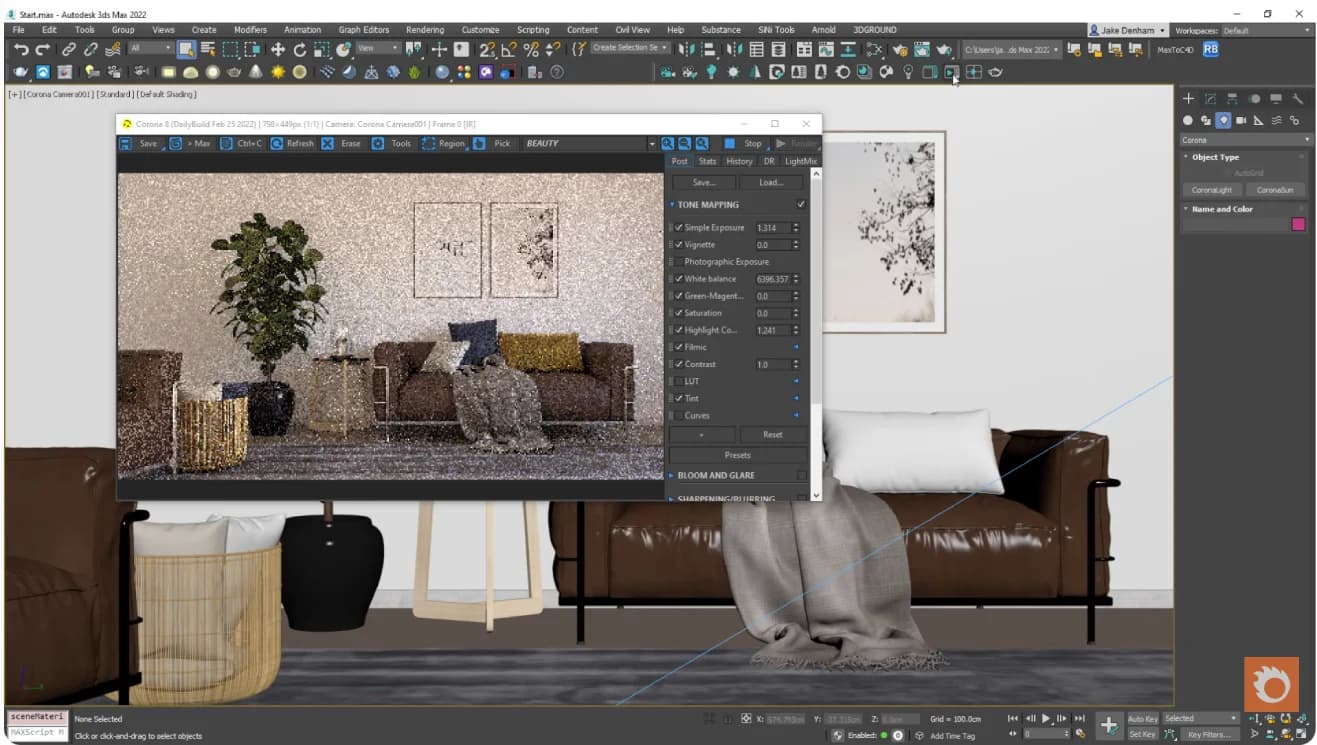
Corona's Interactive Rendering mode updates the viewport continuously as materials, lights, and camera settings are adjusted, allowing artists to make scene decisions based on near-final quality previews rather than committing to full render times for each adjustment.
Advanced Denoising
Chaos Corona includes AI-powered denoising (via NVIDIA OptiX and Intel Open Image Denoise) that removes render noise at lower sample counts, reducing the total render time needed to reach a clean, deliverable image without manual cleanup.
Material and Lighting Library
Corona comes with a library of ready-to-use physically based materials — concrete, wood, glass, fabric, metals — and supports standard material workflows including PBR texture maps, allowing artists to build realistic material setups from standard asset sources.
Pros & Cons
Pros
- ✅ Physically accurate rendering produces consistently photorealistic stills and animations
- ✅ Interactive rendering previews update in real time as scene changes are made
- ✅ Lower technical complexity than V-Ray makes it more accessible to visualization artists
- ✅ Strong denoising technology reduces render times without significantly sacrificing quality
Cons
- ❌ Primarily integrated with 3ds Max and Cinema 4D — limited support for other 3D applications
- ❌ CPU-based rendering is slower than GPU renderers on scenes with very high complexity
- ❌ Subscription pricing model requires ongoing payment rather than a one-time license
- ❌ Not suited for real-time or game-engine visualization workflows
Who Is It Best For?
Chaos Corona is the right tool if you:
- Produce architectural visualization, interior renders, or furniture imagery as a core business deliverable
- Work in 3ds Max or Cinema 4D and want a renderer that integrates directly into your existing workflow
- Need consistently photorealistic output for client presentations, property marketing, or product catalogs
- Want a renderer with a gentler learning curve than V-Ray but comparable output quality at its peak
Chaos Corona is not the right tool if you:
- Need real-time interactive visualization for client walkthroughs (use Enscape or Lumion instead)
- Work primarily in Revit, Rhino, or other 3D tools outside the 3ds Max / Cinema 4D ecosystem
- Are a hobbyist or student who doesn't need production-grade rendering at a subscription cost
Alternatives to Consider
- V-Ray — the other dominant production renderer; more complex but used on larger and more varied project types
- Lumion — real-time renderer better suited for architect-led visualization where speed matters more than peak quality
- Enscape — faster real-time rendering directly inside Revit, SketchUp, or Rhino
- KeyShot — better for product visualization and furniture where the render workflow is simpler
- D5 Render — GPU-based real-time renderer with strong quality and growing architecture adoption
Final Verdict
Chaos Corona has earned its position as one of the two go-to production renderers for architectural visualization because it consistently delivers photorealistic outputs with a workflow that visualization artists can master without years of V-Ray-level technical complexity. The interactive rendering mode, strong denoising, and physically accurate materials make the path from 3D model to client-ready render as efficient as offline rendering allows.
For studios and freelancers working in 3ds Max or Cinema 4D who need consistently high-quality stills and animations for architecture, interiors, and furniture, Corona is the most practical production rendering choice in 2026.
Our recommendation: If you're evaluating Corona against V-Ray, run the same scene through both and compare total time-to-final-render including setup, adjustments, and denoising — not just raw render time. Corona's workflow efficiency often makes up for any raw speed differences. For real-time client presentations alongside final renders, pair Corona with Enscape or Lumion for complementary workflows.
Key Features
Physically accurate rendering produces consistently photorealistic stills and animations
Interactive rendering previews update in real time as scene changes are made
Lower technical complexity than V-Ray makes it more accessible to visualization artists
Strong denoising technology reduces render times without significantly sacrificing quality
Best For
Architectural visualization studios producing photorealistic stills and fly-through animations
Interior designers creating high-quality client presentation renders from furnished 3D models
Furniture manufacturers producing lifestyle and product imagery from CAD models
Real estate developers commissioning off-plan CGI for marketing before construction
Pros & Cons
What We Like
- Physically accurate rendering produces consistently photorealistic stills and animations
- Interactive rendering previews update in real time as scene changes are made
- Lower technical complexity than V-Ray makes it more accessible to visualization artists
- Strong denoising technology reduces render times without significantly sacrificing quality
What We Don't Like
- Primarily integrated with 3ds Max and Cinema 4D — limited support for other 3D applications
- CPU-based rendering is slower than GPU renderers on scenes with very high complexity
- Subscription pricing model requires ongoing payment rather than a one-time license
- Not suited for real-time or game-engine visualization workflows
Top Chaos Corona Alternatives
View all alternatives →

Chaos Corona vs Top Alternatives
| Tool | Best For | Price | AI Quality | Features | Support | Ease of Use | Rating | |
|---|---|---|---|---|---|---|---|---|
 | Architectural visualization studios producing photorealistic stills and fly-through animations | Contact for pricing | 9.4/10 | Current | ||||
 | Architecture | Contact for pricing | 8.9/10 | Read Review → | ||||
 | Architecture | Contact for pricing | 8.6/10 | Read Review → | ||||
 | Architecture | Contact for pricing | 8.3/10 | Read Review → | ||||
K KeyShot | Architecture | Contact for pricing | 8/10 | — |
Our Chaos Corona Verdict
Chaos Corona is best suited for architectural visualization studios and interior designers using 3ds Max or Cinema 4D who need a physically accurate, production-grade renderer that produces photorealistic stills and animations with a relatively accessible learning curve.
Visit website for full details
FAQ
Related Articles
View all articles →Best AI Tools for Interior Design in 2026
Our editorial guide to the AI tools we recommend, including Chaos Corona.
Read Guide →Chaos Corona vs Top Alternatives: Full Comparison
Side-by-side breakdown of Chaos Corona and its main competitors.
View Comparisons →Hands-on Guides & Workflows
Step-by-step playbooks for getting the most out of tools like Chaos Corona.
Browse Guides →Related Tools in Interior Design
See all the best Interior Design →
Chaos Enscape
Chaos Enscape is best suited for architects and interior designers using Revit, SketchUp, Rhino, or ArchiCAD who want real-time rendering and VR visualization directly inside their design software — enabling instant visual feedback and client walkthroughs without a separate rendering pipeline.
Read Review →
Adobe Firefly
Adobe Firefly is best suited for creative professionals already working inside the Adobe ecosystem who need commercially safe generative AI for images, text effects, and vector graphics — especially those integrating AI into Photoshop and Illustrator workflows.
Read Review →
Canva AI
Canva AI is best suited for marketing teams, real estate agents, interior designers, and furniture brands who need to produce professional-quality visual content — social media posts, presentations, flyers, and mood boards — without professional design skills.
Read Review →
Chaos V-Ray
Chaos V-Ray is best suited for professional architectural visualization studios and production rendering teams who need the most widely adopted, broadly compatible production renderer — supporting more host applications than any competitor and trusted across film, games, and architecture for decades.
Read Review →