

Moodboard AI Review:
Is It Worth It in 2026?
Moodboard AI is best suited for interior designers and decorators who need to quickly produce cohesive, styled mood boards for client presentations — generating color palettes, material pairings, and layout compositions from a style brief instead of manually assembling reference images.
Best For
Our Overall Rating
Based on comprehensive testing
Best For
- Interior designers producing initial concept mood boards for client kickoff meetings
- Decorators needing quick style direction visuals before detailed product selection
- Real estate stagers creating concept boards to pitch design directions to sellers
- Design students learning to communicate style concepts visually
Pricing
See current pricing on the Moodboard AI website.
Bottom Line
Moodboard AI is best suited for interior designers and decorators who need to quickly produce cohesive, styled mood boards for client presentations — generating color palettes, material pairings, and layout compositions from a style brief instead of manually assembling reference images.
Visit Moodboard AI →Quick Verdict
Moodboard AI scores 8.2/10 in our testing and is a strong choice for Interior designers producing initial concept mood boards for client kickoff meetings and Decorators needing quick style direction visuals before detailed product selection.
What Is Moodboard AI?
Overview
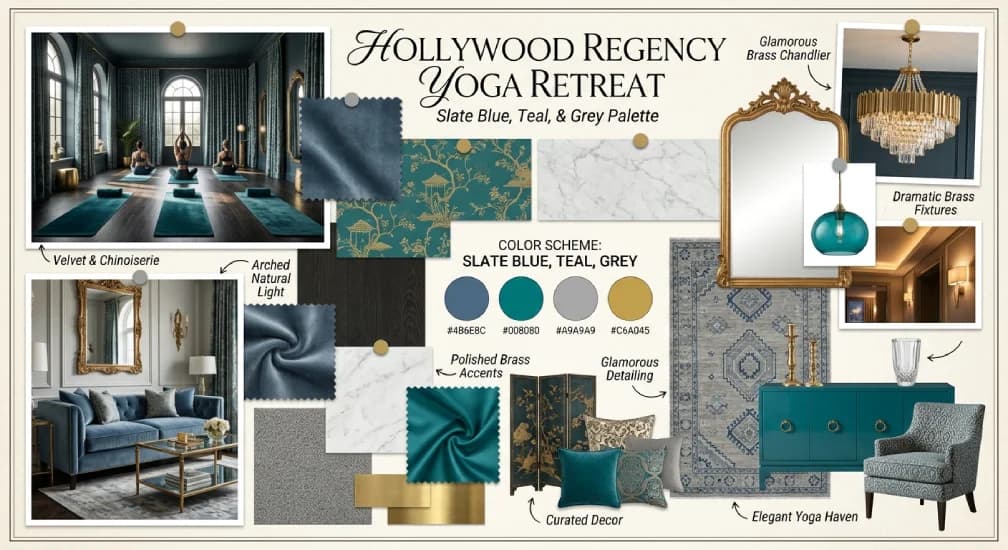
Moodboard AI is a design tool that generates cohesive interior design mood boards using artificial intelligence — producing color palettes, material pairings, and styled compositions from a text description of the desired aesthetic. Rather than manually searching for and arranging reference images from multiple sources, designers can describe a style direction and receive a structured visual board as a starting point.
For interior designers, the mood board is a critical early-stage client communication tool — it sets style expectations before detailed product selection and floor planning begins. Moodboard AI compresses the time spent assembling this first visual reference, particularly useful when producing multiple concept directions for client review.
This review evaluates Moodboard AI based on its generation quality, design utility, and practical fit for interior design professionals in 2026.
Key Features
AI-Generated Style Boards
From a text prompt describing a desired style — "warm minimalist with natural wood tones" or "coastal grandmother aesthetic" — Moodboard AI generates a composed board with coordinated colors, textures, and material references that visually communicate the style direction.
Color Palette Suggestions
The tool generates coordinated color palettes based on the style brief, giving designers a starting point for paint colors, fabric selections, and accent choices that work together cohesively.
Multiple Style Variations
Designers can generate multiple distinct mood board options from the same brief, allowing client presentations to include several style directions for comparison rather than committing to a single AI interpretation.
Exportable Client Presentations
Generated boards can be exported in presentation-ready formats, reducing the time needed to format and prepare mood boards for client meetings after the initial generation.
Pros & Cons
Pros
- ✅ Generates complete, styled mood boards from a text description or style preference in minutes
- ✅ Suggests cohesive color palettes and material pairings based on design style inputs
- ✅ Significantly faster than manually sourcing and arranging reference images
- ✅ Exportable, client-ready layouts save time on presentation formatting
Cons
- ❌ Generated boards are starting points and often need manual refinement for client specificity
- ❌ Image sourcing is AI-generated rather than pulling from real, purchasable products
- ❌ Less control over precise material and product selection compared to manual curation
- ❌ Style accuracy depends on how well the AI interprets the design brief
Who Is It Best For?
Moodboard AI is the right tool if you:
- Need to produce multiple style concepts quickly for early client presentations
- Want a faster starting point than manually searching Pinterest or stock photo sites for references
- Present several design directions to clients before committing to detailed product selection
- Are exploring a style direction yourself before locking in a specific design concept
Moodboard AI is not the right tool if you:
- Need boards built from real, purchasable products that clients can buy directly
- Require precise control over every material and color selection from the start
- Are working on a brief where AI-generated imagery doesn't capture the necessary nuance
Alternatives to Consider
- Canva AI — broader design tool with AI image generation and more layout control
- Pinterest — manual but free reference curation with a massive existing image library
- Milanote — visual collaboration board for organizing real reference images and notes
- Foyr Neo — full interior design platform with real furniture catalog for client-ready concepts
- Collov AI — AI redesign tool that works from actual room photos rather than abstract style boards
Final Verdict
Moodboard AI fills a useful niche at the very beginning of the interior design process — turning a style description into a visual starting point faster than manual curation allows. For designers who need to present multiple concept directions quickly, the speed advantage is real.
The tool's outputs are conceptual rather than commercially actionable — AI-generated imagery isn't tied to real, purchasable products — so it works best as the first step before moving into product-based design tools. For that specific use case, it's a practical time-saver.
Our recommendation: Use Moodboard AI to generate initial concept directions for client kickoff conversations, then transition to a product-based tool like Foyr Neo once a style direction is confirmed and detailed product selection begins.
Key Features
Generates complete, styled mood boards from a text description or style preference in minutes
Suggests cohesive color palettes and material pairings based on design style inputs
Significantly faster than manually sourcing and arranging reference images
Exportable, client-ready layouts save time on presentation formatting
Best For
Interior designers producing initial concept mood boards for client kickoff meetings
Decorators needing quick style direction visuals before detailed product selection
Real estate stagers creating concept boards to pitch design directions to sellers
Design students learning to communicate style concepts visually
Pros & Cons
What We Like
- Generates complete, styled mood boards from a text description or style preference in minutes
- Suggests cohesive color palettes and material pairings based on design style inputs
- Significantly faster than manually sourcing and arranging reference images
- Exportable, client-ready layouts save time on presentation formatting
What We Don't Like
- Generated boards are starting points and often need manual refinement for client specificity
- Image sourcing is AI-generated rather than pulling from real, purchasable products
- Less control over precise material and product selection compared to manual curation
- Style accuracy depends on how well the AI interprets the design brief
Top Moodboard AI Alternatives
View all alternatives →
Canva AI
Alternative to Moodboard AI
Read Review →Alternative to Moodboard AI
Milanote
Alternative to Moodboard AI

Foyr Neo
Alternative to Moodboard AI
Read Review →
Collov AI
Alternative to Moodboard AI
Read Review →Moodboard AI vs Top Alternatives
| Tool | Best For | Price | AI Quality | Features | Support | Ease of Use | Rating | |
|---|---|---|---|---|---|---|---|---|
 | Interior designers producing initial concept mood boards for client kickoff meetings | Contact for pricing | 8.2/10 | Current | ||||
 | Furniture | Contact for pricing | 7.7/10 | Read Review → | ||||
P Pinterest | Furniture | Contact for pricing | 7.4/10 | — | ||||
M Milanote | Furniture | Contact for pricing | 7.1/10 | — | ||||
 | Furniture | Contact for pricing | 7/10 | Read Review → |
Our Moodboard AI Verdict
Moodboard AI is best suited for interior designers and decorators who need to quickly produce cohesive, styled mood boards for client presentations — generating color palettes, material pairings, and layout compositions from a style brief instead of manually assembling reference images.
Visit website for full details
FAQ
Related Articles
View all articles →Best AI Tools for Interior Design in 2026
Our editorial guide to the AI tools we recommend, including Moodboard AI.
Read Guide →Moodboard AI vs Top Alternatives: Full Comparison
Side-by-side breakdown of Moodboard AI and its main competitors.
View Comparisons →Hands-on Guides & Workflows
Step-by-step playbooks for getting the most out of tools like Moodboard AI.
Browse Guides →Related Tools in Interior Design
See all the best Interior Design →
Sofabrain
Sofabrain is best suited for homeowners and furniture shoppers who want to see how specific furniture pieces would look in their own space before buying.
Read Review →
MyRoomDesigner AI
MyRoomDesigner AI is best suited for homeowners and interior designers who want an affordable, easy-to-use AI tool to generate redesign concepts and style variations from a single room photo, helping visualize design directions before committing time or budget to a renovation.
Read Review →
RoomStudioAI
RoomStudioAI is best suited for real estate agents, interior designers, and homeowners who need quick, affordable AI-generated room redesigns and virtual staging — uploading a room photo and generating styled, furnished variations across multiple design aesthetics.
Read Review →
RoomGPT
RoomGPT is best suited for homeowners and casual users who want a quick, free way to visualize how a room could look in a different style — uploading a photo and generating redesigned versions in seconds without any design software learning curve.
Read Review →