

Homestyler Review:
Is It Worth It in 2026?
Homestyler is best suited for homeowners, aspiring interior designers, and real estate stagers who want a free, browser-based platform to experiment with room layouts, furniture placement, and interior styles in 3D — without the learning curve of professional design software.
Best For
Our Overall Rating
Based on comprehensive testing
Best For
- Homeowners planning a room redesign or renovation before committing to purchases
- Real estate stagers creating virtual staging concepts for property listings
- Interior design students exploring space planning and styling fundamentals
- Furniture retailers offering a basic visualization tool as a customer engagement feature
Pricing
See current pricing on the Homestyler website.
Bottom Line
Homestyler is best suited for homeowners, aspiring interior designers, and real estate stagers who want a free, browser-based platform to experiment with room layouts, furniture placement, and interior styles in 3D — without the learning curve of professional design software.
Visit Homestyler →Quick Verdict
Homestyler scores 8.2/10 in our testing and is a strong choice for Homeowners planning a room redesign or renovation before committing to purchases and Real estate stagers creating virtual staging concepts for property listings.
What Is Homestyler?
Overview
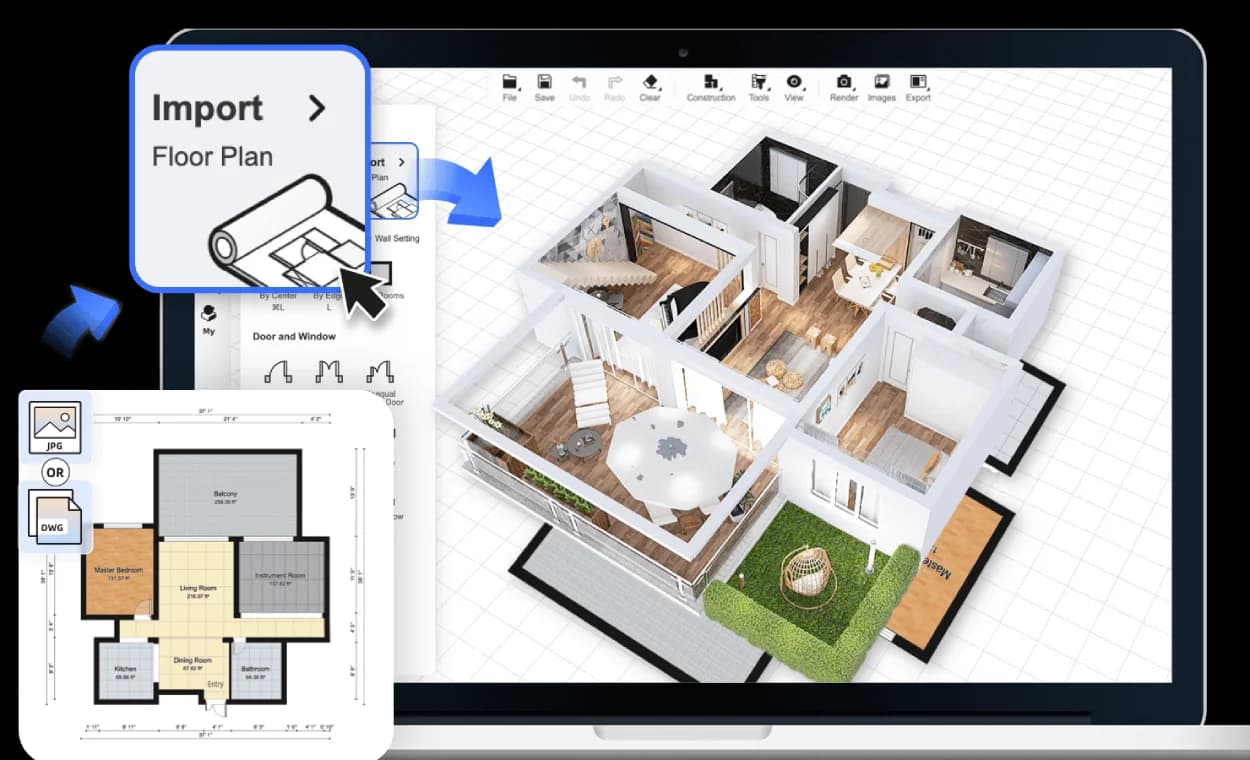
Homestyler is a free, browser-based interior design platform developed by Autodesk that allows anyone to create 2D floor plans and furnish them in 3D — without any design software experience. It includes a large library of furniture and decor models, AI-generated design inspiration features, and a social community where users share and discover room designs.
Unlike professional tools aimed at interior designers and architects, Homestyler is designed for accessibility — its primary users are homeowners planning renovations, real estate agents staging virtual rooms, and design enthusiasts experimenting with layouts and styles. The combination of zero cost and zero learning curve makes it the most widely accessible interior visualization tool available.
This review evaluates Homestyler based on its design capabilities, AI features, and practical value for its target users in 2026.
Key Features
2D and 3D Floor Plan Editor
Homestyler's room editor allows users to draw floor plans with room dimensions and then furnish them in 3D. The workflow from floor plan to furnished 3D room is straightforward enough for users with no design software experience, which is the core value proposition for homeowner and consumer use cases.
AI Interior Design Inspiration
Homestyler's AI features generate interior design concept images based on room photos or user-selected styles — helping users who aren't sure what style they want to visualize options before building a floor plan. This AI inspiration layer bridges the gap between "I want to redesign my living room" and "here's a specific layout and furniture selection to try."
Furniture and Decor Library
The platform includes a large library of furniture and decor models that users can drag into room designs. While the library includes many generic models, some brand-specific products are available through brand partnerships.
Community and Templates
Homestyler has a large community of published room designs that users can browse, use as starting point templates, and remix for their own projects — reducing the blank canvas problem for users who aren't sure where to begin.
Pros & Cons
Pros
- ✅ Free to use with a large library of furniture and decor models for interior visualization
- ✅ AI-generated interior design inspirations help users discover and visualize room styles
- ✅ Intuitive floor plan and 3D room editor requires no design or CAD experience
- ✅ Large community of published room designs provides inspiration and starting-point templates
Cons
- ❌ Not suited to professional production rendering or client-facing architectural visualization
- ❌ Furniture library includes many generic models rather than specific branded products
- ❌ Limited customization depth compared to professional interior design tools like Foyr Neo
- ❌ Free tier has usage limits and watermarks on exported images
Who Is It Best For?
Homestyler is the right tool if you:
- Are a homeowner planning a renovation and want to experiment with layout and furniture options before buying
- Want a free starting point for interior design exploration without committing to a paid tool
- Need basic virtual staging for real estate listing photos without professional staging software
- Are new to interior design and want an accessible introduction to space planning concepts
Homestyler is not the right tool if you:
- Need professional-quality renders for client presentations or marketing materials
- Require accurate, dimensioned floor plans for construction or permit purposes
- Want real, purchasable furniture products integrated into the design workflow
Alternatives to Consider
- Foyr Neo — professional interior design platform with far greater capability for designers who need client-ready output
- Planner 5D — similar accessibility with slightly stronger render quality for consumer use
- Collov AI — better for AI-generated style concepts directly from room photos
- RoomGPT — AI room redesign from a single photo, simpler and faster than full floor planning
- Decorilla — for users who want professional design assistance rather than a self-service tool
Final Verdict
Homestyler occupies the right position in the market for what it is — a free, accessible interior design tool that lowers the barrier for homeowners and design enthusiasts to visualize room changes without professional software. For its target audience, it delivers more value than any competing free tool.
For professional designers or anyone needing client-quality output, Homestyler's production ceiling is a limitation that purpose-built professional tools like Foyr Neo address directly. But as an entry-level, zero-cost tool for homeowner planning and basic virtual staging, it's genuinely useful.
Our recommendation: Use Homestyler for quick homeowner planning and virtual staging experiments. When client deliverable quality is required, move to Foyr Neo or Planner 5D — the additional capability is worth the cost for professional output. See our guide to the best AI tools for interior design for the full category breakdown.
Key Features
Free to use with a large library of furniture and decor models for interior visualization
AI-generated interior design inspirations help users discover and visualize room styles
Intuitive floor plan and 3D room editor requires no design or CAD experience
Large community of published room designs provides inspiration and starting-point templates
Best For
Homeowners planning a room redesign or renovation before committing to purchases
Real estate stagers creating virtual staging concepts for property listings
Interior design students exploring space planning and styling fundamentals
Furniture retailers offering a basic visualization tool as a customer engagement feature
Pros & Cons
What We Like
- Free to use with a large library of furniture and decor models for interior visualization
- AI-generated interior design inspirations help users discover and visualize room styles
- Intuitive floor plan and 3D room editor requires no design or CAD experience
- Large community of published room designs provides inspiration and starting-point templates
What We Don't Like
- Not suited to professional production rendering or client-facing architectural visualization
- Furniture library includes many generic models rather than specific branded products
- Limited customization depth compared to professional interior design tools like Foyr Neo
- Free tier has usage limits and watermarks on exported images
Top Homestyler Alternatives
View all alternatives →


Homestyler vs Top Alternatives
| Tool | Best For | Price | AI Quality | Features | Support | Ease of Use | Rating | |
|---|---|---|---|---|---|---|---|---|
 | Homeowners planning a room redesign or renovation before committing to purchases | Contact for pricing | 8.2/10 | Current | ||||
 | Furniture | Contact for pricing | 7.7/10 | Read Review → | ||||
 | Furniture | Contact for pricing | 7.4/10 | Read Review → | ||||
 | Furniture | Contact for pricing | 7.1/10 | Read Review → | ||||
 | Furniture | Contact for pricing | 7/10 | Read Review → |
Our Homestyler Verdict
Homestyler is best suited for homeowners, aspiring interior designers, and real estate stagers who want a free, browser-based platform to experiment with room layouts, furniture placement, and interior styles in 3D — without the learning curve of professional design software.
Visit website for full details
FAQ
Related Articles
View all articles →Best AI Tools for Interior Design in 2026
Our editorial guide to the AI tools we recommend, including Homestyler.
Read Guide →Homestyler vs Top Alternatives: Full Comparison
Side-by-side breakdown of Homestyler and its main competitors.
View Comparisons →Hands-on Guides & Workflows
Step-by-step playbooks for getting the most out of tools like Homestyler.
Browse Guides →Head-to-Head Comparisons
Related Tools in Interior Design
See all the best Interior Design →
ImagineArt
ImagineArt is best suited for interior designers, furniture brands, and architects who need a versatile AI image generation platform to create concept visuals, mood board imagery, product renders, and design inspiration — going from text prompt to styled visual in seconds.
Read Review →
InstantDeco AI
InstantDeco AI is best suited for real estate agents, property managers, and homeowners who need instant, affordable AI-generated interior redesigns and virtual staging — transforming a single room photo into multiple styled variations in seconds via API or a simple web interface.
Read Review →
Moodboard AI
Moodboard AI is best suited for interior designers and decorators who need to quickly produce cohesive, styled mood boards for client presentations — generating color palettes, material pairings, and layout compositions from a style brief instead of manually assembling reference images.
Read Review →
Sofabrain
Sofabrain is best suited for homeowners and furniture shoppers who want to see how specific furniture pieces would look in their own space before buying.
Read Review →