

PlanSwift Review:
Is It Worth It in 2026?
PlanSwift is best suited for contractors and estimators who want fast, accurate digital takeoffs from blueprints — with an AI first pass through Takeoff Boost — instead of measuring plans manually or building estimates from scratch in a spreadsheet.
Best For
Our Overall Rating
Based on comprehensive testing
Best For
- General contractors producing detailed takeoffs and estimates from digital plans regularly
- Estimators wanting to cut manual measurement time on roofing, flooring, and material takeoffs
- Construction firms sending takeoff quantities directly into existing Excel estimating sheets
- Trades using Google Maps aerial takeoff for roofing, paving, or land area estimates
Pricing
See current pricing on the PlanSwift website.
Bottom Line
PlanSwift is best suited for contractors and estimators who want fast, accurate digital takeoffs from blueprints — with an AI first pass through Takeoff Boost — instead of measuring plans manually or building estimates from scratch in a spreadsheet.
Visit PlanSwift →Quick Verdict
PlanSwift scores 8.8/10 in our testing and is a strong choice for General contractors producing detailed takeoffs and estimates from digital plans regularly and Estimators wanting to cut manual measurement time on roofing, flooring, and material takeoffs.
What Is PlanSwift?
Overview
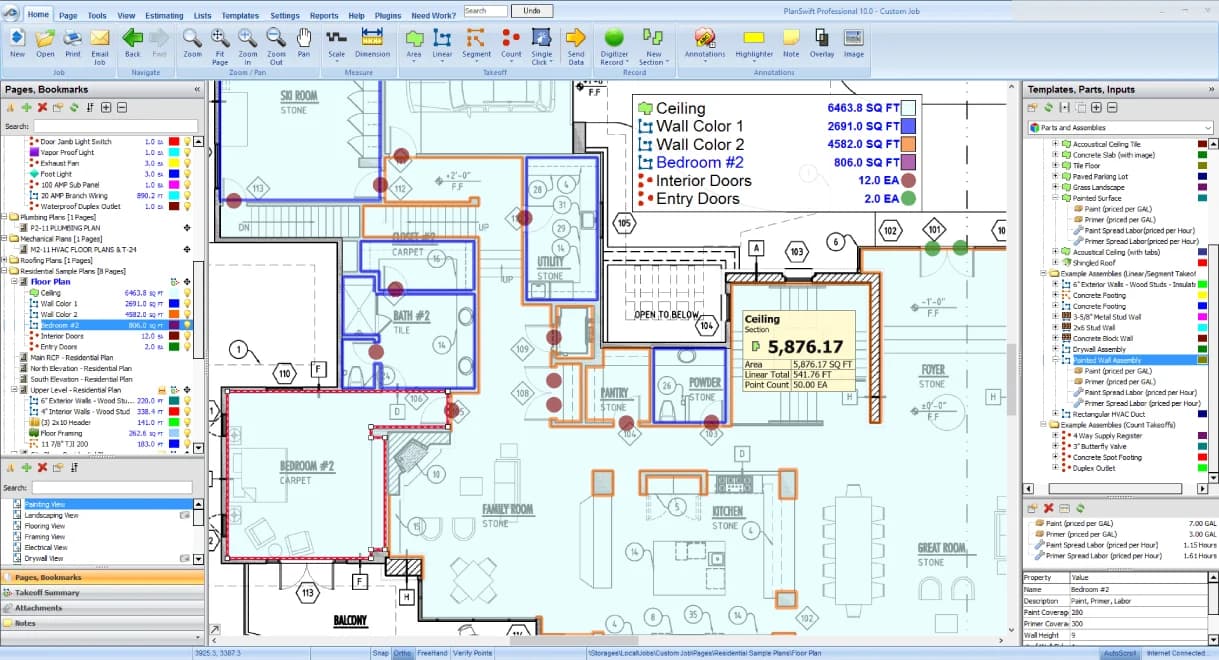
PlanSwift is construction takeoff and estimating software built around a visual, point-and-click interface — users drag and drop parts or assemblies directly onto a digitized blueprint to gather quantities and build an estimate, rather than measuring plans by hand or manually entering quantities into a spreadsheet. Its newer AI capability, Takeoff Boost, gives estimators an automated first pass on scaling and project setup so review time focuses on checking and pricing rather than raw measurement.
For contractors and estimators producing takeoffs and bids regularly, this matters because manual measurement is one of the slowest, most error-prone parts of pre-construction — a missed quantity or a scaling mistake can throw off an entire bid, and PlanSwift's digitized, click-based workflow reduces both the time and the risk of that manual process.
This review evaluates PlanSwift based on its takeoff accuracy, AI-assisted features, and practical fit for contractors and estimators heading into 2026.
Key Features
AI-Assisted Takeoff (Takeoff Boost)
Takeoff Boost applies AI to scaling, takeoff, and project setup, giving estimators an automated first pass on a set of plans so they can focus their time on reviewing and pricing rather than raw manual measurement.
Visual Point-and-Click Takeoff
Users drag and drop individual parts or full assemblies directly onto a digitized blueprint to gather quantity takeoffs, with linears, unit counts, square footage, pitches, and angles measurable in seconds with a single click.
Aerial & Multi-Format Plan Support
PlanSwift integrates with Google Maps for aerial takeoffs of roofing, asphalt, or land areas, and supports common plan formats — PDF, DWG, DXF, TIF, JPG — including plans imported directly from online plan rooms.
Direct Excel Integration
Takeoff quantities can be sent directly into existing Microsoft Excel estimating spreadsheets, fitting into an estimator's established pricing workflow rather than requiring a switch to a new estimating format.
Pros & Cons
Pros
- ✅ Takeoff Boost gives an AI-assisted first pass on scaling and takeoff before manual review
- ✅ Visual point-and-click interface drops assemblies directly onto a digitized blueprint
- ✅ Measures linears, unit counts, square footage, pitches, and angles in a single click
- ✅ Supports common plan formats (PDF, DWG, DXF, TIF) and sends quantities straight to Excel
Cons
- ❌ AI-assisted takeoff still needs an estimator's review before pricing goes out the door
- ❌ Best value comes with a real, recurring volume of takeoffs to justify the license cost
- ❌ Learning assemblies and templates well takes some upfront setup time
- ❌ Primarily a Windows-based desktop tool rather than a lightweight browser app
Who Is It Best For?
PlanSwift is the right tool if you:
- Produce takeoffs and estimates regularly across multiple trades or project types
- Want an AI first pass on scaling and measurement rather than doing it entirely by hand
- Already estimate in Excel and want takeoff quantities to flow directly into that workflow
- Work with digital plans in standard formats like PDF, DWG, or DXF
PlanSwift is not the right tool if you:
- Only bid the occasional project where manual takeoff is fast enough already
- Need a browser-first, cross-platform tool rather than a Windows desktop application
- Want fully automated estimating without any estimator review before pricing
Alternatives to Consider
- Handoff — better if you want AI estimating combined with CRM and client pipeline management
- Buildots — focused on automated progress tracking during construction, not pre-bid takeoffs
- TestFit — relevant earlier, for site feasibility and massing rather than detailed takeoffs
- Procore AI — better suited for larger commercial project management beyond estimating alone
- PlanGrid — narrower focus on document and field management, now in maintenance mode
Final Verdict
PlanSwift earns its place for contractors and estimators who produce takeoffs regularly and want to cut the time and error risk out of manual measurement. The combination of a visual, click-based takeoff workflow and the Takeoff Boost AI first pass addresses the most tedious part of pre-construction estimating without removing the estimator's final judgment on pricing.
For occasional bidders, the license investment may not be justified — PlanSwift delivers the most value for teams estimating consistently across multiple projects and trades.
Our recommendation: Run Takeoff Boost on a project you've already estimated manually to compare its automated first pass against your known numbers before relying on it for a live bid.
Key Features
Takeoff Boost gives an AI-assisted first pass on scaling and takeoff before manual review
Visual point-and-click interface drops assemblies directly onto a digitized blueprint
Measures linears, unit counts, square footage, pitches, and angles in a single click
Supports common plan formats (PDF, DWG, DXF, TIF) and sends quantities straight to Excel
Best For
General contractors producing detailed takeoffs and estimates from digital plans regularly
Estimators wanting to cut manual measurement time on roofing, flooring, and material takeoffs
Construction firms sending takeoff quantities directly into existing Excel estimating sheets
Trades using Google Maps aerial takeoff for roofing, paving, or land area estimates
Pros & Cons
What We Like
- Takeoff Boost gives an AI-assisted first pass on scaling and takeoff before manual review
- Visual point-and-click interface drops assemblies directly onto a digitized blueprint
- Measures linears, unit counts, square footage, pitches, and angles in a single click
- Supports common plan formats (PDF, DWG, DXF, TIF) and sends quantities straight to Excel
What We Don't Like
- AI-assisted takeoff still needs an estimator's review before pricing goes out the door
- Best value comes with a real, recurring volume of takeoffs to justify the license cost
- Learning assemblies and templates well takes some upfront setup time
- Primarily a Windows-based desktop tool rather than a lightweight browser app
Top PlanSwift Alternatives
View all alternatives →


PlanSwift vs Top Alternatives
| Tool | Best For | Price | AI Quality | Features | Support | Ease of Use | Rating | |
|---|---|---|---|---|---|---|---|---|
 | General contractors producing detailed takeoffs and estimates from digital plans regularly | Contact for pricing | 8.8/10 | Current | ||||
 | Construction | Contact for pricing | 8.3/10 | Read Review → | ||||
 | Construction | Contact for pricing | 8/10 | Read Review → | ||||
 | Construction | Contact for pricing | 7.7/10 | Read Review → | ||||
 | Construction | Contact for pricing | 7.4/10 | Read Review → |
Our PlanSwift Verdict
PlanSwift is best suited for contractors and estimators who want fast, accurate digital takeoffs from blueprints — with an AI first pass through Takeoff Boost — instead of measuring plans manually or building estimates from scratch in a spreadsheet.
Visit website for full details
FAQ
Related Articles
View all articles →Best AI Tools for Construction in 2026
Our editorial guide to the AI tools we recommend, including PlanSwift.
Read Guide →PlanSwift vs Top Alternatives: Full Comparison
Side-by-side breakdown of PlanSwift and its main competitors.
View Comparisons →Hands-on Guides & Workflows
Step-by-step playbooks for getting the most out of tools like PlanSwift.
Browse Guides →Related Tools in Construction
See all the best Construction →
Autodesk Construction Cloud
Autodesk Construction Cloud is best suited for general contractors and project teams who want a connected construction management suite across the project lifecycle — with Construction IQ AI surfacing design, RFI, and quality risks, plus AI features across takeoff, submittals, and documentation.
Read Review →
Kreo
Kreo is best suited for contractors, estimators, and construction firms who need to automate quantity takeoff from 2D drawings and BIM models — reducing the manual measurement time that traditionally makes estimating one of the most time-intensive parts of preconstruction.
Read Review →
LeadTruffle
LeadTruffle is best suited for contractors and home service businesses who lose leads because they can't answer every call or website inquiry instantly, and want AI to qualify and follow up via SMS within seconds.
Read Review →
STACK
STACK is best suited for contractors, subcontractors, and estimating teams who need a fast, cloud-based takeoff and estimating platform to measure quantities from digital drawings, build cost estimates, and manage bid packages — all in a single shareable workspace.
Read Review →