

OpenSpace Review:
Is It Worth It in 2026?
OpenSpace is best suited for general contractors and project teams who need an effortless way to capture comprehensive, walkable photo documentation of construction sites — using a simple hard-hat-mounted camera and AI to automatically map images to floor plans without manual tagging.
Best For
Our Overall Rating
Based on comprehensive testing
Best For
- General contractors documenting daily site progress for owner and stakeholder transparency
- Project managers needing to resolve disputes or claims with timestamped visual evidence
- Architects and owners on remote or distant projects who can't visit the site frequently
- Construction teams wanting a reliable visual record for warranty and as-built documentation
Pricing
See current pricing on the OpenSpace website.
Bottom Line
OpenSpace is best suited for general contractors and project teams who need an effortless way to capture comprehensive, walkable photo documentation of construction sites — using a simple hard-hat-mounted camera and AI to automatically map images to floor plans without manual tagging.
Visit OpenSpace →Quick Verdict
OpenSpace scores 9.0/10 in our testing and is an excellent choice for General contractors documenting daily site progress for owner and stakeholder transparency and Project managers needing to resolve disputes or claims with timestamped visual evidence.
What Is OpenSpace?
Overview
OpenSpace is a construction site documentation platform that uses 360-degree cameras and AI to automatically capture, stitch, and map photo documentation of job sites to floor plans — creating a navigable visual timeline of construction progress without requiring manual photo tagging or organization. A site superintendent simply walks the project wearing a hard-hat-mounted 360° camera, and OpenSpace's AI handles the rest.
This effortless capture model addresses a common construction documentation problem: comprehensive site photo documentation is valuable but rarely done consistently because manual photo organization is tedious. OpenSpace removes that friction, making regular, comprehensive documentation practical for every project.
This review evaluates OpenSpace based on its capture technology, documentation value, and practical fit for construction project teams in 2026.
Key Features
Hands-Free 360° Capture
OpenSpace uses a 360-degree camera mounted on a hard hat or pole — the user simply walks through the site at a normal pace, and the camera continuously captures imagery without requiring stops for individual photos. This dramatically reduces the time and effort needed compared to traditional photo documentation.
AI-Powered Floor Plan Mapping
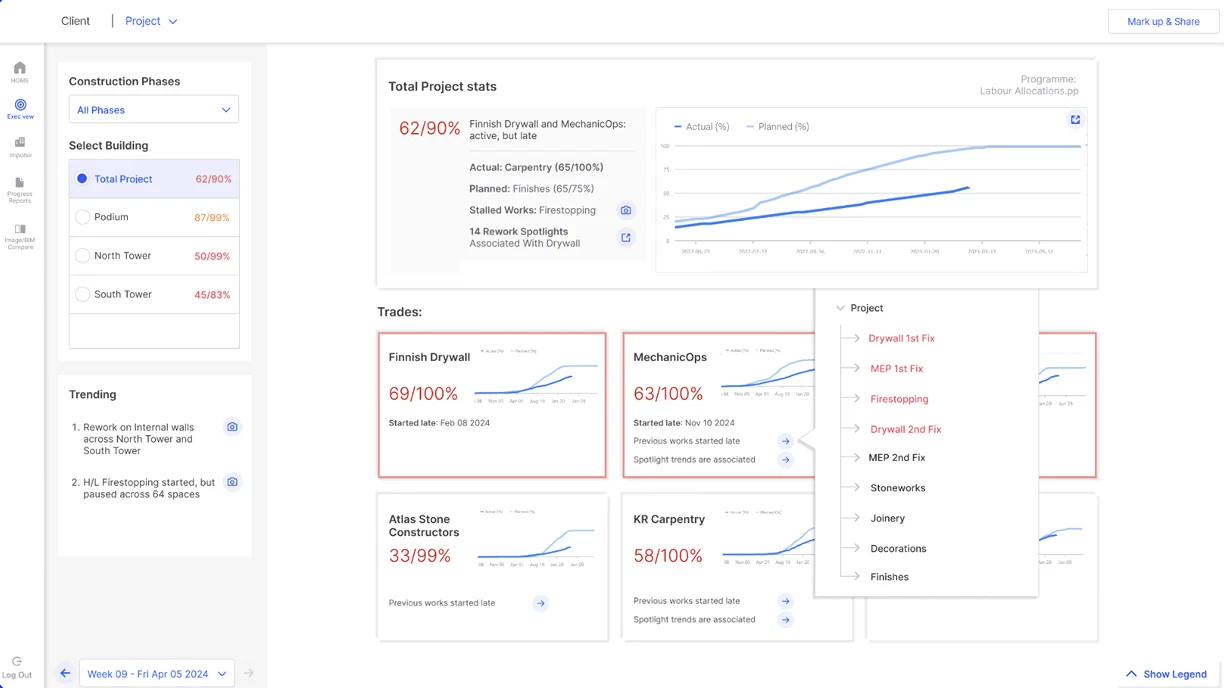
OpenSpace's AI automatically processes captured 360° footage and maps it to the project's floor plan, creating a navigable visual representation where any point on the plan can be clicked to see the corresponding site photo from that location and date.
Visual Progress Timeline
Because captures are tied to both location and date, OpenSpace builds a navigable timeline showing how any specific area of the site looked at different points in construction — useful for tracking progress, verifying completed work, and resolving disputes about what was installed and when.
BIM Comparison
OpenSpace can overlay captured site imagery against BIM model data, helping teams visually verify that as-built conditions match design intent without requiring a separate scanning process.
Pros & Cons
Pros
- ✅ Hands-free 360° capture requires only walking the site with a mounted camera, no manual photo tagging
- ✅ AI automatically stitches and maps captured imagery to the building's floor plan
- ✅ Creates a navigable visual timeline of site progress for remote review and dispute resolution
- ✅ Reduces site visit frequency needed for owners, architects, and remote project stakeholders
Cons
- ❌ Requires consistent site walks to build a useful, comprehensive documentation timeline
- ❌ Primarily a documentation and visualization tool — not a project management or scheduling platform
- ❌ Best value scales with project size and the number of stakeholders needing remote visibility
- ❌ Image-based documentation alone doesn't replace dedicated quality inspection workflows
Who Is It Best For?
OpenSpace is the right tool if you:
- Need consistent, comprehensive site documentation without the manual overhead of traditional photo organization
- Have remote stakeholders — owners, architects, lenders — who need visibility into site progress without frequent visits
- Face disputes or claims where timestamped visual evidence of site conditions is valuable
- Manage larger projects where the cost of regular site walks is justified by documentation value
OpenSpace is not the right tool if you:
- Run small projects where informal photo documentation is sufficient
- Need a full project management platform rather than a documentation and visualization tool
- Require detailed quality inspection workflows beyond visual documentation
Alternatives to Consider
- Doxel — adds AI-powered BIM deviation detection and productivity analytics beyond documentation
- StructionSite — similar 360° capture and floor plan mapping technology
- Matterport — broader 3D scanning platform used across real estate and construction
- Procore — comprehensive construction management platform with photo documentation as one feature
- Fieldwire — field task management with photo attachment capabilities rather than systematic 360° capture
Final Verdict
OpenSpace solves construction documentation's core adoption problem — comprehensive site photo records are valuable, but manual photo management is tedious enough that most teams skip it. By making capture effortless and organization automatic, OpenSpace makes consistent documentation practical for projects of meaningful size.
The tool's value compounds with project duration and stakeholder count — the more often disputes, remote reviews, or progress verification come up, the more the documentation timeline pays for itself. For projects where owner transparency and dispute protection matter, OpenSpace is a low-friction addition to the project workflow.
Our recommendation: Start using OpenSpace from the earliest possible point in construction — the documentation value compounds over the project timeline, and starting late means losing the early-stage visual record that's often most useful for dispute resolution and as-built verification.
Key Features
Hands-free 360° capture requires only walking the site with a mounted camera, no manual photo tagging
AI automatically stitches and maps captured imagery to the building's floor plan
Creates a navigable visual timeline of site progress for remote review and dispute resolution
Reduces site visit frequency needed for owners, architects, and remote project stakeholders
Best For
General contractors documenting daily site progress for owner and stakeholder transparency
Project managers needing to resolve disputes or claims with timestamped visual evidence
Architects and owners on remote or distant projects who can't visit the site frequently
Construction teams wanting a reliable visual record for warranty and as-built documentation
Pros & Cons
What We Like
- Hands-free 360° capture requires only walking the site with a mounted camera, no manual photo tagging
- AI automatically stitches and maps captured imagery to the building's floor plan
- Creates a navigable visual timeline of site progress for remote review and dispute resolution
- Reduces site visit frequency needed for owners, architects, and remote project stakeholders
What We Don't Like
- Requires consistent site walks to build a useful, comprehensive documentation timeline
- Primarily a documentation and visualization tool — not a project management or scheduling platform
- Best value scales with project size and the number of stakeholders needing remote visibility
- Image-based documentation alone doesn't replace dedicated quality inspection workflows
Top OpenSpace Alternatives
View all alternatives →


OpenSpace vs Top Alternatives
| Tool | Best For | Price | AI Quality | Features | Support | Ease of Use | Rating | |
|---|---|---|---|---|---|---|---|---|
 | General contractors documenting daily site progress for owner and stakeholder transparency | Contact for pricing | 9/10 | Current | ||||
 | Construction | Contact for pricing | 8.5/10 | Read Review → | ||||
 | Construction | Contact for pricing | 8.2/10 | Read Review → | ||||
 | Construction | Contact for pricing | 7.9/10 | Read Review → | ||||
 | Construction | Contact for pricing | 7.6/10 | Read Review → |
Our OpenSpace Verdict
OpenSpace is best suited for general contractors and project teams who need an effortless way to capture comprehensive, walkable photo documentation of construction sites — using a simple hard-hat-mounted camera and AI to automatically map images to floor plans without manual tagging.
Visit website for full details
FAQ
Related Articles
View all articles →Best AI Tools for Construction in 2026
Our editorial guide to the AI tools we recommend, including OpenSpace.
Read Guide →OpenSpace vs Top Alternatives: Full Comparison
Side-by-side breakdown of OpenSpace and its main competitors.
View Comparisons →Hands-on Guides & Workflows
Step-by-step playbooks for getting the most out of tools like OpenSpace.
Browse Guides →Related Tools in Construction
See all the best Construction →
ALICE Technologies
ALICE Technologies is best suited for general contractors, project managers, and construction firms handling complex projects who need AI to generate and compare thousands of construction schedule scenarios to optimize cost, time, and resource allocation.
Read Review →
PlanSwift
PlanSwift is best suited for contractors and estimators who want fast, accurate digital takeoffs from blueprints — with an AI first pass through Takeoff Boost — instead of measuring plans manually or building estimates from scratch in a spreadsheet.
Read Review →
Autodesk Construction Cloud
Autodesk Construction Cloud is best suited for general contractors and project teams who want a connected construction management suite across the project lifecycle — with Construction IQ AI surfacing design, RFI, and quality risks, plus AI features across takeoff, submittals, and documentation.
Read Review →
Kreo
Kreo is best suited for contractors, estimators, and construction firms who need to automate quantity takeoff from 2D drawings and BIM models — reducing the manual measurement time that traditionally makes estimating one of the most time-intensive parts of preconstruction.
Read Review →