

Fieldwire Review:
Is It Worth It in 2026?
Fieldwire is best suited for general contractors, subcontractors, and site superintendents who need a mobile-first platform for managing field tasks, distributing drawings, and coordinating punch lists on active construction sites — with offline capability for areas with poor connectivity.
Best For
Our Overall Rating
Based on comprehensive testing
Best For
- Site superintendents managing daily task assignments and field coordination
- Subcontractors who need drawing access and task tracking on the job site
- General contractors managing punch lists, inspections, and defect tracking
- Construction teams working in areas with inconsistent internet connectivity
Pricing
See current pricing on the Fieldwire website.
Bottom Line
Fieldwire is best suited for general contractors, subcontractors, and site superintendents who need a mobile-first platform for managing field tasks, distributing drawings, and coordinating punch lists on active construction sites — with offline capability for areas with poor connectivity.
Visit Fieldwire →Quick Verdict
Fieldwire scores 9.0/10 in our testing and is an excellent choice for Site superintendents managing daily task assignments and field coordination and Subcontractors who need drawing access and task tracking on the job site.
What Is Fieldwire?
Overview
Fieldwire is a construction field management platform built around the day-to-day needs of site teams — distributing drawings, assigning tasks, tracking punch lists, and coordinating inspections from mobile devices on the job site. Its mobile-first design and offline capability make it particularly suited to the realities of construction site work, where internet connectivity is often unreliable and workers need tools that function on a phone or tablet.
Now part of the Hilti Group, Fieldwire is used across general contractors, subcontractors, and specialty trades on commercial construction, residential, and infrastructure projects. It occupies the practical middle ground between basic project management tools and complex enterprise construction platforms like Procore.
This review evaluates Fieldwire based on its field management capabilities, mobile performance, and practical fit for construction site teams in 2026.
Key Features
Mobile Drawing Access and Markup
Fieldwire distributes the latest drawing revisions to all field devices automatically, with markup tools that allow teams to annotate plans, attach photos, and create task links directly on drawings — ensuring field workers are always working from current information.
Task and Punch List Management
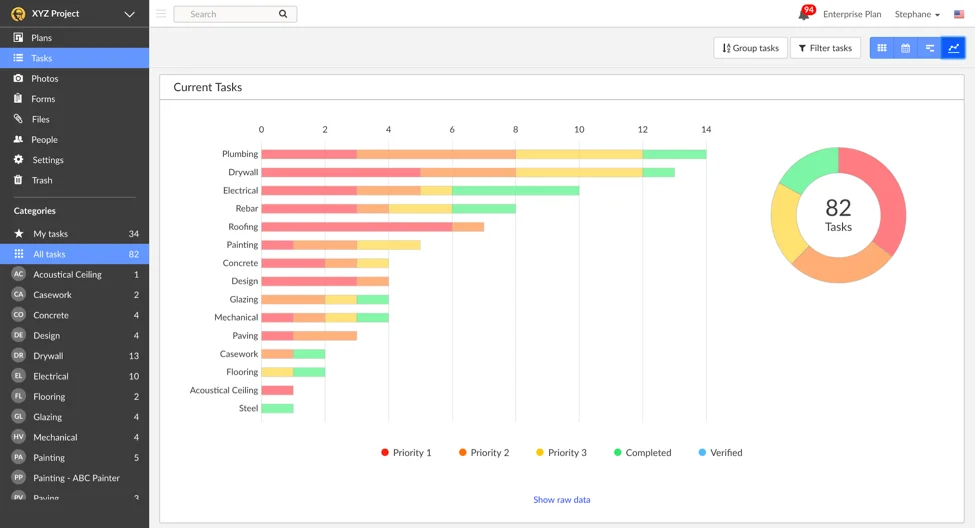
Task creation, assignment, and tracking is Fieldwire's core workflow. Superintendents can assign tasks to specific trades, set due dates, require photo completion evidence, and track progress from a desktop overview or mobile device. Punch lists follow the same workflow with inspection status tracking.
Offline Mode
Fieldwire's offline mode caches drawings, tasks, and project data locally so field workers can access and update information in areas without cellular or Wi-Fi coverage. Updates sync when connectivity is restored, which is a practical necessity on many construction sites.
RFI and Issue Tracking
Beyond tasks, Fieldwire manages RFIs (Requests for Information) and site issues with photo documentation, assignment to responsible parties, and resolution tracking — providing a log of field conditions and design clarifications.
Pros & Cons
Pros
- ✅ Mobile-first design works well on site for field workers using phones and tablets
- ✅ Offline mode allows task access and updates in areas with poor or no internet connectivity
- ✅ Drawing markup and version control keeps all field staff on the latest plan revisions
- ✅ Punch list and task management workflows are practical for daily site coordination
Cons
- ❌ Less comprehensive than enterprise platforms like Procore for financial and contract management
- ❌ Reporting and analytics are more basic compared to larger construction management suites
- ❌ Integration with accounting and ERP systems requires additional configuration
- ❌ Best suited to field coordination — not a full project management solution on its own
Who Is It Best For?
Fieldwire is the right tool if you:
- Need a practical mobile tool for site teams rather than a comprehensive project management platform
- Work on sites with unreliable connectivity where offline capability is essential
- Manage field tasks, punch lists, and drawing distribution as your primary site coordination need
- Are a subcontractor who needs drawing access and task tracking without the overhead of an enterprise platform
Fieldwire is not the right tool if you:
- Need integrated financials, contract management, and procurement alongside field management
- Require advanced reporting and project analytics across a large project portfolio
- Are looking for a single platform covering all project management functions end to end
Alternatives to Consider
- Procore — more comprehensive platform covering financials and contracts alongside field management
- PlanGrid — similar drawing distribution and field management with strong Autodesk integration
- Autodesk Construction Cloud — broader ecosystem connecting BIM to field management
- Buildertrend — better suited for residential and home builder workflows
- CoConstruct — purpose-built for custom home builders and remodelers
Final Verdict
Fieldwire is one of the most field-practical construction management tools available — designed for how construction sites actually work rather than how project managers wish they did. The offline capability, mobile drawing access, and task management workflow make it genuinely useful to the people doing the work on site.
For teams needing integrated project financials and comprehensive reporting, Fieldwire's scope is intentionally limited. But for field coordination, punch list management, and drawing distribution, it's among the strongest purpose-built options available.
Our recommendation: Pilot Fieldwire on a single project with your site superintendent and lead subcontractors before evaluating it against a more comprehensive platform. The field adoption rate is the most important indicator — tools that field workers actually use every day deliver more value than comprehensive platforms that live on project managers' desks.
Key Features
Mobile-first design works well on site for field workers using phones and tablets
Offline mode allows task access and updates in areas with poor or no internet connectivity
Drawing markup and version control keeps all field staff on the latest plan revisions
Punch list and task management workflows are practical for daily site coordination
Best For
Site superintendents managing daily task assignments and field coordination
Subcontractors who need drawing access and task tracking on the job site
General contractors managing punch lists, inspections, and defect tracking
Construction teams working in areas with inconsistent internet connectivity
Pros & Cons
What We Like
- Mobile-first design works well on site for field workers using phones and tablets
- Offline mode allows task access and updates in areas with poor or no internet connectivity
- Drawing markup and version control keeps all field staff on the latest plan revisions
- Punch list and task management workflows are practical for daily site coordination
What We Don't Like
- Less comprehensive than enterprise platforms like Procore for financial and contract management
- Reporting and analytics are more basic compared to larger construction management suites
- Integration with accounting and ERP systems requires additional configuration
- Best suited to field coordination — not a full project management solution on its own
Top Fieldwire Alternatives
View all alternatives →
Procore
Alternative to Fieldwire
Read Review →
PlanGrid
Alternative to Fieldwire
Read Review →
Autodesk Construction Cloud
Alternative to Fieldwire
Read Review →Buildertrend
Alternative to Fieldwire
CoConstruct
Alternative to Fieldwire
Fieldwire vs Top Alternatives
| Tool | Best For | Price | AI Quality | Features | Support | Ease of Use | Rating | |
|---|---|---|---|---|---|---|---|---|
 | Site superintendents managing daily task assignments and field coordination | Contact for pricing | 9/10 | Current | ||||
 | Construction | Contact for pricing | 8.5/10 | Read Review → | ||||
 | Construction | Contact for pricing | 8.2/10 | Read Review → | ||||
 | Construction | Contact for pricing | 7.9/10 | Read Review → | ||||
B Buildertrend | Construction | Contact for pricing | 7.6/10 | — |
Our Fieldwire Verdict
Fieldwire is best suited for general contractors, subcontractors, and site superintendents who need a mobile-first platform for managing field tasks, distributing drawings, and coordinating punch lists on active construction sites — with offline capability for areas with poor connectivity.
Visit website for full details
FAQ
Related Articles
View all articles →Best AI Productivity Tools for Professionals in 2026
Discover the top AI tools we recommend in AI Productivity Tools.
View Hub →Fieldwire vs Top Alternatives: Full Comparison
Side-by-side breakdown of Fieldwire and its main competitors.
View Comparisons →Hands-on Guides & Workflows
Step-by-step playbooks for getting the most out of tools like Fieldwire.
Browse Guides →Related Tools in AI Productivity Tools
See all the best AI Productivity Tools →
Notion AI
Notion AI is best suited for architecture, construction, and real estate teams already using Notion as their knowledge base who want AI-powered writing, summarization, and Q&A built directly into their existing docs and wikis.
Read Review →
Omnisend
Omnisend is best suited for furniture and home decor e-commerce businesses that want AI-powered email and SMS marketing automation — building automated campaigns, recovering abandoned carts, and driving repeat purchases with pre-built workflows designed specifically for online retail.
Read Review →
Perplexity AI
Perplexity AI is best suited for architecture, construction, and real estate professionals who need quick, well-sourced answers to research questions — market data, material specs, regulations — with citations they can actually verify.
Read Review →
SaneBox
SaneBox is best suited for architecture, construction, furniture, and real estate professionals drowning in email who want unimportant messages automatically filtered out without switching email providers or learning a new inbox.
Read Review →