

Pixelcut.ai Review:
Is It Worth It in 2026?
Pixelcut.ai is best suited for furniture and home decor sellers who need fast, affordable AI product photo editing — background removal, scene generation, and photo enhancement — to produce e-commerce-ready images without a professional photo studio.
We may earn a commission when you purchase through links on our site. Learn more
Best For
Our Overall Rating
Based on comprehensive testing
Best For
- Furniture and home decor sellers needing affordable product photo editing at scale
- Small e-commerce brands wanting consistent, styled product images without a studio
- Sellers on marketplaces who need to refresh product photos quickly for new listings
- Mobile-first sellers who photograph products on a phone and need fast editing tools
Pricing
See current pricing on the Pixelcut.ai website.
Bottom Line
Pixelcut.ai is best suited for furniture and home decor sellers who need fast, affordable AI product photo editing — background removal, scene generation, and photo enhancement — to produce e-commerce-ready images without a professional photo studio.
Visit Pixelcut.ai →Quick Verdict
Pixelcut.ai scores 8.2/10 in our testing and is a strong choice for Furniture and home decor sellers needing affordable product photo editing at scale and Small e-commerce brands wanting consistent, styled product images without a studio.
What Is Pixelcut.ai?
Overview
Pixelcut.ai is an AI-powered product photography editing tool that helps sellers remove backgrounds, generate styled scenes, and enhance product photos quickly from any device, including mobile. For furniture and home decor sellers without access to a professional photo studio, Pixelcut.ai provides a fast, affordable path to more polished product imagery for online listings.
The tool is built around a mobile-first workflow, making it practical for sellers who photograph products with a smartphone and need to quickly turn those photos into e-commerce-ready images without a desktop editing tool or design experience.
This review evaluates Pixelcut.ai based on its image editing quality, ease of use, and practical fit for furniture and home decor e-commerce sellers in 2026.
Key Features
AI Background Removal and Replacement
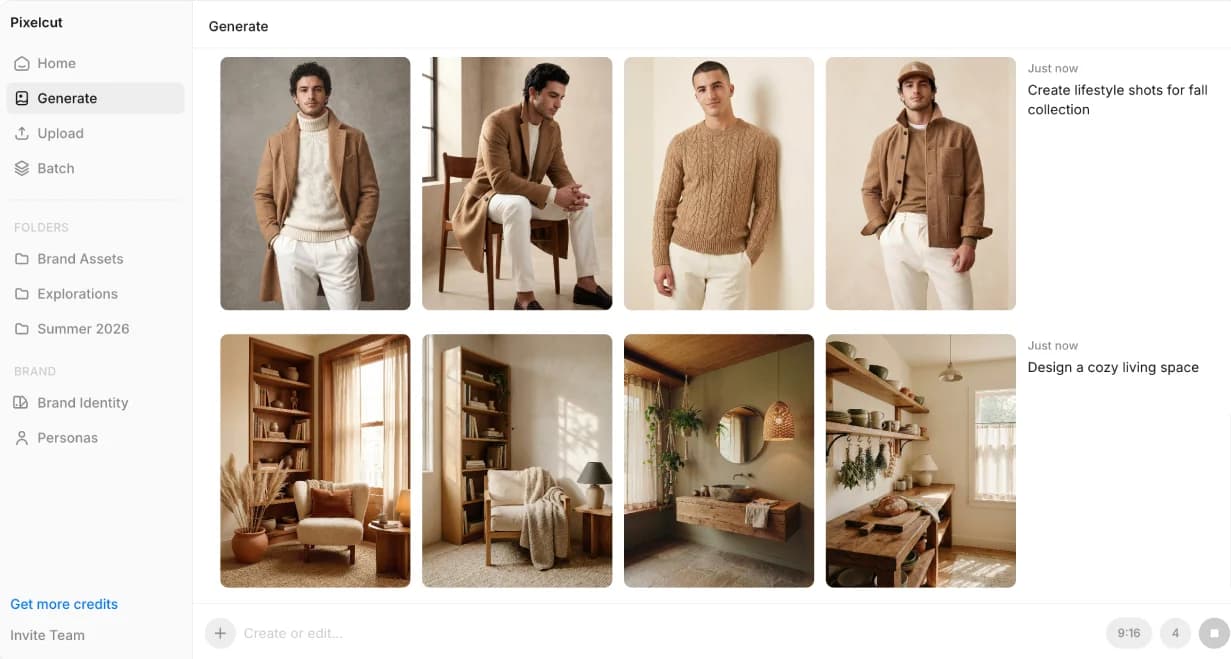
Pixelcut.ai automatically detects and removes the background from a product photo, then allows users to replace it with a solid color, styled scene, or AI-generated backdrop — turning a basic product shot into a more polished listing image in seconds.
AI Scene Generation
Beyond simple background removal, Pixelcut.ai can generate realistic styled scenes around a product — placing furniture or decor items into contextual settings that make listing photos more visually appealing than plain studio backgrounds.
Mobile-First Editing
The Pixelcut.ai mobile app is designed for sellers who shoot product photos on a smartphone, enabling the full edit-and-export workflow without needing to transfer files to a desktop computer first.
Batch Photo Editing
For sellers managing larger catalogs, Pixelcut.ai supports processing multiple product images with consistent editing treatment, reducing the time needed to prepare a full catalog of listing photos.
Pros & Cons
Pros
- ✅ Removes and replaces product photo backgrounds in seconds with a simple upload
- ✅ AI-generated scenes and backdrops give product photos a styled, professional look
- ✅ Mobile app makes it practical to edit and publish product photos directly from a phone
- ✅ Affordable pricing makes it accessible for small sellers without a photography budget
Cons
- ❌ Background and scene realism can vary depending on the original product photo quality
- ❌ Less control over precise lighting and shadow accuracy compared to a professional shoot
- ❌ Best suited to smaller product categories rather than large furniture needing scale context
- ❌ Free tier has limited monthly generations, requiring a paid plan for regular catalog use
Who Is It Best For?
Pixelcut.ai is the right tool if you:
- Sell furniture or home decor online and need a fast way to improve product photo quality
- Photograph products on a smartphone and want a mobile-first editing workflow
- Don't have budget for professional photography for every item in your catalog
- Need to process many product images quickly ahead of a listing refresh or new product launch
Pixelcut.ai is not the right tool if you:
- Sell large furniture pieces where accurate scale and room context are essential to the listing
- Need pixel-perfect, brand-controlled photography for premium product positioning
- Require precise, repeatable studio lighting setups for catalog consistency
Alternatives to Consider
- Pebblely — comparable AI background generation with a wider variety of scene styles
- Photoroom — strong background removal and replacement with a similar e-commerce focus
- Adobe Firefly — higher-end AI image generation with more creative control, requires Creative Cloud
- Removal.ai — simpler, dedicated background removal tool
- Canva AI — broader design tool with background editing as one of many capabilities
Final Verdict
Pixelcut.ai offers a practical, mobile-friendly solution for furniture and home decor sellers who need to improve product photo quality without investing in a professional photo studio. The combination of fast background editing and AI scene generation makes it easy to produce more polished listing images directly from a phone.
For premium brands needing photography-grade precision, the AI editing has limits — but for sellers needing a meaningful step up from plain or inconsistent product photos, Pixelcut.ai delivers solid value at an accessible price point.
Our recommendation: Test Pixelcut.ai on your next batch of new product listings and compare engagement against your current photo treatment before rolling it out across your full catalog.
Key Features
Removes and replaces product photo backgrounds in seconds with a simple upload
AI-generated scenes and backdrops give product photos a styled, professional look
Mobile app makes it practical to edit and publish product photos directly from a phone
Affordable pricing makes it accessible for small sellers without a photography budget
Best For
Furniture and home decor sellers needing affordable product photo editing at scale
Small e-commerce brands wanting consistent, styled product images without a studio
Sellers on marketplaces who need to refresh product photos quickly for new listings
Mobile-first sellers who photograph products on a phone and need fast editing tools
Pros & Cons
What We Like
- Removes and replaces product photo backgrounds in seconds with a simple upload
- AI-generated scenes and backdrops give product photos a styled, professional look
- Mobile app makes it practical to edit and publish product photos directly from a phone
- Affordable pricing makes it accessible for small sellers without a photography budget
What We Don't Like
- Background and scene realism can vary depending on the original product photo quality
- Less control over precise lighting and shadow accuracy compared to a professional shoot
- Best suited to smaller product categories rather than large furniture needing scale context
- Free tier has limited monthly generations, requiring a paid plan for regular catalog use
Top Pixelcut.ai Alternatives
View all alternatives →


Pixelcut.ai vs Top Alternatives
| Tool | Best For | Price | AI Quality | Features | Support | Ease of Use | Rating | |
|---|---|---|---|---|---|---|---|---|
 | Furniture and home decor sellers needing affordable product photo editing at scale | Contact for pricing | 8.2/10 | Current | ||||
 | Furniture | Contact for pricing | 7.7/10 | Read Review → | ||||
 | Furniture | Contact for pricing | 7.4/10 | Read Review → | ||||
 | Furniture | Contact for pricing | 7.1/10 | Read Review → | ||||
R Removal.ai | Furniture | Contact for pricing | 7/10 | — |
Our Pixelcut.ai Verdict
Pixelcut.ai is best suited for furniture and home decor sellers who need fast, affordable AI product photo editing — background removal, scene generation, and photo enhancement — to produce e-commerce-ready images without a professional photo studio.
Visit website for full details
FAQ
Related Articles
View all articles →Best AI Design Tools for Professionals in 2026
Discover the top AI tools we recommend in AI Design Tools.
View Hub →Pixelcut.ai vs Top Alternatives: Full Comparison
Side-by-side breakdown of Pixelcut.ai and its main competitors.
View Comparisons →Hands-on Guides & Workflows
Step-by-step playbooks for getting the most out of tools like Pixelcut.ai.
Browse Guides →Related Tools in AI Design Tools
See all the best AI Design Tools →
Rendar AI
Rendar AI is a general-purpose AI image and video generation platform best suited for furniture and real estate brands that want to produce marketing visuals, social ads, and product creatives from text prompts without a design team.
Read Review →
Pebblely
Pebblely is best suited for furniture and home decor sellers who need professional-looking product photography backgrounds without a photo studio — using AI to place product photos into realistic, styled scenes in seconds.
Read Review →
Vertebrae
Vertebrae was a 3D and AR commerce platform that let furniture and home goods brands show products in customers' real spaces — acquired by Snap in 2021, its technology now lives inside Snap's AR shopping ecosystem, and brands seeking its capabilities today should evaluate current AR commerce platforms.
Read Review →
Autodesk Forma
Autodesk Forma is best suited for architects and urban planners who need to evaluate the environmental performance — sun, wind, noise, and microclimate — of building concepts during early design, before committing to detailed development.
Read Review →