

Julius.ai Review:
Is It Worth It in 2026?
Julius.ai is best suited for real estate analysts, construction project managers, and design business owners who want to analyze data without writing code — uploading spreadsheets and asking questions in plain English to get charts, insights, and analysis from an AI data analyst.
We may earn a commission when you purchase through links on our site. Learn more
Best For
Our Overall Rating
Based on comprehensive testing
Best For
- Real estate analysts examining market data, pricing trends, and property performance without coding
- Construction project managers analyzing cost data, timelines, and project metrics from spreadsheets
- Furniture and design business owners analyzing sales data and customer trends in plain English
- Anyone who works with spreadsheets and wants AI analysis without learning Excel formulas or code
Pricing
See current pricing on the Julius.ai website.
Bottom Line
Julius.ai is best suited for real estate analysts, construction project managers, and design business owners who want to analyze data without writing code — uploading spreadsheets and asking questions in plain English to get charts, insights, and analysis from an AI data analyst.
Visit Julius.ai →Quick Verdict
Julius.ai scores 8.8/10 in our testing and is a strong choice for Real estate analysts examining market data, pricing trends, and property performance without coding and Construction project managers analyzing cost data, timelines, and project metrics from spreadsheets.
What Is Julius.ai?
Overview
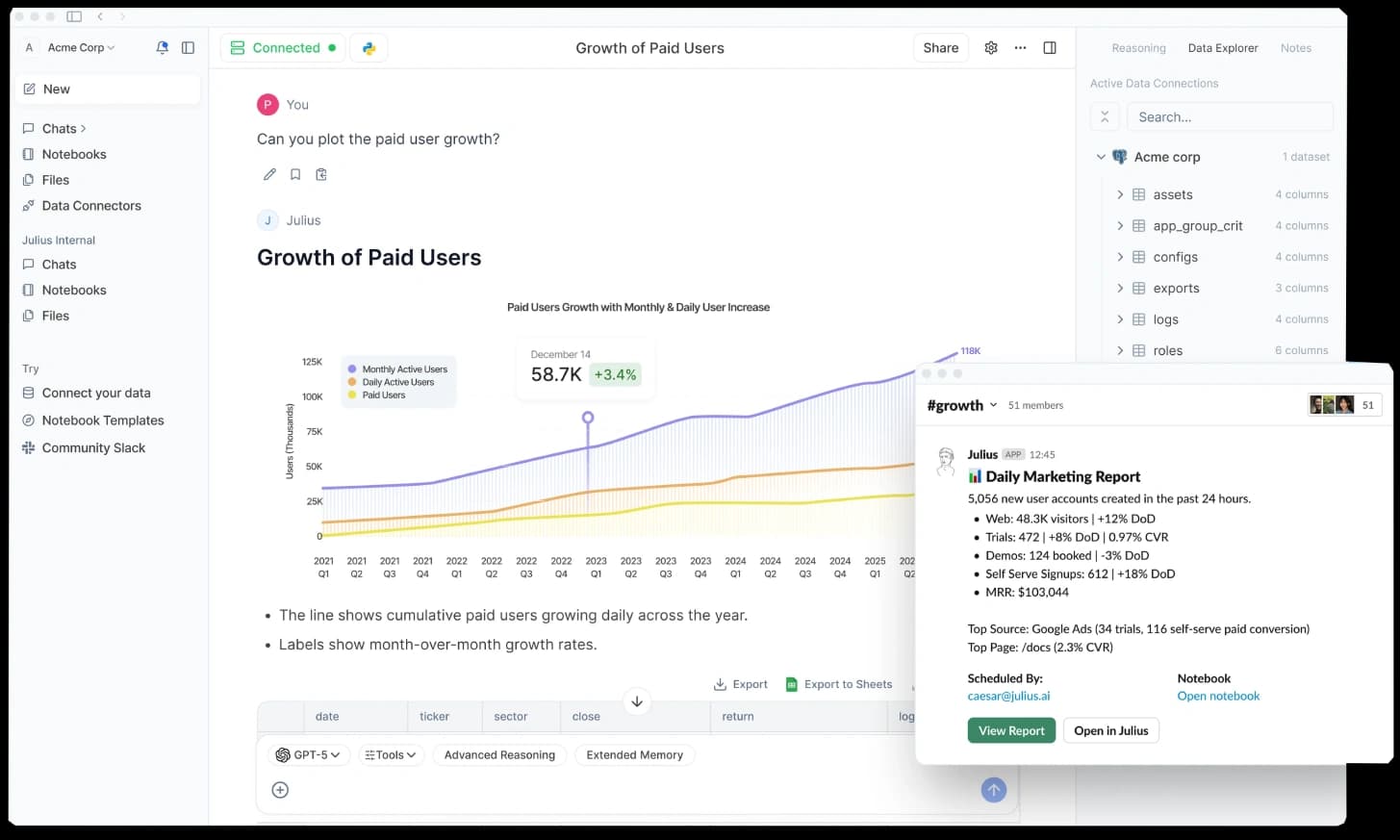
Julius.ai is an AI data analyst that lets users analyze data by asking questions in plain English rather than writing code, formulas, or building complex spreadsheet functions. Users upload spreadsheets or data files, ask questions about the data conversationally, and Julius generates charts, statistical analysis, and insights automatically — effectively acting as a data analyst that non-technical users can direct through natural language.
For real estate analysts examining market and pricing data, construction project managers analyzing cost and timeline metrics, and design business owners looking at sales and customer trends, Julius.ai removes the technical barrier to data analysis — making it possible to get meaningful insights from data without expertise in Excel, SQL, or statistical software.
This review evaluates Julius.ai based on its analysis capabilities, ease of use, and practical fit for data analysis in the real estate, construction, and design industries in 2026.
Key Features
Natural Language Data Analysis
Julius.ai lets users ask questions about their data in plain English — "what were my best-selling products last quarter?" or "show me the price trend by neighborhood" — and generates the analysis automatically, without requiring formulas or code.
Automatic Visualization
The platform generates charts and visualizations from data based on the questions asked, presenting insights visually rather than as raw numbers — making patterns and trends easier to understand and communicate.
Statistical Analysis
Beyond simple summaries, Julius.ai can perform more advanced statistical analysis — correlations, forecasting, and trend analysis — bringing capabilities that would otherwise require statistical software or expertise within reach of non-technical users.
Spreadsheet and File Upload
Users work with their existing data by uploading spreadsheets and data files directly, without needing to migrate data into a specialized platform or restructure it into a specific format first.
Pros & Cons
Pros
- ✅ Analyzes spreadsheets and data files using plain-English questions — no coding or formulas required
- ✅ Generates charts, visualizations, and statistical analysis automatically from natural language prompts
- ✅ Makes data analysis accessible to non-technical business owners and managers
- ✅ Handles a range of analysis types from simple summaries to more advanced statistical work
Cons
- ❌ AI analysis requires review — results should be verified before making significant decisions
- ❌ Data quality and structure affect output — messy data produces less reliable analysis
- ❌ Not a replacement for a dedicated business intelligence platform for ongoing dashboards
- ❌ Sensitive business data handling requires attention to privacy and security considerations
Who Is It Best For?
Julius.ai is the right tool if you:
- Work with spreadsheets and want analysis without learning Excel formulas, SQL, or statistical software
- Need quick data insights — market trends, sales patterns, cost analysis — from data you already have
- Are a non-technical business owner or manager who wants data analysis without a data analyst
- Want visualizations generated automatically to understand and communicate data findings
Julius.ai is not the right tool if you:
- Need ongoing, automated dashboards rather than ad-hoc analysis (a BI platform fits better)
- Work with highly sensitive data where uploading to an AI platform raises security concerns
- Require the precision and auditability of manually verified analysis for high-stakes financial decisions
Alternatives to Consider
- ChatGPT Data Analysis — general AI with strong data analysis capability via file upload
- Microsoft Copilot — AI analysis built into Excel and the Microsoft ecosystem
- Tableau — professional data visualization and BI platform for ongoing dashboards
- Power BI — Microsoft's business intelligence platform for enterprise data analysis
- Google Sheets AI — AI features within Google Sheets for those working in that ecosystem
Final Verdict
Julius.ai delivers genuine value by removing the technical barrier to data analysis. For real estate analysts, construction managers, and design business owners who have data in spreadsheets but lack the technical skills to analyze it deeply, the ability to ask questions in plain English and get charts and statistical analysis is a meaningful capability unlock.
The essential caveat is verification — AI analysis is a powerful starting point, but results should be reviewed before driving significant decisions, particularly since data quality and structure affect reliability. For ad-hoc analysis and exploration, Julius.ai is an excellent accessible tool; for high-stakes decisions, treat it as a fast first pass that informs, rather than replaces, careful verification.
Our recommendation: Start by asking Julius.ai questions you already know the answer to from your data — this lets you calibrate how reliable its analysis is on your specific data structure before trusting it with questions you can't independently verify, building appropriate confidence in the tool for higher-stakes analysis.
Key Features
Analyzes spreadsheets and data files using plain-English questions — no coding or formulas required
Generates charts, visualizations, and statistical analysis automatically from natural language prompts
Makes data analysis accessible to non-technical business owners and managers
Handles a range of analysis types from simple summaries to more advanced statistical work
Best For
Real estate analysts examining market data, pricing trends, and property performance without coding
Construction project managers analyzing cost data, timelines, and project metrics from spreadsheets
Furniture and design business owners analyzing sales data and customer trends in plain English
Anyone who works with spreadsheets and wants AI analysis without learning Excel formulas or code
Pros & Cons
What We Like
- Analyzes spreadsheets and data files using plain-English questions — no coding or formulas required
- Generates charts, visualizations, and statistical analysis automatically from natural language prompts
- Makes data analysis accessible to non-technical business owners and managers
- Handles a range of analysis types from simple summaries to more advanced statistical work
What We Don't Like
- AI analysis requires review — results should be verified before making significant decisions
- Data quality and structure affect output — messy data produces less reliable analysis
- Not a replacement for a dedicated business intelligence platform for ongoing dashboards
- Sensitive business data handling requires attention to privacy and security considerations
Top Julius.ai Alternatives
View all alternatives →
ChatGPT Data Analysis
Alternative to Julius.ai
Read Review →
Microsoft Copilot
Alternative to Julius.ai
Read Review →Tableau
Alternative to Julius.ai
Power BI
Alternative to Julius.ai
Google Sheets AI
Alternative to Julius.ai
Julius.ai vs Top Alternatives
| Tool | Best For | Price | AI Quality | Features | Support | Ease of Use | Rating | |
|---|---|---|---|---|---|---|---|---|
 | Real estate analysts examining market data, pricing trends, and property performance without coding | Contact for pricing | 8.8/10 | Current | ||||
 | Real Estate | Contact for pricing | 8.3/10 | Read Review → | ||||
 | Real Estate | Contact for pricing | 8/10 | Read Review → | ||||
T Tableau | Real Estate | Contact for pricing | 7.7/10 | — | ||||
PB Power BI | Real Estate | Contact for pricing | 7.4/10 | — |
Our Julius.ai Verdict
Julius.ai is best suited for real estate analysts, construction project managers, and design business owners who want to analyze data without writing code — uploading spreadsheets and asking questions in plain English to get charts, insights, and analysis from an AI data analyst.
Visit website for full details
FAQ
Related Articles
View all articles →Best AI Productivity Tools for Professionals in 2026
Discover the top AI tools we recommend in AI Productivity Tools.
View Hub →Julius.ai vs Top Alternatives: Full Comparison
Side-by-side breakdown of Julius.ai and its main competitors.
View Comparisons →Hands-on Guides & Workflows
Step-by-step playbooks for getting the most out of tools like Julius.ai.
Browse Guides →Related Tools in AI Productivity Tools
See all the best AI Productivity Tools →
Kit
Kit (formerly ConvertKit) is best suited for real estate agents, designers, and design businesses building an audience through email — offering creator-friendly newsletters, automation, landing pages, and subscriber management to nurture leads and clients over time.
Read Review →Microsoft Copilot
Microsoft Copilot is best suited for architecture, construction, and real estate firms already standardized on Microsoft 365 who want AI assistance built directly into Word, Excel, Outlook, and Teams.
Read Review →
Nifty
Nifty is best suited for architecture, construction, and design firms that want project tracking, team chat, and client-facing roadmaps in one connected workspace instead of juggling a separate task tool, chat app, and document system.
Read Review →
Submagic
Submagic is best suited for real estate agents, designers, and content creators making short-form video who want AI to add dynamic captions, B-roll, and effects automatically — turning raw phone footage into polished, engaging TikToks, Reels, and Shorts without manual editing.
Read Review →