

AI Designer Review:
Is It Worth It in 2026?
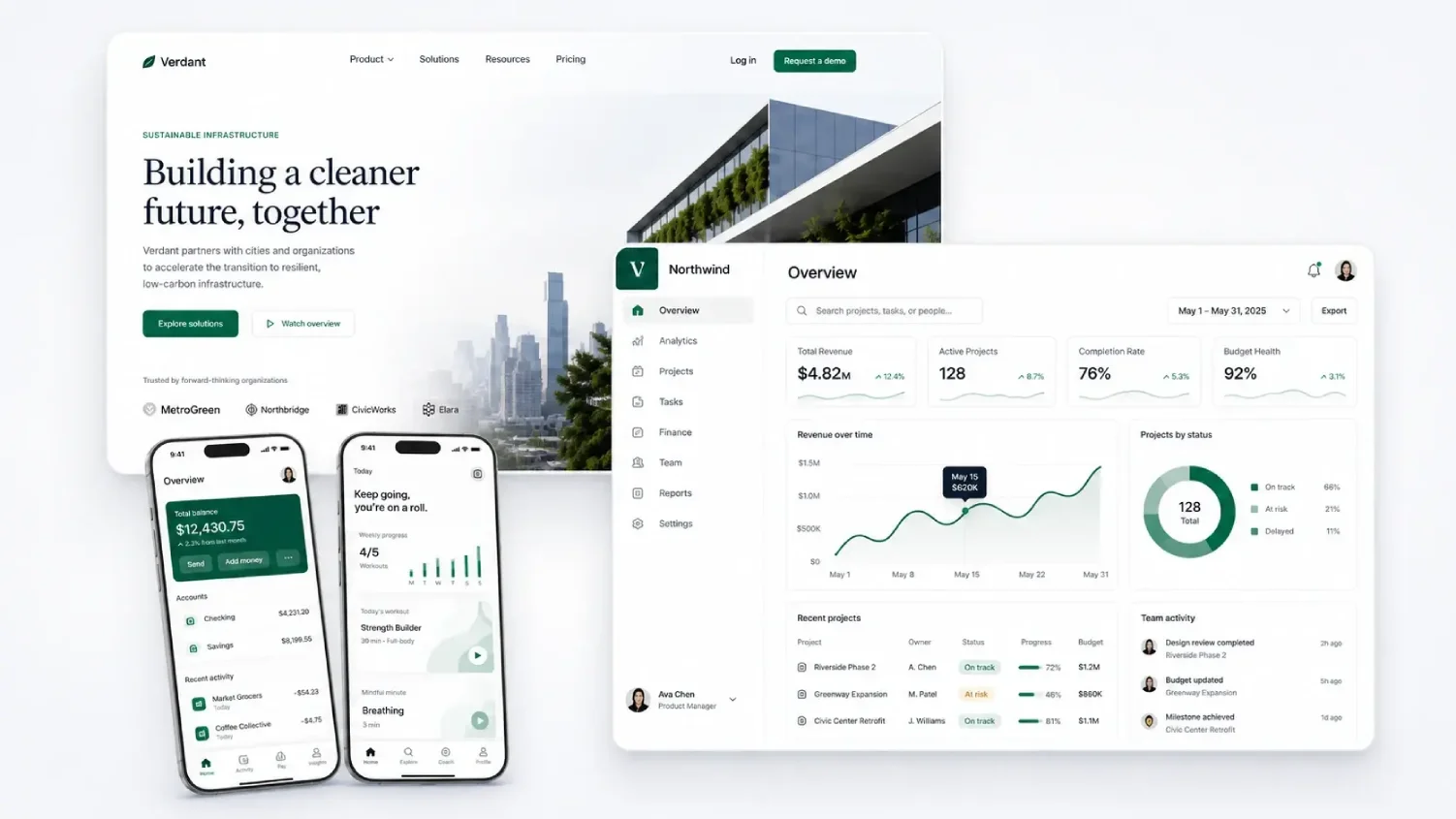
AI Designer is best suited for small architecture, construction, furniture, and real estate businesses that need polished website, app, or brand visuals from a prompt without hiring a designer or learning design software.
We may earn a commission when you purchase through links on our site. Learn more
Best For
Our Overall Rating
Based on comprehensive testing
Best For
- Small construction or architecture firms needing a quick website UI concept
- Furniture brands exploring brand kit and logo directions before committing
- Real estate startups needing app screen or dashboard concepts without a designer
- Founders wanting to visualize a product idea before hiring a design team
Pricing
See current pricing on the AI Designer website.
Bottom Line
AI Designer is best suited for small architecture, construction, furniture, and real estate businesses that need polished website, app, or brand visuals from a prompt without hiring a designer or learning design software.
Visit AI Designer →Quick Verdict
AI Designer scores 8.2/10 in our testing and is a strong choice for Small construction or architecture firms needing a quick website UI concept and Furniture brands exploring brand kit and logo directions before committing.
What Is AI Designer?
Overview
AI Designer turns simple prompts into premium website UI, mobile app screens, images, brand kits, logos, and other reusable visual assets, aiming to give founders, marketers, and product teams polished design output without starting from a blank canvas or learning a traditional design tool first. Rather than specializing in just logos or just website layouts, it covers a broad range of visual design needs from one prompt-based interface.
For small architecture, construction, furniture, and real estate businesses without in-house design resources, this matters because getting from "we need this to look professional" to an actual visual concept usually requires either hiring a designer or learning design software — both of which take time most small teams don't have.
This review evaluates AI Designer based on its output quality, breadth of design types, and practical fit for non-designers needing visual concepts heading into 2026.
Key Features
Prompt-to-UI Generation
Describing a desired website, app screen, or interface concept in plain language generates a visual design directly, skipping the blank-canvas starting point that traditional design tools require.
Brand Kit & Logo Concepts
Beyond UI, AI Designer can generate brand directions and logo ideas, giving businesses a starting point for visual identity alongside their website or app design needs.
Broad Visual Asset Coverage
The platform covers landing pages, dashboards, app screens, ad creatives, and other visual design work, letting a single tool address several different design needs rather than requiring separate specialized tools.
No Design Experience Required
AI Designer is built for founders, developers, marketers, and product teams without traditional design skills, aiming for professional-quality output without a learning curve.
Pros & Cons
Pros
- ✅ Turns a simple prompt into website UI, app screens, brand kits, or logo concepts
- ✅ No traditional design software or experience required to get usable output
- ✅ Covers a broad range of visual assets — landing pages, dashboards, ads, brand directions
- ✅ Useful for quickly exploring multiple visual directions before committing to one
Cons
- ❌ AI-generated UI and brand concepts still benefit from a design-literate review
- ❌ Breadth across many output types means depth on any one varies
- ❌ Best as a starting point for design direction, not a finished, pixel-perfect product
- ❌ Output still needs to be implemented into an actual working website or app
Who Is It Best For?
AI Designer is the right tool if you:
- Need a visual design concept fast without hiring a designer or learning design software
- Want to explore multiple design directions before committing to one
- Need both UI and brand assets covered by one tool rather than several
- Are comfortable treating output as a starting point rather than a finished product
AI Designer is not the right tool if you:
- Need pixel-perfect, production-ready design without further refinement
- Have very specific, technical UI requirements that need expert design judgment
- Already have a designer or design system that's working well
Alternatives to Consider
AI Designer is strong for broad, prompt-based visual design generation, but it is not the only option:
- Turbologo — more focused specifically on logo and brand kit generation
- Unicorn Platform — better if you need a complete, working website rather than design concepts
- Mixo — comparable AI website generation with a focus on going live quickly
- GetIllustrations — relevant for illustration assets rather than UI or brand design
- 10Web — better if your need is a full WordPress site rather than design concepts alone
Final Verdict
AI Designer earns its place for small teams that need a fast visual starting point — a website concept, a brand direction, an app screen — without the cost and timeline of hiring a designer. The breadth across UI, brand, and general visual assets means one tool can cover several different early-stage design needs.
Treat the output as a strong starting direction rather than a finished product — implementing a generated UI concept into an actual working site, or refining a brand direction into a final identity, still takes additional work.
Our recommendation: Generate a few different directions for your specific need — a website concept or a brand direction — and use them as a starting brief for refinement rather than expecting a final, ready-to-ship result.
Key Features
Turns a simple prompt into website UI, app screens, brand kits, or logo concepts
No traditional design software or experience required to get usable output
Covers a broad range of visual assets — landing pages, dashboards, ads, brand directions
Useful for quickly exploring multiple visual directions before committing to one
Best For
Small construction or architecture firms needing a quick website UI concept
Furniture brands exploring brand kit and logo directions before committing
Real estate startups needing app screen or dashboard concepts without a designer
Founders wanting to visualize a product idea before hiring a design team
Pros & Cons
What We Like
- Turns a simple prompt into website UI, app screens, brand kits, or logo concepts
- No traditional design software or experience required to get usable output
- Covers a broad range of visual assets — landing pages, dashboards, ads, brand directions
- Useful for quickly exploring multiple visual directions before committing to one
What We Don't Like
- AI-generated UI and brand concepts still benefit from a design-literate review
- Breadth across many output types means depth on any one varies
- Best as a starting point for design direction, not a finished, pixel-perfect product
- Output still needs to be implemented into an actual working website or app
Top AI Designer Alternatives
View all alternatives →


AI Designer vs Top Alternatives
| Tool | Best For | Price | AI Quality | Features | Support | Ease of Use | Rating | |
|---|---|---|---|---|---|---|---|---|
 | Small construction or architecture firms needing a quick website UI concept | Contact for pricing | 8.2/10 | Current | ||||
 | Cross-niche | Contact for pricing | 7.7/10 | Read Review → | ||||
 | Cross-niche | Contact for pricing | 7.4/10 | Read Review → | ||||
 | Cross-niche | Contact for pricing | 7.1/10 | Read Review → | ||||
 | Cross-niche | Contact for pricing | 7/10 | Read Review → |
Our AI Designer Verdict
AI Designer is best suited for small architecture, construction, furniture, and real estate businesses that need polished website, app, or brand visuals from a prompt without hiring a designer or learning design software.
Visit website for full details
FAQ
Related Articles
View all articles →Best AI Design Tools for Professionals in 2026
Discover the top AI tools we recommend in AI Design Tools.
View Hub →AI Designer vs Top Alternatives: Full Comparison
Side-by-side breakdown of AI Designer and its main competitors.
View Comparisons →Hands-on Guides & Workflows
Step-by-step playbooks for getting the most out of tools like AI Designer.
Browse Guides →Related Tools in AI Design Tools
See all the best AI Design Tools →
Pixelcut.ai
Pixelcut.ai is best suited for furniture and home decor sellers who need fast, affordable AI product photo editing — background removal, scene generation, and photo enhancement — to produce e-commerce-ready images without a professional photo studio.
Read Review →
Rendar AI
Rendar AI is a general-purpose AI image and video generation platform best suited for furniture and real estate brands that want to produce marketing visuals, social ads, and product creatives from text prompts without a design team.
Read Review →
Pebblely
Pebblely is best suited for furniture and home decor sellers who need professional-looking product photography backgrounds without a photo studio — using AI to place product photos into realistic, styled scenes in seconds.
Read Review →
Vertebrae
Vertebrae was a 3D and AR commerce platform that let furniture and home goods brands show products in customers' real spaces — acquired by Snap in 2021, its technology now lives inside Snap's AR shopping ecosystem, and brands seeking its capabilities today should evaluate current AR commerce platforms.
Read Review →