

Notion AI Review:
Is It Worth It in 2026?
Notion AI is best suited for architecture, construction, and real estate teams already using Notion as their knowledge base who want AI-powered writing, summarization, and Q&A built directly into their existing docs and wikis.
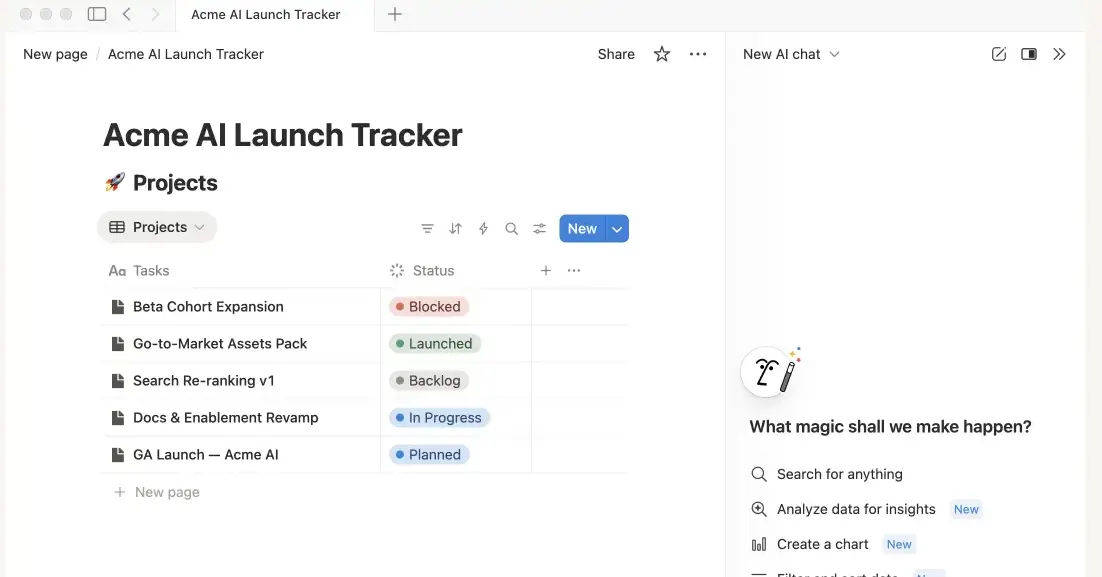
Best For
Our Overall Rating
Based on comprehensive testing
Best For
- Architecture firms maintaining project wikis and design documentation in Notion
- Construction teams summarizing meeting notes and daily site reports
- Real estate agencies organizing listings, client notes, and internal SOPs
- Furniture brands managing product specs and marketing content in one workspace
Pricing
See current pricing on the Notion AI website.
Bottom Line
Notion AI is best suited for architecture, construction, and real estate teams already using Notion as their knowledge base who want AI-powered writing, summarization, and Q&A built directly into their existing docs and wikis.
Visit Notion AI →Quick Verdict
Notion AI scores 9.0/10 in our testing and is an excellent choice for Architecture firms maintaining project wikis and design documentation in Notion and Construction teams summarizing meeting notes and daily site reports.
What Is Notion AI?
Overview
Notion AI brings AI-powered writing, summarization, and question-answering directly into Notion, the workspace many teams already use for documentation, project tracking, and internal wikis. Rather than requiring users to copy content into a separate chat tool, Notion AI works on the pages and databases already living in the workspace.
For architecture, construction, and real estate teams that have centralized project documentation, meeting notes, and client information in Notion, this means AI assistance shows up exactly where the underlying knowledge already lives — a meaningful advantage over a standalone AI tool disconnected from that context.
This review evaluates Notion AI based on its writing assistance, summarization quality, and workspace-wide Q&A heading into 2026.
Key Features
In-Document Writing Assistance
Notion AI can draft, edit, and rewrite content directly inside any Notion page, helping turn rough notes into polished documentation or client-facing content without leaving the workspace.
Meeting & Document Summarization
Long meeting notes, project updates, or reports can be summarized into key points automatically, saving time for team members who need the highlights without reading the full document.
Workspace-Wide Q&A
Notion AI can answer questions by searching across a team's entire connected workspace, surfacing relevant information from multiple pages rather than requiring someone to know exactly where a piece of information lives.
Database & Table Automation
Within Notion's databases, AI features can help fill in fields, categorize entries, and generate summaries for table rows, adding automation to structured project or client data.
Pros & Cons
Pros
- ✅ AI assistance built directly into the docs and wikis teams already maintain
- ✅ Strong summarization for long meeting notes and project documentation
- ✅ Q&A feature can answer questions across a team's entire connected workspace
- ✅ Reduces the need to copy content into a separate AI tool and back
Cons
- ❌ Most valuable for teams that have already centralized documentation in Notion
- ❌ AI features are an add-on cost on top of a regular Notion subscription
- ❌ Less capable as a general-purpose assistant outside the Notion ecosystem
- ❌ Answer quality depends on how well-organized the underlying workspace is
Who Is It Best For?
Notion AI is the right tool if you:
- Already use Notion as your team's primary documentation or knowledge base
- Spend significant time summarizing meeting notes, reports, or project updates
- Want answers pulled from your own workspace rather than the open web
- Maintain structured databases in Notion that could benefit from AI-assisted fields
Notion AI is not the right tool if you:
- Don't already use Notion as your team's documentation hub
- Need a general-purpose AI assistant for tasks unrelated to your workspace content
- Want AI features included by default rather than as an additional cost
Alternatives to Consider
Notion AI is strong for workspace-embedded AI assistance, but it is not the only option:
- ChatGPT — more flexible general-purpose assistant, disconnected from your specific workspace
- Claude — strong for analyzing documents pasted in directly, without Notion integration
- Gemini — better fit if your team uses Google Workspace instead of Notion
- Microsoft Copilot — better fit for teams centered on Microsoft 365 rather than Notion
- Grammarly — more focused specifically on writing correction rather than workspace Q&A
Final Verdict
Notion AI earns its place for teams that have already invested in Notion as their documentation and knowledge hub. The ability to summarize, draft, and search across the workspace directly — without exporting content elsewhere — saves real time for teams managing project documentation, meeting notes, and client information in one place.
For teams not already using Notion, the value proposition weakens considerably — the AI features are an enhancement to an existing workspace, not a standalone reason to adopt one.
Our recommendation: If your team already runs on Notion, trial the AI add-on for a billing cycle focused specifically on meeting summarization and workspace Q&A before deciding if it's worth the additional cost.
Key Features
AI assistance built directly into the docs and wikis teams already maintain
Strong summarization for long meeting notes and project documentation
Q&A feature can answer questions across a team's entire connected workspace
Reduces the need to copy content into a separate AI tool and back
Best For
Architecture firms maintaining project wikis and design documentation in Notion
Construction teams summarizing meeting notes and daily site reports
Real estate agencies organizing listings, client notes, and internal SOPs
Furniture brands managing product specs and marketing content in one workspace
Pros & Cons
What We Like
- AI assistance built directly into the docs and wikis teams already maintain
- Strong summarization for long meeting notes and project documentation
- Q&A feature can answer questions across a team's entire connected workspace
- Reduces the need to copy content into a separate AI tool and back
What We Don't Like
- Most valuable for teams that have already centralized documentation in Notion
- AI features are an add-on cost on top of a regular Notion subscription
- Less capable as a general-purpose assistant outside the Notion ecosystem
- Answer quality depends on how well-organized the underlying workspace is
Top Notion AI Alternatives
View all alternatives →


Notion AI vs Top Alternatives
| Tool | Best For | Price | AI Quality | Features | Support | Ease of Use | Rating | |
|---|---|---|---|---|---|---|---|---|
 | Architecture firms maintaining project wikis and design documentation in Notion | Contact for pricing | 9/10 | Current | ||||
 | Cross-niche | Contact for pricing | 8.5/10 | Read Review → | ||||
 | Cross-niche | Contact for pricing | 8.2/10 | Read Review → | ||||
 | Cross-niche | Contact for pricing | 7.9/10 | Read Review → | ||||
 | Cross-niche | Contact for pricing | 7.6/10 | Read Review → |
Our Notion AI Verdict
Notion AI is best suited for architecture, construction, and real estate teams already using Notion as their knowledge base who want AI-powered writing, summarization, and Q&A built directly into their existing docs and wikis.
Visit website for full details
FAQ
Related Articles
View all articles →Best AI Productivity Tools for Professionals in 2026
Discover the top AI tools we recommend in AI Productivity Tools.
View Hub →Notion AI vs Top Alternatives: Full Comparison
Side-by-side breakdown of Notion AI and its main competitors.
View Comparisons →Hands-on Guides & Workflows
Step-by-step playbooks for getting the most out of tools like Notion AI.
Browse Guides →Featured in Workflows
Related Tools in AI Productivity Tools
See all the best AI Productivity Tools →
Omnisend
Omnisend is best suited for furniture and home decor e-commerce businesses that want AI-powered email and SMS marketing automation — building automated campaigns, recovering abandoned carts, and driving repeat purchases with pre-built workflows designed specifically for online retail.
Read Review →
Perplexity AI
Perplexity AI is best suited for architecture, construction, and real estate professionals who need quick, well-sourced answers to research questions — market data, material specs, regulations — with citations they can actually verify.
Read Review →
SaneBox
SaneBox is best suited for architecture, construction, furniture, and real estate professionals drowning in email who want unimportant messages automatically filtered out without switching email providers or learning a new inbox.
Read Review →
Claap
Claap is best suited for architecture, construction, and real estate teams that run frequent client and vendor meetings who want automatic recording, transcription, and structured notes instead of manual note-taking during every call.
Read Review →