
Best AI Virtual Staging Tools in 2026 (Tested & Compared)
Virtual staging costs 90–97% less than physical staging, and the category has split into three tiers that serve genuinely different needs. This guide breaks down those tiers, the tools in each, and the MLS compliance rules that increasingly matter.
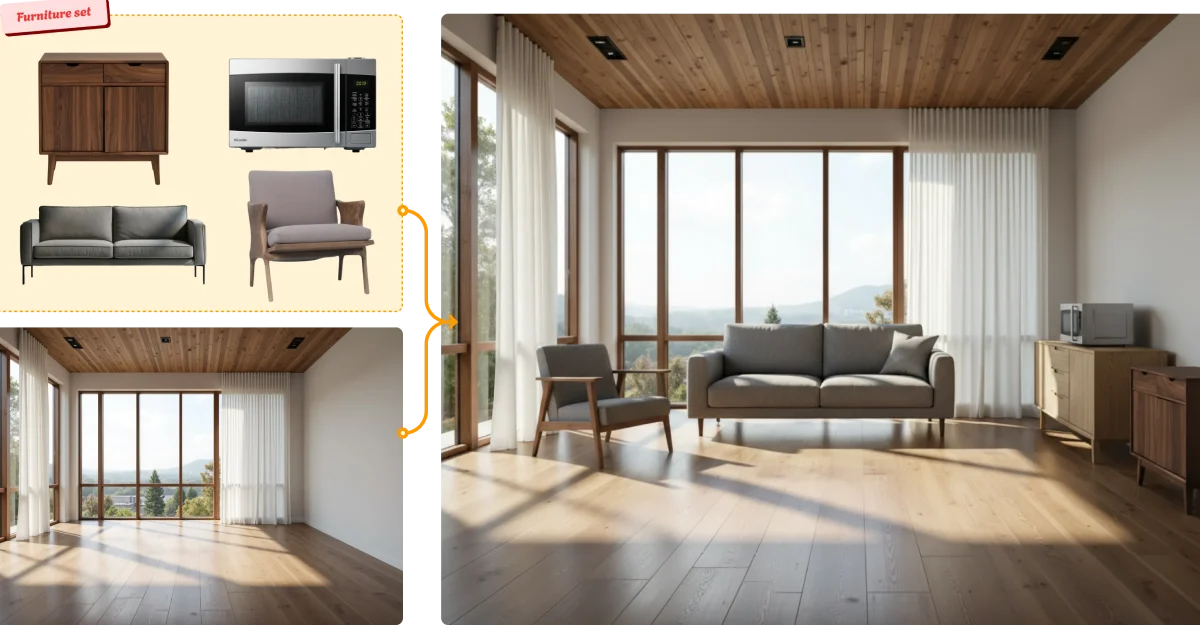
Virtual staging has quietly become one of the highest-ROI applications of AI in the property business. The economics explain why: traditional physical staging runs roughly $1,500 to $4,000 per month according to HomeLight data, which makes it impractical for most listings. Virtual staging costs 90 to 97 percent less — and AI-first tools have pushed the per-image price below $0.30 in some cases.
The results justify the attention. RESA's 2025 data found staged homes sell 72% faster, and the Home Staging Institute calculates a $23.34 return for every $1 invested in staging. NAR's 2025 Profile of Home Staging found that 83% of buyer's agents said staging helped buyers picture themselves living in a space — which is precisely the psychological barrier an empty listing photo fails to clear.
The market has responded accordingly: virtual staging was valued at $454 million in 2025 and is projected to reach $4.73 billion by 2035, according to Business Research Insights.
But the category has fragmented into three distinct tiers that serve genuinely different needs — and choosing the wrong tier wastes either money or credibility. This guide breaks down those tiers, the tools in each, and the compliance rules that increasingly matter.

The Three Tiers (and Why the Distinction Matters)
Almost every buying mistake in this category comes from treating these three as interchangeable.
Tier 1 — AI-first platforms
Fully automated. Upload a photo, pick a style, get a staged image back in 15 to 90 seconds. Per-image costs typically range from under $0.30 to a few dollars depending on plan and volume.
Best for: High-volume everyday MLS listings, agents under deadline pressure, photographers processing many properties per month.
Tradeoff: Realism is generally very good but not flawless. Artifacts occur — furniture that doesn't quite respect the room's geometry, lighting that doesn't match the original photo, inconsistency between multiple angles of the same room.
Tier 2 — Hybrid (AI + human QA)
AI generates the staging, a human reviews and corrects it before delivery. Turnaround is typically around 24 hours.
Best for: Agents who want better consistency than pure AI without luxury-tier pricing.
Tier 3 — Designer-led services
Human designers produce the staging, often working from a proper 3D pipeline. Turnaround 24 to 48 hours or longer, with per-image costs commonly in the $24 to $69 range — roughly 30 to 80 times the cost of AI-first tools.
Best for: Luxury listings where the listing photo is the marketing brochure, and where a visible artifact would undermine a multi-million-dollar presentation.
The honest read: most professionals running volume don't need Tier 3 for every listing. But for a marquee property, the cost difference is trivial relative to the commission at stake.
The Tools, Grouped by Tier
AI-first platforms
Virtual Staging AI is one of the most frequently referenced tools in this tier, built for speed and automation with minimal friction in the workflow. Notably for larger operations, it offers a robust API — making it practical for brokerages or MLS platforms to integrate staging directly into their own backend systems rather than having staff upload images manually.
Collov AI and REimagineHome are also commonly cited in this tier. REimagineHome is the AI arm of Styldod, which means the same company offers both an instant AI option and a fully human-reviewed one — useful if you want a single vendor relationship covering both ends of the quality spectrum.
Apply Design takes a meaningfully different approach within this tier. Rather than pure one-click generation, it provides a 3D editor that lets you move individual furniture pieces around the room, rotate items, swap specific objects, and stage 360-degree panoramic photos. Reported pricing sits around $7 to $10 per photo. The tradeoff is time — manual placement removes the "instant" advantage, typically requiring 15 to 20 minutes per image. This suits agents who want design control rather than speed.
RoomGPT appears in many virtual staging discussions, but it's worth being clear about what it is: a consumer-facing room-restyling app, not a tool built for real estate listing workflows. It's excellent for quick design inspiration and remodel ideas. It is not designed for MLS-compliant listing production.
Designer-led services
BoxBrownie is among the most established names, widely used for its combination of affordability relative to other human-designed services and reliable turnaround at volume.
Styldod positions itself specifically for real estate rather than serving as a generalist photo-editing shop — its designers work with real estate-specific training covering furniture scale, buyer psychology, and listing photography conventions. Reported pricing sits around $24 to $32 per staged image, meaning a typical 6 to 8-room listing runs $150 to $250 for staging alone.
PhotoUp, Stuccco, and roOomy round out this tier and are frequently mentioned in professional comparisons.
Quick Comparison
| Tool | Tier | Turnaround | Reported pricing | Notes | |
|---|---|---|---|---|---|
| Virtual Staging AI | AI-first | Seconds | Subscription/credit-based | Robust API for brokerage/MLS integration | Visit ↗ |
| Collov AI | AI-first | Seconds to minutes | Varies by plan | Frequently cited in professional comparisons | Visit ↗ |
| REimagineHome | AI-first | Seconds to minutes | Varies by plan | AI arm of Styldod; same vendor for both tiers | Visit ↗ |
| Apply Design | AI-first (manual control) | 15–20 min per image | ~$7–10 per photo | 3D editor, 360° panorama support | |
| RoomGPT | Consumer restyle | Seconds | Low / free tier | Not built for MLS listing workflows | Visit ↗ |
| BoxBrownie | Designer-led | 24–48 hours | Mid-range per image | Established, strong at volume | |
| Styldod | Designer-led | ~24 hours (human-assisted) | ~$24–32 per image | Real estate-specific designer training | |
| PhotoUp / Stuccco / roOomy | Designer-led | 24–48+ hours | Premium per image | Full-service, luxury-oriented |
Pricing and turnaround figures reflect publicly reported information as of July 2026 and vary significantly by plan, volume, and add-ons. Verify current rates directly with each vendor — several do not publish 2026 pricing publicly.
Compliance: The Part Most Guides Skip
This is the section that matters most and gets the least coverage elsewhere.
Virtually staged images must be disclosed. MLS rules generally require that virtually staged photos be clearly labeled, and enforcement has been tightening. California's AB 723, effective 2026, is currently the strictest state-level version of this requirement.
Practical steps that keep you safe regardless of jurisdiction: set a caption template and use it consistently — "Virtually staged" on every affected image, not just the first one; retain original, unedited photos for every listing you stage virtually; check your local MLS rulebook directly, since requirements vary meaningfully between MLSs, and the CRMLS knowledge base is a useful reference point for the California standard; and never remove or alter permanent features — virtual staging means adding furniture and décor, not deleting a support column, changing window placement, or hiding damage.
The last point is the one that creates genuine legal exposure. Adding a sofa to an empty room helps a buyer visualize. Removing a structural feature or concealing a defect is a different thing entirely.
How to Choose: A Simple Decision Framework
Solo agents with a handful of listings per month: Start with an AI-first tool on an entry plan. The per-image economics only matter at volume, and the speed advantage — same-day listing photos — is where the value shows up for you.
High-volume agents, teams, and brokerages: Prioritize per-image cost at volume and API/integration capability. If staging is being done by staff at scale, the ability to integrate directly into your listing workflow saves more time than any individual tool's speed advantage.
Real estate photographers serving multiple clients: An AI-first tool with strong multi-angle consistency is the priority, since you'll be staging several rooms of the same property and visible style drift between angles undermines the whole set.
Agents handling luxury or marquee listings: Run a mixed portfolio. Use an AI-first tool for everyday inventory and a designer-led service for properties where the photography is the primary marketing asset. The cost difference on a single luxury listing is negligible against the commission.
Before committing to any tool: stage three angles of the same room and assess style cohesion and artifact rate across all three. Single-image demos hide the multi-angle consistency problems that actually matter in a real listing.
Frequently Asked Questions
Do I have to disclose that a photo is virtually staged?
Yes. MLS rules generally require clear disclosure of virtually staged images, and California's AB 723 (effective 2026) is currently the strictest state-level requirement. Check your local MLS rulebook — requirements vary — and use consistent caption language on every affected image.
Can virtual staging tools remove existing furniture?
Most modern AI virtual staging tools include furniture removal or replacement, which is useful for occupied homes with dated or mismatched décor. Removing furniture is standard practice; removing or altering permanent features is not, and crosses into misrepresentation.
How realistic is AI staging compared to designer-led services?
AI-first tools have improved substantially and are generally convincing for standard room types and contemporary styles. Designer-led services still lead on peak realism, multi-angle consistency, and unusual spaces. The practical question is whether the realism gap is visible enough to matter for a specific listing's price point.
How much does virtual staging actually cost compared to physical staging?
Physical staging typically runs $1,500 to $4,000 per month. Virtual staging is 90 to 97 percent cheaper, with AI-first tools starting well under $1 per image and designer-led services running roughly $24 to $69 per image.
Is virtual staging worth it if the home is already furnished?
Often yes — furniture removal and restaging is one of the most common use cases, particularly for occupied homes with dated décor that distracts from the space itself.
Read Our In-Depth Virtual Staging Tool Reviews
VirtualStagingAI is best suited for real estate agents and photographers who want to furnish empty or outdated listing photos in seconds, at a fraction of the cost of traditional physical staging.
Collov AI is best suited for homeowners, designers, and real estate professionals who want comprehensive AI-generated interior design concepts and virtual staging from real room photos.
REimagineHome is best suited for real estate agents and homeowners who need fast, affordable virtual staging or renovation visualization — uploading a photo of an empty or outdated room and generating furnished or renovated versions in different styles within minutes.
RoomGPT is best suited for homeowners and casual users who want a quick, free way to visualize how a room could look in a different style — uploading a photo and generating redesigned versions in seconds without any design software learning curve.
Some “Visit site” links are affiliate links — we may earn a commission at no extra cost to you. Learn more
Hands-on reviews from our team — see how each staging tool performs on real listing photos.
A Note on This List
This guide is based on independent research and publicly available reviews as of July 2026, not paid placements. Note that many "best virtual staging tool" lists online are published by vendors ranking their own product first — we've excluded self-promotional claims and focused on functional differences and independently reported figures. We're actively testing tools in this space and will update this guide as our own hands-on reviews are published.