

Twin Review:
Is It Worth It in 2026?
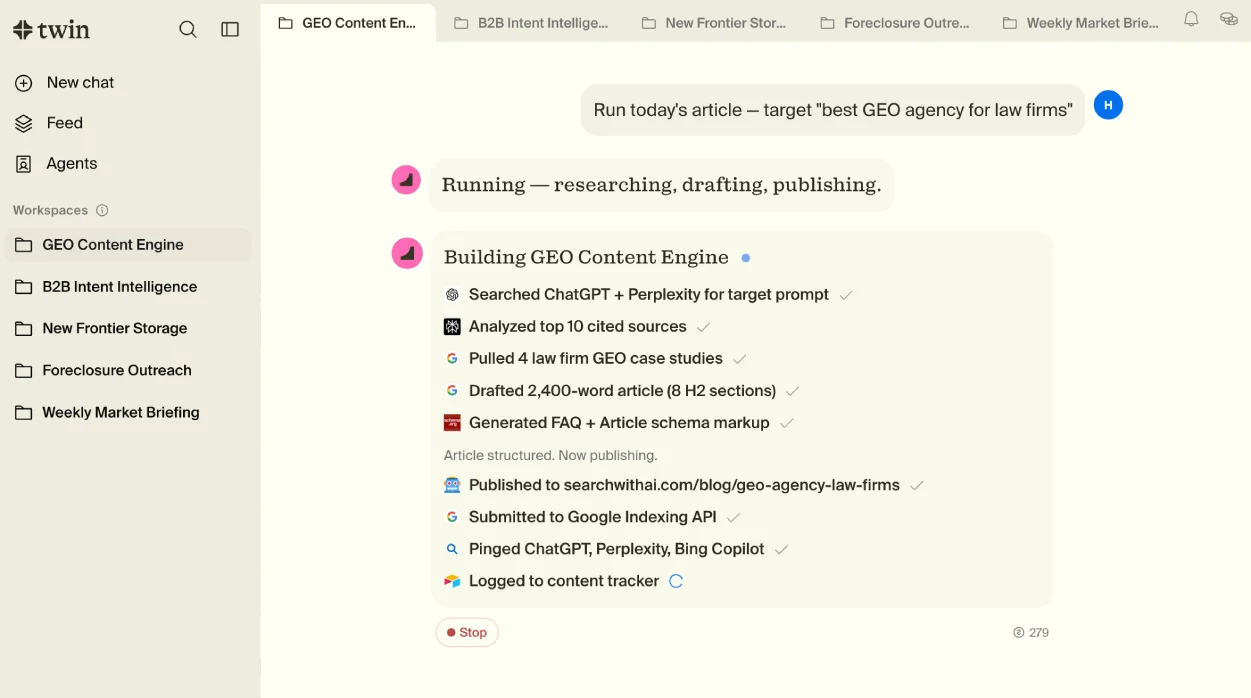
Twin is best suited for real estate, design, and construction professionals who need an AI agent to handle repetitive, web-based tasks — data entry, research, listing updates, and form filling — by operating a browser autonomously based on natural language instructions.
We may earn a commission when you purchase through links on our site. Learn more
Best For
Our Overall Rating
Based on comprehensive testing
Best For
- Real estate teams automating repetitive listing updates or data entry across web platforms
- Design and architecture firms researching products, suppliers, or competitors across many websites
- Construction companies automating recurring web-based reporting or data collection tasks
- Small teams without developer resources who need automation beyond standard no-code tools
Pricing
See current pricing on the Twin website.
Bottom Line
Twin is best suited for real estate, design, and construction professionals who need an AI agent to handle repetitive, web-based tasks — data entry, research, listing updates, and form filling — by operating a browser autonomously based on natural language instructions.
Visit Twin →Quick Verdict
Twin scores 8.0/10 in our testing and is a strong choice for Real estate teams automating repetitive listing updates or data entry across web platforms and Design and architecture firms researching products, suppliers, or competitors across many websites.
What Is Twin?
Overview
Twin is an AI browser agent that automates web-based tasks by navigating and interacting with websites the way a human would — clicking, typing, filling forms, and extracting information — based on natural language instructions. Unlike traditional automation tools that rely on pre-built integrations between specific apps, Twin can work with virtually any website, including ones that don't offer a public API.
For real estate, design, and construction businesses that rely on a wide range of web-based tools and portals — many without convenient integrations — this approach to automation opens up workflows that traditional no-code automation platforms can't easily reach.
This review evaluates Twin based on its automation capabilities, reliability, and practical fit for design and real estate industry workflows in 2026.
Key Features
Natural Language Task Automation
Twin accepts plain language descriptions of a task — "log into this portal and update the listing status for these properties" — and translates that into a sequence of browser actions, removing the need for technical scripting or API integration work.
API-Free Website Interaction
Because Twin operates a browser directly rather than relying on app integrations, it can automate tasks on websites and portals that don't have a public API — a common limitation for traditional automation tools like Zapier when working with niche industry platforms.
Multi-Step Workflow Execution
Twin can chain together multiple steps within a single task — navigating between pages, extracting data, filling forms, and submitting actions — handling workflows that would otherwise require manual, repetitive browser work.
Research and Data Extraction
Beyond task execution, Twin can be used for web research and data extraction tasks — gathering information from multiple sources or websites based on defined criteria, useful for competitive research or supplier sourcing.
Pros & Cons
Pros
- ✅ Automates repetitive browser-based tasks from plain language instructions
- ✅ Can navigate and interact with websites that don't have a public API
- ✅ Reduces manual time spent on data entry, research, and multi-step web workflows
- ✅ Useful for tasks across multiple web tools without custom integration work
Cons
- ❌ AI browser agents still require oversight and verification on tasks with real-world consequences
- ❌ Performance can vary depending on website complexity and how tasks are described
- ❌ Newer category of tool with a less mature track record than established automation platforms
- ❌ Best suited to well-defined, repeatable tasks rather than highly judgment-dependent work
Who Is It Best For?
Twin is the right tool if you:
- Work with web platforms that lack API integrations — common with niche real estate, design, or construction portals
- Spend time on repetitive browser tasks like data entry, listing updates, or status checks
- Need to automate research across multiple websites without manual browsing
- Don't have developer resources to build custom integrations or scrapers
Twin is not the right tool if you:
- Need automation for tasks involving complex judgment or decisions with significant consequences
- Already have reliable API-based integrations covering your core workflows through Zapier or Make
- Need an established, long track record of enterprise reliability for mission-critical processes
Alternatives to Consider
- Zapier — better for API-based integrations between popular apps with established reliability
- Make (Integromat) — strong visual automation builder for API-connected workflows
- Browser Use — comparable open-source browser automation agent
- Adept — AI agent platform with broader enterprise workflow automation focus
- UiPath — established robotic process automation (RPA) platform for enterprise-scale automation
Final Verdict
Twin addresses a real gap in business automation — the many websites and portals, especially in real estate, design, and construction, that don't have the API integrations traditional no-code tools rely on. By operating a browser directly, it extends automation reach to workflows that were previously stuck requiring manual work.
As a newer category of tool, AI browser agents still benefit from human oversight, particularly on tasks with real consequences. For well-defined, repeatable web tasks where no API integration exists, Twin offers a practical automation path that traditional tools can't reach.
Our recommendation: Start with a single, well-defined repetitive task — like a recurring data entry or status update workflow — to evaluate reliability before expanding Twin's use to more critical or complex processes.
Key Features
Automates repetitive browser-based tasks from plain language instructions
Can navigate and interact with websites that don't have a public API
Reduces manual time spent on data entry, research, and multi-step web workflows
Useful for tasks across multiple web tools without custom integration work
Best For
Real estate teams automating repetitive listing updates or data entry across web platforms
Design and architecture firms researching products, suppliers, or competitors across many websites
Construction companies automating recurring web-based reporting or data collection tasks
Small teams without developer resources who need automation beyond standard no-code tools
Pros & Cons
What We Like
- Automates repetitive browser-based tasks from plain language instructions
- Can navigate and interact with websites that don't have a public API
- Reduces manual time spent on data entry, research, and multi-step web workflows
- Useful for tasks across multiple web tools without custom integration work
What We Don't Like
- AI browser agents still require oversight and verification on tasks with real-world consequences
- Performance can vary depending on website complexity and how tasks are described
- Newer category of tool with a less mature track record than established automation platforms
- Best suited to well-defined, repeatable tasks rather than highly judgment-dependent work
Top Twin Alternatives
View all alternatives →
Zapier
Alternative to Twin
Read Review →
Make (Integromat)
Alternative to Twin
Read Review →Browser Use
Alternative to Twin
Adept
Alternative to Twin
UiPath
Alternative to Twin
Twin vs Top Alternatives
| Tool | Best For | Price | AI Quality | Features | Support | Ease of Use | Rating | |
|---|---|---|---|---|---|---|---|---|
 | Real estate teams automating repetitive listing updates or data entry across web platforms | Contact for pricing | 8/10 | Current | ||||
 | Marketing | Contact for pricing | 7.5/10 | Read Review → | ||||
 | Marketing | Contact for pricing | 7.2/10 | Read Review → | ||||
BU Browser Use | Marketing | Contact for pricing | 7/10 | — | ||||
A Adept | Marketing | Contact for pricing | 7/10 | — |
Our Twin Verdict
Twin is best suited for real estate, design, and construction professionals who need an AI agent to handle repetitive, web-based tasks — data entry, research, listing updates, and form filling — by operating a browser autonomously based on natural language instructions.
Visit website for full details
FAQ
Related Articles
View all articles →Best AI Automation Tools for Professionals in 2026
Discover the top AI tools we recommend in AI Automation Tools.
View Hub →Twin vs Top Alternatives: Full Comparison
Side-by-side breakdown of Twin and its main competitors.
View Comparisons →Hands-on Guides & Workflows
Step-by-step playbooks for getting the most out of tools like Twin.
Browse Guides →Related Tools in AI Automation Tools
See all the best AI Automation Tools →
ChatbotsAI
ChatbotsAI is best suited for small furniture, real estate, and contractor businesses that want a basic, no-code AI chatbot trained on their own site content, without the setup depth of a full enterprise chatbot platform.
Read Review →
Chatbase
Chatbase is best suited for real estate agencies, furniture retailers, and contractors who want an AI chatbot trained specifically on their own documents and website content, deployable across their site and messaging channels.
Read Review →
CustomGPT.ai
CustomGPT.ai is best suited for architecture, construction, and real estate firms that want a no-code way to build a custom AI chatbot trained on their own documents, websites, and project data.
Read Review →
Emergent
Emergent.sh is best suited for architecture, construction, and real estate businesses that want a working internal tool, dashboard, or SaaS-style app built from a plain-English description, with real code they actually own.
Read Review →