

Signeasy Review:
Is It Worth It in 2026?
Signeasy is a legally binding e-signature and contract management platform used by 48,000+ businesses across 100 countries. It combines document signing, multi-party workflows, audit trails, and AI-powered contract management — at pricing that undercuts DocuSign and Adobe Sign.
We may earn a commission when you purchase through links on our site. Learn more
From
Free plan available / From $10/user/month
Best For
Our Overall Rating
Based on comprehensive testing
Best For
- Architecture and construction firms managing client contracts and proposals
- Real estate agencies handling purchase agreements and lease documents
- Furniture retailers processing supplier and customer contracts
- Small and mid-size teams replacing DocuSign at lower cost
- Remote and field teams needing mobile-first signing
Pricing
Starts at
Bottom Line
Signeasy is a legally binding e-signature and contract management platform used by 48,000+ businesses across 100 countries. It combines document signing, multi-party workflows, audit trails, and AI-powered contract management — at pricing that undercuts DocuSign and Adobe Sign.
Visit Signeasy →Quick Verdict
Signeasy scores 8.8/10 in our testing and is a strong choice for Architecture and construction firms managing client contracts and proposals and Real estate agencies handling purchase agreements and lease documents. A free tier is available, with paid plans from Free plan available / From $10/user/month.
What Is Signeasy?
Overview
Every professional services business runs on contracts — and getting them signed quickly, securely, and with a legally defensible audit trail is a daily operational need. For architecture firms managing project agreements, real estate agencies processing purchase contracts, construction companies handling subcontractor documents, and furniture retailers managing supplier terms, the e-signature workflow is constant.
Signeasy is built for exactly this. Used by 48,000+ businesses across 100 countries, it provides legally binding e-signatures compliant with ESIGN, eIDAS, and HIPAA, combined with contract management features that go beyond basic signing into document tracking, approval workflows, and AI-powered contract insights.
The differentiator vs. DocuSign and Adobe Sign: comparable compliance and feature depth at meaningfully lower pricing, with no transaction caps on paid plans.
Key Features
Legally Binding E-Signatures
Every signature collected through Signeasy is backed by ESIGN (US), eIDAS (EU), and HIPAA compliance standards. Each signed document generates a full audit trail — timestamps, IP addresses, signing order, and document hash — creating a legally defensible record for every agreement.
For real estate agencies processing purchase agreements, or construction firms managing subcontractor contracts, this audit trail is not optional — it is a legal requirement.
Multi-Party Signing with Flexible Workflows
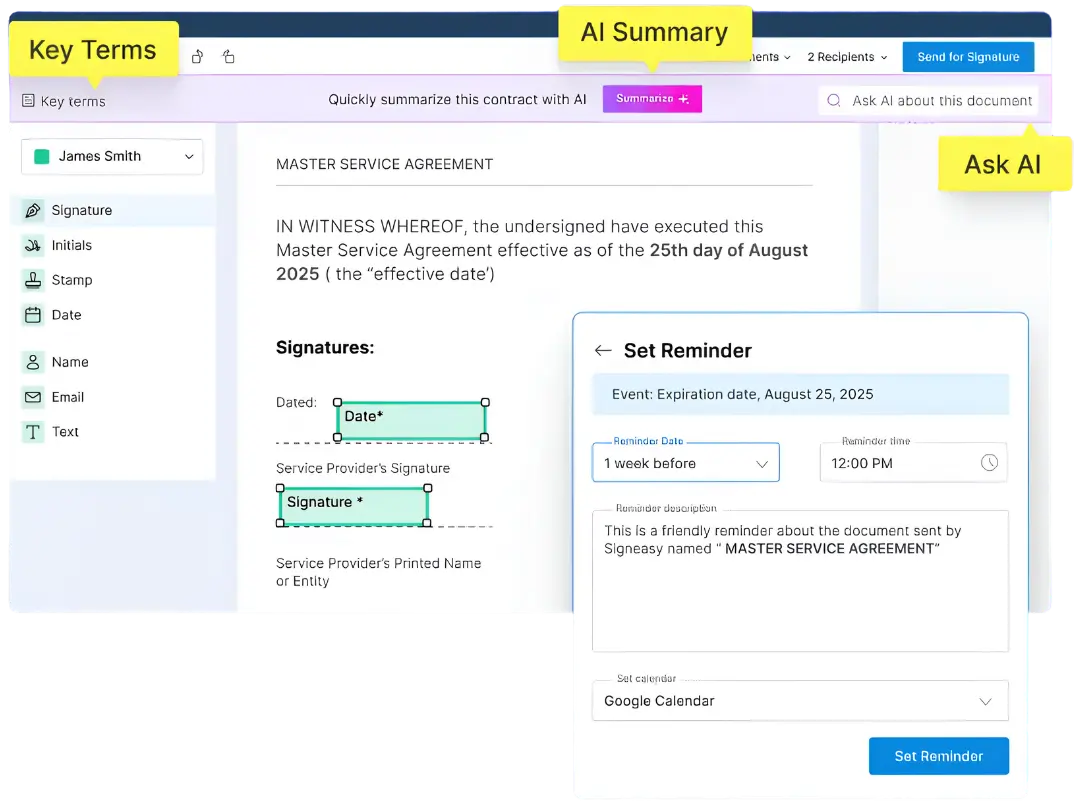
Send documents to multiple signers simultaneously or sequentially. Set signing order when required (e.g., client signs first, then countersigned by a director). Documents can be sent via email, SMS, or public signing links — relevant for clients who may not have a Signeasy account.
Automated reminders and real-time activity tracking ensure contracts do not sit unsigned in inboxes.
Document Templates
Build reusable templates for your most common documents — project proposals, non-disclosure agreements, purchase orders, lease agreements — with pre-positioned signature fields. For teams sending the same document type repeatedly, templates eliminate the repetitive setup work and reduce errors.
AI-Powered Contract Management
Signeasy's contract management layer (available on Business and Business Pro plans) adds AI analysis to signed documents: key clause extraction, renewal date tracking, obligation flagging, and contract search across your document library. For firms managing large volumes of contracts, this transforms the signed document archive from a static repository into an active, searchable business asset.
Integrations
Native integrations with Google Workspace, Microsoft 365, HubSpot, Salesforce, SharePoint, and Slack. Documents can be sent for signature directly from the tools your team already uses, without switching contexts.
Mobile-First Signing
Strong iOS and Android apps support offline signing — sign documents without an internet connection, syncing when connectivity is restored. Relevant for construction site managers, real estate agents visiting properties, and furniture showroom staff working away from their desks.
Use Cases by Industry
Architecture & Construction
Project proposals, client agreements, subcontractor contracts, change orders, and compliance sign-offs are high-frequency signing scenarios. Signeasy's sequential signing workflows (client → project manager → legal, for example) match how approval chains work in these industries.
Construction site managers can sign and collect signatures from mobile devices on-site — no printer, scanner, or return trip to the office required.
Real Estate
Purchase agreements, lease contracts, disclosure documents, and agency agreements require fast turnaround and legally defensible signatures. Signeasy's SMS signing option is particularly useful for real estate clients who are more responsive to text than email during the purchase process.
Audit trails with timestamps and IP addresses provide the documentation layer required by real estate regulatory bodies in most jurisdictions.
Furniture & Interior Design
Supplier contracts, custom order agreements, installation service terms, and client project contracts are all recurring signing needs. Templates for standard agreement types save significant administrative time across high-volume operations.
Who Is It Best For?
Signeasy is the right fit if you:
- Send contracts regularly and need a compliant, audit-trailed solution
- Are currently using DocuSign or Adobe Sign and want lower cost for similar features
- Need mobile signing capability for field staff
- Require HIPAA or eIDAS compliance
- Manage multi-party signing workflows with sequential approval chains
It is not the right fit if you:
- Need specialized CLM (Contract Lifecycle Management) features at enterprise scale — dedicated CLM platforms like Ironclad or ContractPodAi go deeper
- Only sign documents occasionally — the free plan or a pay-per-document tool may suffice
- Need deep integration with niche industry-specific software not covered by Signeasy's integration library
Alternatives to Consider
- DocuSign — market leader, broadest integration ecosystem, but more expensive and transaction-capped at lower tiers
- Adobe Acrobat Sign — strong if your team already uses Adobe products; PDF editing bundled; pricing starts at $12.99/month
- PandaDoc — stronger for proposal creation and CPQ workflows alongside e-signature; better for sales-heavy teams
- SignNow — competitive on price; good for simple signing workflows; weaker on contract management features
Final Verdict
Signeasy delivers enterprise-grade e-signature compliance at SMB-friendly pricing, with a feature set that covers the full contract workflow from send to signed to managed. For architecture, construction, real estate, and furniture professionals who process contracts regularly, the combination of unlimited sends, HIPAA/eIDAS compliance, mobile signing, and AI contract management makes it a strong default choice.
The 14-day free trial with no credit card required is a genuine evaluation window — enough time to process real contracts with real clients and assess whether the workflow fits your team.
Our recommendation: Start with the Business plan at $20/user/month. The Personal plan lacks team management features that make Signeasy most efficient for professional services workflows. If AI contract management is a priority, upgrade to Business Pro.
Key Features
Legally binding across ESIGN, eIDAS, and HIPAA standards
More affordable than DocuSign and Adobe Sign at comparable feature set
Unlimited document sends with no transaction caps on paid plans
14-day free trial — no credit card required
Strong mobile apps for signing on the go
Integrates with Google Workspace, Microsoft 365, HubSpot, Salesforce, Slack
Best For
Architecture and construction firms managing client contracts and proposals
Real estate agencies handling purchase agreements and lease documents
Furniture retailers processing supplier and customer contracts
Small and mid-size teams replacing DocuSign at lower cost
Remote and field teams needing mobile-first signing
Signeasy Pricing
Pro
For professionals and growing teams
Try Signeasy Pro- All Free features
- Unlimited usage
- Priority support
- Advanced integrations
- Analytics
Enterprise
Custom pricing for large teams
Contact Sales- Everything in Pro
- Custom workflows
- Dedicated support
- SLA guarantee
- SSO & security
Prices shown are indicative. Always verify current pricing on the Signeasy website.
Pros & Cons
What We Like
- Legally binding across ESIGN, eIDAS, and HIPAA standards
- More affordable than DocuSign and Adobe Sign at comparable feature set
- Unlimited document sends with no transaction caps on paid plans
- 14-day free trial — no credit card required
- Strong mobile apps for signing on the go
- Integrates with Google Workspace, Microsoft 365, HubSpot, Salesforce, Slack
What We Don't Like
- Advanced features (bulk sending, custom branding) locked to higher tiers
- Recent price increases noted by some long-term users
- AI contract management features still maturing vs. specialized CLM tools
- Free plan is limited — light use only
Top Signeasy Alternatives
View all alternatives →DocuSign
Alternative to Signeasy
Adobe Acrobat Sign
Alternative to Signeasy
PandaDoc
Alternative to Signeasy
SignNow
Alternative to Signeasy
Signeasy vs Top Alternatives
| Tool | Best For | Price | AI Quality | Features | Support | Ease of Use | Rating | |
|---|---|---|---|---|---|---|---|---|
 | Architecture and construction firms managing client contracts and proposals | Free plan available / From $10/user/month | 8.8/10 | Current | ||||
D DocuSign | Cross-niche | Contact for pricing | 8.3/10 | — | ||||
AA Adobe Acrobat Sign | Cross-niche | Contact for pricing | 8/10 | — | ||||
P PandaDoc | Cross-niche | Contact for pricing | 7.7/10 | — | ||||
S SignNow | Cross-niche | Contact for pricing | 7.4/10 | — |
Our Signeasy Verdict
Signeasy is a legally binding e-signature and contract management platform used by 48,000+ businesses across 100 countries. It combines document signing, multi-party workflows, audit trails, and AI-powered contract management — at pricing that undercuts DocuSign and Adobe Sign.
Free plan available
FAQ
Related Articles
View all articles →Best AI Tools for Real Estate in 2026
Our editorial guide to the AI tools we recommend, including Signeasy.
Read Guide →Signeasy vs Top Alternatives: Full Comparison
Side-by-side breakdown of Signeasy and its main competitors.
View Comparisons →Hands-on Guides & Workflows
Step-by-step playbooks for getting the most out of tools like Signeasy.
Browse Guides →Featured in Workflows
Related Tools in Real Estate
See all the best Real Estate →
Ylopo
Ylopo is best suited for real estate agents and teams who want a dedicated AI-powered lead generation and digital marketing platform — running targeted social and search advertising to attract buyer and seller leads, then nurturing them through behavioral follow-up automation.
Read Review →
Cloud CMA
Cloud CMA is best suited for listing agents who need polished, persuasive comparative market analysis reports and listing presentations — turning MLS data into branded, client-friendly reports that help win listings and guide pricing conversations with sellers.
Read Review →
Dotloop
Dotloop is best suited for agents, teams, and brokerages who want to move real estate transactions off paper — centralizing contracts, templates, e-signatures, task lists, and compliance review in one workspace with broad forms coverage.
Read Review →
Offrs
Offrs is best suited for real estate agents and brokers who want to focus prospecting effort on homeowners statistically likely to sell soon, rather than cold-calling or mailing an entire neighborhood at random.
Read Review →