

Cloud CMA Review:
Is It Worth It in 2026?
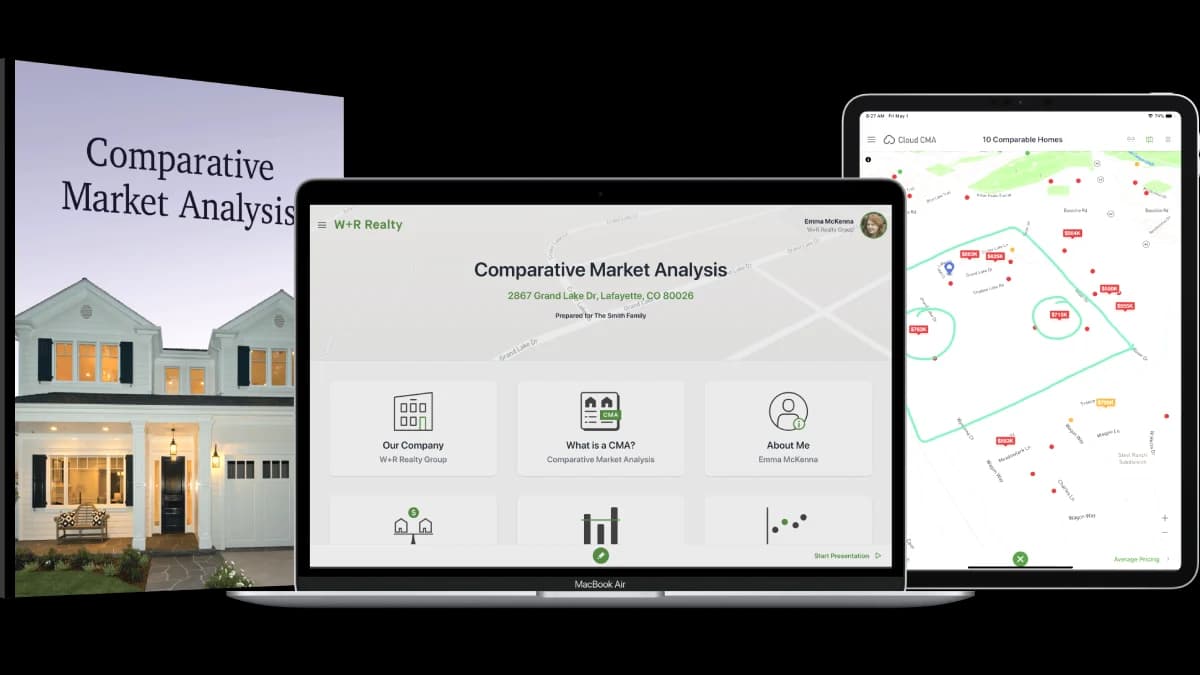
Cloud CMA is best suited for listing agents who need polished, persuasive comparative market analysis reports and listing presentations — turning MLS data into branded, client-friendly reports that help win listings and guide pricing conversations with sellers.
Best For
Our Overall Rating
Based on comprehensive testing
Best For
- Listing agents competing for sellers with professional, branded CMA presentations
- Agents who want fast CMA turnaround without manual report assembly
- Teams standardizing their listing presentation across agents
- Agents guiding realistic pricing conversations with data-backed visual reports
Pricing
See current pricing on the Cloud CMA website.
Bottom Line
Cloud CMA is best suited for listing agents who need polished, persuasive comparative market analysis reports and listing presentations — turning MLS data into branded, client-friendly reports that help win listings and guide pricing conversations with sellers.
Visit Cloud CMA →Quick Verdict
Cloud CMA scores 8.6/10 in our testing and is a strong choice for Listing agents competing for sellers with professional, branded CMA presentations and Agents who want fast CMA turnaround without manual report assembly.
What Is Cloud CMA?
Overview
Cloud CMA, part of Lone Wolf Technologies, is the widely used platform for creating comparative market analysis reports and listing presentations — turning MLS data into polished, branded, seller-friendly reports in minutes. For listing agents, the CMA is both an analytical tool and a sales document: it guides the pricing conversation and demonstrates professionalism in the listing appointment where sellers choose their agent.
Cloud CMA's strength is presentation quality and speed: agents select comparables, and the platform assembles a designed, branded report — with interactive live presentation modes for in-person and virtual listing appointments.
This review evaluates Cloud CMA based on its report quality, presentation features, and practical fit for listing-side real estate work in 2026.
Key Features
Fast, Branded CMA Reports
Cloud CMA generates designed, agent-branded CMA reports from MLS data — replacing manually assembled spreadsheets and print-outs with a professional document that reflects well on the agent in listing competitions.
Live Interactive Presentations
The platform's presentation mode turns the CMA into an interactive experience for listing appointments — walking sellers through comparables, adjustments, and pricing strategy in person or over video.
Seller-Friendly Communication
Reports are designed for non-expert readers: clear visuals, comparable photos, and pricing logic presented in a way sellers can follow — supporting realistic pricing conversations backed by data rather than argument.
Lone Wolf Ecosystem
As part of Lone Wolf's suite, Cloud CMA connects with transaction management and other agent tools common across brokerages, fitting into established agent workflows.
Pros & Cons
Pros
- ✅ Produces polished, branded CMA reports from MLS data in minutes
- ✅ Interactive live presentations support in-person and virtual listing appointments
- ✅ Seller-facing report design communicates pricing logic clearly to non-experts
- ✅ Part of Lone Wolf's ecosystem, integrating with widely used agent tools
Cons
- ❌ Focused on CMA and presentation — not a full marketing or CRM platform
- ❌ CMA quality still depends on the agent's comparable selection and judgment
- ❌ Subscription cost adds up alongside other agent tool subscriptions
- ❌ Report customization has limits compared to fully custom presentation design
Who Is It Best For?
Cloud CMA is the right tool if you:
- Compete for listings and want presentation quality that stands out at appointments
- Produce CMAs regularly and want minutes-not-hours turnaround
- Guide pricing conversations with sellers using clear, data-backed visuals
- Run a team and want consistent, branded listing presentations across agents
Cloud CMA is not the right tool if you:
- Work primarily with buyers where CMA presentation tools see little use
- Need automated valuation data science rather than presentation (consider HouseCanary)
- Want one platform covering CRM, marketing, and presentations together
Alternatives to Consider
- HouseCanary — data-driven valuation and analytics rather than presentation focus
- Homesnap Pro — agent search and client collaboration complementing listing tools
- RealScout — buyer-side matching and alerts for the other half of the business
- Lofty — all-in-one platform with CRM and marketing beyond CMA
- kvCORE — all-in-one brokerage platform with presentation capabilities included
Final Verdict
Cloud CMA remains the standard for fast, professional CMA reports and listing presentations — a focused tool that does its job well. For listing agents, the ROI case is simple: winning even one additional listing from a stronger presentation pays for years of subscription, and the time saved per CMA compounds across every seller conversation.
It's deliberately not a platform — pairing it with a CRM and marketing stack covers the full workflow. Within its focus, it's a dependable, polished choice that has earned its wide adoption.
Our recommendation: Build a reusable presentation template with your branding and standard pricing-strategy pages once, so every future CMA inherits it — the compounding value of Cloud CMA comes from turning your best listing presentation into your default one, produced in minutes for every appointment.
Key Features
Produces polished, branded CMA reports from MLS data in minutes
Interactive live presentations support in-person and virtual listing appointments
Seller-facing report design communicates pricing logic clearly to non-experts
Part of Lone Wolf's ecosystem, integrating with widely used agent tools
Best For
Listing agents competing for sellers with professional, branded CMA presentations
Agents who want fast CMA turnaround without manual report assembly
Teams standardizing their listing presentation across agents
Agents guiding realistic pricing conversations with data-backed visual reports
Pros & Cons
What We Like
- Produces polished, branded CMA reports from MLS data in minutes
- Interactive live presentations support in-person and virtual listing appointments
- Seller-facing report design communicates pricing logic clearly to non-experts
- Part of Lone Wolf's ecosystem, integrating with widely used agent tools
What We Don't Like
- Focused on CMA and presentation — not a full marketing or CRM platform
- CMA quality still depends on the agent's comparable selection and judgment
- Subscription cost adds up alongside other agent tool subscriptions
- Report customization has limits compared to fully custom presentation design
Top Cloud CMA Alternatives
View all alternatives →


Cloud CMA vs Top Alternatives
| Tool | Best For | Price | AI Quality | Features | Support | Ease of Use | Rating | |
|---|---|---|---|---|---|---|---|---|
 | Listing agents competing for sellers with professional, branded CMA presentations | Contact for pricing | 8.6/10 | Current | ||||
 | Real Estate | Contact for pricing | 8.1/10 | Read Review → | ||||
 | Real Estate | Contact for pricing | 7.8/10 | Read Review → | ||||
 | Real Estate | Contact for pricing | 7.5/10 | Read Review → | ||||
 | Real Estate | Contact for pricing | 7.2/10 | Read Review → |
Our Cloud CMA Verdict
Cloud CMA is best suited for listing agents who need polished, persuasive comparative market analysis reports and listing presentations — turning MLS data into branded, client-friendly reports that help win listings and guide pricing conversations with sellers.
Visit website for full details
FAQ
Related Articles
View all articles →Best AI Tools for Real Estate in 2026
Our editorial guide to the AI tools we recommend, including Cloud CMA.
Read Guide →Cloud CMA vs Top Alternatives: Full Comparison
Side-by-side breakdown of Cloud CMA and its main competitors.
View Comparisons →Hands-on Guides & Workflows
Step-by-step playbooks for getting the most out of tools like Cloud CMA.
Browse Guides →Related Tools in Real Estate
See all the best Real Estate →
Dotloop
Dotloop is best suited for agents, teams, and brokerages who want to move real estate transactions off paper — centralizing contracts, templates, e-signatures, task lists, and compliance review in one workspace with broad forms coverage.
Read Review →
Offrs
Offrs is best suited for real estate agents and brokers who want to focus prospecting effort on homeowners statistically likely to sell soon, rather than cold-calling or mailing an entire neighborhood at random.
Read Review →
Rechat
Rechat is best suited for real estate brokerages and agents who need a modern CRM platform with integrated AI marketing tools — combining contact management, listing marketing automation, and transaction coordination in a single system built for how real estate teams actually operate.
Read Review →
SkySlope
SkySlope is best suited for mid-size to large brokerages that need to manage high transaction volume with compliance built in — smart checklists, automated auditing, e-signatures, and pre-loaded forms that keep teams audit-ready.
Read Review →