

Jetboost Review:
Is It Worth It in 2026?
Jetboost is best suited for real estate platforms, furniture catalogs, and architecture portfolios built on Webflow that need search, filtering, and sorting on their CMS content without writing custom code.
We may earn a commission when you purchase through links on our site. Learn more
Best For
Our Overall Rating
Based on comprehensive testing
Best For
- Real estate platforms letting visitors filter and search property listings
- Furniture retailers adding catalog filtering by category, price, or style
- Architecture firms building filterable, searchable project portfolios
- Job boards, directories, and membership sites built on Webflow CMS
Pricing
See current pricing on the Jetboost website.
Bottom Line
Jetboost is best suited for real estate platforms, furniture catalogs, and architecture portfolios built on Webflow that need search, filtering, and sorting on their CMS content without writing custom code.
Visit Jetboost →Quick Verdict
Jetboost scores 9.0/10 in our testing and is an excellent choice for Real estate platforms letting visitors filter and search property listings and Furniture retailers adding catalog filtering by category, price, or style.
What Is Jetboost?
Overview
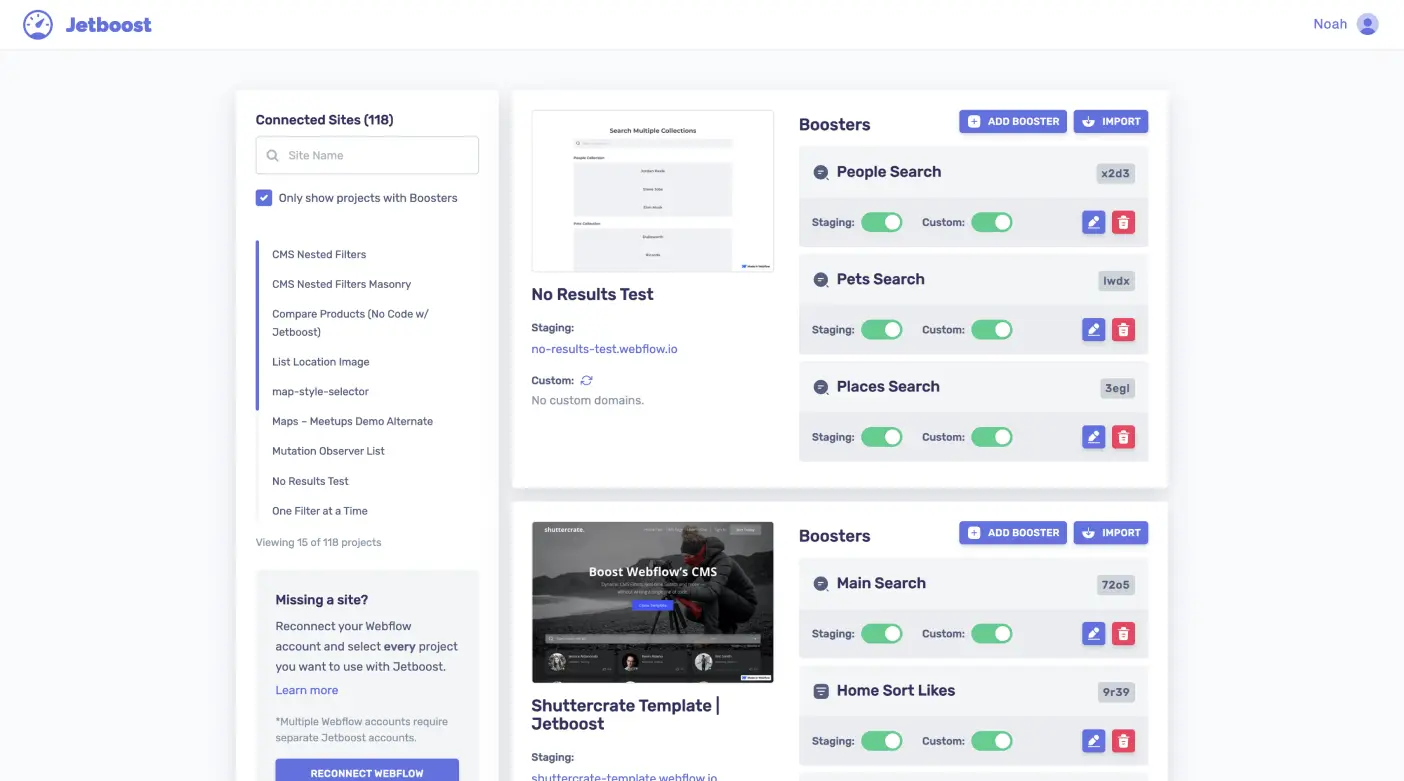
Jetboost is a no-code add-on built exclusively for Webflow that extends CMS Collection Lists with real-time search, multi-criteria filtering, dynamic sorting, infinite scroll, favoriting, and interactive maps — all without writing custom JavaScript. Features are organized into modular "Boosters" that can be combined on the same collection list, letting a single property listing page, product catalog, or portfolio support several interactive features at once.
For real estate platforms, furniture catalogs, and architecture portfolios built on Webflow, this matters because giving visitors control over how they browse content — filtering listings by price, sorting a catalog by category, searching a project archive — is exactly the kind of interactivity that's otherwise hard to add to a no-code site without custom development.
This review evaluates Jetboost based on its setup simplicity, Booster reliability, and practical fit for Webflow-based content sites heading into 2026.
Key Features
Real-Time Search & Filtering
Jetboost adds search-as-you-type and multi-criteria filtering directly to Webflow CMS collection lists, letting visitors narrow down listings, products, or projects without a page reload.
Dynamic Sorting & Pagination
Visitors can sort collection list items dynamically — by price, date, or any other field — and infinite scroll pagination keeps long lists manageable without a traditional numbered page system.
Interactive Maps & Favoriting
For location-based content like real estate listings, Jetboost supports interactive maps, and a favoriting feature lets visitors save items of interest to revisit later in the same session.
Modular Boosters That Work Together
Each capability is delivered as a separate "Booster" — search, filter, sort, pagination, maps, favoriting — and multiple Boosters can run simultaneously on the same collection list without conflicting with each other.
Pros & Cons
Pros
- ✅ Adds real-time search, filtering, and sorting to Webflow CMS without JavaScript
- ✅ Modular "Boosters" cover search, pagination, maps, favoriting, and more
- ✅ All Boosters work together on the same collection list without conflicts
- ✅ Visual configurator typically gets a feature live in 15-30 minutes
Cons
- ❌ Built exclusively for Webflow — not usable on other website platforms
- ❌ More advanced multi-Booster setups still require some configuration care
- ❌ Relies on Webflow's CMS structure, so very unusual data models may need workarounds
- ❌ Adds an ongoing subscription cost on top of existing Webflow hosting
Who Is It Best For?
Jetboost is the right tool if you:
- Already build on Webflow and need interactive search or filtering on CMS content
- Run a listings, catalog, or portfolio site where visitors need to narrow down options
- Want no-code interactivity without hiring a developer for custom JavaScript
- Need several features together — search, filter, sort, maps — on the same content
Jetboost is not the right tool if you:
- Build on a platform other than Webflow
- Have very simple content that doesn't need search or filtering at all
- Want a one-time cost rather than an ongoing subscription for this functionality
Alternatives to Consider
Jetboost is strong for Webflow CMS interactivity, but it is not the only option:
- Unicorn Platform — relevant if you're choosing a website builder rather than extending Webflow
- Mixo — comparable AI website generation outside the Webflow ecosystem
- 10Web — better if your site is built on WordPress rather than Webflow
- Geo Targetly — relevant for location-based personalization rather than CMS filtering
- Zigpoll — useful for collecting visitor feedback rather than filtering content
Final Verdict
Jetboost earns its place for Webflow sites that need genuine content interactivity — search, filtering, sorting — without the cost and complexity of custom development. The modular Booster approach means a real estate listings page or furniture catalog can get exactly the features it needs without paying for unrelated functionality.
Being Webflow-exclusive is the main limiting factor — businesses on a different platform will need to look elsewhere for comparable functionality.
Our recommendation: Start with the Filter and Search Boosters on your highest-traffic collection list, and add Sorting or Maps only once you've confirmed the core interactivity is working as expected.
Key Features
Adds real-time search, filtering, and sorting to Webflow CMS without JavaScript
Modular 'Boosters' cover search, pagination, maps, favoriting, and more
All Boosters work together on the same collection list without conflicts
Visual configurator typically gets a feature live in 15-30 minutes
Best For
Real estate platforms letting visitors filter and search property listings
Furniture retailers adding catalog filtering by category, price, or style
Architecture firms building filterable, searchable project portfolios
Job boards, directories, and membership sites built on Webflow CMS
Pros & Cons
What We Like
- Adds real-time search, filtering, and sorting to Webflow CMS without JavaScript
- Modular 'Boosters' cover search, pagination, maps, favoriting, and more
- All Boosters work together on the same collection list without conflicts
- Visual configurator typically gets a feature live in 15-30 minutes
What We Don't Like
- Built exclusively for Webflow — not usable on other website platforms
- More advanced multi-Booster setups still require some configuration care
- Relies on Webflow's CMS structure, so very unusual data models may need workarounds
- Adds an ongoing subscription cost on top of existing Webflow hosting
Top Jetboost Alternatives
View all alternatives →


Jetboost vs Top Alternatives
| Tool | Best For | Price | AI Quality | Features | Support | Ease of Use | Rating | |
|---|---|---|---|---|---|---|---|---|
 | Real estate platforms letting visitors filter and search property listings | Contact for pricing | 9/10 | Current | ||||
 | Cross-niche | Contact for pricing | 8.5/10 | Read Review → | ||||
 | Cross-niche | Contact for pricing | 8.2/10 | Read Review → | ||||
 | Cross-niche | Contact for pricing | 7.9/10 | Read Review → | ||||
 | Cross-niche | Contact for pricing | 7.6/10 | Read Review → |
Our Jetboost Verdict
Jetboost is best suited for real estate platforms, furniture catalogs, and architecture portfolios built on Webflow that need search, filtering, and sorting on their CMS content without writing custom code.
Visit website for full details
FAQ
Related Articles
View all articles →Best AI Automation Tools for Professionals in 2026
Discover the top AI tools we recommend in AI Automation Tools.
View Hub →Jetboost vs Top Alternatives: Full Comparison
Side-by-side breakdown of Jetboost and its main competitors.
View Comparisons →Hands-on Guides & Workflows
Step-by-step playbooks for getting the most out of tools like Jetboost.
Browse Guides →Related Tools in AI Automation Tools
See all the best AI Automation Tools →
Make
Make is best suited for architecture, construction, furniture, and real estate businesses that want to visually build multi-step automations connecting their existing tools — CRM, email, spreadsheets, forms — without writing code.
Read Review →
MindStudio
MindStudio is best suited for architecture, construction, and real estate teams who want to build custom AI agents — for lead qualification, document Q&A, or internal workflows — without hiring a developer or managing multiple AI subscriptions.
Read Review →
Zapier
Zapier is best suited for real estate agents, interior designers, and design business owners who need to automate repetitive workflows between their apps — CRM updates, lead notifications, email sequences, and data sync — without writing code or hiring a developer.
Read Review →
10Web
10Web is best suited for architecture, construction, and real estate businesses that want a fully functional WordPress website generated from a simple prompt, combined with managed hosting, without hiring a developer.
Read Review →