

Insightful Review:
Is It Worth It in 2026?
Insightful is an advanced employee monitoring and time tracking software suited for architecture, construction, and real estate teams looking to optimize productivity and track billable hours.
We may earn a commission when you purchase through links on our site. Learn more
Best For
Our Overall Rating
Based on comprehensive testing
Best For
- Architecture firms tracking time spent on CAD and design phases
- Construction and engineering companies managing project budgets
- Real estate agencies seeking productivity transparency for remote teams
- Mid-size to enterprise organizations requiring detailed workforce analytics
Pricing
See current pricing on the Insightful website.
Bottom Line
Insightful is an advanced employee monitoring and time tracking software suited for architecture, construction, and real estate teams looking to optimize productivity and track billable hours.
Visit Insightful →Quick Verdict
Insightful scores 9.6/10 in our testing and is an excellent choice for Architecture firms tracking time spent on CAD and design phases and Construction and engineering companies managing project budgets.
What Is Insightful?
Overview
Insightful (formerly known as Workpuls) has evolved into a premier workforce analytics and employee monitoring platform. Moving beyond traditional time tracking, Insightful provides deep, data-driven visibility into how work is actually executed across distributed, hybrid, and office-based teams. By capturing activity data in the background, it helps organizations spot workflow bottlenecks, calculate accurate billable hours, and optimize employee productivity without micromanagement.
For professionals in Architecture, Construction, Interior Design, and Real Estate, time is literally money. From the initial schematic design phases in CAD to client presentations and site visits, understanding where time goes is critical to maintaining project profitability. Insightful caters specifically to these needs by allowing managers to tie tracked time directly to specific projects, phases, and cost centers, turning raw workforce data into actionable operational insights.
Key Features
Automated Time Tracking & Timesheets
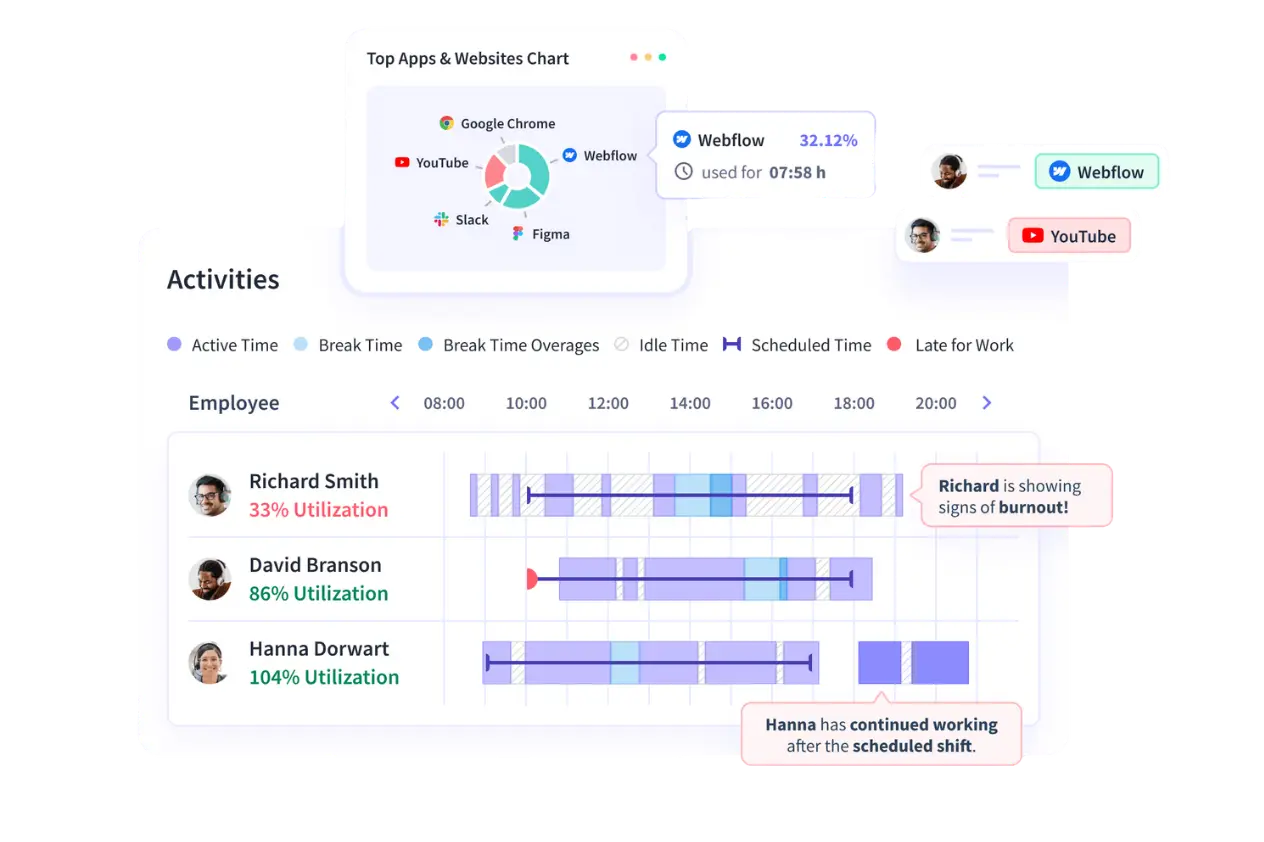
Insightful removes the friction of manual time entry. The software automatically tracks computer activity and maps it to specific apps and websites, distinguishing between active and idle time. At the end of the day or week, the platform generates accurate timesheets automatically, which managers can easily review, approve, and export for payroll or client invoicing.
Deep Productivity Analytics
Rather than just logging hours, Insightful categorizes apps and websites as productive, unproductive, or neutral based on an employee's specific role. A 3D rendering software might be productive for an architect, but a distraction for an administrative assistant. This granularity allows business leaders to benchmark productive output, pinpoint wasted effort, and intervene before key performance indicators decline.
Project and Task Tracking
For project-based industries like construction and interior design, Insightful is a game-changer. Employees can log their time against specific projects or tasks (e.g., "Design Development" vs. "Construction Documents"). This feature ensures budgets are kept in check, prevents scope creep, and guarantees that all billable hours are accurately captured and invoiced to clients.
Employee Monitoring & Stealth Mode
To ensure accountability, Insightful offers optional screenshot capture and stealth mode monitoring. While visible monitoring encourages self-accountability, stealth mode allows administrators to monitor company-owned devices without interrupting user workflows. This feature is paired with insider threat detection to secure sensitive client data and architectural intellectual property.
Industry-Leading Security
When handling proprietary architectural designs and confidential real estate data, security is paramount. Insightful boasts enterprise-grade security with multi-certificate compliance, including HIPAA, SOC 2, ISO 27001, and GDPR, ensuring that all monitored data is encrypted and kept private.
Pros & Cons
Pros
- ✅ Automated time tracking reduces manual data entry errors
- ✅ Granular productivity analytics and actionable reports
- ✅ Project and task-based tracking ideal for billable hours
- ✅ High-level security compliance (SOC 2, ISO 27001, HIPAA)
Cons
- ❌ Mobile app capabilities are limited compared to desktop
- ❌ Detailed monitoring features may feel excessive for small teams
- ❌ Manual time entry editing lacks flexibility
- ❌ Occasional false positives during idle time detection
Who Is It Best For?
Insightful is the right tool if you:
- Manage project-based teams in architecture, construction, or real estate and need to tie time directly to billable hours
- Need workforce visibility across remote, hybrid, or office-based employees without micromanaging day to day
- Operate in a regulated or security-sensitive environment and need SOC 2, ISO 27001, or HIPAA-level compliance
- Want automated timesheets to reduce administrative overhead on payroll and client invoicing
Insightful is not the right tool if you:
- Run a very small team where detailed activity monitoring feels disproportionate to the need
- Rely heavily on mobile workflows — the mobile app is more limited than the desktop experience
- Need frequent manual adjustments to time entries — editing flexibility is limited
Alternatives to Consider
Insightful is strong for project-based productivity analytics, but it is not the only option:
- Time Doctor — comparable monitoring depth with a stronger focus on distraction alerts
- Hubstaff — better suited for teams that also need GPS tracking and field-based time tracking
- Clockify — more budget-friendly for teams that only need basic time tracking without deep analytics
- Toggl Track — simpler, lighter-weight tracking aimed at freelancers and small teams
- Apploye — comparable feature set at a lower price point for smaller organizations
Final Verdict
Insightful earns its place for project-based industries where time directly maps to project cost and client billing. The combination of automated timesheets, granular productivity analytics, and project-level tracking gives managers the data they need to protect margins on long-running projects.
The main consideration is fit: the depth of monitoring that makes Insightful valuable for mid-size and enterprise teams can feel excessive for very small teams or solo practitioners.
Our recommendation: Start with a trial on one active project to validate how accurately time maps to your existing billing structure before rolling Insightful out across the full team.
Key Features
Automated time tracking reduces manual data entry errors
Granular productivity analytics and actionable reports
Project and task-based tracking ideal for billable hours
High-level security compliance (SOC 2, ISO 27001, HIPAA)
Best For
Architecture firms tracking time spent on CAD and design phases
Construction and engineering companies managing project budgets
Real estate agencies seeking productivity transparency for remote teams
Mid-size to enterprise organizations requiring detailed workforce analytics
Pros & Cons
What We Like
- Automated time tracking reduces manual data entry errors
- Granular productivity analytics and actionable reports
- Project and task-based tracking ideal for billable hours
- High-level security compliance (SOC 2, ISO 27001, HIPAA)
What We Don't Like
- Mobile app capabilities are limited compared to desktop
- Detailed monitoring features may feel excessive for small teams
- Manual time entry editing lacks flexibility
- Occasional false positives during idle time detection
Top Insightful Alternatives
View all alternatives →Time Doctor
Alternative to Insightful
Hubstaff
Alternative to Insightful
Clockify
Alternative to Insightful
Toggl Track
Alternative to Insightful
Apploye
Alternative to Insightful
Insightful vs Top Alternatives
| Tool | Best For | Price | AI Quality | Features | Support | Ease of Use | Rating | |
|---|---|---|---|---|---|---|---|---|
 | Architecture firms tracking time spent on CAD and design phases | Contact for pricing | 9.6/10 | Current | ||||
TD Time Doctor | Cross-niche | Contact for pricing | 9.1/10 | — | ||||
H Hubstaff | Cross-niche | Contact for pricing | 8.8/10 | — | ||||
C Clockify | Cross-niche | Contact for pricing | 8.5/10 | — | ||||
TT Toggl Track | Cross-niche | Contact for pricing | 8.2/10 | — |
Our Insightful Verdict
Insightful is an advanced employee monitoring and time tracking software suited for architecture, construction, and real estate teams looking to optimize productivity and track billable hours.
Visit website for full details
FAQ
Related Articles
View all articles →Best AI Tools for Construction in 2026
Our editorial guide to the AI tools we recommend, including Insightful.
Read Guide →Insightful vs Top Alternatives: Full Comparison
Side-by-side breakdown of Insightful and its main competitors.
View Comparisons →Hands-on Guides & Workflows
Step-by-step playbooks for getting the most out of tools like Insightful.
Browse Guides →Related Tools in Construction
See all the best Construction →
Buildots
Buildots is best suited for general contractors and construction managers who want automated, photo-based site progress tracking compared directly against the BIM model, instead of manual walkthroughs and spreadsheets.
Read Review →
Procore AI
Procore AI is best suited for construction teams already using Procore who want AI agents handling routine project workflows — RFIs, submittals, daily logs, risk flags — automatically rather than manually.
Read Review →
Handoff
Handoff is best suited for residential contractors, home builders, and remodelers who want AI to generate estimates, scopes, and invoices directly from drawings, notes, and photos, while managing the client pipeline in one place.
Read Review →
OpenSpace
OpenSpace is best suited for general contractors and project teams who need an effortless way to capture comprehensive, walkable photo documentation of construction sites — using a simple hard-hat-mounted camera and AI to automatically map images to floor plans without manual tagging.
Read Review →