

Routine Review:
Is It Worth It in 2026?
Routine is best suited for real estate agents, designers, and business owners who want a unified productivity tool combining tasks, calendar, and notes with AI assistance — organizing their day in one place instead of juggling separate apps for scheduling, to-dos, and quick notes.
We may earn a commission when you purchase through links on our site. Learn more
Best For
Our Overall Rating
Based on comprehensive testing
Best For
- Real estate agents managing showings, follow-ups, and daily tasks in one planner
- Interior designers and architects organizing project tasks alongside their calendar
- Solo business owners who want tasks, notes, and scheduling unified rather than scattered
- Professionals seeking a fast daily-planning tool over heavy project management software
Pricing
See current pricing on the Routine website.
Bottom Line
Routine is best suited for real estate agents, designers, and business owners who want a unified productivity tool combining tasks, calendar, and notes with AI assistance — organizing their day in one place instead of juggling separate apps for scheduling, to-dos, and quick notes.
Visit Routine →Quick Verdict
Routine scores 8.4/10 in our testing and is a strong choice for Real estate agents managing showings, follow-ups, and daily tasks in one planner and Interior designers and architects organizing project tasks alongside their calendar.
What Is Routine?
Overview
Routine is a productivity app that unifies task management, calendar, and note-taking into a single workspace with AI-supported daily planning. Rather than switching between a to-do app, a calendar, and a notes tool, Routine brings these core productivity functions together so professionals can plan their day, capture tasks quickly, and keep scheduling aligned with their to-dos in one place.
For real estate agents juggling showings and follow-ups, designers and architects tracking project tasks, and solo business owners managing a full workload, Routine addresses the fragmentation of daily planning — where tasks live in one app, meetings in another, and notes in a third, making it hard to see the whole day at a glance.
This review evaluates Routine based on its unified planning features, ease of use, and practical fit for busy professionals in the real estate and design industries in 2026.
Key Features
Unified Tasks and Calendar
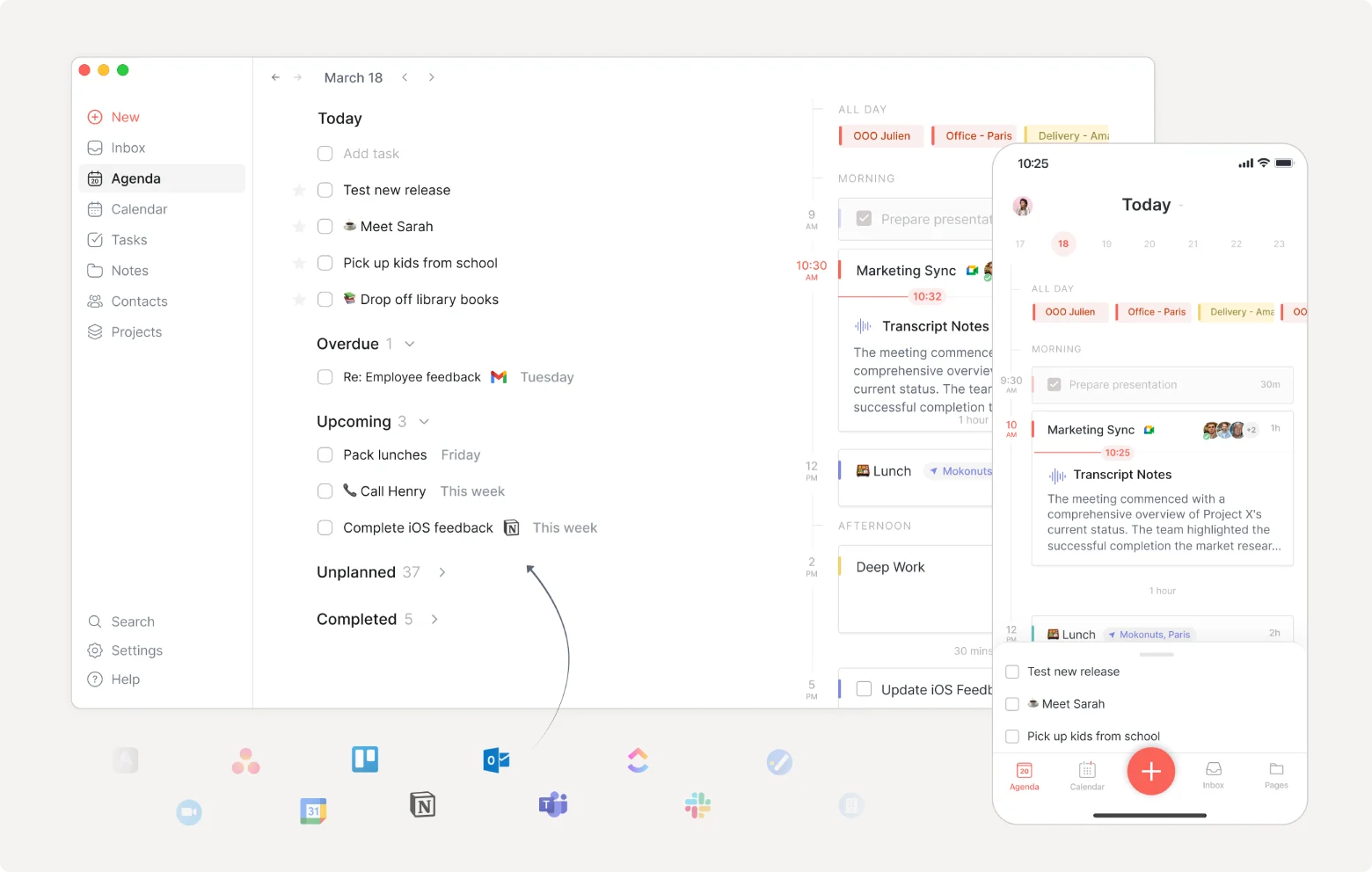
Routine brings tasks and calendar events into a single view, allowing professionals to plan their day with to-dos and scheduled commitments visible together — rather than reconciling separate task and calendar apps manually.
Fast Capture
The platform emphasizes quick capture, letting users jot down tasks and notes instantly without breaking their workflow — addressing the friction that causes to-dos to get lost when capturing them takes too many steps.
Integrated Notes
Routine includes note-taking connected to tasks and calendar, so meeting notes, project details, and quick thoughts live alongside the schedule and to-dos they relate to rather than in a disconnected notes app.
Keyboard-Driven Workflow
The platform is built for speed with a keyboard-friendly interface and command-based navigation, appealing to professionals who want to plan and manage their day efficiently without heavy mouse-driven interaction.
Pros & Cons
Pros
- ✅ Combines tasks, calendar, and notes in one unified productivity workspace
- ✅ Fast capture lets you jot tasks and notes quickly without breaking focus
- ✅ Calendar integration keeps scheduling and to-dos aligned in a single view
- ✅ Clean, keyboard-friendly interface designed for speed and daily planning
Cons
- ❌ Productivity tool value depends on consistent daily use to build the habit
- ❌ Less specialized than dedicated project management tools for complex team projects
- ❌ AI features are supportive rather than the core draw compared to AI-first tools
- ❌ Switching from an established task or calendar system requires migration effort
Who Is It Best For?
Routine is the right tool if you:
- Juggle tasks, meetings, and notes across separate apps and want them unified in one view
- Plan your day actively and want scheduling and to-dos aligned rather than in separate tools
- Value fast capture so tasks and ideas don't get lost when they occur to you
- Prefer a keyboard-driven workflow for efficient daily planning
Routine is not the right tool if you:
- Need heavy project management with Gantt charts, dependencies, and team collaboration
- Already have a task and calendar workflow that works well and don't want to migrate
- Want an AI-first tool where AI automation is the central feature rather than a support
Alternatives to Consider
- Motion — AI-first task and calendar tool that auto-schedules tasks into open time slots
- Todoist — established, flexible task manager with strong cross-platform support
- Notion Calendar — calendar tied to the Notion workspace for those already using Notion
- Sunsama — daily planning tool with a calm, intentional approach to task and calendar management
- Akiflow — task and calendar consolidation tool with strong integrations and fast capture
Final Verdict
Routine delivers a clean, unified approach to daily planning for professionals who are tired of juggling separate task, calendar, and note apps. For real estate agents, designers, and solo business owners who manage their own full workload, having tasks, scheduling, and notes in one fast, keyboard-friendly workspace is a genuine productivity gain.
The value of any productivity tool depends on consistent adoption — Routine works best for professionals who actively plan their day rather than those seeking heavy project management or AI-first automation. For daily personal planning, it's a well-designed, focused option.
Our recommendation: Commit to using Routine for your morning planning routine for two weeks before judging it — unified productivity tools deliver their value through daily habit, and the payoff of having your whole day visible in one place only becomes clear once the capture-and-plan workflow becomes automatic.
Key Features
Combines tasks, calendar, and notes in one unified productivity workspace
Fast capture lets you jot tasks and notes quickly without breaking focus
Calendar integration keeps scheduling and to-dos aligned in a single view
Clean, keyboard-friendly interface designed for speed and daily planning
Best For
Real estate agents managing showings, follow-ups, and daily tasks in one planner
Interior designers and architects organizing project tasks alongside their calendar
Solo business owners who want tasks, notes, and scheduling unified rather than scattered
Professionals seeking a fast daily-planning tool over heavy project management software
Pros & Cons
What We Like
- Combines tasks, calendar, and notes in one unified productivity workspace
- Fast capture lets you jot tasks and notes quickly without breaking focus
- Calendar integration keeps scheduling and to-dos aligned in a single view
- Clean, keyboard-friendly interface designed for speed and daily planning
What We Don't Like
- Productivity tool value depends on consistent daily use to build the habit
- Less specialized than dedicated project management tools for complex team projects
- AI features are supportive rather than the core draw compared to AI-first tools
- Switching from an established task or calendar system requires migration effort
Top Routine Alternatives
View all alternatives →Motion
Alternative to Routine
Todoist
Alternative to Routine
Notion Calendar
Alternative to Routine
Sunsama
Alternative to Routine
Akiflow
Alternative to Routine
Routine vs Top Alternatives
| Tool | Best For | Price | AI Quality | Features | Support | Ease of Use | Rating | |
|---|---|---|---|---|---|---|---|---|
 | Real estate agents managing showings, follow-ups, and daily tasks in one planner | Contact for pricing | 8.4/10 | Current | ||||
M Motion | Marketing | Contact for pricing | 7.9/10 | — | ||||
T Todoist | Marketing | Contact for pricing | 7.6/10 | — | ||||
NC Notion Calendar | Marketing | Contact for pricing | 7.3/10 | — | ||||
S Sunsama | Marketing | Contact for pricing | 7/10 | — |
Our Routine Verdict
Routine is best suited for real estate agents, designers, and business owners who want a unified productivity tool combining tasks, calendar, and notes with AI assistance — organizing their day in one place instead of juggling separate apps for scheduling, to-dos, and quick notes.
Visit website for full details
FAQ
Related Articles
View all articles →Best AI Productivity Tools for Professionals in 2026
Discover the top AI tools we recommend in AI Productivity Tools.
View Hub →Routine vs Top Alternatives: Full Comparison
Side-by-side breakdown of Routine and its main competitors.
View Comparisons →Hands-on Guides & Workflows
Step-by-step playbooks for getting the most out of tools like Routine.
Browse Guides →Related Tools in AI Productivity Tools
See all the best AI Productivity Tools →
Simplified
Simplified is best suited for real estate agents, furniture brands, and design businesses that want an all-in-one platform for graphic design, AI content writing, video editing, and social media scheduling — replacing multiple separate tools with a single marketing workspace.
Read Review →
tabExtend
tabExtend is best suited for architecture, construction, and real estate professionals juggling research tabs, project links, and reference material across browser sessions who want a visual way to save, organize, and revisit them.
Read Review →
UniScribe
UniScribe is best suited for real estate agents, architects, and design professionals who record meetings, videos, and voice notes — converting audio and video into accurate text transcripts, summaries, and repurposable content quickly and affordably.
Read Review →
Akool
Akool is best suited for real estate, furniture, and design businesses that want AI-generated video, avatars, and personalized visual content — creating talking-avatar videos, personalized marketing, and image/video generation for social and advertising campaigns.
Read Review →