

Meshy Review:
Is It Worth It in 2026?
Meshy is best suited for furniture designers, product developers, and 3D artists who want to generate 3D models quickly using AI — turning text prompts or reference images into textured 3D assets for visualization, prototyping, and design exploration without manual 3D modeling.
We may earn a commission when you purchase through links on our site. Learn more
Best For
Our Overall Rating
Based on comprehensive testing
Best For
- Furniture designers generating 3D concept models for visualization and design exploration
- Product developers prototyping 3D assets quickly before committing to detailed modeling
- Interior designers creating 3D objects to populate room visualizations and renders
- 3D artists and game developers speeding up asset creation with AI-generated base models
Pricing
See current pricing on the Meshy website.
Bottom Line
Meshy is best suited for furniture designers, product developers, and 3D artists who want to generate 3D models quickly using AI — turning text prompts or reference images into textured 3D assets for visualization, prototyping, and design exploration without manual 3D modeling.
Visit Meshy →Quick Verdict
Meshy scores 8.6/10 in our testing and is a strong choice for Furniture designers generating 3D concept models for visualization and design exploration and Product developers prototyping 3D assets quickly before committing to detailed modeling.
What Is Meshy?
Overview
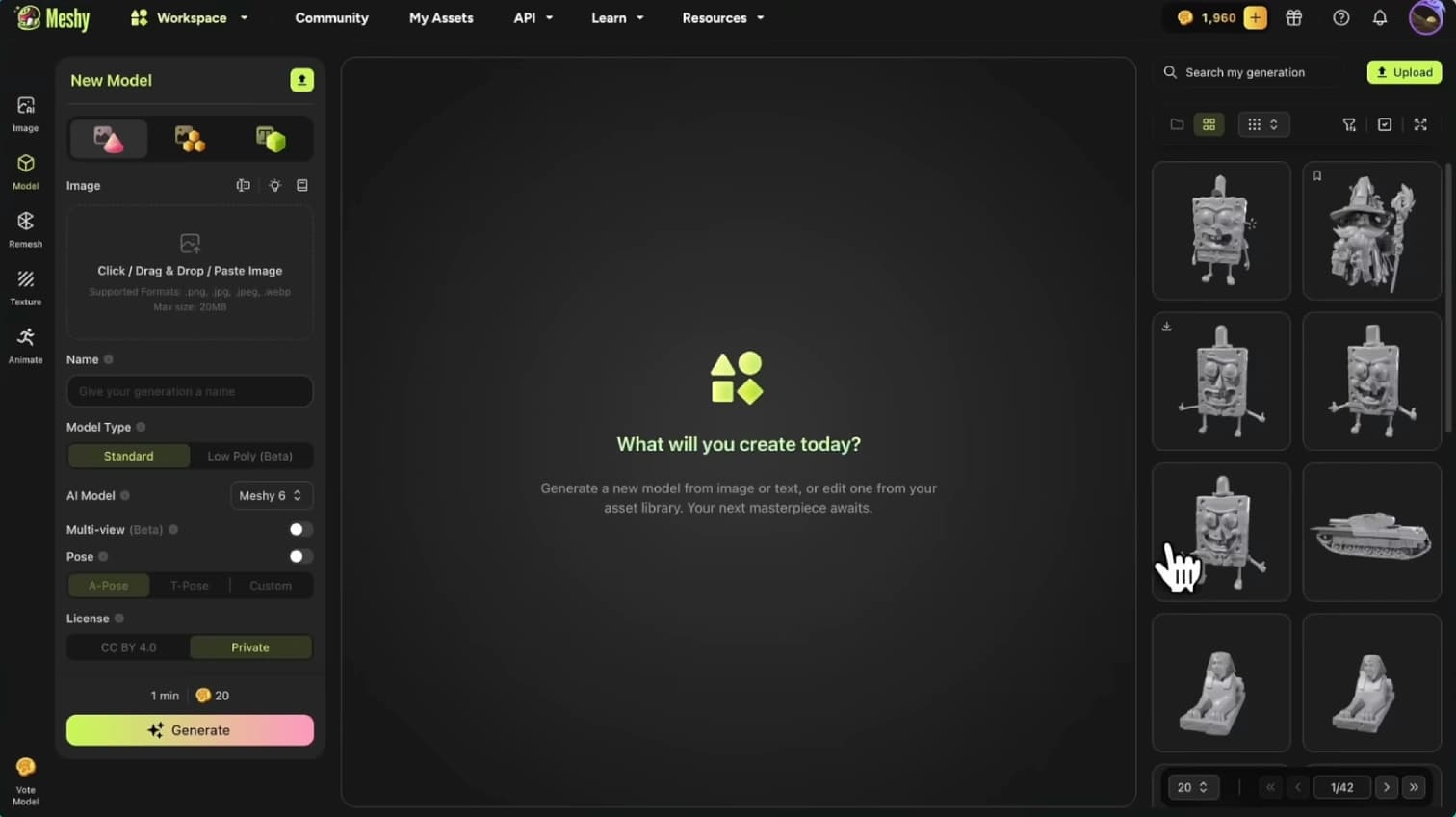
Meshy is an AI-powered 3D model generation platform that creates textured 3D assets from text prompts or reference images in minutes. Rather than manually modeling 3D objects in software like Blender or Maya — a skilled, time-intensive process — users describe what they want or upload a reference image, and Meshy generates a 3D model with textures applied.
For furniture designers exploring product concepts, product developers prototyping designs, and interior designers populating room visualizations with 3D objects, Meshy addresses the bottleneck of 3D asset creation — making it possible to generate 3D models for visualization and exploration without advanced 3D modeling expertise or the hours that manual modeling requires.
This review evaluates Meshy based on its 3D generation quality, texturing capability, and practical fit for furniture, product, and design visualization in 2026.
Key Features
Text-to-3D Generation
Meshy generates 3D models from text descriptions — describing an object, its style, and characteristics produces a textured 3D model, making 3D asset creation accessible through natural language rather than modeling software.
Image-to-3D Conversion
The platform can generate 3D models from reference images, turning a 2D photo or concept image into a 3D asset — useful for converting product photos or design references into 3D form for visualization.
Automatic Texturing
Meshy applies textures and materials to generated models automatically, producing ready-to-use 3D assets with surface detail rather than untextured geometry that would require additional manual work.
Export for Design Workflows
Generated models can be exported in standard 3D formats for use in other design, visualization, and rendering tools — fitting into existing workflows rather than locking assets into a single platform.
Pros & Cons
Pros
- ✅ Generates 3D models from text prompts or images in minutes rather than hours of manual modeling
- ✅ Automatic texturing produces ready-to-use 3D assets with materials applied
- ✅ Dramatically speeds up 3D concept exploration and prototyping for design work
- ✅ Accessible to designers without advanced 3D modeling software expertise
Cons
- ❌ AI-generated 3D models may need cleanup for production-quality or manufacturing use
- ❌ Geometry accuracy and detail can vary — complex or precise objects may need manual refinement
- ❌ Not a replacement for professional 3D modeling for precise manufacturing specifications
- ❌ Output quality depends on prompt clarity and reference image quality
Who Is It Best For?
Meshy is the right tool if you:
- Explore 3D design concepts and want fast 3D models for visualization without manual modeling
- Prototype product or furniture designs where quick 3D form matters more than manufacturing precision
- Populate room visualizations with 3D objects for interior design renders and presentations
- Lack advanced 3D modeling skills but need 3D assets for design and visualization work
Meshy is not the right tool if you:
- Need manufacturing-precise 3D models with exact dimensions and production-ready geometry
- Require the highest quality 3D assets where manual modeling detail is essential
- Work on projects where AI-generated geometry cleanup would take longer than modeling from scratch
Alternatives to Consider
- Luma AI — AI 3D capture and generation with strong photorealistic scene reconstruction
- Spline — collaborative 3D design tool with AI features for web and product visualization
- Kaedim — AI 3D model generation focused on production-ready game and product assets
- Sloyd — parametric 3D asset generation for real-time and game development
- Blender — free professional 3D modeling software for those needing full manual control
Final Verdict
Meshy delivers impressive speed for 3D asset creation, turning text prompts and reference images into textured 3D models in minutes. For furniture designers, product developers, and interior designers who need 3D assets for visualization and concept exploration, it removes the traditional bottleneck of manual 3D modeling and makes 3D work accessible without specialized software expertise.
The key boundary is production versus visualization: AI-generated models are excellent for concept exploration, prototyping, and visualization, but manufacturing-precise applications still require professional modeling or cleanup. Within the visualization and concept space, Meshy is a genuinely useful acceleration tool.
Our recommendation: Use Meshy for the concept and visualization stage — generating 3D models to explore ideas and populate renders quickly — and reserve manual 3D modeling or professional cleanup for the assets that will ultimately go to manufacturing, where dimensional precision and clean geometry matter.
Key Features
Generates 3D models from text prompts or images in minutes rather than hours of manual modeling
Automatic texturing produces ready-to-use 3D assets with materials applied
Dramatically speeds up 3D concept exploration and prototyping for design work
Accessible to designers without advanced 3D modeling software expertise
Best For
Furniture designers generating 3D concept models for visualization and design exploration
Product developers prototyping 3D assets quickly before committing to detailed modeling
Interior designers creating 3D objects to populate room visualizations and renders
3D artists and game developers speeding up asset creation with AI-generated base models
Pros & Cons
What We Like
- Generates 3D models from text prompts or images in minutes rather than hours of manual modeling
- Automatic texturing produces ready-to-use 3D assets with materials applied
- Dramatically speeds up 3D concept exploration and prototyping for design work
- Accessible to designers without advanced 3D modeling software expertise
What We Don't Like
- AI-generated 3D models may need cleanup for production-quality or manufacturing use
- Geometry accuracy and detail can vary — complex or precise objects may need manual refinement
- Not a replacement for professional 3D modeling for precise manufacturing specifications
- Output quality depends on prompt clarity and reference image quality
Top Meshy Alternatives
View all alternatives →Luma AI
Alternative to Meshy
Spline
Alternative to Meshy
Kaedim
Alternative to Meshy
Sloyd
Alternative to Meshy
Blender
Alternative to Meshy
Meshy vs Top Alternatives
| Tool | Best For | Price | AI Quality | Features | Support | Ease of Use | Rating | |
|---|---|---|---|---|---|---|---|---|
 | Furniture designers generating 3D concept models for visualization and design exploration | Contact for pricing | 8.6/10 | Current | ||||
LA Luma AI | Furniture | Contact for pricing | 8.1/10 | — | ||||
S Spline | Furniture | Contact for pricing | 7.8/10 | — | ||||
K Kaedim | Furniture | Contact for pricing | 7.5/10 | — | ||||
S Sloyd | Furniture | Contact for pricing | 7.2/10 | — |
Our Meshy Verdict
Meshy is best suited for furniture designers, product developers, and 3D artists who want to generate 3D models quickly using AI — turning text prompts or reference images into textured 3D assets for visualization, prototyping, and design exploration without manual 3D modeling.
Visit website for full details
FAQ
Related Articles
View all articles →Best Furniture for Professionals in 2026
Discover the top AI tools we recommend in Furniture.
View Hub →Meshy vs Top Alternatives: Full Comparison
Side-by-side breakdown of Meshy and its main competitors.
View Comparisons →Hands-on Guides & Workflows
Step-by-step playbooks for getting the most out of tools like Meshy.
Browse Guides →Related Tools in Furniture
See all the best Furniture →
Tagshop
Tagshop is best suited for furniture retailers and interior design brands that want to turn Instagram, TikTok, and customer photos into shoppable galleries on their own website instead of leaving product discovery locked inside social apps.
Read Review →
Smartli
Smartli is best suited for furniture retailers, interior design product brands, and e-commerce businesses that need to generate high-quality, SEO-optimized product descriptions at scale — reducing the manual writing time required to maintain a large product catalog with compelling, consistent copy.
Read Review →
Threekit
Threekit is best suited for furniture manufacturers and brands with configurable products — powering interactive 3D configurators, photorealistic virtual photography, and AR experiences that let customers customize fabrics, finishes, and options while seeing exactly what they're ordering.
Read Review →