

Keap Review:
Is It Worth It in 2026?
Keap is best suited for small furniture, real estate, and construction businesses that want CRM, email and SMS marketing, sales pipelines, and invoicing combined in one automated platform instead of juggling separate tools for each.
We may earn a commission when you purchase through links on our site. Learn more
Best For
Our Overall Rating
Based on comprehensive testing
Best For
- Furniture and real estate businesses automating lead follow-up and appointment reminders
- Construction companies wanting invoicing and payment processing tied to their sales pipeline
- Solopreneurs and small teams wanting one platform instead of separate CRM and email tools
- Businesses wanting automated nurture sequences without hiring a dedicated marketing ops person
Pricing
See current pricing on the Keap website.
Bottom Line
Keap is best suited for small furniture, real estate, and construction businesses that want CRM, email and SMS marketing, sales pipelines, and invoicing combined in one automated platform instead of juggling separate tools for each.
Visit Keap →Quick Verdict
Keap scores 8.8/10 in our testing and is a strong choice for Furniture and real estate businesses automating lead follow-up and appointment reminders and Construction companies wanting invoicing and payment processing tied to their sales pipeline.
What Is Keap?
Overview
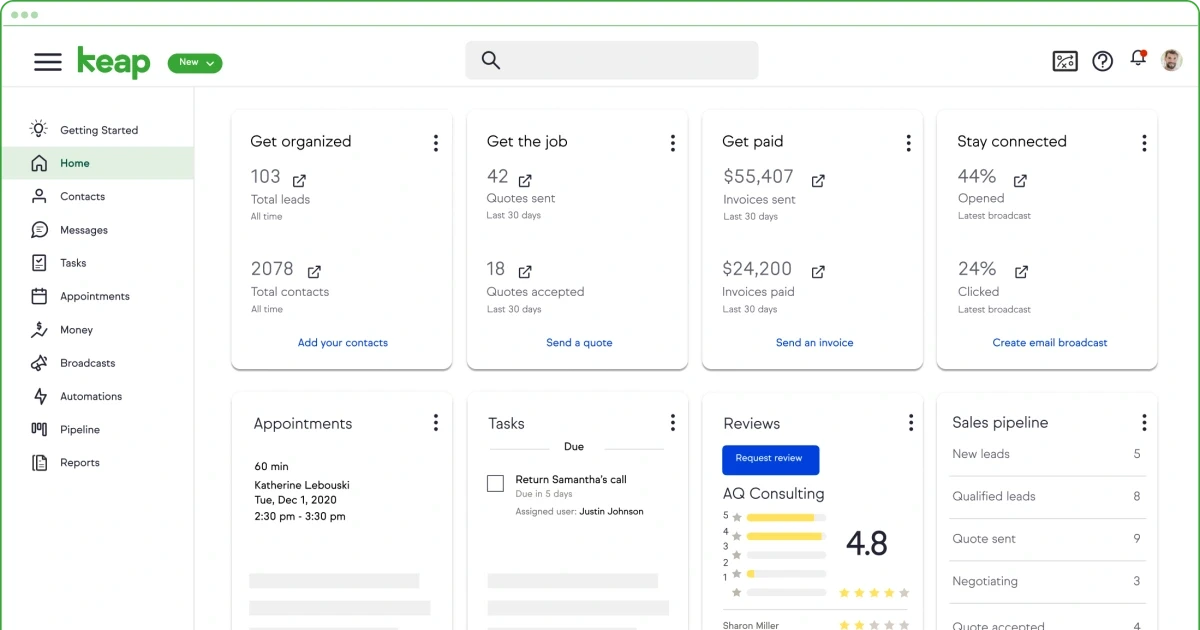
Keap (formerly Infusionsoft) combines CRM, email and SMS marketing, visual campaign automation, sales pipelines, appointment scheduling, invoicing, and payment processing under one subscription, aiming to give small businesses and solopreneurs an integrated system without the complexity of a full enterprise platform. Its automation builder lets users create sequences that trigger emails, assign tasks, update records, and process payments — all from one visual canvas — automating repetitive work like lead follow-up, appointment reminders, invoice reminders, and thank-you messages.
For furniture, real estate, and construction businesses juggling leads, ongoing client communication, and invoicing, this matters because those functions are often split across three or four separate tools that don't share data — Keap ties them together so a deal moving through the pipeline can automatically trigger the right follow-up, reminder, or invoice without manual coordination.
This review evaluates Keap based on its automation depth, pipeline management, and practical fit for small businesses wanting an all-in-one CRM heading into 2026.
Key Features
Visual Automation Builder
Keap's automation builder lets users create sequences that trigger emails, assign tasks, update records, and process payments from one visual canvas, automating repetitive sales and marketing work like lead follow-up and nurture sequences.
Drag-and-Drop Sales Pipelines
A drag-and-drop pipeline builder, including pre-built templates, gives a clear picture of business opportunities and stage-based automation — moving a deal to a new stage can automatically trigger the next email, task, or reminder.
Combined Marketing & Payments
Email marketing, SMS marketing, invoicing, and payment processing are built into the same platform as the CRM, removing the need to sync data manually between separate marketing and billing tools.
Appointment Scheduling
Built-in scheduling ties directly into the CRM and automation system, so booking a meeting can automatically trigger reminder sequences and update a contact's record without manual follow-up.
Pros & Cons
Pros
- ✅ Combines CRM, email/SMS marketing, sales pipelines, scheduling, and invoicing in one subscription
- ✅ Visual automation builder triggers emails, tasks, record updates, and payments from one canvas
- ✅ Drag-and-drop pipeline builder with pre-built templates for organizing deals quickly
- ✅ Reports saving customers roughly 10 hours a week by automating follow-up and lead capture
Cons
- ❌ Breadth across CRM, marketing, and invoicing takes real time to configure well initially
- ❌ Pricing is positioned above the most basic CRM-only tools given the bundled feature set
- ❌ Best value comes from actually using the automation builder, not just the contact database
- ❌ Small businesses with very simple needs may find the platform more than they require
Who Is It Best For?
Keap is the right tool if you:
- Want CRM, marketing, scheduling, and invoicing in one platform rather than several disconnected tools
- Have repetitive follow-up and reminder work worth automating from a visual builder
- Run a small business or solo operation wanting an integrated system without enterprise complexity
- Want deal-stage changes to automatically trigger the right next communication
Keap is not the right tool if you:
- Only need a simple contact list without marketing automation or invoicing
- Aren't prepared to invest setup time configuring pipelines and automation sequences
- Already have a working, disconnected stack that doesn't need consolidating
Alternatives to Consider
- EngageBay — comparable all-in-one platform with a genuinely free tier for smaller teams
- folk — lighter-weight CRM better suited to relationship-driven pipelines than automation-heavy sales
- Apollo.io — better if your primary need is prospecting and database access rather than automation
- Cakemail — relevant if email marketing alone, not full CRM, is the priority
- Moosend — relevant for standalone email automation rather than combined CRM and invoicing
Final Verdict
Keap earns its place for small businesses that want CRM, marketing, scheduling, and invoicing genuinely connected rather than living in separate tools that don't talk to each other. The visual automation builder addresses the real time cost of manual follow-up, reminders, and lead capture that many small teams handle by hand.
The platform's breadth means real setup time upfront — businesses with very simple, low-volume needs may find a narrower, cheaper tool sufficient instead.
Our recommendation: Build one automated sequence — lead follow-up or appointment reminders are common starting points — using Keap's visual builder first, and measure the time saved before configuring the rest of your pipeline around it.
Key Features
Combines CRM, email/SMS marketing, sales pipelines, scheduling, and invoicing in one subscription
Visual automation builder triggers emails, tasks, record updates, and payments from one canvas
Drag-and-drop pipeline builder with pre-built templates for organizing deals quickly
Reports saving customers roughly 10 hours a week by automating follow-up and lead capture
Best For
Furniture and real estate businesses automating lead follow-up and appointment reminders
Construction companies wanting invoicing and payment processing tied to their sales pipeline
Solopreneurs and small teams wanting one platform instead of separate CRM and email tools
Businesses wanting automated nurture sequences without hiring a dedicated marketing ops person
Pros & Cons
What We Like
- Combines CRM, email/SMS marketing, sales pipelines, scheduling, and invoicing in one subscription
- Visual automation builder triggers emails, tasks, record updates, and payments from one canvas
- Drag-and-drop pipeline builder with pre-built templates for organizing deals quickly
- Reports saving customers roughly 10 hours a week by automating follow-up and lead capture
What We Don't Like
- Breadth across CRM, marketing, and invoicing takes real time to configure well initially
- Pricing is positioned above the most basic CRM-only tools given the bundled feature set
- Best value comes from actually using the automation builder, not just the contact database
- Small businesses with very simple needs may find the platform more than they require
Top Keap Alternatives
View all alternatives →


Keap vs Top Alternatives
| Tool | Best For | Price | AI Quality | Features | Support | Ease of Use | Rating | |
|---|---|---|---|---|---|---|---|---|
 | Furniture and real estate businesses automating lead follow-up and appointment reminders | Contact for pricing | 8.8/10 | Current | ||||
 | Cross-niche | Contact for pricing | 8.3/10 | Read Review → | ||||
 | Cross-niche | Contact for pricing | 8/10 | Read Review → | ||||
 | Cross-niche | Contact for pricing | 7.7/10 | Read Review → | ||||
 | Cross-niche | Contact for pricing | 7.4/10 | Read Review → |
Our Keap Verdict
Keap is best suited for small furniture, real estate, and construction businesses that want CRM, email and SMS marketing, sales pipelines, and invoicing combined in one automated platform instead of juggling separate tools for each.
Visit website for full details
FAQ
Related Articles
View all articles →Best AI Sales Tools for Professionals in 2026
Discover the top AI tools we recommend in AI Sales Tools.
View Hub →Keap vs Top Alternatives: Full Comparison
Side-by-side breakdown of Keap and its main competitors.
View Comparisons →Hands-on Guides & Workflows
Step-by-step playbooks for getting the most out of tools like Keap.
Browse Guides →Related Tools in AI Sales Tools
See all the best AI Sales Tools →
Structurely
Structurely is best suited for real estate teams and agents who need to follow up with leads instantly and consistently — using an AI conversational assistant that engages, qualifies, and nurtures leads via text and email until they're ready to speak with a human agent.
Read Review →
Woodpecker
Woodpecker is a cold email and multichannel outreach platform built for agencies and B2B sales teams who need deliverability-focused automation without the complexity of a full sales engagement suite.
Read Review →
Collect.chat
Collect.chat is best suited for real estate agencies, architecture firms, and contractors who want a simple, no-code chatbot on their website to capture leads and book appointments, without building a custom chat system.
Read Review →
Waalaxy
Waalaxy is best suited for architecture, construction, and real estate businesses doing B2B prospecting who want pre-built LinkedIn and email outreach sequences at an affordable price, without needing deep automation platform expertise.
Read Review →