

Adalo Review:
Is It Worth It in 2026?
Adalo is a no-code app builder best suited for architecture, construction, and real estate teams who want to build a custom internal tool or client-facing mobile app without hiring developers.
We may earn a commission when you purchase through links on our site. Learn more
Best For
Our Overall Rating
Based on comprehensive testing
Best For
- Construction companies building a field crew or job-tracking app
- Real estate agencies building a client-facing property browsing app
- Architecture firms prototyping internal tools without engineering resources
- Furniture retailers building a simple internal inventory or ordering app
Pricing
See current pricing on the Adalo website.
Bottom Line
Adalo is a no-code app builder best suited for architecture, construction, and real estate teams who want to build a custom internal tool or client-facing mobile app without hiring developers.
Visit Adalo →Quick Verdict
Adalo scores 8.4/10 in our testing and is a strong choice for Construction companies building a field crew or job-tracking app and Real estate agencies building a client-facing property browsing app.
What Is Adalo?
Overview
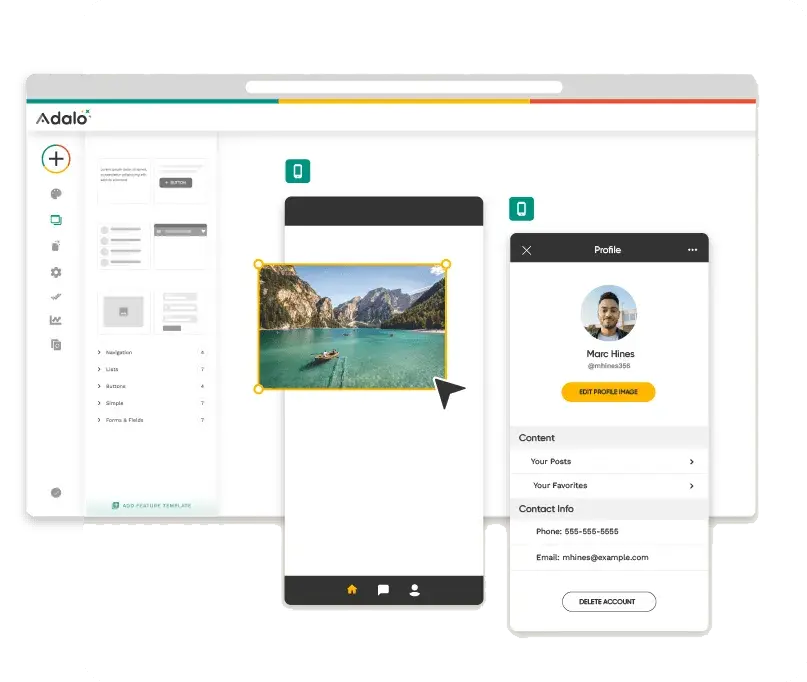
Adalo is a no-code platform for building functional mobile and web applications using a visual, drag-and-drop interface rather than writing code. Users design screens, connect them to a built-in database, and add logic and workflows — producing a real, usable app that can be published to the web or app stores.
For project-based industries like construction, architecture, and real estate, this matters because many internal tooling needs — job tracking, client portals, simple booking apps — don't justify the cost of custom software development but are also too complex for a basic spreadsheet or form.
This review evaluates Adalo based on its app-building workflow, feature depth, and practical fit for non-technical teams heading into 2026.
Key Features
Visual App Builder
Adalo's core editor lets users design app screens visually, dragging in components like lists, forms, and buttons, and connecting them to real data — no coding required to produce a working prototype or production app.
Built-In Database & Logic
Apps built in Adalo come with a relational database and conditional logic, letting teams build genuinely functional tools — not just static mockups — that handle real user data, accounts, and workflows.
Mobile & Web Publishing
Apps can be published as native mobile apps to the App Store and Google Play, or accessed as responsive web apps, giving flexibility depending on whether the target users are field teams, clients, or internal staff.
Integrations & API Access
Adalo connects to external services and APIs, allowing built apps to pull in or send data to other systems a business already uses, rather than existing as an isolated tool.
Pros & Cons
Pros
- ✅ Build functional mobile and web apps without writing code
- ✅ Visual, drag-and-drop interface with real data and logic
- ✅ Supports custom databases, user accounts, and workflows
- ✅ Faster and cheaper than custom development for simple internal tools
Cons
- ❌ Performance and customization limits compared to native development
- ❌ Can get expensive as user counts and complexity scale
- ❌ Steeper learning curve than the simplest no-code form builders
- ❌ Not a replacement for a fully custom, complex application
Who Is It Best For?
Adalo is the right tool if you:
- Need a custom internal tool or client app but don't have budget for full custom development
- Want to validate an idea quickly before investing in a fully engineered product
- Have moderately complex logic needs that go beyond what simple form or spreadsheet tools can handle
- Need both mobile and web access to the same underlying app and data
Adalo is not the right tool if you:
- Need a high-performance app with complex native functionality
- Expect very large user volumes without a significant budget increase
- Want a five-minute setup — building a real app still takes deliberate planning
Alternatives to Consider
Adalo is strong for visual app building with real logic, but it is not the only option:
- Bubble — more powerful and flexible for complex web apps, with a steeper learning curve
- Glide — simpler and faster for spreadsheet-based apps with lighter logic needs
- Softr — better if you're building primarily on top of Airtable or Google Sheets
- FlutterFlow — better for teams wanting more control over native mobile app performance
- AppSheet — strong fit if your team is already using Google Workspace
Final Verdict
Adalo earns its place for teams that need a real, working app — not just a prototype — without the cost and timeline of custom development. The combination of a visual builder with an actual database and logic layer puts it a step above simpler no-code tools for project-based businesses with genuine internal tooling needs.
The tradeoff is that it isn't free of limits: as an app's complexity and user base grow, both cost and performance constraints become more noticeable.
Our recommendation: Start by building a single, well-scoped internal tool — like a job tracker or simple client portal — to evaluate whether Adalo's capabilities and pricing fit your needs before committing to a larger build.
Key Features
Build functional mobile and web apps without writing code
Visual, drag-and-drop interface with real data and logic
Supports custom databases, user accounts, and workflows
Faster and cheaper than custom development for simple internal tools
Best For
Construction companies building a field crew or job-tracking app
Real estate agencies building a client-facing property browsing app
Architecture firms prototyping internal tools without engineering resources
Furniture retailers building a simple internal inventory or ordering app
Pros & Cons
What We Like
- Build functional mobile and web apps without writing code
- Visual, drag-and-drop interface with real data and logic
- Supports custom databases, user accounts, and workflows
- Faster and cheaper than custom development for simple internal tools
What We Don't Like
- Performance and customization limits compared to native development
- Can get expensive as user counts and complexity scale
- Steeper learning curve than the simplest no-code form builders
- Not a replacement for a fully custom, complex application
Top Adalo Alternatives
View all alternatives →Bubble
Alternative to Adalo
Glide
Alternative to Adalo
Softr
Alternative to Adalo
FlutterFlow
Alternative to Adalo
AppSheet
Alternative to Adalo
Adalo vs Top Alternatives
| Tool | Best For | Price | AI Quality | Features | Support | Ease of Use | Rating | |
|---|---|---|---|---|---|---|---|---|
 | Construction companies building a field crew or job-tracking app | Contact for pricing | 8.4/10 | Current | ||||
B Bubble | Cross-niche | Contact for pricing | 7.9/10 | — | ||||
G Glide | Cross-niche | Contact for pricing | 7.6/10 | — | ||||
S Softr | Cross-niche | Contact for pricing | 7.3/10 | — | ||||
F FlutterFlow | Cross-niche | Contact for pricing | 7/10 | — |
Our Adalo Verdict
Adalo is a no-code app builder best suited for architecture, construction, and real estate teams who want to build a custom internal tool or client-facing mobile app without hiring developers.
Visit website for full details
FAQ
Related Articles
View all articles →Best AI Automation Tools for Professionals in 2026
Discover the top AI tools we recommend in AI Automation Tools.
View Hub →Adalo vs Top Alternatives: Full Comparison
Side-by-side breakdown of Adalo and its main competitors.
View Comparisons →Hands-on Guides & Workflows
Step-by-step playbooks for getting the most out of tools like Adalo.
Browse Guides →Related Tools in AI Automation Tools
See all the best AI Automation Tools →
Algomo
Algomo is an AI-powered customer support platform combining a ChatGPT-powered chatbot, live chat, and unified helpdesk — with an 85% automation rate and 10x agent productivity increase. Supports 100+ languages, installs in 4 minutes, and starts at $9/month.
Read Review →
EmailListVerify
EmailListVerify is the most affordable full-featured bulk email verification service in 2026, with pay-as-you-go pricing starting at $4 per 1,000 verifications. It runs 8 verification checks, supports real-time API integration, and includes free deliverability tools — used to verify over 5 billion emails.
Read Review →
HelpDesk
HelpDesk is best suited for furniture retailers, real estate agencies, and design firms that need a structured, AI-assisted customer support ticketing system to manage client inquiries, after-sale support, and team collaboration — replacing scattered email threads with an organized shared inbox.
Read Review →
Mixo
Mixo is best suited for small architecture, construction, and real estate businesses that want a complete, working website — content, layout, forms, and SEO basics — generated from a single prompt in under a minute.
Read Review →